
Our Short List of 3

- Best for: Viewers who want the sharpest motion and deepest contrast for match days and late-night gaming, especially in a dimmer room.
- 55-inch OLED evo 4K panel with 144Hz native refresh rate
- 0.1ms listed response time
- Four HDMI 2.1 inputs
- NVIDIA G-Sync, AMD FreeSync Premium, and VRR

- Best for: PlayStation 5 owners who want a TV that configures itself for gaming, and viewers who value accurate color for live broadcasts.
- 55-inch Mini-LED QLED 4K panel with 120Hz native refresh rate
- XR Processor with XR Backlight Master Drive
- Two HDMI 2.1 ports supporting 4K at 120Hz
- VRR, ALLM, and PlayStation 5 exclusive features

- Best for: PC gamers and sports fans who want the highest refresh rate and the brightest HDR picture without paying flagship prices.
- 55-inch Mini-LED ULED 4K panel with native 165Hz refresh rate
- VRR up to 288Hz in game mode
- Peak brightness listed up to 5,000 nits
- Full-array local dimming with quantum-dot color
All 4 Picks at a Glance
| Product | Specs | Action |
|---|---|---|
| 1. LG OLED evo C4 55-Inch — Best Overall for Sports and Gaming |
| Check price on Amazon |
| 3. Sony BRAVIA 7 55-Inch — Best for PlayStation Players |
| Check price on Amazon |
| 4. Hisense U8QG 55-Inch — Best High Refresh Rate Value |
| Check price on Amazon |
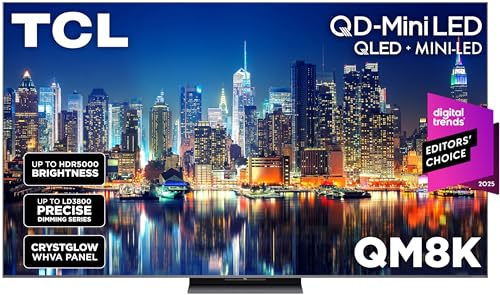 5. TCL QM8K 65-Inch — Best Big-Screen Pick |
| Check price on Amazon |
Key takeaways
- Discover the best TVs for sports and gaming: five 4K picks with high refresh rates, low input lag, smooth motion and bright HDR for fast-paced action at home.
Disclosure: As an Amazon Associate, we earn from qualifying purchases.
A television that handles both live sports and gaming has a harder job than a TV built for movies alone. A football match swings the camera across the whole pitch in a fraction of a second, a racing game throws scenery past at high speed, and a competitive shooter punishes even a few milliseconds of delay between controller and screen. The best TVs for sports and gaming keep fast motion sharp, keep input lag low, and keep bright highlights punchy whether the room is dark at night or sunlit on a Sunday afternoon.
This guide compares five 4K televisions that cover those demands from different angles: an OLED flagship for the deepest blacks and fastest pixel response, two Mini-LED sets built for bright rooms, a Sony model tuned for PlayStation play, and a value-focused Mini-LED with the highest native refresh rate in the group. Every pick supports a high refresh rate, variable refresh rate, and a dedicated game mode, and every one is listed on Amazon US with its ASIN shown so you can check the current listing before you buy.
How to Choose a TV for Sports and Gaming
Sports and gaming reward the same core strengths: speed, clarity in motion, and responsiveness. A TV can look superb with a slow drama and still fall apart on a fast break or a quick camera pan. Use the checklist below to judge any set before you commit.
Refresh Rate: 120Hz Should Be the Floor
The refresh rate is how many times per second the screen redraws the image. A 120Hz panel redraws twice as often as a standard 60Hz set, making a sliding tackle or a racing game look noticeably smoother. Several picks here go further, with 144Hz or even 165Hz native panels, useful for PC gaming at high frame rates. Be wary of marketing terms such as “Motion Rate 480”: those numbers describe motion processing, not the panel’s native refresh rate.
Input Lag and Game Mode
Input lag is the delay between pressing a button and seeing the result on screen, and for gaming it matters more than almost any other number. Look for a dedicated game mode that drops input lag into the low teens or single digits in milliseconds, plus Auto Low Latency Mode (ALLM), which switches into game mode automatically when a console powers on.
Variable Refresh Rate and HDMI 2.1
Variable refresh rate (VRR) lets the TV match its refresh rate to the frame rate from the console or PC, removing screen tearing and stutter when frame rates fluctuate. NVIDIA G-Sync and AMD FreeSync support is a bonus for PC players. HDMI 2.1 ports carry 4K at 120Hz from a PlayStation 5, Xbox Series X, or modern graphics card, so count the full-bandwidth HDMI 2.1 ports. Two consoles and a gaming PC call for four ports; two ports work if one device is a streaming box.
Panel Type: OLED vs. Mini-LED
OLED panels light each pixel individually, which delivers perfect blacks, superb contrast, and near-instant pixel response times — the strongest choice for motion clarity and dark-room viewing. Mini-LED LCD panels use thousands of tiny backlights behind a quantum-dot layer, and they can get much brighter than OLED, which helps in sunlit rooms and makes HDR highlights in daytime sports pop. Mini-LED sets also carry no risk of permanent image retention from static score bugs or game HUDs left on screen for hours.
Brightness, Anti-Glare, and Viewing Angle
Sports are often watched during the day, so peak brightness and glare handling matter. A bright Mini-LED panel holds up better against windows and lamps than a dimmer OLED, and an anti-reflective coating makes a real difference in a bright living room. Wide viewing angles matter too if friends and family spread across the couch: OLED holds its picture quality off-axis better than most LCD panels, while higher-end Mini-LED sets narrow the gap.
Motion Handling and Sports Modes
Good motion processing keeps a fast-moving ball round instead of smeared, and keeps a scrolling crowd readable instead of blurry. Look for a motion setting you can tune or switch off, because maximum smoothing often creates the “soap opera effect” on films. Several sets below include a sports picture mode that boosts brightness and sharpness for live broadcasts; it is a handy starting point, though many viewers end up fine-tuning from there.
Size and Viewing Distance
A 55-inch set suits most living rooms and bedrooms, and every pick below except one is a 55-inch model. The 65-inch TCL pick fits seating roughly 8 to 10 feet from the screen. As a rough guide, sit about 1.5 times the screen diagonal away: around 7 feet for a 55-inch TV and 8 feet for a 65-inch TV.
Top Picks
1. LG OLED evo C4 55-Inch — Best Overall for Sports and Gaming
- Best for: Viewers who want the sharpest motion and deepest contrast for match days and late-night gaming, especially in a dimmer room.
- 55-inch OLED evo 4K panel with 144Hz native refresh rate
- 0.1ms listed response time
- Four HDMI 2.1 inputs
- NVIDIA G-Sync, AMD FreeSync Premium, and VRR
Viewers who want the sharpest motion and deepest contrast for match days and late-night gaming, especially in a dimmer room.
The LG C4 is the most complete sports-and-gaming television in this roundup. Its OLED evo panel delivers self-lit pixels with perfect blacks and a listed 0.1ms response time, so a hockey puck or a fast camera pan stays crisp with almost no blur behind it. The 144Hz native refresh rate pairs with NVIDIA G-Sync, AMD FreeSync Premium, and VRR for tear-free play on console and PC.
Four full-bandwidth HDMI 2.1 inputs mean a PlayStation 5, an Xbox Series X, and a gaming PC can all stay connected at full speed without a switcher. The α9 AI Processor Gen7 upscales lower-resolution broadcasts, sharpening live sports feeds that are not native 4K. Dolby Vision and Dolby Atmos cover HDR movies and games, while LG’s Game Optimizer and Game Dashboard put refresh rate, VRR status, and picture presets in one on-screen menu.
Key specifications:
Pros:
Cons:
2. Samsung QN90D 55-Inch Neo QLED — Best for Bright Rooms
The Samsung QN90D is the pick for living rooms with big windows. Its Neo QLED panel uses a Mini-LED backlight with Quantum Matrix technology, pushing brightness well beyond OLED while keeping local dimming tight enough that a bright ball against a dark stadium still looks clean. That brightness is exactly what daytime sports need, and it makes HDR highlights stand out even with the curtains open.
For gaming, the QN90D offers a 144Hz refresh rate with Motion Xcelerator, VRR, and FreeSync Premium Pro support, plus four HDMI 2.1 ports and a dedicated Game Mode with an on-screen Game Bar. Object Tracking Sound+ follows the action across the screen, and the anti-glare coating is a genuine advantage in a room that faces the sun.
Key specifications:
- 55-inch Neo QLED Mini-LED 4K panel with 144Hz refresh rate
- Neo Quantum HDR+ with Quantum Matrix backlight
- Four HDMI 2.1 inputs
- VRR, AMD FreeSync Premium Pro, and Motion Xcelerator
- Object Tracking Sound+ with Dolby Atmos
- Tizen smart platform with Gaming Hub
Pros:
- Very high brightness holds up in sunlit rooms
- Anti-glare screen keeps daytime matches watchable
- Four HDMI 2.1 ports and a full gaming feature set
- No image retention worries with static score bugs
Cons:
- Black levels and off-angle viewing trail OLED
- Motion handling is strong but not quite as instant as an OLED pixel response
Best for: Daytime sports fans and gamers whose TV faces windows, or anyone who watches with the lights on.
3. Sony BRAVIA 7 55-Inch — Best for PlayStation Players
- Best for: PlayStation 5 owners who want a TV that configures itself for gaming, and viewers who value accurate color for live broadcasts.
- 55-inch Mini-LED QLED 4K panel with 120Hz native refresh rate
- XR Processor with XR Backlight Master Drive
- Two HDMI 2.1 ports supporting 4K at 120Hz
- VRR, ALLM, and PlayStation 5 exclusive features
PlayStation 5 owners who want a TV that configures itself for gaming, and viewers who value accurate color for live broadcasts.
Sony builds the BRAVIA 7 around its XR Processor and a Mini-LED backlight with full-array local dimming, balancing brightness, color accuracy, and motion for live sport and cinematic games alike. The 120Hz native panel is a step below the 144Hz and 165Hz panels elsewhere in this guide, but 120Hz matches the maximum output of current consoles, so PlayStation 5 and Xbox Series X owners lose nothing in practice.
Where the BRAVIA 7 earns its place is PlayStation integration. Exclusive PlayStation 5 features include Auto HDR Tone Mapping, which tunes HDR settings automatically, and Auto Genre Picture Mode, which switches into game mode when you start playing and back to a cinema preset for films. The Google TV interface is fast, and Dolby Vision is supported.
Key specifications:
Pros:
Cons:
4. Hisense U8QG 55-Inch — Best High Refresh Rate Value
- Best for: PC gamers and sports fans who want the highest refresh rate and the brightest HDR picture without paying flagship prices.
- 55-inch Mini-LED ULED 4K panel with native 165Hz refresh rate
- VRR up to 288Hz in game mode
- Peak brightness listed up to 5,000 nits
- Full-array local dimming with quantum-dot color
PC gamers and sports fans who want the highest refresh rate and the brightest HDR picture without paying flagship prices.
The Hisense U8QG is the dark horse of this roundup. Its headline figure is a native 165Hz panel, the fastest refresh rate here, with VRR up to 288Hz in game mode for PC players who want the smoothest possible motion. That speed shows up on the pitch as well as in games: fast pans stay readable and the ball stays distinct.
Brightness is the other headline: the listing advertises up to 5,000 nits of peak brightness, far beyond the other sets here, so HDR sports and games stay vivid even in a bright room. Dense full-array local dimming, quantum-dot color, and Dolby Vision IQ round out the picture, while a 4.1.2-channel Dolby Atmos speaker system is unusually generous for a TV at this level.
Key specifications:
Pros:
Cons:
5. TCL QM8K 65-Inch — Best Big-Screen Pick
- Best for: Living rooms where the TV is the centerpiece for match days, and gamers who want a big, bright screen for immersive play.
- 65-inch QD-Mini LED 4K panel with 120Hz to 144Hz refresh rate
- Game Accelerator 288 VRR
- Halo Control System with precise local dimming
- CrystGlow anti-reflective screen
Living rooms where the TV is the centerpiece for match days, and gamers who want a big, bright screen for immersive play.
If the match deserves a bigger stage, the TCL QM8K delivers it in a 65-inch frame. Its QD-Mini LED panel pairs quantum-dot color with a Mini-LED backlight managed by TCL’s Halo Control System, designed to keep blooming low around bright objects on dark backgrounds. The 120Hz to 144Hz panel supports Game Accelerator 288 VRR for high-frame-rate PC play, and the CrystGlow anti-reflective screen helps in a bright living room.
Audio tuned by Bang & Olufsen with Dolby Atmos gives commentary and stadium atmosphere more weight without a soundbar. Google TV covers the app lineup, and Dolby Vision IQ and HDR10+ provide broad HDR coverage. Note that the QM8K line starts at 65 inches, so it suits larger rooms; measure your wall and seating distance first.
Key specifications:
Pros:
Cons:
Comparison Table
| TV | Panel | Size | Native Refresh Rate | HDMI 2.1 Ports | VRR | Best For |
|---|---|---|---|---|---|---|
| LG OLED evo C4 | OLED evo | 55-inch | 144Hz | 4 | Yes, G-Sync and FreeSync | Best overall motion and contrast |
| Samsung QN90D | Neo QLED Mini-LED | 55-inch | 144Hz | 4 | Yes, FreeSync Premium Pro | Bright rooms and daytime sport |
| Sony BRAVIA 7 | Mini-LED QLED | 55-inch | 120Hz | 2 | Yes | PlayStation 5 players |
| Hisense U8QG | Mini-LED ULED | 55-inch | 165Hz | 2 | Yes, up to 288Hz | Highest refresh rate and brightness |
| TCL QM8K | QD-Mini LED | 65-inch | 120–144Hz | 2 | Yes, up to 288Hz | Big-screen living rooms |
Frequently Asked Questions
What refresh rate is best for sports and gaming TVs?
A 120Hz native panel is the practical minimum: it doubles the motion smoothness of a 60Hz set and matches the top frame-rate output of current consoles. Panels rated at 144Hz or 165Hz add headroom for PC gaming, but the jump from 120Hz to 144Hz is subtler than the jump from 60Hz to 120Hz. Judge the native refresh rate, not marketing motion figures.
Is OLED or Mini-LED better for watching sports?
Both work well, and the right choice depends on your room. OLED gives you perfect blacks, the fastest pixel response, and the widest viewing angles, which suits dark rooms and groups spread across a couch. Mini-LED gets much brighter, which suits sunlit rooms and daytime matches, and it has no risk of image retention from a static score bug left on screen for hours. Evening viewers should lean OLED; daytime viewers should lean Mini-LED.
How important is input lag for sports viewing?
Input lag matters most for gaming, where a delay between controller and screen affects your performance. For sports it matters very little, because you are watching rather than reacting. If you game even occasionally, choose a TV with a low-lag game mode and ALLM so the TV switches automatically.
Do I need four HDMI 2.1 ports?
Four HDMI 2.1 ports suit two consoles and a gaming PC, since each stays connected at full 4K 120Hz speed. With one console and a streaming device, two ports are enough, with a soundbar usually connecting through the eARC port. Count your devices before you buy: running out of ports means buying an HDMI switch or swapping cables.
What size TV should I buy for sports and gaming?
A 55-inch TV suits most living rooms and bedrooms, with seating around 7 feet away. Move up to 65 inches if your seating is around 8 feet or more from the screen. Bigger is not automatically better: sitting too close to a very large screen forces you to turn your head to follow the action.
Does a sports mode actually help?
A sports picture mode usually raises brightness, sharpness, and motion smoothing, which can make a live broadcast look punchier at first glance. It is a reasonable starting point, but the strongest motion smoothing settings can make films look unnatural and add artifacts around fast-moving players. Many viewers end up using a standard or cinema preset with moderate motion processing instead.
Conclusion
The best TVs for sports and gaming share a simple formula: a high native refresh rate, low input lag, variable refresh rate, and enough brightness for the room. The LG OLED evo C4 covers that formula most completely, with the fastest pixel response and four HDMI 2.1 ports. The Samsung QN90D is the strongest choice for bright rooms, the Sony BRAVIA 7 is the most convenient partner for a PlayStation 5, the Hisense U8QG offers the fastest refresh rate and brightest picture, and the TCL QM8K brings the package to a bigger 65-inch screen.
Match the pick to your room and your devices rather than chasing a single specification. Check the listing for your chosen model on Amazon before ordering, and confirm screen size and HDMI 2.1 port count against your setup.
More from Amazon
Programs that pair well with the guide above. Offers and eligibility are set by Amazon and may change.
Free shipping on eligible items, Prime Video and more. Eligible new members can start with a free trial.
Start a Prime free trialAd-free music streaming. Eligible new subscribers can start with a free trial.
Try Music Unlimited freeA Prime membership for ages 18-24 with a trial period. Eligibility is set by Amazon.
See Prime for Young AdultsAudiobooks and podcasts to listen to on the go. Eligible new members can start with a free trial.
Try Audible freeAs an Amazon Associate we earn from qualifying purchases.










Write Your Review
No reviews yet. Be the first to share your experience!