

Key takeaways
- Connectivity: USB-C wired, Bluetooth 5.3 and a 2.4 GHz dongle, with a 1,000 Hz maximum polling rate on wired and 2.4 GHz.
- Battery: 3,000 mAh, rated at up to 120 hours with lighting off and about 14 hours with lighting on.
- Size and weight: about 398 x 126 x 21.5 mm and roughly 870 g, so it stays put on the desk.
- Software: full VIA support for remapping and macros without installing a vendor app.
The Lofree Flow 2 is the best Lofree keyboard for most people in 2026, thanks to its single-block aluminum case, VIA remapping and refined low-profile typing feel, while the Flow Lite84 is the better pick if you want the Lofree look without the premium tier. Lofree builds slim, wireless, hot-swappable boards that borrow the soft, rounded look of Apple’s Magic Keyboard but add real mechanical switches, and the lineup is now wide enough that picking the wrong model is easy. This guide compares seven current Lofree keyboards by layout, case material, switches, battery and software support, then maps each one to a type of buyer.
Our top picks


As an Amazon Associate we earn from qualifying purchases at no extra cost to you.
Quick Comparison of the Best Lofree Keyboards
| Pick | Best for | Layout | Case | Battery (per spec sheet) | Price tier |
|---|---|---|---|---|---|
| Lofree Flow 2 100 | Best overall | 96%, 100 keys | Anodized aluminum | 3,000 mAh, up to 120 hours lights off | Premium |
| Lofree Flow 2 84 | Best compact premium | 75%, 84 keys | Aluminum | See maker sheet | Premium |
| Lofree Flow Lite84 | Best value | 75%, 84 keys | ABS plastic | 2,000 mAh, up to 100 hours lights off | Budget to mid-range |
| Lofree Flow Lite100 | Best budget full-size | 96%, 100 keys | ABS plastic | 3,000 mAh | Budget to mid-range |
| Lofree Flow84 | Best original-design 75% | 75%, 84 keys | Aluminum alloy | 2,000 mAh, about 40 hours | Mid-range |
| Lofree Block 98 | Best retro style | 98 keys | ABS | 2,000 mAh, up to 80 hours lights off | Mid-range |
| Lofree Edge | Best for thin and portable | 75%, 84 keys | Carbon fiber top, magnesium alloy base | 2,000 mAh, up to 130 hours lights off | Premium |
What Makes a Lofree Keyboard Different
Lofree designs for people who type a lot and want a desk object that looks good. Three traits run through the whole lineup. First, nearly every board uses low-profile hot-swappable switches co-developed with Kailh or TTC, usually in full POM material, which gives a smooth, slightly muted stroke rather than the sharp clack of a typical gaming board. Second, almost all of them are tri-mode, meaning USB-C wired, Bluetooth and a 2.4 GHz dongle. Third, the shapes are soft and the colors lean toward off-white, marble, pastel and black, which makes them look closer to a design product than to a gaming peripheral.
Those same traits explain the trade-offs. Low-profile keycaps with shine-through legends can be hard to read in dim rooms, battery life drops sharply when the backlight is on, and software support varies from full VIA on the Flow 2 to a proprietary mapper on the Lite line to nothing at all on the Block. If you are shopping mainly for competitive gaming, you will find faster options elsewhere. If you are shopping for typing comfort and looks, this is where Lofree shines.
Best Overall: Lofree Flow 2 100
The Flow 2 100 is the flagship in the sense that matters most: it feels the best to type on and it is built the most solidly. Per the manufacturer’s spec sheet it is a 96% layout with 100 keys, a single-block anodized aluminum case with a fine 205-grit finish, and Lofree x Kailh Cloud Series POM switches in three flavors, Surfer linear, Pulse tactile and Void silent linear. All three are rated at roughly 40 gf operating force with about 2.8 mm of total travel and 50 million keystrokes.
- Connectivity: USB-C wired, Bluetooth 5.3 and a 2.4 GHz dongle, with a 1,000 Hz maximum polling rate on wired and 2.4 GHz.
- Battery: 3,000 mAh, rated at up to 120 hours with lighting off and about 14 hours with lighting on.
- Size and weight: about 398 x 126 x 21.5 mm and roughly 870 g, so it stays put on the desk.
- Software: full VIA support for remapping and macros without installing a vendor app.
Who it suits: writers, programmers, spreadsheet users and anyone who wants a premium low-profile board with a number pad. Main trade-offs: reviewers have criticized the touch strip on the right side for accidental triggers, the side-mounted USB-C port, the lack of storage for the dongle and a fiddly VIA setup. The wider case also needs more desk space than the original Flow. If you can live with those quirks, this is the Lofree to buy.
Best Compact Premium: Lofree Flow 2 84
The Flow 2 84 takes the same design language and typing character to a 75% layout. It keeps the Flow 2 family’s aluminum build and Cloud Series switch feel but trims the number pad and shortens the footprint, which suits smaller desks and anyone who keeps the mouse close to the keyboard. Check the manufacturer’s page for the exact battery capacity and weight of the 84-key variant, because those differ from the full-size model.
Who it suits: people who liked the Flow 2 100 on paper but never use a number pad, and mixed-use setups where the keyboard shares space with a laptop or tablet stand. Main trade-off: you pay premium money for a board whose main advantage over the Flow Lite84 is the metal case and the VIA support. If neither matters to you, the cheaper model is the smarter buy.
Best Value: Lofree Flow Lite84
The Flow Lite84 is the board that makes the Lofree look affordable. It uses an ABS plastic case instead of aluminum, but keeps the gasket mount, the full-POM Lofree x Kailh low-profile switches and the hot-swap sockets. Per the maker’s specification, it measures about 316.8 x 138 x 23.5 mm and weighs about 550 g, with double-shot PBT and polycarbonate shine-through keycaps and a static white backlight.
- Switches: Specter linear at about 40 gf by default, or Hades silent linear.
- Connectivity: 2.4 GHz at 1,000 Hz, Bluetooth 5.4 and USB-C wired.
- Battery: 2,000 mAh, claimed up to 100 hours with the backlight off, although some roundups quote a lower figure near 80 hours.
- Layouts and colors: ANSI, ISO-UK, ISO-DE, ISO-FR and JIS, in Off White, Marble and Flamingo.
Who it suits: students, remote workers and first-time enthusiast buyers. Main trade-offs: it uses the Lofree Key Mapper rather than VIA, so remapping options are narrower, and reviewers noted some build quality oversights compared with metal boards. For the money, it is the best entry point into the brand.
Best Budget Full-Size: Lofree Flow Lite100
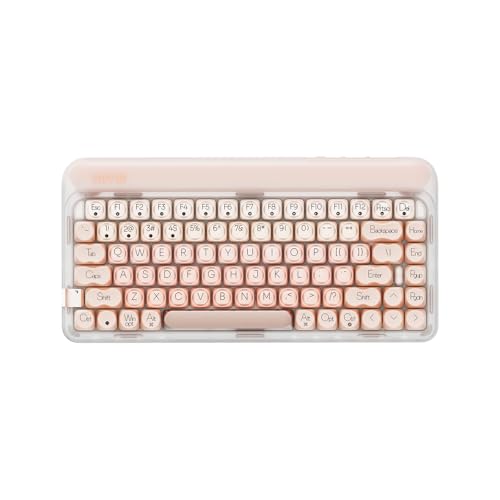
If you need a number pad and want to spend less than a Flow 2 100 costs, the Flow Lite100 is the answer. It is the 96% version of the Lite design, with a 3,000 mAh battery, a weight near 738 g and dimensions of about 373 x 126 x 26 mm. It shares the Lite family’s plastic case and switch options, so the typing feel is close to the Lite84 with extra keys.
Who it suits: accountants, data entry workers and anyone who types numbers all day. Main trade-offs: the same software limits as the Lite84, and the plastic case sounds a little hollower than the aluminum boards. A larger battery helps it last longer between charges than the compact model.
Best Original-Design 75%: Lofree Flow84
The Flow84 is the board that put Lofree on the map. Per the manufacturer’s spec sheet it has 84 keys in a 75% layout, an aluminum alloy frame, dye-sublimated PBT keycaps, a gasket mount and Kailh full-POM hot-swap switches in Ghost linear, Phantom tactile and Wizard clicky versions. The Phantom has about 2.8 mm of total travel and 45 gf actuation force. It measures about 316 x 126 x 24.5 mm and weighs between roughly 568 and 594 g depending on the source.
- Connectivity: Bluetooth 5.0 and USB-C wired, with up to three paired devices.
- Battery: 2,000 mAh, up to about 40 hours of working time, which reviewers called weak.
- Lighting: white backlight with eight RGB sidelights.
Who it suits: buyers who want a metal 75% board and prefer tactile switches. Main trade-offs: no 2.4 GHz dongle and short battery life. Reviewers described it as beautiful but flawed, which is a fair summary. Newer models have largely overtaken it, so buy it mainly if you find it at a clear discount.
Best Retro Style: Lofree Block 98
The Block 98 is the oddball of the lineup, and that is the point. It is a retro tablet-style keyboard with 98 keys, a dedicated number pad and navigation cluster, two knobs and a small visual status panel that shows the active connection mode, lock status and battery state. Per the maker, the switches are Lofree x TTC Block linear with a full POM stem, rated at 43 gf operating force, 1.6 mm pre-travel and 3.8 mm total travel.
- Build: ABS frame, dye-sub PBT keycaps, gasket mount, hot-swap sockets and a white LED backlight with 14 modes.
- Size and weight: about 387 x 165 x 40.5 mm and 1,090 g, making it the heaviest and tallest board here.
- Battery: 2,000 mAh, up to 80 hours lights off and about 10 hours with all lights on.
- Connectivity: USB-C wired, Bluetooth 5.0 and 2.4 GHz.
Who it suits: anyone who wants a conversation piece with a deep, thocky sound. Main trade-offs: no remap software, a modest battery for its size and a high profile that practically requires a wrist rest. Reviews describe it as charming and comfortable, but it is a style purchase first.
Best for Thin and Portable: Lofree Edge
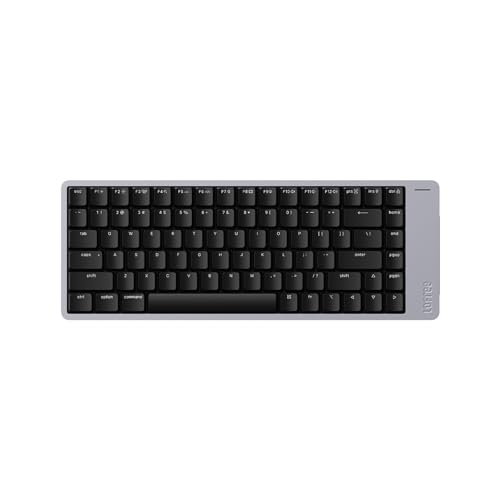
The Edge is the thinnest and lightest board Lofree makes, and it is aimed at people who carry a keyboard in a laptop bag. The specification lists 84 keys in a 75% layout, a top case made from twill-weave carbon fiber and a bottom case in magnesium alloy. It is about 5.4 mm at its thinnest and 16.5 mm at its thickest including keycaps, weighs roughly 485 g (independent measurements land between about 479 and 498 g) and measures about 318 x 154 mm.
- Switches: Kailh POM Switch 2.0 low-profile with about 2.4 mm of travel, shorter than the Flow’s 2.8 mm.
- Battery: 2,000 mAh, up to 130 hours with lights off and about 10 with all lights on.
- Connectivity: Bluetooth 5.3 and USB-C wired, up to three devices.
- Hot-swap: the maker’s sheet lists it as not supported, so you cannot change switches.
Who it suits: travelers, minimalists and Magic Keyboard fans who want a mechanical upgrade. Main trade-offs: the typing feel is less rich than the Flow’s according to several reviewers, the thin legends are hard to read in dim light because the PBT keycaps do not let the backlight shine through, and it sits in the highest price tier. It is a niche product that does its niche well.
How to Choose a Lofree Keyboard
Start with the layout, because it affects every other decision. A 75% board saves roughly 8 to 10 cm of width compared with a 96% board, which leaves more room for the mouse arm and reduces shoulder reach. If you use a number pad daily, choose the Flow 2 100, Flow Lite100 or Block 98. If not, the 75% boards are easier to live with.
Decision Matrix by Situation
| Your situation | Choose | Why |
|---|---|---|
| Type all day, want the best feel | Flow 2 100 | Aluminum case, VIA, 3,000 mAh battery |
| Small desk, mixed laptop use | Flow Lite84 or Flow 2 84 | 75% width, tri-mode connections |
| Tight budget | Flow Lite84 | Keeps gasket mount and POM switches |
| Numbers all day | Flow Lite100 or Flow 2 100 | Dedicated number pad |
| Carry it in a bag | Edge | Roughly 485 g and 16.5 mm maximum thickness |
| Desk decoration | Block 98 | Retro shape, knobs and status panel |
Worked Battery Example
Battery claims are almost always measured with the backlight off. If a board is rated for 100 hours lights off and you type about 5 hours a day, you get roughly 20 days between charges with lighting disabled. Turn the backlight on and the Flow 2 100’s rating drops from 120 hours to about 14, which at the same 5 hours a day is under three days. Treat the backlight as a battery feature you enable only when needed.
Ownership Realities
- What wears first: low-profile switches have less travel to absorb impact, so bottoming out hard shortens the feel of the stem over time. Typing lightly extends life well beyond the rated 50 million keystrokes in practice.
- Keycaps: PBT resists shine better than ABS, but thin legends can fade if you clean with harsh solvents. Use a damp cloth and a soft brush.
- Dongles: several models have nowhere to store the 2.4 GHz receiver, so keep a spare cable and a small case.
- Switch swaps: Lofree low-profile sockets are not compatible with standard MX switches, so plan on buying Lofree or Kailh low-profile replacements only.
Lofree Versus Other Low-Profile Boards
Lofree’s pitch is feel and looks over raw gaming speed. Compared with gaming-focused low-profile boards from the big peripheral brands, Lofree offers a quieter, smoother stroke but fewer advanced features such as analog actuation or deep macro software. Compared with Apple’s keyboard, Lofree adds hot-swap sockets, tri-mode wireless that works with non-Apple devices and a far more distinct key feel. If you are cross-shopping, ask whether you will use features like rapid trigger or onboard profiles. If the answer is no, Lofree is a strong fit.
Choosing Switches and Connection Mode
Switch type changes the daily experience more than any spec on the box. Linear switches such as the Surfer, Specter and Ghost have no bump, so they feel smoothest and suit fast typing and games. Tactile options such as the Pulse and Phantom add a small bump at the actuation point that helps accuracy when you type without looking, which many writers prefer. Silent variants such as the Void and Hades add dampening so the board is easier to use in shared offices or late at night, at the cost of a slightly softer bottom-out.
Connection mode matters just as much. Bluetooth is convenient for switching between a laptop, tablet and phone, but it adds latency and can drop when the radio environment is crowded. The 2.4 GHz dongle is the right choice for a main desktop because it supports the full 1,000 Hz polling rate on boards that offer it. Wired USB-C is the fallback that never needs charging and is the best option for gaming sessions. A sensible routine is to leave the dongle plugged into your desktop, pair Bluetooth to a second device and keep the cable in a drawer for emergencies.
Frequently Asked Questions
Which Lofree keyboard is best for typing?
The Flow 2 100 is the strongest typing board in the lineup, according to reviewers who praised its aluminum build and Surfer switches. Its 2.8 mm travel, 40 gf operating force and full POM switch construction give a smooth, quiet stroke. The Flow Lite84 delivers a similar character at a lower tier.
Are Lofree keyboards good for gaming?
They work for casual and single-player gaming, since the 1,000 Hz polling over wired and 2.4 GHz connections is adequate. They lack analog switches and rapid trigger, so competitive shooter players will usually prefer a dedicated gaming board. Use the dongle or wired mode rather than Bluetooth for any game.
Can you change the switches on a Lofree keyboard?
Most models are hot-swappable, including the Flow 2, Flow Lite, Flow84 and Block, but the Edge’s maker sheet lists no hot-swap support. Replacement switches must be Lofree or Kailh low-profile types, because standard MX switches do not fit these sockets.
Does Lofree support VIA?
The Flow 2 supports VIA, which lets you remap keys and record macros from a browser without installing an app. The Flow Lite line uses the Lofree Key Mapper instead, and the Block has no remapping software. Check this before buying if custom layers matter to you.
How long does a Lofree battery last?
Rated figures range from about 40 hours on the Flow84 to 130 hours on the Edge with lights off, and they fall to roughly 10 to 14 hours with lighting on. In practice, keeping the backlight off and using Bluetooth rather than the dongle will give the longest run time.





Write Your Review
No reviews yet. Be the first to share your experience!