
Our Short List of 3
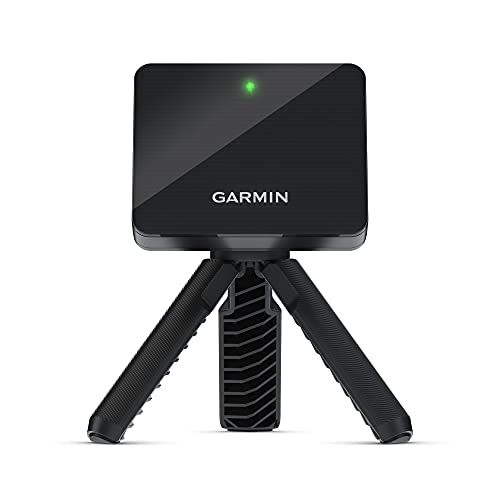
- Best for: Range sessions and long practice days away from home.
- Portable launch monitor for home, indoor, and driving range use
- Up to 10 hours of battery life
- Pairs with the Garmin Golf app for shot data and virtual rounds
- Tripod mount for placement behind the ball

- Best for: Garage net practice with video and measured spin.
- Dual cameras plus Doppler radar
- Measures spin rate and spin axis with RPT balls
- Records swing video and impact video for every shot
- Works indoors and outdoors with the Rapsodo app

- Best for: Deep swing data with simulator play and no added plan.
- 18 swing data parameters out of the box
- Front facing camera with GPS overview and shot tracer
- 8 E6 simulation courses included
- About 6 hours of battery life with USB-C charging
All 5 Picks at a Glance
| Product | Specs | Action |
|---|---|---|
| Garmin Approach R10, Portable Golf Launch Monitor, Take Your Game Home, Indoors or to The Driving Range, Up to 10 Hours Battery Life – 010-02356-00 |
| Check price on Amazon |
| Rapsodo MLM2PRO Mobile Launch Monitor + Golf Simulator |
| Check price on Amazon |
| FlightScope Mevo Gen2 Portable Golf Launch Monitor and Simulator with 18 Swing Data Parameters, Front Facing Camera, 8 E6 Simulation Courses with GPS Overview and Shot Tracer, Indoor and Outdoor |
| Check price on Amazon |
 FlightScope Mevo+ GPS Launch Monitor and Golf Simulator, 20+ Swing Data Parameters with Multicam, 12 E6 Courses, 17 Practice Ranges and Games – for Indoor and Outdoor Use, Works with iOS and PC |
| Check price on Amazon |
 Voice Caddie SC4 PRO Golf Launch Monitor and 3D Driving Range Simulator for Indoor and Outdoor Use, Portable Golf Swing Analyzer and Tracker with Built-in Screen, No Fees |
| Check price on Amazon |
Key takeaways
- Five golf launch monitors compared for carry distance, spin, launch angle, indoor and outdoor use, and better practice at home or the range.
A launch monitor turns guesswork into numbers. Without one, a golfer at the range or in a garage net can only judge a shot by feel, which hides the carry distance, spin, and launch angle that decide whether a swing change helps. With one, every shot comes back with data that shows what changed and what still needs work, and the choice comes down to how each unit measures, where it works, and what it shows after each swing.
This guide compares five portable launch monitors for a home setup, a garage net, or a bag carried to the range: the Garmin Approach R10, the Rapsodo MLM2PRO, the FlightScope Mevo Gen2 and Mevo+, and the Voice Caddie SC4 PRO. Some suit golfers who want a screen on the unit, others suit golfers who want deep swing data or simulator play on a phone, tablet, or PC. Each pick below comes from its Amazon listing, so you can match the unit to your space and the way you practice.
Quick Picks
As an Amazon Associate we earn from qualifying purchases
| Product | Best for | Key spec from title |
|---|---|---|
| Garmin Approach R10, Portable Golf Launch Monitor, Take Your Game Home, Indoors or to The Driving Range, Up to 10 Hours Battery Life – 010-02356-00 | Range sessions and long practice days | Up to 10 hours of battery life |
| Rapsodo MLM2PRO Mobile Launch Monitor + Golf Simulator | Swing video with measured spin indoors | Dual cameras plus Doppler radar |
| FlightScope Mevo Gen2 Portable Golf Launch Monitor and Simulator with 18 Swing Data Parameters, Front Facing Camera, 8 E6 Simulation Courses with GPS Overview and Shot Tracer, Indoor and Outdoor | Deep data with simulator play at home | 18 swing data parameters and 8 E6 courses |
| FlightScope Mevo+ GPS Launch Monitor and Golf Simulator, 20+ Swing Data Parameters with Multicam, 12 E6 Courses, 17 Practice Ranges and Games – for Indoor and Outdoor Use, Works with iOS and PC | Full simulator play with wide data | 20+ swing data parameters and 12 E6 courses |
| Voice Caddie SC4 PRO Golf Launch Monitor and 3D Driving Range Simulator for Indoor and Outdoor Use, Portable Golf Swing Analyzer and Tracker with Built-in Screen, No Fees | Phone-free practice at the range | Built-in screen with voice output |
How to Choose
Match the monitor to your space
Where you hit the ball shapes the choice more than any feature. A radar unit sits behind the ball and needs room behind it plus enough ball flight in front, so a short garage may suit a camera-based unit or a radar unit placed well. A range gives most units room, while a net at home rewards a unit that reads spin and speed from a short flight. Measure your hitting area before you buy: the distance from ball to net, the ceiling height, and whether the unit can sit on level ground behind the ball. A unit that fits your room gives steadier numbers than a stronger unit squeezed into a space it was never built for.
Decide how much data you want
Some golfers only need carry distance, ball speed, and launch angle to shape a practice session, and a simple unit covers that well. Others want spin rate, spin axis, club path, and angle of attack to work on a slice, a hook, or a low ball flight, and that calls for a unit with more sensors or a camera that reads the ball at impact. More data only helps if you use it: a long list of numbers you never open adds nothing to your game. Pick the data set that matches the fault you are working on, and leave the deeper club data for later if your main goal is simply to learn your true distances with each club.
Check how you will see each shot
A launch monitor is only useful if you can read its numbers without breaking your rhythm. Some units show data on their own screen and call it out by voice, so you never touch a phone between swings. Others send every shot to an app on a phone, tablet, or PC, which gives bigger charts, shot history, and video replay. Think about where you practice: at a busy range, a built-in screen keeps things simple, while at home a big display turns practice into simulator rounds. If you like video of your swing beside the numbers, pick a unit with cameras that record each shot.
Think about what comes after the purchase
Some launch monitors work fully from the day they arrive, with every feature open and no plan to join. Others unlock their best data, courses, or video tools only with a membership, so the unit keeps asking for more after the first purchase. Neither path is wrong, but the difference matters over a year of practice. Read the listing to see which features need a plan and which come with the unit itself, then weigh that against how often you will play simulator rounds or open advanced data. A unit with no added plan suits golfers who want one purchase and nothing else to manage.
The 5 Best Options
Garmin Approach R10, Portable Golf Launch Monitor, Take Your Game Home, Indoors or to The Driving Range, Up to 10 Hours Battery Life – 010-02356-00
- Best for: Range sessions and long practice days away from home.
- Portable launch monitor for home, indoor, and driving range use
- Up to 10 hours of battery life
- Pairs with the Garmin Golf app for shot data and virtual rounds
- Tripod mount for placement behind the ball
Range sessions and long practice days away from home.
The app carries much of the display work, so keep a charged phone or tablet nearby.
The Approach R10 is the portable pick for golfers who want solid numbers at the range without a large unit to carry. It sits behind the ball on a small tripod, pairs with the Garmin Golf app, and reports the ball and club data that shape most practice sessions, from carry distance and ball speed to launch angle and spin. With up to 10 hours of battery life, it lasts through long range sessions and full rounds of simulator play on a phone or tablet. Its small size suits a golf bag, and its app links shot data to virtual rounds on thousands of courses.
Rapsodo MLM2PRO Mobile Launch Monitor + Golf Simulator
- Best for: Garage net practice with video and measured spin.
- Dual cameras plus Doppler radar
- Measures spin rate and spin axis with RPT balls
- Records swing video and impact video for every shot
- Works indoors and outdoors with the Rapsodo app
Garage net practice with video and measured spin.
Spin data needs RPT balls indoors, and some features need a membership.
The MLM2PRO suits golfers who want video beside their numbers. Two cameras and a Doppler radar sit behind the ball: one camera films the swing, the other watches the ball at impact, and the radar adds club and ball speed. With RPT balls, the impact camera reads spin rate and spin axis indoors, which radar alone struggles to do from a short flight into a net. The app adds a driving range, courses, and shot history, and the unit works for left- and right-handed golfers without moving it. It is a strong fit for a garage net where video and spin matter most.
FlightScope Mevo Gen2 Portable Golf Launch Monitor and Simulator with 18 Swing Data Parameters, Front Facing Camera, 8 E6 Simulation Courses with GPS Overview and Shot Tracer, Indoor and Outdoor
- Best for: Deep swing data with simulator play and no added plan.
- 18 swing data parameters out of the box
- Front facing camera with GPS overview and shot tracer
- 8 E6 simulation courses included
- About 6 hours of battery life with USB-C charging
Deep swing data with simulator play and no added plan.
Full club path and face data need the optional Pro Package.
The Mevo Gen2 gives deep data in a small upright unit that sits behind the ball and pairs with a phone, tablet, or PC. Its Fusion Tracking blends 3D Doppler radar with a front facing camera, and the base unit reports 18 swing data parameters, from carry and total distance to spin axis, smash factor, and angle of attack. Eight E6 Connect courses come with the unit, so simulator rounds need no added plan, and the front camera adds a shot tracer and swing video. With about 6 hours of battery and USB-C charging, it covers a full practice day at home or the range.
FlightScope Mevo+ GPS Launch Monitor and Golf Simulator, 20+ Swing Data Parameters with Multicam, 12 E6 Courses, 17 Practice Ranges and Games – for Indoor and Outdoor Use, Works with iOS and PC
- Best for: Home simulator rounds with a wide course library.
- 20+ swing data parameters with Multicam
- 12 E6 courses and 17 practice ranges and games
- Works with iOS and PC
- Indoor and outdoor use
Home simulator rounds with a wide course library.
It needs space behind the ball and a display for the best simulator feel.
The Mevo+ is the pick for golfers who want the widest simulator library in this group. It reports 20+ swing data parameters with Multicam, and the listing pairs it with 12 E6 courses plus 17 practice ranges and games, so a home setup can feel like a full simulator bay. It works indoors and outdoors with iOS and PC, and its radar and camera mix tracks both ball and club data across full swings, chips, and putts. Golfers who already own a screen or projector will get the most from it, since the unit shines when its courses fill a large display.
Voice Caddie SC4 PRO Golf Launch Monitor and 3D Driving Range Simulator for Indoor and Outdoor Use, Portable Golf Swing Analyzer and Tracker with Built-in Screen, No Fees
- Best for: Phone-free practice at the range or in a home net.
- Built-in screen with voice output and a remote
- 3D driving range simulator included
- 5 E6 Connect courses included with no fees
- Portable swing analyzer and tracker for indoor and outdoor use
Phone-free practice at the range or in a home net.
The built-in screen goes blank in simulator mode, so pick screen or software for each session.
The SC4 PRO is the pick for golfers who want numbers without a phone in hand. Its built-in screen shows carry and total distance, ball speed, launch angle, and more right after each shot, and a voice output calls the numbers out loud, so you can stay in your stance and keep swinging. A magnetic remote changes clubs without a walk back to the unit, and the free VoiceCaddie S app adds a 3D driving range, shot history, and swing video. With a 3D driving range simulator and E6 Connect courses included and no fees, it is a self-contained unit for the range or a home net.
Which One Fits Your Situation
You practice mostly at the range
At the range, room is rarely the limit, so pick the unit that is quick to place and easy to read between shots. A built-in screen or a voice readout keeps your eyes on the ball, while a phone-based unit suits golfers who like to study each shot on a display. Battery life matters here too: a unit that lasts through a bucket of balls without a recharge keeps the session smooth from the first swing to the last.
You hit into a net in a garage or spare room
A net at home gives short ball flights, so pick a unit that reads spin and speed well from a few feet of flight. Camera-based units and radar units both work here, as long as you leave the room the maker asks for behind the ball. Check the ceiling height for swings with a driver, and leave space for a mat. A unit that pairs with a simulator turns a room into a place you want to practice in.
You want simulator rounds at home
Simulator play needs courses, a display, and a unit that talks to your PC or tablet. Pick a unit with courses included, then add a screen or projector to complete the bay. The Mevo Gen2 and Mevo+ both ship with E6 courses, while the SC4 PRO adds a 3D range and E6 courses with no added plan. Set the unit behind the ball, and check that your room fits a swing before you buy a screen.
You want numbers without looking at a phone
Some golfers practice best when the phone stays in the bag. A unit with its screen and voice output gives carry, speed, and launch angle after each shot, with no app to open and no display to glance at. The SC4 PRO is built for this, with a remote to change clubs from your stance. If you want shot history, pair it with the app after the session and let the data wait until you are done swinging.
Common Mistakes
- Placing the unit too close to the ball or on uneven ground, which skews every number that follows.
- Buying for simulator courses you will never open, then leaving the data you actually need unused.
- Skipping the room check and learning too late that a driver swing clips the ceiling.
- Ignoring spin indoors, where a short flight hides the spin that shapes iron shots.
- Chasing more data than you will use, instead of learning your true carry distance with each club.
Frequently Asked Questions
Do I need a net to use a launch monitor?
No. Most launch monitors work at a driving range, where the ball flies free and the unit reads a full flight. A net suits home practice, and many golfers use one in a garage or spare room. If you use a net, leave the room the maker asks for behind the ball and in front of it, and pick a unit that reads spin well from a short flight.
Can I use a launch monitor indoors?
Yes, as long as your room fits the unit and a full swing. Radar units sit behind the ball and need open space behind them, while camera units read the ball at impact. Check the ceiling height for a driver, leave room for a mat, and give the ball enough flight to the net for steady numbers.
Do launch monitors work for left-handed golfers?
Most do. Radar units sit behind the ball on the target line and read shots from either side without moving, and camera units work the same way. Check the listing for your model before you buy, and place the unit on the target line rather than to one side, so it sees every shot the same way.
Which launch monitor is best for a small room?
Pick a unit that reads spin and speed from a short flight and fits the space behind the ball. Camera-based units and compact radar units both suit small rooms, as long as you meet the maker room guidance. Measure your space first, then match the unit to it rather than buying the deepest data set and hoping it fits.
More from Amazon
Programs that pair well with the guide above. Offers and eligibility are set by Amazon and may change.
Free shipping on eligible items, Prime Video and more. Eligible new members can start with a free trial.
Start a Prime free trialAd-free music streaming. Eligible new subscribers can start with a free trial.
Try Music Unlimited freeA Prime membership for ages 18-24 with a trial period. Eligibility is set by Amazon.
See Prime for Young AdultsAudiobooks and podcasts to listen to on the go. Eligible new members can start with a free trial.
Try Audible freeAs an Amazon Associate we earn from qualifying purchases.










Write Your Review
No reviews yet. Be the first to share your experience!