

Key takeaways
- Three affordable golf launch monitors that track ball and club data at the range or at home. Compare the Garmin R10, Rapsodo MLM and Swing Caddie SC4.
A golf launch monitor turns a driving-range session into numbers you can actually work with: ball speed, launch angle, carry distance and club speed, instead of guessing from where the ball lands. The affordable tier is where the trade-offs get real, because the cheapest devices measure fewer data points and lean on your phone for display and analysis, while pricier units add their own screens and simulation. Picking well means matching the device to how you practise — at the range, in the garage, or on the course — and knowing which numbers you will actually use before you buy.
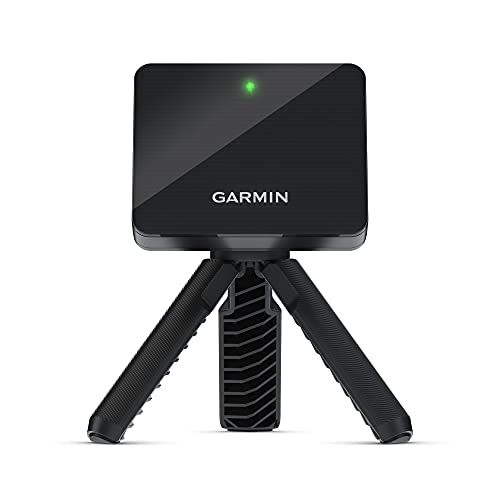

This guide is for golfers who want feedback on every shot without spending what a tour-grade system costs, and it covers only golf launch monitors — the swing and ball-data devices, not computer monitors. Three models had listings on Amazon US that could be verified from the Amazon page, so this guide covers exactly those three, with every specification taken only from their listings.
Quick Picks
As an Amazon Associate we earn from qualifying purchases
| Product | Best for | Key spec |
|---|---|---|
| Garmin Approach R10 | The widest set of measured data | Tracks 12+ metrics |
| Rapsodo Mobile Launch Monitor | Range sessions with a course view | GPS satellite view |
| Swing Caddie SC4 | Practising with a simulator at home | E6 simulator included |
How to Choose
Which numbers the device measures
The first decision is how much data you actually need. A launch monitor can report ball speed, club speed, launch angle and carry distance, but affordable models differ in how many they measure directly and how many they calculate. The Garmin R10 tracks more than a dozen metrics, while the Rapsodo MLM focuses on ball speed, club speed and launch angle. If you are working on one specific part of your swing, a focused set of numbers may be enough. If you want to compare clubs or track progress across a season, a broader set gives you more to compare, so check the metric list before you choose.
Phone, app and compatibility
Every affordable launch monitor in this guide works together with a phone app, and that app is part of the product, not an optional extra. The phone displays your numbers, stores your session history and, on some models, draws the shot on a course view. That makes phone compatibility a real buying factor: the Rapsodo MLM works with iOS only, so an Android user should rule it out immediately. Before buying any of these, check that your phone runs the companion app and that you are comfortable using your phone as the display for every session, because a launch monitor without its app is a device with no screen.
Battery life and where you practise
Battery life decides whether a launch monitor survives a full practice session. Two of the three picks in this guide list a 10-hour battery, which covers a long range session or an afternoon into a net without a recharge. The third pick lists no battery figure, so confirm its running time on the product page rather than assume it. Think about where you will use it most: a device at a range with no outlet nearby needs a long battery, while one used at home near a socket can be topped up between sessions. Also consider setup: a monitor that needs a tripod or a clear line to the ball adds time at every session.
What comes in the box
Box contents matter more with launch monitors than with most golf gear, because a missing accessory can mean an extra purchase before your first session. The Garmin R10 ships with a tripod, a phone mount and a carry case, so it is ready to set up at the range. The Swing Caddie SC4 ships with a remote and a USB cable, and it includes the E6 simulator software, which is a big part of its value at home. The Rapsodo MLM ships as a compact unit that pairs with its app. Before you buy, read the included-items list and note anything you would still need, such as a tripod or a net, so you know what else you need.
The 3 Best Options
Garmin Approach R10
The Garmin Approach R10 is the pick for the golfer who wants the broadest set of numbers. It tracks more than a dozen metrics, including club head speed, ball speed, launch angle and launch direction, and the listing states accuracy tolerances for those readings, so each figure comes with a stated margin. It runs for 10 hours on a charge and carries an IPX7 rating, useful outdoors in bad weather. The tripod, phone mount and carry case in the box mean it is ready to set up at the range, and its phone app turns the readings into a session you can look back on shot by shot.
Specs
- Tracks 12+ metrics
- Club head speed accuracy within 3 mph
- Ball speed accuracy within 1 mph
- Launch angle and launch direction accuracy within 1 degree
- 10-hour battery life
- IPX7 water resistance rating
- Tripod, phone mount and carry case included
Best for: Golfers who want the widest set of measured data at an affordable tier.
Watch out for: The listing behind this pick has the stalest crawl in this guide, so confirm the listing is still live on the product page before ordering. Use the base unit only, not the Signature Series Power Bundle variant.
Rapsodo Mobile Launch Monitor
The Rapsodo Mobile Launch Monitor is the pick for the golfer who practises at the range and wants to see each shot drawn on a course. Its GPS satellite view shows where the ball would land on a real hole, which turns a flat range session into something closer to playing golf. It reports ball speed, club speed and launch angle, a focused set that covers the numbers most golfers check first when they are working on distance and consistency. It is a 2019 model, so it is an older design than the other two picks, and that shows in its narrower feature set rather than in the readings themselves.
Specs
- iOS only
- GPS satellite view
- Ball speed measurement
- Club speed measurement
- Launch angle measurement
- 2019 model
Best for: Range golfers who want a course view of every shot on an iPhone.
Watch out for: It works with iOS only, so Android users should not buy it. The listing states no battery figure, so confirm running time on the product page before ordering.
Swing Caddie SC4
The Swing Caddie SC4 is the pick for the golfer who practises at home and wants simulator play without buying a separate software package. It includes the E6 simulator, so shots can be played on virtual courses rather than only read as numbers, and it connects over Bluetooth to show those shots on a paired device. Its 10-hour battery covers long practice sessions, and the remote in the box lets you control it without walking back to the unit between shots. It is the original SC4, not the PRO version, and the listing for the PRO showed no available offers, so this is the version to buy.
Specs
- 10-hour battery life
- Bluetooth connectivity
- E6 simulator included
- Remote included
- USB cable included
Best for: Home practice with simulator play on virtual courses.
Watch out for: Buy the original SC4 only; the SC4 PRO listing showed no available offers. The listing states no accuracy tolerances, so treat its readings as practice feedback rather than laboratory-grade measurement.
Which One Fits Your Situation
You practise mostly at the driving range
Choose the Garmin Approach R10. Its tripod and phone mount set up quickly on a range bay, the carry case keeps everything together between sessions, and the 10-hour battery covers a long afternoon of hitting balls. The wide metric list also gives you more to look back on after the session, which is the point of range practice for most golfers, and the stated accuracy tolerances tell you how much weight each number deserves.
You want to see shots on a real course
Choose the Rapsodo Mobile Launch Monitor, provided you use an iPhone. Its GPS satellite view draws each shot onto a course, so a range session feels closer to playing a hole, and the focused set of ball speed, club speed and launch angle covers the numbers most golfers check first. If you use Android, skip this one and pick the Garmin instead, since the MLM does not work with Android phones.
You practise at home into a net
Choose the Swing Caddie SC4. The included E6 simulator turns net practice into virtual rounds, the remote lets you control the unit from the hitting area, and Bluetooth keeps the setup simple. Its 10-hour battery means it will last through a full evening of practice without a recharge, and the virtual courses keep repetitive net sessions interesting.
You want the most measured data
Choose the Garmin Approach R10. It is the only pick in this guide that tracks more than a dozen metrics and states accuracy tolerances for club head speed, ball speed, launch angle and launch direction, so it gives you the most numbers to work with when you compare clubs or track progress over time, and the tolerances show which readings to trust most.
Common Mistakes
- Buying a launch monitor for a computer setup: these are golf swing and ball-data devices, not computer monitors.
- Buying the Rapsodo MLM without an iPhone: it works with iOS only, and Android users will not be able to use it.
- Buying the SC4 PRO or the FlightScope Mevo instead of the picks in this guide: the PRO listing showed no available offers, and the original Mevo has been discontinued by its maker.
- Assuming every metric is measured directly: affordable monitors calculate some numbers from a smaller set of readings, so check which metrics are measured and which are estimated.
- Skipping the box contents: a missing tripod, mount or cable can delay your first session, so read the included-items list before ordering.
Frequently Asked Questions
Do I need a phone to use a launch monitor?
Yes, for all three picks here. Each one pairs with a companion app, and the phone acts as the display for your numbers, your session history and, on some models, the course or simulator view. The Garmin R10 includes a phone mount, and the Swing Caddie SC4 connects over Bluetooth. Check that your phone runs the companion app before you buy — the device on its own has no screen.
Can I use a launch monitor indoors?
Yes, if you have enough space and a safe place for the ball to go, such as a net. The Swing Caddie SC4 fits indoor use because it includes the E6 simulator for virtual courses, and its remote lets you control it from the hitting area. The Garmin R10 also works indoors, though a launch monitor needs a clear line to the ball and enough distance to read the shot.
What is the difference between a launch monitor and a golf simulator?
A launch monitor measures your shot: ball speed, club speed, launch angle and more. A golf simulator is software that turns those numbers into a virtual round. The Swing Caddie SC4 includes the E6 simulator, so it does both jobs. The Garmin R10 and the Rapsodo MLM focus on measurement and show your data in their apps, with the Rapsodo adding a GPS course view.
Should I buy the FlightScope Mevo instead of one of these three?
No, not on the evidence available. FlightScope has discontinued the original Mevo, so only certified pre-owned units remain, and the Amazon listing behind it rests on a mirror with a 306-day-old crawl and a low-inventory warning. A discontinued product is not a safe pick. The three picks in this guide are the verified affordable options, with the Garmin R10 as the widest-data choice.
More from Amazon
Programs that pair well with the guide above. Offers and eligibility are set by Amazon and may change.
Free shipping on eligible items, Prime Video and more. Eligible new members can start with a free trial.
Start a Prime free trialAd-free music streaming. Eligible new subscribers can start with a free trial.
Try Music Unlimited freeA Prime membership for ages 18-24 with a trial period. Eligibility is set by Amazon.
See Prime for Young AdultsAudiobooks and podcasts to listen to on the go. Eligible new members can start with a free trial.
Try Audible freeAs an Amazon Associate we earn from qualifying purchases.
Write Your Review
No reviews yet. Be the first to share your experience!