

The best HyperX gaming keyboard for most players in 2026 is the Origins 2 65, because it combines a compact layout, hot-swappable switches and an 8,000 Hz polling rate that no older HyperX board offers. If you want a proven aluminum board with fewer moving parts, the Alloy Origins 65 is the safer buy, and if you want a wireless 75% layout, the Alloy Rise 75 Wireless is the one to shortlist. The rest of this guide sorts every current HyperX line by layout, switch feel and desk setup so you can match a board to your own habits.
HyperX keyboards now sit under the HP umbrella, and the catalog has two generations side by side: the older Alloy Origins family with a full aluminum body and the newer Origins 2 and Alloy Rise boards that lean into hot-swap sockets, gasket-style mounting and faster polling. That split matters, because the two generations feel very different at the desk and age very differently over several years of use. The picks below follow the manufacturer’s published specifications, and where a figure varies between regional product pages the article says so instead of guessing.
Our top picks

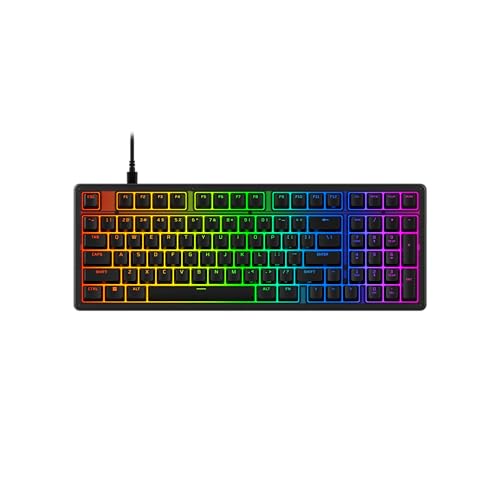


As an Amazon Associate we earn from qualifying purchases at no extra cost to you.
Quick Comparison of the Seven HyperX Picks
| Pick | Best for | Layout | Key specs | Price range |
|---|---|---|---|---|
| Origins 2 65 | Best overall | 65% | Hot-swap, o-ring mount, per-key RGB, up to 8,000 Hz polling | Mid-range to premium |
| Origins 2 1800 | Full-size users | Compact full-size | Same Origins 2 design language, numpad kept | Premium |
| Alloy Rise 75 | Best 75% wired | 75% | Gasket mount, hot-swap, ambient light sensor | Mid-range |
| Alloy Rise 75 Wireless | Best wireless | 75% | Wireless modes, rated for 80 hours of backlit use | Premium |
| Alloy Origins 65 | Best tough build | 65% | Aluminum body, PBT keycaps, 1,000 Hz, 3 onboard profiles | Mid-range |
| Alloy Origins Core | Best tenkeyless | TKL | Detachable cable, 3 angles, NGENUITY software | Mid-range |
| Alloy Origins 60 | Best small desk | 60% | 296 x 105.5 x 36.9 mm, 781.5 g, double shot PBT | Budget to mid-range |
Best Overall: HyperX Origins 2 65
The Origins 2 65 debuted at CES 2026 and is the board that defines where HyperX keyboards are heading. Tom’s Hardware’s review describes an o-ring mount design, a frosted polycarbonate case, dampening foam, a hot-swappable PCB that accepts 5-pin switches, per-key RGB and polling that reaches 8,000 Hz. Each of those features answers a specific complaint about older HyperX boards: sound, customization and input latency.
Who it suits: competitive players on 240 Hz or faster monitors who want a small footprint and the option to swap in their favorite linear or tactile switches later. An 8,000 Hz polling rate shortens the interval between reports from 1 ms (at 1,000 Hz) to 0.125 ms, so on paper the keyboard can report a press eight times as often. In practice the gain is small for most players, and it only helps if your USB port, mouse and CPU can keep up, but it removes the keyboard as a possible bottleneck.
Main trade-off: polycarbonate cases do not feel as dense as aluminum, and a hot-swap board invites tinkering that changes the stock sound. High polling rates also increase CPU interrupt load slightly, so players on very old processors may prefer to run 1,000 Hz.
Best Full-Size: HyperX Origins 2 1800
HyperX announced the Origins 2 1800 alongside the 65 at CES 2026. It keeps the numpad but trims dead space, which is the compact full-size idea often called an 1800 layout. This is the pick for players who also use spreadsheets, accounting software or flight and racing sims that benefit from a numeric block.
Who it suits: hybrid work-and-play desks where dropping the numpad would slow daily tasks. The compact arrangement saves a little desk width compared with a traditional 104-key board, which leaves more mouse travel on the right side. Check the current HyperX product page for the final switch options and exact dimensions, because this model is newer and regional listings change.
Main trade-off: it is wider than every other pick here, so low-sensitivity mouse players with a big swipe may still feel cramped. If horizontal space is tight, step down to a 75% or 65% board.
Best 75% Wired: HyperX Alloy Rise 75
The Alloy Rise 75 is hot-swappable, gasket-mounted and fitted with an ambient light sensor that adjusts backlight brightness to the room. A 75% layout keeps the function row in a tight block and the arrow keys in a proper cluster, which makes it a smoother upgrade for someone moving from a full-size or tenkeyless board than a 60% or 65% design.
Who it suits: players who type for work during the day and play in the evening. The gasket mounting gives the plate a bit of flex, which softens bottoming out, and the hot-swap sockets let you change switches without a soldering iron. If you share a desk or office, the quieter, cushioned feel is a real advantage over the harder, clackier older HyperX boards.
Main trade-off: no polling rate above the standard range is advertised for this model, so competitive players chasing the lowest possible latency should look at the Origins 2 65 instead.
Best Wireless: HyperX Alloy Rise 75 Wireless
The wireless version of the Rise 75 is rated by HyperX for about 80 hours of backlit gameplay on a charge, which is the figure that matters most when you decide whether you will ever think about the battery. Because backlighting is the biggest drain on any gaming keyboard, a backlit rating is more honest than a lights-off number.
Who it suits: players with a clean desk setup, a console in the living room or a laptop that travels with them. A wireless board removes cable drag, which is relevant on small desks where a braided USB cable catches on a monitor stand. At 80 hours of backlit use, a person who plays three hours a day would recharge roughly once every 26 days (80 divided by 3), which is a worked example worth keeping in mind when you compare it to a wired board.
Main trade-off: wireless connections add a tiny amount of latency compared with a wired link, and the lithium battery will eventually age. For tournament play, plug in the cable.
Best Tough Build: HyperX Alloy Origins 65
The Alloy Origins 65 uses a full aircraft-grade aluminum body and double shot PBT keycaps, according to HyperX. It offers three adjustable angles, a detachable USB-C cable, per-key RGB with five brightness levels, three onboard profiles, a 1,000 Hz polling rate, N-key rollover and a Game Mode, and it works with PC, PS5, PS4 and both Xbox Series and Xbox One consoles. It is available with Aqua tactile or Red linear switches and runs through NGENUITY software.
Who it suits: anyone who wants a keyboard that survives years of travel and desk accidents. The aluminum body resists flex and rarely develops squeaks, and the PBT keycaps do not shine from finger oils the way ABS caps do. It is wired only, which means no battery to degrade.
Main trade-off: it is not hot-swappable in the way the newer boards are, so your switch choice at purchase is the switch you live with. Choose carefully between linear Red switches for fast repeated presses and tactile Aqua switches for a bump that confirms actuation.
Best Tenkeyless: HyperX Alloy Origins Core
The Alloy Origins Core is the tenkeyless member of the family, with a detachable cable, three adjustable angles, onboard profiles, N-key rollover, a Game Mode and RGB lighting configurable in NGENUITY. TKL keeps the navigation block and arrow keys while dropping the numpad.
Who it suits: FPS players who want mouse space but still use the Home, End, Page Up and Page Down keys for work. It is a straightforward, durable choice, and because it shares its design with the 65 it carries the same aluminum build confidence.
Main trade-off: TKL is wider than 65%, so if your goal is the maximum possible mouse swing, the 65% and 60% boards leave more room.
Best for Small Desks: HyperX Alloy Origins 60
The Alloy Origins 60 measures 296.0 x 105.5 x 36.9 mm and weighs 781.5 g with its 5.9 ft braided USB-C to USB-A cable, per HyperX’s specification. It has a 60% layout, double shot PBT keycaps, RGB backlighting, 100% anti-ghosting and HyperX mechanical switches rated for 80 million keystrokes. The Aqua tactile variant has a 1.8 mm actuation point and 3.8 mm total travel.
Who it suits: players who want the widest mouse swing and the smallest footprint, or who carry a keyboard to LAN events. It fits easily into a backpack side pocket.
Main trade-off: a 60% layout has no dedicated arrow keys or function row. Arrows, F-keys and navigation sit behind a function layer, which is fine for many shooters but painful for office work, so expect to use the Fn key constantly if you also code or write on the same board.
Spec Comparison by Layout and Size
| Layout | Typical key count | Arrow keys | Function row | Numpad | Best use |
|---|---|---|---|---|---|
| 60% | 61 | Layer only | Layer only | No | Esports, travel |
| 65% | 67 to 68 | Dedicated | Layer only | No | Gaming plus light work |
| 75% | 82 to 84 | Dedicated | Yes | No | Mixed work and play |
| TKL | 87 | Dedicated | Yes | No | FPS and general use |
| Compact full-size (1800) | about 96 to 98 | Dedicated | Yes | Yes | Sims, spreadsheets |
Understanding Polling Rate, Latency and Why It Matters Less Than You Think
Polling rate is how many times per second the keyboard reports its state to the PC. At 1,000 Hz that is once per millisecond, and at 8,000 Hz it is once every 0.125 ms. The Origins 2 65 is the only HyperX board in this guide advertising the higher figure. Before paying for it, consider the rest of the chain. A 144 Hz monitor refreshes every 6.9 ms, a 240 Hz monitor every 4.2 ms, and typical human reaction time is well over 150 ms. Shaving under a millisecond from keyboard polling is therefore a margin-of-error improvement for most people, and it makes the most sense for competitive players who have already optimized their monitor, mouse and network.
Debounce time and switch travel also influence feel. A shorter actuation distance such as the 1.8 mm used on HyperX Aqua and Red switches lets a key register earlier in the press, which is a bigger practical difference than polling rate alone. If you are coming from a membrane board with a 3 to 4 mm actuation point, the change will be obvious immediately.
Wired or Wireless for Gaming
Modern 2.4 GHz wireless links are close enough to wired for most games, but they do add battery management and a small chance of interference in crowded radio environments such as apartment buildings. Bluetooth modes, where offered, are best kept for work devices and tablets. For ranked competitive play, keep a cable nearby even if you normally run wireless, because a battery that dies mid-match costs more than any comfort benefit.
How to Choose a HyperX Keyboard
Start with the layout, not the brand line
Measure the space between your keyboard and mouse. If your mouse hand regularly runs off the pad during fast flicks, a 60% or 65% board gives you extra room compared with a full-size layout. Then check how often you use the numpad or function row. Anyone who uses either more than a few times per hour will find a 60% layout annoying.
Match switch feel to the games you play
- Linear switches feel smooth with no bump, which suits rapid repeated presses in shooters and rhythm games.
- Tactile switches add a bump at the actuation point, which helps typists confirm a press without bottoming out and reduces accidental presses in MMOs and strategy titles.
- Hot-swap sockets let you change your mind later. If you are unsure, the Origins 2 65 or Alloy Rise 75 removes the risk of picking the wrong switch.
Decision matrix by situation
| Your situation | Choose | Reason |
|---|---|---|
| Competitive FPS, 240 Hz monitor | Origins 2 65 | Highest polling rate, small footprint |
| Work all day, game at night | Alloy Rise 75 | Function row and arrows retained, cushioned feel |
| Clean wireless desk | Alloy Rise 75 Wireless | No cable drag, long rated battery life |
| Rough use, LAN travel | Alloy Origins 60 or 65 | Aluminum body, detachable cable |
| Need a numpad | Origins 2 1800 | Compact full-size |
| Console and PC | Alloy Origins 65 | Listed as compatible with PS5, PS4 and Xbox |
Worked durability example
Switch life ratings help you compare durability. At 80 million keystrokes per switch, a player who presses a single key 20,000 times a day would take about 4,000 days, or nearly 11 years, to reach the rating (80,000,000 divided by 20,000). Real failures come from chassis damage, cable wear or software issues far earlier, so the cable and case matter more than the headline switch number.
Keycap Materials and Why PBT Is Worth Noting
Double shot PBT keycaps are made by molding two layers of plastic so the legends cannot rub off. PBT resists the shiny wear that ABS caps develop on frequently used keys such as W, A, S and D, and it usually sounds slightly deeper when you type. Most of the Alloy Origins boards ship with PBT caps, which is a quiet reason they stay looking new for longer than cheaper boards at the same tier. If a newer board ships with different caps, aftermarket PBT sets in standard sizes fit most layouts, but check the bottom-row dimensions before buying.
Ownership Realities and Maintenance
- Software: NGENUITY handles lighting, macros and profile storage. Save a profile to onboard memory so the board keeps its settings when you plug it into a different PC.
- Cable care: a detachable USB-C cable means the most common failure point, a frayed cable, costs a small replacement rather than a whole keyboard.
- Cleaning: pull keycaps with a puller every few months, blow out debris with compressed air and wipe PBT caps with a slightly damp cloth. Keep liquids away from the PCB.
- Switch swapping: on hot-swap boards, pull the switch straight up and press the new one straight down to avoid bending pins. A bent pin will not seat and may stop the key working.
- Stabilizers: a rattling space bar is often a stabilizer issue, not a switch fault, and can be reduced with a drop of lubricant on the wire ends.
Common Buying Mistakes
- Buying a 60% board and then discovering you need the function row.
- Assuming a higher polling rate will fix problems caused by a slow monitor or weak mouse sensor.
- Ignoring regional listings: some HyperX products appear under both HyperX and HP store pages with different dates, so verify the exact model name before ordering.
- Choosing wireless for competitive play without checking how easily the cable can be plugged in.
- Skipping the keyboard-to-mouse distance check and ending up with a board that is too wide for a low-sensitivity setup.
Frequently Asked Questions
Which HyperX keyboard is best for FPS games?
The Origins 2 65 is the strongest choice because of its compact layout and polling rate of up to 8,000 Hz, according to Tom’s Hardware’s review. If you prefer a sturdier metal frame, the Alloy Origins 65 or 60 are strong alternatives at a lower polling rate.
Are HyperX keyboards hot-swappable?
The newer Origins 2 65 and Alloy Rise 75 boards are hot-swappable, while the Alloy Origins 60, 65 and Core are built around fixed HyperX switches. Check the exact product page before buying if swapping is important to you.
Do HyperX keyboards work on consoles?
HyperX lists the Alloy Origins 65 as compatible with PC, PS5, PS4, Xbox Series X and S, and Xbox One. Other models may work through USB, but compatibility depends on console firmware and whether the board is wired.
Is a 65% keyboard better than a 60% for gaming?
A 65% board adds dedicated arrow keys and a few navigation keys at the cost of a few extra centimeters of width. Most gamers who also type find that trade worthwhile, while pure esports players who never use arrows often prefer the smaller 60%.
What does HyperX NGENUITY do?
NGENUITY is the HyperX software for lighting effects, key remapping, macro creation and profile management. HyperX lists the Origins 2 65, Alloy Rise 75, Alloy Origins PBT and Alloy Origins 60 as supported.
How long do HyperX mechanical switches last?
The Alloy Origins 60 specification lists switches rated for 80 million keystrokes. Cases, cables and keycaps usually wear before the switches do, so ownership comes down to build quality rather than the switch rating.





Write Your Review
No reviews yet. Be the first to share your experience!