

Our Short List of 3
All 3 Picks at a Glance
| Product | Specs | Action |
|---|---|---|
 Lenovo ThinkPad E16 Gen 3 | Check price on Amazon | |
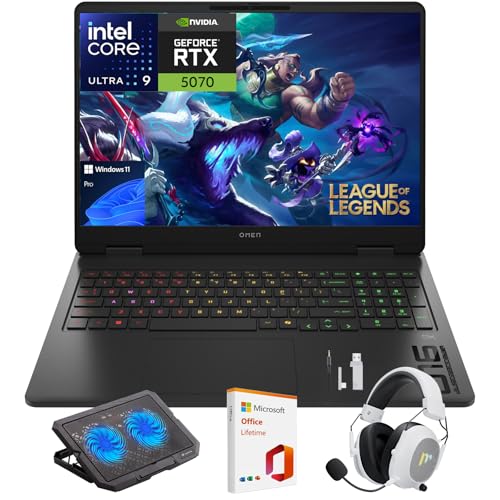 HP OMEN 16 Slim | Check price on Amazon | |
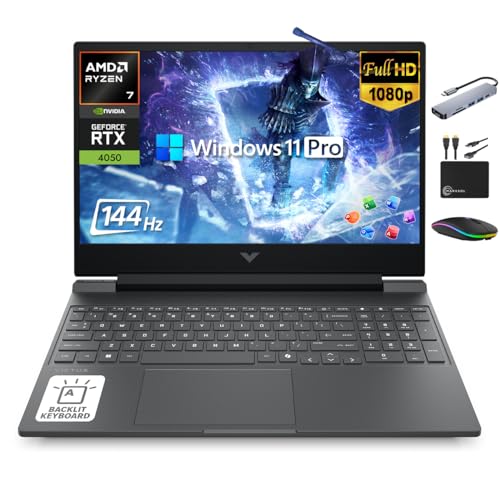 HP Victus 15 | Check price on Amazon |
Key takeaways
- Looking for the best 32GB RAM laptops? Compare five powerful models for work, gaming, and creative tasks, with specs and buying guidance.
The best 32GB RAM laptops give you room to breathe. With 32GB of memory, you can keep dozens of browser tabs open, edit large photo and video files, run virtual machines, and switch between heavy applications without the slowdowns that come with smaller memory configurations. For many buyers, 32GB is the sweet spot: it is enough for serious multitasking and creative work, yet it does not push you into the workstation pricing tier that comes with 64GB and above.
This guide compares five laptops that all ship with 32GB of RAM, covering business machines, mobile workstations, and gaming laptops. Every pick below is a complete laptop with 32GB of memory installed, so you can compare them on the things that actually differ: processor, graphics, display, storage, and build. Use the buying criteria below to narrow the list to the machine that fits your workload, then check the comparison table for a side-by-side view.
How to Choose
1. RAM Type and Speed
Not all 32GB configurations are equal. DDR5 memory runs faster than DDR4 and pairs better with current-generation processors, while DDR4 still handles everyday multitasking well. Some laptops use soldered LPDDR5x memory, which is fast and power-efficient but cannot be upgraded later. If you want the option to expand, look for laptops with SODIMM slots instead.
2. Upgradeability
Check whether the memory is soldered or socketed before you buy. A laptop with two SODIMM slots lets you replace or expand memory down the road, while a soldered configuration locks you into 32GB for the life of the machine. Several laptops in this guide are sold in upgraded configurations, where the seller opens the box to install the memory and storage. That is common on Amazon, but it means the warranty on the upgraded parts comes from the seller rather than the manufacturer, so read the listing carefully.
3. Processor Pairing
Memory only helps if the processor can keep up. For office work, browsing, and light creative tasks, a modern mid-range processor is plenty. For video editing, 3D work, and compiling code, step up to a higher core-count chip such as an Intel Core Ultra 7 or 9, or an AMD Ryzen 7 or 9. Gaming laptops pair strong processors with dedicated graphics, which matters more than raw clock speed alone.
4. Graphics
Integrated graphics are fine for office work, streaming, and photo editing, but they struggle with demanding games and GPU-accelerated creative software. If you edit video, render 3D scenes, or play modern games, choose a laptop with a dedicated NVIDIA GeForce RTX graphics card. The RTX 4050 handles 1080p gaming well, while the RTX 5060 and 5070 give you more headroom for higher resolutions and heavier creative workloads.
5. Storage
Every laptop in this guide ships with at least 1TB of solid-state storage, which is a good baseline for a 32GB machine. Video projects, game libraries, and virtual machines fill drives quickly, so prefer a model with a second storage slot or a larger drive if your files are large. NVMe SSDs are the standard here, and they make booting and loading noticeably quicker than older drive types.
6. Display and Portability
A 32GB laptop is often a workhorse, but it still has to be pleasant to use. Look for a bright IPS display with good color coverage if you edit photos or video, and a high refresh rate if you play games. Larger 16-inch and 17-inch screens are easier on the eyes for long sessions, while 14-inch models travel better. Weight and battery life matter if the laptop leaves your desk often, so check both before deciding.
Top Picks
Lenovo ThinkPad E16 Gen 3
Lenovo ThinkPad E16 Gen 3 on Amazon
The ThinkPad E16 Gen 3 is the business-first pick in this guide. It pairs an Intel Core Ultra 5 225H processor with 32GB of DDR5 memory and a 1TB PCIe SSD, and it runs Windows 11 Pro with a fingerprint reader for quick sign-in. The 16-inch FHD+ display gives you plenty of room for spreadsheets, documents, and video calls, and the ThinkPad keyboard is one of the most comfortable in the business laptop class.
This laptop suits professionals who juggle email, video conferencing, large documents, and browser-heavy research all day. The 32GB of DDR5 memory keeps all of that running smoothly at once, and the 1TB drive holds a full working library without constant cleanup. Battery life is designed for full workdays, and fast charging helps when you need a quick top-up between meetings.
Caveats: the integrated Intel Arc graphics handle office work and media playback well, but this is not a gaming or 3D rendering machine. If your work involves GPU-heavy creative software, look at the workstation or gaming picks below instead. Also confirm the exact configuration in the listing, since ThinkPad models are sold in many variants.
Dell Alienware 16 Aurora
Dell Alienware 16 Aurora on Amazon
The Alienware 16 Aurora brings 32GB of memory to a gaming-focused package. It runs an Intel 10-core Core 7 240H processor with an NVIDIA GeForce RTX 5060 graphics card, a combination that handles modern games and creative workloads with room to spare. The 16-inch WQXGA display runs at 120Hz, which makes motion smoother in games and in fast-scrolling timelines.
Gamers are the obvious audience here, but this laptop also works well for creators who use GPU-accelerated editing and rendering tools. The 32GB of RAM keeps large game worlds and editing projects loaded without stutter, and the 1TB SSD gives you space for a solid game library. Alienware styling is bold, with the lighting and chassis design the brand is known for.
Caveats: gaming laptops run warmer and louder under load than business laptops, and the Aurora is no exception. Battery life during gaming is limited, so plan to stay near an outlet for long sessions. The 120Hz display is a good match for the RTX 5060, but very demanding titles may need settings adjusted for the smoothest frame rates.
HP OMEN 16 Slim
The HP OMEN 16 Slim pairs a high-end Intel Core Ultra 9 285H processor with an NVIDIA GeForce RTX 5070 graphics card, 32GB of DDR5 memory, and a 1TB SSD. Its 16-inch display runs at 2K resolution with a 144Hz refresh rate, which is a strong combination for gaming and for detailed creative work. Despite the powerful hardware, the Slim chassis is thinner than many gaming laptops in this class.
This is the pick for buyers who want top-tier gaming performance without carrying a thick, heavy machine. The RTX 5070 supports DLSS 4, which helps newer games run smoothly at higher settings, and the 32GB of DDR5 memory handles streaming, recording, and editing alongside gameplay. Windows 11 Pro is included, and the RGB backlit keyboard adds a gaming touch.
Caveats: this listing is a professionally upgraded configuration, so the manufacturer box is opened to install the memory and storage upgrades. The upgraded parts carry a seller warranty rather than the standard manufacturer coverage, so read the listing terms before buying. As with other gaming laptops, expect fan noise under heavy load.
Lenovo ThinkPad P1 Gen 7
Lenovo ThinkPad P1 Gen 7 on Amazon
The ThinkPad P1 Gen 7 is the mobile workstation of this group. It combines an Intel Core Ultra 7 165H processor with an NVIDIA RTX 3000 Ada Generation graphics card, 32GB of LPDDR5x memory, and a 1TB SSD. The standout feature is the 16-inch WQUXGA OLED touchscreen, which delivers deep blacks and vivid color for photo and video work, along with a 5MP camera for video calls.
Creative professionals and engineers will get the most from this machine. The RTX 3000 Ada graphics card is built for professional applications, including CAD, 3D modeling, and GPU-accelerated video editing, and the OLED display is a genuine advantage for color-critical work. The P1 Gen 7 also uses customer-replaceable LPCAMM2 memory, which is unusual for a thin workstation and gives you an upgrade path that most soldered designs lack.
Caveats: this is a premium workstation, and the OLED touchscreen and professional graphics reflect that positioning. The LPDDR5x memory is fast, but the specific configuration in the listing uses a single LPCAMM2 module, so confirm the exact memory layout if you plan to upgrade later. Battery life is modest under heavy creative loads.
HP Victus 15
The HP Victus 15 is the most accessible gaming laptop in this guide. It runs an AMD Ryzen 7 7445HS processor with an NVIDIA GeForce RTX 4050 graphics card, 32GB of DDR5 memory, and 1TB of SSD storage, plus a 500GB external drive included in the bundle. The 15.6-inch FHD display runs at 144Hz, which suits fast-paced games and smooth everyday use.
This laptop fits buyers who want a capable gaming machine without stepping up to the higher-end models above. The RTX 4050 handles 1080p gaming well, and the 32GB of memory means you can keep a game, a browser, and a chat app open at the same time without slowdowns. The backlit keyboard and Windows 11 Pro round out a solid package for gaming, schoolwork, and general use.
Caveats: the storage figure includes a 500GB external drive, so the internal SSD is 1TB and the extra storage travels separately. This listing is also a seller-upgraded configuration, so the upgraded memory and storage carry a seller warranty. The RTX 4050 is the entry-level card in this group, so very demanding games will need lower settings.
Comparison Table
| Model | RAM | Processor | Graphics | Storage | Display | Best For |
|---|---|---|---|---|---|---|
| Lenovo ThinkPad E16 Gen 3 | 32GB DDR5 | Intel Core Ultra 5 225H | Integrated Intel Arc | 1TB SSD | 16-inch FHD+ | Business and office work |
| Dell Alienware 16 Aurora | 32GB | Intel Core 7 240H | NVIDIA RTX 5060 | 1TB SSD | 16-inch WQXGA 120Hz | Gaming and creating |
| HP OMEN 16 Slim | 32GB DDR5 | Intel Core Ultra 9 285H | NVIDIA RTX 5070 | 1TB SSD | 16-inch 2K 144Hz | High-end gaming |
| Lenovo ThinkPad P1 Gen 7 | 32GB LPDDR5x | Intel Core Ultra 7 165H | NVIDIA RTX 3000 Ada | 1TB SSD | 16-inch OLED touchscreen | Professional creative work |
| HP Victus 15 | 32GB DDR5 | AMD Ryzen 7 7445HS | NVIDIA RTX 4050 | 1TB SSD plus 500GB external | 15.6-inch FHD 144Hz | Everyday gaming |
Which One Is Right for You?
For office work and business use, the ThinkPad E16 Gen 3 is the natural choice. It has the keyboard, build quality, and professional features that suit long workdays, and its integrated graphics are fine for everything except gaming and heavy 3D work.
For gaming, choose between the Alienware 16 Aurora, the HP OMEN 16 Slim, and the HP Victus 15 based on how much performance you need. The Victus 15 covers 1080p gaming at a lower tier, the Aurora steps up to the RTX 5060 with a sharper display, and the OMEN 16 Slim offers the strongest graphics and the highest-resolution screen of the three.
For professional creative work, the ThinkPad P1 Gen 7 stands apart. Its OLED touchscreen and RTX 3000 Ada graphics are built for color-critical and GPU-heavy tasks, and the LPCAMM2 memory design gives you an upgrade path that the other laptops here do not offer.
If you are unsure, start from your heaviest task. Office work points to the E16, gaming points to the Victus or Aurora, demanding games and streaming point to the OMEN, and professional creative work points to the P1 Gen 7. All five share 32GB of memory, so the decision comes down to processor, graphics, and display.
Frequently Asked Questions
Is 32GB of RAM enough for video editing?
For most video editing, yes. 32GB handles 1080p and 4K timelines in common editing software, along with photo editing and multitasking alongside the edit. Very large projects with heavy effects, or editing while running other memory-hungry applications, can benefit from more memory, but 32GB is a strong baseline for serious creative work.
What is the difference between DDR4 and DDR5 memory?
DDR5 is the newer standard and runs at higher speeds with better bandwidth than DDR4, which helps with large files and heavy multitasking. DDR4 still performs well for everyday tasks and lighter creative work. When you compare two laptops, treat DDR5 as a plus rather than a requirement, and weigh it alongside the processor and graphics.
Can I upgrade the RAM in these laptops later?
It depends on the model. Laptops with SODIMM slots let you swap or add memory modules, while laptops with soldered memory lock you into the factory configuration. The ThinkPad P1 Gen 7 uses replaceable LPCAMM2 memory, which is an unusual and welcome exception for a thin workstation. Check the listing and the manufacturer specifications for the exact model before you buy.
Do I need 32GB of RAM for gaming?
Most current games run well on 16GB, but 32GB gives you headroom to keep a browser, chat app, and streaming software open while you play. It also helps with newer games that use more memory and with modded games that load large amounts of content. If you plan to keep the laptop for several years, 32GB is a sensible choice that keeps your options open.
Disclosure: As an Amazon Associate, we may earn from qualifying purchases.
More from Amazon
Programs that pair well with the guide above. Offers and eligibility are set by Amazon and may change.
Free shipping on eligible items, Prime Video and more. Eligible new members can start with a free trial.
Start a Prime free trialAd-free music streaming. Eligible new subscribers can start with a free trial.
Try Music Unlimited freeA Prime membership for ages 18-24 with a trial period. Eligibility is set by Amazon.
See Prime for Young AdultsAudiobooks and podcasts to listen to on the go. Eligible new members can start with a free trial.
Try Audible freeAs an Amazon Associate we earn from qualifying purchases.

Write Your Review
No reviews yet. Be the first to share your experience!