
Our Short List of 3

- Best for: A maker who wants a quiet, portable laptop with a sharp screen for color work.

- Best for: A maker who wants a large touchscreen and room for detailed, layered designs.
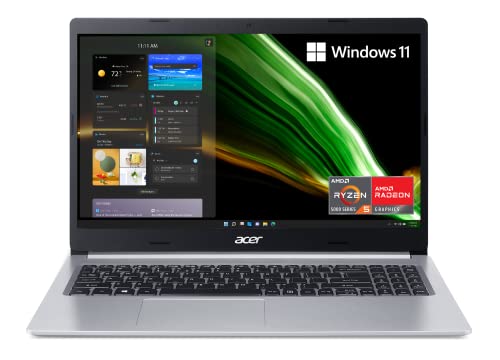
- Best for: A maker who wants a solid everyday laptop for regular craft sessions.
All 5 Picks at a Glance
| Product | Specs | Action |
|---|---|---|
| Apple 2025 MacBook Air 13-inch Laptop with M4 chip |
| Check price on Amazon |
| Lenovo IdeaPad Slim 3 Laptop 2025 |
| Check price on Amazon |
| Acer Aspire 5 A515-45-R74Z Slim Laptop |
| Check price on Amazon |
 HP Pavilion 15.6-inch FHD Touch Screen 2025 Laptop |
| Check price on Amazon |
 ASUS Vivobook 15 Laptop F1504ZA-AS34 |
| Check price on Amazon |
Key takeaways
- Find a laptop that runs Cricut Design Space with ease. Compare five laptops with sharp screens, ample memory, and room for large craft files.
Choosing a laptop for a Cricut Maker means choosing a machine that keeps Design Space fluid while you shape vinyl, iron-on, paper, fabric, and cardstock into finished work. A slow machine turns a joyful craft session into waiting, lagging cursors, and frozen layers, while a capable machine lets you resize, weld, slice, and arrange complex designs without losing your place. The right laptop gives you a clear screen for color work, enough memory for layered files, and enough storage for fonts, images, and saved projects.
This guide covers five laptops for makers at different levels, from a first cutting machine to a busy craft room that runs long sessions every week. Each pick comes from its Amazon listing, with a processor, memory, storage, display, and connection details that suit Design Space and the design apps around it. You will find a quiet portable pick, a large touchscreen pick, a solid everyday pick, a high-memory pick, and a simple pick for a new maker.
Quick Picks
As an Amazon Associate we earn from qualifying purchases
| Product | Best for | Key spec from title |
|---|---|---|
| Apple 2025 MacBook Air 13-inch Laptop with M4 chip | Smooth portable crafting | M4 chip, 16GB memory, 256GB SSD |
| Lenovo IdeaPad Slim 3 Laptop 2025 | Large touchscreen designs | Ryzen 7 5825U, 16GB memory, 512GB SSD |
| Acer Aspire 5 A515-45-R74Z Slim Laptop | Everyday craft sessions | Ryzen 5 5500U, 8GB memory, 256GB SSD |
| HP Pavilion 15.6-inch FHD Touch Screen 2025 Laptop | Heavy layered files | Core i5-1334U, 32GB memory, 1TB SSD |
| ASUS Vivobook 15 Laptop F1504ZA-AS34 | A simple first laptop | Core i3-1215U, 8GB memory, 128GB SSD |
How to Choose
Match memory to layered designs
Design Space runs well when memory can hold the app, a browser with reference images, and a design file with many layers at once. A laptop with 8GB of memory can handle simple vinyl decals, cards, and iron-on shirts, yet it may feel crowded when you open a large layered paper project with dozens of shapes. A laptop with 16GB of memory gives you more room to keep several apps open and work on detailed files without closing everything else. A laptop with 32GB of memory suits a maker who edits large print-then-cut files and works on long projects that grow over days. Choose memory for your largest file.
Pick a screen that shows true color
A Cricut Maker project lives or dies by color, so the screen in front of you matters as much as the chip inside the laptop. A full HD display with an IPS panel shows vinyl, paper, and fabric colors from a wide viewing angle, which helps when you share the screen. A larger 15.6-inch display gives you more room for the canvas, the layers panel, and the tools menu, so you spend less time scrolling and zooming. A 13.6-inch display can still work well when it is sharp and bright, and it suits a maker who moves between rooms or takes a laptop to a craft class.
Check storage for fonts and files
Craft files add up quickly, because each project can hold uploaded images, fonts, SVG files, and saved versions of a design. A 256GB solid-state drive holds Design Space, a good set of fonts, and many projects, yet it can fill up when you also keep photos, videos, and other apps on the same machine. A 512GB solid-state drive gives you more breathing room for a growing library, and it keeps the laptop useful for longer. A 1TB solid-state drive suits a maker who stores many print-then-cut images and keeps full project folders. Pick storage that leaves space after the apps and the system files, and clear old uploads you no longer need.
Confirm the connections you need
A Cricut Maker connects to a laptop through Bluetooth or a USB cable, so the laptop must support a stable wireless link and have a USB port for a wired link when you want one. A laptop with Wi-Fi 6 keeps downloads quick and helps Design Space sync your saved projects, while Bluetooth 5.2 gives a steady link to the cutting machine across a craft room. A USB-C port helps with a modern hub, a second display, or an external drive, and an HDMI port helps when you want to show a design on a larger screen for a class. A webcam and a backlit keyboard help for calls and evening work.
The 5 Best Options
Apple 2025 MacBook Air 13-inch Laptop with M4 chip
- Best for: A maker who wants a quiet, portable laptop with a sharp screen for color work.
A maker who wants a quiet, portable laptop with a sharp screen for color work.
Storage is 256GB, so keep large image libraries on an external drive.
This MacBook Air suits a maker who wants a calm, portable machine for Design Space, with a sharp display for color work and enough memory for layered files. The M4 chip keeps the app responsive while you move shapes, change fonts, and check a cut, and the fanless design keeps the room quiet during a long craft session. The 13.6-inch Liquid Retina display shows vinyl and paper colors with clarity, and the light frame moves easily from a desk to a kitchen table or a craft class. It pairs well with a Cricut Maker over Bluetooth, and it holds a charge through a long afternoon of designing.
Specs:
– Apple M4 chip
– 13.6-inch Liquid Retina Display
– 16GB Unified Memory
– 256GB SSD Storage
– 12MP Center Stage Camera
– Touch ID
– Sky Blue finish
Lenovo IdeaPad Slim 3 Laptop 2025
- Best for: A maker who wants a large touchscreen and room for detailed, layered designs.
A maker who wants a large touchscreen and room for detailed, layered designs.
The large frame needs a full-size spot on a craft desk.
This Lenovo IdeaPad Slim 3 suits a maker who wants a large touchscreen for direct work on a design, with a strong processor and generous memory for complex files. The 15.6-inch full HD touchscreen lets you tap, drag, and zoom with a finger, which can feel natural when you arrange small shapes or check a fine detail. The Ryzen 7 processor and 16GB of memory keep Design Space fluid while you switch between a browser, a font library, and a layered file. The 512GB solid-state drive holds many projects, fonts, and uploaded images, and Wi-Fi 6 helps sync stay quick.
Specs:
– AMD Ryzen 7 5825U, 8-core processor
– 15.6-inch FHD 1920 x 1080 Touchscreen
– AMD Radeon Graphics
– 16GB DDR4 memory
– 512GB SSD
– Wi-Fi 6
– Bluetooth 5.2
– 720p HD Camera
– Windows 11 Home
Acer Aspire 5 A515-45-R74Z Slim Laptop
- Best for: A maker who wants a solid everyday laptop for regular craft sessions.
A maker who wants a solid everyday laptop for regular craft sessions.
Memory is 8GB, so close extra apps when you open a very large file.
This Acer Aspire 5 suits a maker who wants a dependable everyday laptop for vinyl, iron-on, and paper projects without a complicated setup. The Ryzen 5 processor handles Design Space, a browser, and a music app at once, and the 15.6-inch full HD IPS display shows colors clearly from a normal viewing angle. The 8GB of memory and 256GB solid-state drive cover a solid set of fonts and saved projects, and the backlit keyboard helps during evening sessions. Wi-Fi 6 keeps the app connected, and the slim frame fits a craft room shelf when the session ends.
Specs:
– AMD Ryzen 5 5500U Hexa-Core Mobile Processor
– 15.6-inch Full HD IPS display
– AMD Radeon Graphics
– 8GB DDR4 memory
– 256GB NVMe SSD
– Wi-Fi 6
– Backlit Keyboard
– Windows 11 Home
HP Pavilion 15.6-inch FHD Touch Screen 2025 Laptop
- Best for: A maker who edits heavy layered files and keeps a large craft library.
A maker who edits heavy layered files and keeps a large craft library.
The bundle includes a portable drive, so keep it in a safe spot.
This HP Pavilion suits a maker who works on heavy files with many layers, large print-then-cut images, and long sessions that run for hours. The 32GB of memory gives Design Space plenty of room, and the 1TB solid-state drive plus a 128GB portable drive gives you space for a large craft library. The 15.6-inch full HD touchscreen lets you tap and drag shapes directly, and the numeric keyboard helps when you enter exact sizes for a cut. The Core i5 processor and Intel Iris Xe Graphics keep the canvas smooth while you edit, and the webcam helps for craft calls.
Specs:
– Intel Core i5-1334U, 10-Core processor
– 15.6-inch FHD Touchscreen
– 32GB RAM
– 1TB SSD plus 128GB Portable SSD
– Intel Iris Xe Graphics
– Webcam
– Numeric Keyboard
– Windows 11
ASUS Vivobook 15 Laptop F1504ZA-AS34
- Best for: A new maker who wants a simple laptop for a first cutting machine.
A new maker who wants a simple laptop for a first cutting machine.
Storage is 128GB, so move finished projects to an external drive often.
This ASUS Vivobook 15 suits a new maker who wants a simple laptop for a first Cricut Maker, with a clear screen and a familiar layout. The Core i3 processor runs Design Space for decals, cards, and iron-on shirts, and the 15.6-inch full HD display gives you a good view of the canvas and the layers panel. The 8GB of memory covers a first set of fonts and projects, and the laptop stays light enough to move around a home. It works well as a dedicated craft machine when you keep the file library lean and store extra images elsewhere.
Specs:
– Intel Core i3-1215U CPU
– 15.6-inch FHD 1920 x 1080 Display
– Intel UHD Graphics
– 8GB RAM
– 128GB SSD
– Windows 11 Home in S Mode
– Quiet Blue finish
Which One Fits Your Situation
You craft at a kitchen table or in a class
Pick the MacBook Air when you move around a lot and want a quiet machine that fits in a bag. Its sharp display helps you judge colors, and its memory handles layered files without a fuss. Keep your image library lean, and you will have a calm companion for craft nights, classes, and weekend markets.
You design detailed layered paper projects
Pick the Lenovo IdeaPad Slim 3 when your files hold many shapes, fonts, and uploaded images. Its touchscreen lets you work directly on a design, and its memory and storage give you room to grow. It suits a maker who spends hours on a single project and wants a large, clear canvas.
You want one laptop for crafts and daily use
Pick the Acer Aspire 5 when you need a laptop that also handles email, browsing, and documents between craft sessions. Its display and processor cover Design Space well, and its backlit keyboard helps in the evening. It is a balanced pick for a home that shares one machine for work, school, and crafts.
You keep a huge library of fonts and images
Pick the HP Pavilion when your craft library keeps growing and your files keep getting larger. Its memory and storage give you room for print-then-cut images, saved versions, and many fonts. It suits a busy maker who wants a machine that can keep up with a full craft room every day.
Common Mistakes
- Buying a laptop with only 4GB of memory, which leaves little room for Design Space and a browser at once.
- Choosing a small dim screen, which makes it hard to judge vinyl and paper colors before a cut.
- Filling a small drive with old uploads, then finding no room for a new project or font.
- Skipping a Bluetooth check, then finding the link to the cutting machine drops during a long cut.
- Saving every version of a design in one folder, which makes it hard to find the file you actually want.
Frequently Asked Questions
Can a laptop with 8GB of memory run Cricut Design Space?
Yes, a laptop with 8GB of memory can run Design Space for decals, cards, iron-on shirts, and many paper projects. Keep a browser with only a few tabs open, close apps you do not need, and avoid very large layered files in one session. A laptop with 16GB of memory gives you more room when your files grow.
Do I need a touchscreen laptop for a Cricut Maker?
No, a touchscreen is helpful but not required for a Cricut Maker. A mouse and keyboard give you precise control over small shapes, and many makers prefer that setup for detailed work. A touchscreen can feel natural for dragging and zooming, so pick it when you like direct control.
How much storage should I have for craft files?
A 256GB drive covers Design Space, a good font set, and many saved projects for a new maker. A 512GB drive suits a maker with a growing library of images and fonts, while a 1TB drive suits a busy craft room. Move finished projects to an external drive when the main drive fills up.
Can I use a MacBook with a Cricut Maker?
Yes, a MacBook can work with a Cricut Maker, because Design Space runs on macOS and connects through Bluetooth or USB. The MacBook Air in this guide pairs well with the cutting machine and shows colors clearly on its display. Check that your other design apps also run on macOS before you buy.
More from Amazon
Programs that pair well with the guide above. Offers and eligibility are set by Amazon and may change.
Free shipping on eligible items, Prime Video and more. Eligible new members can start with a free trial.
Start a Prime free trialAd-free music streaming. Eligible new subscribers can start with a free trial.
Try Music Unlimited freeA Prime membership for ages 18-24 with a trial period. Eligibility is set by Amazon.
See Prime for Young AdultsAudiobooks and podcasts to listen to on the go. Eligible new members can start with a free trial.
Try Audible freeAs an Amazon Associate we earn from qualifying purchases.










Write Your Review
No reviews yet. Be the first to share your experience!