
Our Short List of 3

- Best for: Everyday school, work, and home use with a touch display.

- Best for: Students and light users who want a clear display and a full keyboard.

- Best for: A portable touch laptop with a clear IPS display for work and study.
All 5 Picks at a Glance
| Product | Specs | Action |
|---|---|---|
| HP 15.6 Inch Touchscreen Laptop 15-fc0499nr |
| Check price on Amazon |
| Lenovo IdeaPad 1 Student Laptop 15.6 Inch FHD |
| Check price on Amazon |
| Acer Aspire 3 Thin and Light Laptop A315-24PT-R90Z |
| Check price on Amazon |
 ASUS Vivobook Go 15 Slim Laptop E1504FA-AB34 |
| Check price on Amazon |
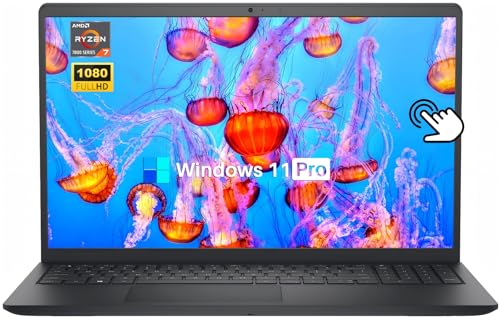 Dell Inspiron 15 3535 Touchscreen Laptop |
| Check price on Amazon |
Key takeaways
- Compare five 15.6-inch Windows laptops for school, work, and home. See screen, memory, storage, and everyday capability side by side before you decide.
Choosing a laptop feels hard when every listing shows a different mix of screen size, memory, storage, and processor names. A buyer wants a machine that opens documents quickly, keeps video calls clear, handles many browser tabs, and still feels comfortable during long sessions at a desk or on a couch. The wrong match can mean slow loading, a dim display, too little room for files, or a keyboard that tires hands after an hour.
Students, home workers, families, and people replacing an older machine all need the same core strengths, yet each group weighs them in a different way. This guide compares five 15.6-inch Windows laptops found on Amazon, each with a distinct balance of processor, memory, storage, and display. Use the comparison below to match one machine to daily habits, then read the detailed notes before making a final choice.
Quick Picks
As an Amazon Associate we earn from qualifying purchases
| Product | Best for | Key spec from title |
|---|---|---|
| HP 15.6 Inch Touchscreen Laptop 15-fc0499nr | Touchscreen use and everyday tasks | AMD Ryzen 5 7520U, 8 GB RAM, 512 GB SSD |
| Lenovo IdeaPad 1 Student Laptop 15.6 Inch FHD | School work and light daily use | Intel Celeron N4500, 8 GB RAM, 128 GB SSD plus 128 GB eMMC |
| Acer Aspire 3 Thin and Light Laptop A315-24PT-R90Z | A clear touch display and portable shape | AMD Ryzen 5 7520U, 8 GB LPDDR5, 512 GB SSD |
| ASUS Vivobook Go 15 Slim Laptop E1504FA-AB34 | Carrying around and quick charging | AMD Ryzen 3 7320U, 8 GB DDR5 RAM, 256 GB SSD |
| Dell Inspiron 15 3535 Touchscreen Laptop | Heavier multitasking and work use | AMD Ryzen 7 7730U, 16 GB RAM, 512 GB SSD |
How to Choose
Screen Size and Clarity
A 15.6-inch display gives room for two windows side by side, which helps when drafting a document beside a browser or a video call beside notes. Full HD resolution keeps text sharp and images clear, while a touch display adds a direct way to scroll, tap, and select items. An IPS panel widens the viewing angle, so colors stay steady when another person looks at the screen from the side. Consider glare too, since a glossy panel can catch light from a window. Match the display to where the laptop will sit most often, and favor a bright, clear panel when work happens in varied rooms.
Memory and Storage
Memory decides how smoothly a laptop juggles open apps, browser tabs, and documents at once. With 8 GB of memory, everyday work, school assignments, and streaming run in a steady way, while 16 GB gives more headroom for larger files and busier days. Storage decides how many apps, photos, documents, and videos can stay on the machine. A 256 GB solid-state drive suits light users who keep most files online, while 512 GB fits broader collections and installed apps. A solid-state drive also helps apps open with less waiting than an older hard drive.
Processor and Everyday Capability
A processor shapes how quickly apps open, files load, and several tasks run together. AMD Ryzen 5 and Ryzen 7 chips in this guide cover everyday work, school projects, video calls, and media with room to spare. An AMD Ryzen 3 chip suits lighter routines, such as browsing, email, documents, and streaming, while an Intel Celeron chip fits basic school and home tasks. Look at core count and boost speed beside memory, since a balanced pair avoids one slow part holding back the rest. Pick a chip that matches daily load, not a name that sounds impressive on its own.
Ports, Battery, and Build
Ports decide what can plug in without extra adapters, so count USB ports, HDMI, a headphone jack, and a card reader before choosing. Wi-Fi 6 helps a laptop hold a steady wireless link in a busy home, while Bluetooth links headphones, a mouse, and other wireless gear. Battery endurance matters when moving between rooms or working away from an outlet, and a slim, light build makes carrying easier. A webcam shield adds privacy between calls, and a solid hinge keeps the lid steady. Weigh these details beside screen, memory, and storage, since they shape daily comfort.
The 5 Best Options
HP 15.6 Inch Touchscreen Laptop 15-fc0499nr
- Best for: Everyday school, work, and home use with a touch display.
Everyday school, work, and home use with a touch display.
The HD display has less sharpness than a Full HD panel.
Lenovo IdeaPad 1 Student Laptop 15.6 Inch FHD
- Best for: Students and light users who want a clear display and a full keyboard.
Students and light users who want a clear display and a full keyboard.
The dual-core chip can feel slow with many heavy apps open at once.
Acer Aspire 3 Thin and Light Laptop A315-24PT-R90Z
- Best for: A portable touch laptop with a clear IPS display for work and study.
A portable touch laptop with a clear IPS display for work and study.
The 8 GB memory ceiling may limit very busy multitasking days.
ASUS Vivobook Go 15 Slim Laptop E1504FA-AB34
- Best for: Carrying a slim laptop through long days of browsing, study, and calls.
Carrying a slim laptop through long days of browsing, study, and calls.
The 256 GB drive fills quickly with large media collections.
Dell Inspiron 15 3535 Touchscreen Laptop
- Best for: Busy workdays with many apps, tabs, and video calls open at once.
Busy workdays with many apps, tabs, and video calls open at once.
The stronger chip and larger memory suit heavier use more than light browsing alone.
Which One Fits Your Situation
A Student Carrying a Laptop Between Classes
A student needs a clear display, a comfortable keyboard, enough memory for research tabs, and storage for class files. The Lenovo IdeaPad 1 covers those basics, while the ASUS Vivobook Go 15 adds a slimmer frame and longer battery support for days on campus. Pick the Lenovo when classroom work stays light, and pick the ASUS when carrying the machine all day matters more.
A Home Worker With Documents and Video Calls
A home worker needs a steady chip, enough memory for documents and calls, a clear webcam, and reliable Wi-Fi. The Dell Inspiron 15 leads here with 16 GB of memory and an eight-core chip, which keeps calls smooth beside open documents. The HP laptop also works well, with a touch display for long documents. Choose the Dell when workdays run long and busy.
A Family Sharing One Machine at Home
A shared family laptop must handle homework, work documents, browsing, and evening media without confusion. The Acer Aspire 3 suits this role with a clear IPS touch display that everyone can use, plus 512 GB of storage for files. The HP laptop also fits, with a touch screen and a simple Windows layout. Keep one profile per person, and favor the larger drive when files pile up.
A Buyer Replacing an Older Machine
A buyer moving from an older laptop will notice quicker app loading, a sharper display, and smoother multitasking. The HP laptop offers a familiar layout with a touch display and solid storage, while the Dell adds more memory and a stronger chip for a longer horizon. Compare the old machine’s memory and storage first, then pick a model that improves both, so the upgrade feels real.
Common Mistakes
- Choosing a laptop by screen size alone, while ignoring memory, storage, and processor balance.
- Picking the smallest drive, then running out of room for apps, photos, and documents.
- Skipping a port check, then finding no HDMI or USB-C where one is needed.
- Assuming every Full HD panel looks the same, while glare and viewing angle vary widely.
- Buying a touch display for a desk-only setup, where a mouse and keyboard already do the work.
Frequently Asked Questions
How much memory do I need for school and work?
For school and work, 8 GB of memory handles documents, browsing, email, and video calls. A busier routine with many tabs, large files, and several apps open at once benefits from 16 GB, which gives the machine room to juggle tasks. Match memory to daily load, and favor the larger amount when workdays run long.
Is a touchscreen useful on a laptop?
A touchscreen helps when scrolling long pages, tapping menus, and selecting items directly on the display. It suits students and home users who move between reading and writing often. A desk-only user with a mouse may use it less, so weigh touch against display clarity, memory, and storage before letting it decide the choice.
Does storage size matter more than memory?
Storage and memory serve different roles, so neither replaces the other. Memory shapes how smoothly many apps run together, while storage decides how many files and apps stay on the machine. A 256 GB drive suits light users, while 512 GB fits broader collections. Aim for a balanced pair.
Can one laptop serve both work and home use?
One laptop can serve both work and home use when it has a clear display, enough memory, and room for files. The Dell and HP models cover documents and calls by day, plus browsing and media in the evening. Keep work and personal files in separate folders, and favor 512 GB of storage when both roles share one machine.
More from Amazon
Programs that pair well with the guide above. Offers and eligibility are set by Amazon and may change.
Free shipping on eligible items, Prime Video and more. Eligible new members can start with a free trial.
Start a Prime free trialAd-free music streaming. Eligible new subscribers can start with a free trial.
Try Music Unlimited freeA Prime membership for ages 18-24 with a trial period. Eligibility is set by Amazon.
See Prime for Young AdultsAudiobooks and podcasts to listen to on the go. Eligible new members can start with a free trial.
Try Audible freeAs an Amazon Associate we earn from qualifying purchases.










Write Your Review
No reviews yet. Be the first to share your experience!