
Our Short List of 3
All 3 Picks at a Glance
| Product | Specs | Action |
|---|---|---|
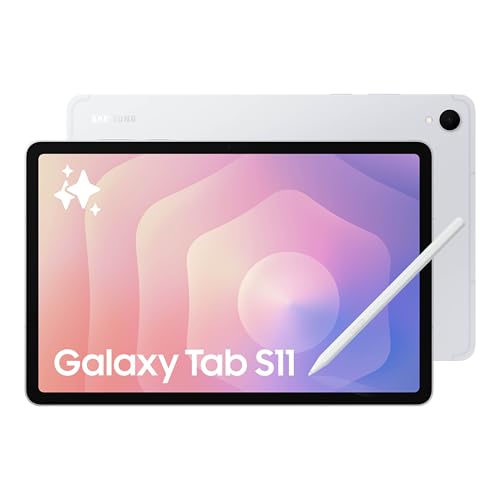 1. Samsung Galaxy Tab S11: the HDR pick | Check price on Amazon | |
 3. Lenovo Tab Plus: the sound-first pick | Check price on Amazon | |
 4. Samsung Galaxy Tab S10 FE: the long-battery value pick | Check price on Amazon |
Key takeaways
- Five tablets that stream Netflix at full quality: Widevine L1 for HD, HDR on the flagship picks, strong speakers and maker-rated video playback hours.
As an Amazon Associate, we earn from qualifying purchases made through links on this page.
A tablet can have a sharp screen and still give you a soft Netflix picture. Stream quality on a tablet is decided less by the panel than by certification: Netflix sends its HD streams only to devices that meet its requirements, and its HDR streams only to a shorter list of certified models. On Android, the gate is Widevine L1, the highest level of the DRM system Netflix checks before it unlocks HD. A tablet with Widevine L3 tops out at standard definition no matter how good its display looks on a spec sheet. On iPad, Netflix publishes its own device list: iPad models from the 5th generation onward play in Full HD, while HDR is reserved for the iPad Pro line.
Two more facts shape this roundup. First, Netflix caps tablet playback at 1080p, so a 4K panel would add nothing here; what matters is how much of the screen a 16:9 picture fills, how the panel handles HDR, and how long the battery lasts through a film. Second, this guide is only about watching. Tablets for cutting and producing video are a separate topic with different hardware demands, and none of the picks below was chosen for editing work. Every tablet here was picked on documented streaming evidence: Widevine L1 or a place on Netflix’s own HD list, the HDR formats the maker certifies, the speaker layout, and the video playback hours the maker publishes.
Our top picks
What to look for in a tablet for Netflix
Widevine L1 comes first. Netflix states plainly that an Android phone or tablet must support Widevine L1 to play in HD. You can confirm the level on a device you already own inside the Netflix app, under App Settings, Diagnostics, Playback Specification. For a new purchase, the maker’s spec sheet and Netflix’s published HD device lists are the evidence to look for. All three Android brands below build their current tablets to L1, but the level is a per-model property, so it is worth checking on any tablet not listed here.
HDR needs both a panel and a permission. A screen that accepts an HDR signal is only half of the chain. Netflix serves HDR10 to certified Android models and Dolby Vision to a smaller certified set, and on iPad it limits HDR to the iPad Pro 10.5-inch and later. HDR also sits behind the top Netflix plan tier, so the same tablet can show HDR at home on one account and plain HD on another.
Aspect ratio decides the black bars. Most Netflix video is 16:9 or wider. A 16:10 Android screen fills more of its area with that picture than a 3:2 iPad screen, which leaves thicker bars above and below. Resolution still matters for sharpness at sofa distance, but shape decides how large the picture feels.
Speakers are half the cinema. Dialogue lives in the centre channel, and a tablet with two small drivers at one end pushes it off to the side in landscape. Four speakers, two at each short end, keep voices centred and give films some width. Dolby Atmos support in the spec sheet tells you the tablet can decode the spatial mixes Netflix attaches to many of its originals.
Read battery claims as video claims. Makers publish a video playback figure measured on a local file at modest brightness, with wireless off in some tests. It is not a streaming figure, but it is the only endurance number measured the same way across brands, so it is the fairest comparison available. A larger number still means a longer flight of films between charges.
Downloads reward storage. Netflix allows downloads on every pick here, and an hour of HD video takes meaningful space. A microSD slot lets you grow a download library without replacing the tablet; the iPad and the Fire HD 10 differ here, since the Fire takes a card and the iPad does not.
1. Samsung Galaxy Tab S11: the HDR pick
The Tab S11 is the strongest Netflix screen in this group because it clears every gate at once. Its 11-inch Dynamic AMOLED 2X panel runs at 2560 x 1600 with a 120Hz refresh rate and HDR10+ support, with peak brightness of 1,600 nits in HDR content, and the tablet carries Widevine L1, so Netflix sends both its HD and HDR streams. Four speakers tuned for Dolby Atmos sit at the ends of the frame, which keeps dialogue centred in landscape viewing.
Samsung rates the 8,400 mAh battery for up to 18 hours of video playback, the figure it measures on a local 720p file at low brightness with Wi-Fi off. Streaming over Wi-Fi at film brightness will land below that, but the cushion over a full evening of episodes is still wide. The Dimensity 9400+ chip and 12 GB of memory are far beyond what the Netflix app needs, and the 128 GB of storage expands by up to 2 TB on a microSD card, which suits a large download library. An S Pen is in the box, though it earns its place here mainly as a remote-free way to pause from the sofa.
Who it is for: viewers who watch Netflix originals shot in HDR and want the deepest contrast a tablet can show, plus the download space to keep a season offline.
Limitations, from the spec sheet: Netflix HDR on Samsung tablets arrives as HDR10, not Dolby Vision, so the finest-grained version of some titles plays on the iPad Pro line instead. There is no headphone jack, the 45W charging adapter is a separate purchase, and Samsung’s 18-hour figure comes from a local-file test rather than streaming.
2. Apple iPad Air 11-inch (M3): the polished HD pick
The iPad Air earns its place on the strength of Netflix’s own list rather than an HDR badge. Netflix counts iPad models from the 5th generation onward as Full HD devices, so the Air plays at the same 1080p ceiling as every other tablet here. Its 11-inch Liquid Retina display resolves 2360 x 1640 with wide P3 colour and 500 nits of brightness, and the M3 chip handles the app, downloads and picture-in-picture without strain. Stereo speakers sit on the landscape edges, a layout Apple moved to this design so sound stays balanced when the tablet is propped for a film.
Apple rates the battery for up to 10 hours of video playback, the lowest figure in this roundup, though it is measured on streamed and local video under Apple’s own test mix. Storage begins at 128 GB with no card slot, so heavy downloaders should size up at purchase. Touch ID in the top button keeps profile switching quick on a shared household tablet.
Who it is for: households already in Apple’s ecosystem who value the Netflix app experience, fast downloads and a bright, colour-accurate screen over HDR.
Limitations, from the spec sheet: Netflix reserves HDR on iPad for the Pro line, so this Air plays HDR titles in standard dynamic range even though its panel is capable of rich colour. The roughly 3:2 screen shape leaves thicker black bars on 16:9 video than the 16:10 Android picks, and the two-speaker layout is a step behind the quad arrays here.
3. Lenovo Tab Plus: the sound-first pick
Lenovo built the Tab Plus around watching and listening, and the spec sheet shows it. Eight JBL speakers, four tweeters and four force-balanced bass units with 26 watts of combined output and Dolby Atmos decoding, fill a room in a way no other tablet in this group attempts. The 11.5-inch LCD resolves 2000 x 1200 at a 90Hz refresh rate and 400 nits, and the tablet carries Widevine L1, so Netflix plays in Full HD. A kickstand is built into the back, which props the screen at a sensible angle on a kitchen counter or tray table without a case.
Lenovo rates the 8,600 mAh battery for up to 12 hours of video playback, and the 45W charging support refills it quickly between films. Storage is 128 GB with a microSD slot for cards up to 1 TB, and a 3.5mm jack survives here for wired headphones. A Bluetooth speaker mode even lets the tablet serve as the household speaker when the screen is off.
Who it is for: viewers who watch in kitchens, workshops and shared rooms where the tablet’s own speakers do all the work, and anyone who wants a stand built in rather than bought.
Limitations, from the spec sheet: the panel has no HDR certification, so Netflix tops out at HD. Wi-Fi is the older 802.11ac standard on a single stream, which is the weakest wireless setup here for crowded networks. The Helio G99 chip is a mid-range part, fine for streaming but with less headroom than the flagships, and at around 650 g this is the heaviest pick in the group.
4. Samsung Galaxy Tab S10 FE: the long-battery value pick
The Tab S10 FE trades the flagship’s AMOLED panel for endurance and a gentler position in the range. The 10.9-inch LCD runs at 2304 x 1440 with a 90Hz refresh rate, the tablet carries Widevine L1 for Netflix in Full HD, and dual speakers with Dolby Atmos handle the audio. Samsung rates the 8,000 mAh battery for up to 20 hours of video playback, the longest maker figure in this roundup, which makes it the natural travel pick.
The Exynos 1580 chip and 8 GB of memory run the Netflix app and downloads comfortably. Storage is 128 GB with microSD expansion up to 2 TB, the body carries an IP68 seal against dust and water, and an S Pen is included in the box. At 497 g it is light enough to hold through a film without a stand.
Who it is for: travellers and commuters who measure a tablet in films per charge, and viewers who want Samsung’s software support window without paying for the flagship screen.
Limitations, from the spec sheet: the LCD has no HDR support, so Netflix stays in standard dynamic range. Two speakers cannot match the width of the quad layouts above, and the mid-range chip gives less spare power for years of app updates than the Tab S11 carries.
5. Amazon Fire HD 10 (2023): the simple household streamer
The Fire HD 10 is the one Fire tablet we include here; the rest of Amazon’s line is covered in our separate Fire roundup on this site. It qualifies on the streaming evidence: the 10.1-inch screen resolves 1920 x 1200, the tablet carries Widevine L1, and Netflix plays in Full HD from Amazon’s own app store. Stereo speakers flank the display, and Amazon rates the battery for up to 13 hours, a figure that covers a day of shared family viewing.
Storage on the linked 32 GB version fills quickly with downloads, but a microSD slot accepts cards up to 1 TB, which fixes the problem cheaply. The octa-core chip and 3 GB of memory are modest, yet the Netflix app is light work, and hands-free Alexa control suits a tablet that lives in a kitchen or a child’s playroom.
Who it is for: households that want a dedicated streaming screen for shared spaces, with simple controls and room for a large download library on a card.
Limitations, from the spec sheet: Fire OS uses Amazon’s app store rather than Google Play, so some Android apps are missing. There is no HDR support, the screen refreshes at 60Hz, and 3 GB of memory is the least here, which shows when switching between several apps.
Comparison table
| Tablet | Display | Netflix ceiling | Speakers | Maker-rated video playback |
|---|---|---|---|---|
| Samsung Galaxy Tab S11 | 11-inch AMOLED 2X, 2560 x 1600, HDR10+ | HD and HDR | Quad, Dolby Atmos | Up to 18 hours |
| Apple iPad Air 11-inch (M3) | 11-inch Liquid Retina, 2360 x 1640 | HD (1080p) | Stereo, landscape | Up to 10 hours |
| Lenovo Tab Plus | 11.5-inch LCD, 2000 x 1200 | HD (1080p) | Eight JBL, Dolby Atmos | Up to 12 hours |
| Samsung Galaxy Tab S10 FE | 10.9-inch LCD, 2304 x 1440 | HD (1080p) | Dual, Dolby Atmos | Up to 20 hours |
| Amazon Fire HD 10 (2023) | 10.1-inch LCD, 1920 x 1200 | HD (1080p) | Stereo | Up to 13 hours |
FAQ
Why does Netflix look soft on some tablets with good screens?
Because Netflix gates HD behind certification, not resolution. On Android the requirement is Widevine L1; a tablet with L3 receives standard definition even on a 2K panel. Check the Playback Specification screen in the Netflix app’s diagnostics to see what any device you own is cleared for.
Can any tablet stream Netflix in 4K?
No. Netflix caps playback on phones and tablets at 1080p, and its 4K streams are reserved for televisions, streaming boxes and computers. A tablet’s job is to reach that 1080p ceiling in HD, and HDR where the model is certified.
Do I need a specific Netflix plan for HDR?
Yes. HDR sits in the top plan tier, so the Tab S11 shows HDR only on an account that includes it. On a lower tier the same tablet plays the same titles in HD, which is still the full resolution a tablet can show.
How much storage do downloads need?
An hour of Netflix video in HD takes roughly a gigabyte or more depending on the title and the quality setting chosen in the app. A 128 GB tablet holds a healthy travel library; if you download whole seasons, choose a pick with a microSD slot or a larger storage tier.
Is a Fire tablet a sensible Netflix-only buy?
For a shared household screen, yes. The Fire HD 10 clears the Widevine L1 bar and plays Netflix in Full HD, and its app comes from Amazon’s store. Choose an Android or iPad pick instead if you also want Google services or HDR.
Conclusion
For the fullest Netflix picture, the Galaxy Tab S11 is the pick: it is the only tablet here that pairs Widevine L1 with an HDR-certified AMOLED screen and quad Atmos speakers. The iPad Air answers with the smoothest app experience and a fine HD picture, held back only by Netflix’s decision to keep HDR on the Pro line. The Lenovo Tab Plus wins on sound, the Tab S10 FE wins on hours per charge, and the Fire HD 10 covers the simple shared-screen job. Whichever you choose, check the Widevine level or the maker’s Netflix listing before you buy, because that single line in the spec sheet decides whether the screen you paid for is the picture you actually get.
More from Amazon
Programs that pair well with the guide above. Offers and eligibility are set by Amazon and may change.
Free shipping on eligible items, Prime Video and more. Eligible new members can start with a free trial.
Start a Prime free trialAd-free music streaming. Eligible new subscribers can start with a free trial.
Try Music Unlimited freeA Prime membership for ages 18-24 with a trial period. Eligibility is set by Amazon.
See Prime for Young AdultsAudiobooks and podcasts to listen to on the go. Eligible new members can start with a free trial.
Try Audible freeAs an Amazon Associate we earn from qualifying purchases.





Write Your Review
No reviews yet. Be the first to share your experience!