

Key takeaways
- The card is longer than about 300 mm or occupies three slots or more.
- The case is mounted upright and the card hangs horizontally with no support at the far end.
- You move the PC to LAN events, transport it or ship it, since vibration multiplies stress.
- You use a card with a metal backplate and a large heatsink, which can weigh well over 1.5 kg.
The best GPU anti-sag bracket for most builds in 2026 is the Lian Li GB-002, a steel bracket that bolts to the motherboard standoffs and adjusts in two directions, so a radiator or tall power supply shroud cannot get in its way. If you want lighting, the Cooler Master MasterAccessory ARGB bracket and the ASUS ROG Herculx are the stand-out choices, and if you want the cheapest fix, a small aluminum brace such as the nkomax or upHere models does the job for very little money.
Modern graphics cards are long, thick and heavy, and the PCIe slot and the card’s mounting bracket were never designed to carry that weight for years. A support bracket takes the load off the slot and keeps the card level. This guide covers seven current options, explains when you actually need one, and shows how to size and install a bracket correctly.
Our top picks


As an Amazon Associate we earn from qualifying purchases at no extra cost to you.
Quick comparison of the best GPU anti-sag brackets
| Bracket | Best for | Type | Material | Adjustment range | Price tier |
|---|---|---|---|---|---|
| Lian Li GB-002 | Best overall | Standoff-mounted rail | Steel | 14 mounting positions, sliding rail | Budget |
| Cooler Master MasterAccessory ARGB | Lighting and looks | Magnetic base, glass panel | ABS and tempered glass | 41 to 171 mm arm | Mid-range |
| ASUS ROG Herculx | Premium tool-free build | Base with height wheel | Zinc alloy and plastic | 72 to 128 mm | Mid-range |
| upHere GPU brace | Budget metal brace | Magnetic pillar or slide type | Aluminum or iron | Varies by model | Budget |
| nkomax GPU brace | Small cases, cheap and light | Magnetic pillar | Anodized aluminum | 26 to 120 mm by size | Budget |
| Cooler Master Vertical GPU Holder Kit V3 | Vertical GPU display | Bracket with riser cable | SGCC steel | Up to 3.5 kg supported | Premium |
| Lian Li vertical GPU bracket kit | Case-specific vertical mount | Bracket with riser cable | Metal | Anti-sag arm supports up to 10 kg per Lian Li | Premium |
Do you actually need a GPU support bracket?
Sag is the gradual downward bend of a heavy graphics card caused by gravity. A card sits on a single PCIe connector at the top of the board and on the screws of the rear bracket. Large modern coolers, three-slot designs and heavy metal backplates put a lot of weight on a lever arm that is more than 300 mm long. The result can be a visibly drooping card, an uneven contact in the slot and, over many years, stress on the slot and the PCB.
You are most likely to benefit from a bracket in these cases:
- The card is longer than about 300 mm or occupies three slots or more.
- The case is mounted upright and the card hangs horizontally with no support at the far end.
- You move the PC to LAN events, transport it or ship it, since vibration multiplies stress.
- You use a card with a metal backplate and a large heatsink, which can weigh well over 1.5 kg.
You may not need one if the card is short and light, if the case has a built-in support (some cases come with an integrated bar or a rear shroud that holds the card) or if the PC is mounted horizontally on a test bench. A bracket does not improve performance; it protects hardware and keeps the card straight for appearance.
Best overall: Lian Li GB-002
The Lian Li GB-002 is a black steel bracket made of a mounting plate and sliding rails, with fourteen mounting positions. It attaches to the motherboard standoffs rather than to the floor of the case, which is why PCBuildHelper picked it as a top choice: a bottom-mounted radiator or tall power supply shroud does not block it. It adjusts vertically and horizontally, and the rails are reversible, so the bracket can support a card from below at the rear or near the middle of the cooler. It fits ATX and E-ATX motherboards and weighs about 82 g. A buyer review of its predecessor, the GB-001, reported fan-blade interference on some GPUs and slot tension from misalignment, so check the position of the contact point against your card’s fan layout before tightening.
Who it is for: most builders with a standard ATX case and a heavy card.
Pros: very low cost, steel build, many mounting positions, standoff mounting, no floor interference.
Cons: no lighting, requires aligning with standoff positions, and can be fiddly in cases with unusual board layouts.
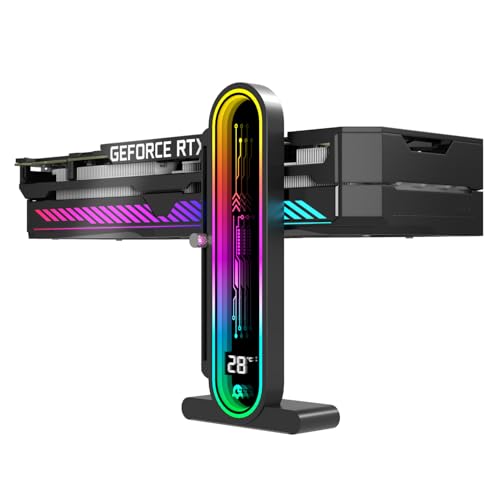
Best for lighting: Cooler Master MasterAccessory ARGB GPU Support Bracket
The Cooler Master MasterAccessory ARGB bracket (model MCA-U000R-GSBTG-00) combines an ABS body with an edge-lit tempered glass panel. Its adjustable support arm spans 41 mm to 171 mm, it comes with two GPU supports that can sit at the tail end or the side of the card, and the base plate is magnetic so it clings to the case floor. Lighting uses a 5V 3-pin addressable RGB connector with a 510 mm cable; an ARGB controller is not included. Dimensions are 58 x 58 x 177 mm, the weight is about 0.14 kg and it has a two-year warranty. Roundups often name it the best overall choice for builds with windowed cases because it looks like part of the build.
Who it is for: builders who want a visible bracket that matches an ARGB lighting scheme.
Pros: attractive glass design, wide height range, magnetic base, solid warranty.
Cons: needs a free ARGB header, plastic body, and it rests on the case floor, so a bottom radiator or cable cover may block placement.
Best premium tool-free design: ASUS ROG Herculx
The ASUS ROG Herculx (model XH01) is a graphics card holder made of solid zinc alloy with plastic elements. It adjusts from 72 mm to 128 mm using a tool-free wheel and a release button, and includes a spirit level so you can set the card perfectly horizontal. Lighting is 3-pin addressable RGB with a 50 cm cable and works with Aura Sync and Armoury Crate. It measures about 20.8 x 7.1 x 4.6 cm, weighs about 0.17 kg, comes in black or white and has a two-year warranty. Its height range suits most standard cases, but if your card sits unusually low or high you should compare the numbers first.
Who it is for: builders who want a quality, tool-free bracket with a stable weighted base.
Pros: solid metal construction, easy height setting, spirit level, black or white finish.
Cons: costs more than basic braces, a fixed height window, and lighting requires an ARGB header.
Best budget metal brace: upHere GPU brace
upHere sells several GPU braces. The G205 and G204 line is anodized aerospace aluminum with a hidden magnet in the base, a scratch-proof pad and tool-less screws. The G276 series is a slide-type bracket that adjusts in two directions and measures 276 mm long by 50 mm high, with an ARGB version using a 5V 3-pin connector (it does not support 12V 4-pin RGB). The GL05 variant is aluminum and weighs only about 70 g. Because the lineup contains different shapes, confirm which model you are buying and measure the gap between your card and the case floor.
Who it is for: builders who want a clean metal brace at a very low cost.
Pros: low cost, magnetic base, some models with lighting, several sizes.
Cons: the product line is confusing, build quality varies by model, and the height range is limited for some versions.
Best compact option: nkomax GPU brace
The nkomax brace is an all-aluminum pillar with a hidden magnetic base, an anti-scratch pad on the support module and a knurled screw for tool-free height adjustment. It comes in several sizes: mini covers 26 to 50 mm, medium covers 50 to 80 mm and large covers 74 to 120 mm. The large version weighs only about 30 g, and the finish is polished and sandblasted anodized aluminum with CNC-finished edges. PropelRC named an aluminum nkomax bracket among the best balances of performance, build quality and value in its roundup. Because it is small, it works well in cases with limited internal space and in builds where you want a nearly invisible support.
Who it is for: small-form-factor builders and anyone who wants a minimal, light brace.
Pros: tiny footprint, size options, magnetic base, tool-free adjustment, very low cost.
Cons: no lighting, relies on a magnet to hold position (a bump can shift it), and the contact point is smaller than on a wide bracket.
Best vertical mount with support: Cooler Master Vertical GPU Holder Kit V3
The Cooler Master Vertical GPU Holder Kit V3 is a thick SGCC steel bracket for E-ATX, ATX and mATX cases with at least four available PCI slots. It supports any GPU length up to three slots wide and, according to Cooler Master, prevents sagging for cards weighing up to 3.5 kg. Closed, it measures 249 x 148.1 x 141.8 mm, extending to 305 x 178 x 141.8 mm when open; it weighs about 0.81 kg. Adjustment is tool-free, up to 65 mm toward the front panel and 30 mm toward the side. It ships with a 165 mm riser cable, either PCIe 4.0 (model MCA-U000R-KFVK03) or PCIe 5.0 (model MCA-U000C-KFVK03), so choose the version that matches your card. Because it moves the card to a vertical orientation, it solves sag completely, since gravity no longer bends the card.
Who it is for: builders who want to show off the graphics card’s fan side in a case with the needed slots.
Pros: eliminates sag, solid steel, tool-free adjustment, riser included.
Cons: needs four slots of clearance, a riser cable can affect compatibility and airflow, and the cost is higher.
Best case-specific vertical solution: Lian Li vertical GPU bracket kit
Lian Li sells vertical GPU bracket kits for its cases, including a four-slot version (the VG4v3). According to Lian Li, the anti-sag arm in its kit supports up to 10 kg and mounts to the motherboard standoffs, and the kit includes a riser cable so the card can stand vertically behind the glass. The advantage is a tight fit with Lian Li cases; the drawback is that compatibility outside that ecosystem varies, so verify the mounting holes and slot count before you buy.
Who it is for: owners of Lian Li cases that support vertical mounting.
Pros: very high rated load, tidy integration, riser included.
Cons: tied to compatible cases, a higher cost than simple braces, and the riser cable still limits airflow slightly.
Decision matrix: which bracket matches your build?
| Your situation | Best match | Reason |
|---|---|---|
| Standard ATX case, heavy card, no lighting needs | Lian Li GB-002 | Steel, standoff-mounted, flexible placement |
| Windowed case with ARGB scheme | Cooler Master ARGB bracket | Glass panel, magnetic base |
| Want a premium look with easy setup | ASUS ROG Herculx | Zinc alloy, tool-free wheel, spirit level |
| Lowest cost, simple fix | upHere or nkomax | Low cost aluminum braces |
| Small case, limited clearance | nkomax mini or medium | Small footprint, size range |
| Show the card vertically, compatible case | Cooler Master V3 or Lian Li kit | Removes sag by changing orientation |
| Transporting the PC regularly | Lian Li GB-002 or a vertical kit | Rigid mounting to board standoffs or case |
A worked example: measuring the gap and choosing the size
Choosing the correct bracket height takes about two minutes. Place the PC on its side or in its normal upright position with the card installed. Measure from the top of the case floor (or the top of the power supply shroud if the bracket sits there) to the bottom edge of the graphics card cooler. For example, suppose the gap is 85 mm. A nkomax mini (26 to 50 mm) and medium (50 to 80 mm) would be too short, while the large version (74 to 120 mm), the ASUS ROG Herculx (72 to 128 mm) and the Cooler Master ARGB bracket (41 to 171 mm) would all fit. Then check where along the card you will place the bracket: the best position is usually under the free end of the heatsink, away from the fans’ spinning blades and close to the center of mass.
The load matters too. A large three-slot card can weigh between 1.5 and 3 kg. A bracket that supports 3.5 kg, such as the Cooler Master V3, has margin, while a thin aluminum pillar is mainly a level-keeper rather than a structural member, because the card’s own bracket and the slot still carry most of the load. In a vertical build, the orientation change removes the bending load entirely, so the choice becomes about case fit.
How to install a GPU support bracket step by step
- Power down and unplug the PC. Touch the metal case to discharge static before reaching into the system.
- Seat the card fully. Make sure the card is locked into the PCIe slot and the rear bracket is screwed in. Do not use the support to lift the card into position.
- Measure the gap. Use a ruler to confirm the distance between the card and the case floor or standoff location.
- Set the bracket height. Adjust the bracket so that it touches the underside of the card without pushing it upward. A spirit level or a straight edge across the card helps.
- Choose a contact point. Place the pad under the heatsink fins or the metal frame, avoiding fan blades, cables and the PCB itself.
- Secure and check. Tighten the screw, magnet or standoff mount. Gently press the card to confirm the support is carrying weight, then close the case.
A common mistake is to over-adjust the bracket so that it lifts the card and puts upward stress on the slot. The aim is to support the weight, not to force the card above its natural position.
How to choose a GPU support bracket
Mounting method
Magnetic bases are simple but can shift if bumped; standoff mounts like the Lian Li GB-002 are more secure; vertical kits change the card’s orientation altogether. Pick the method that fits your case layout.
Height range
Always measure. A bracket that cannot reach the card is useless, and a bracket that is too tall will need to be shortened. Check the numbers listed above against your own gap.
Material and finish
Steel and zinc alloy offer rigidity; aluminum is light and attractive; plastic and glass are used mainly for appearance. For heavy cards, favor metal.
Contact pad
A soft, scratch-proof pad protects the card’s shroud or backplate. Avoid bare metal contact on painted or anodized surfaces.
Lighting and connectors
Addressable RGB models use a 5V 3-pin connector. Do not plug them into a 12V RGB header, as that can damage the lighting. Check your motherboard’s header type before connecting.
Ownership realities and common mistakes
- Blocking airflow: a bracket in front of intake fans or under a fan on a card with a bottom fan can restrict airflow. Check the position after installation.
- Interfering with fans: contact with fan blades can cause noise or damage. Make sure the bracket touches only the frame or shroud.
- Forgetting the bracket when moving the PC: some brackets can slip during transport. Remove or secure them before shipping a system.
- Using a bracket to fix a loose card: a card that is not locked in the slot needs reseating, not a support.
- Assuming it is required for every card: small cards often do not need one, and some premium cards ship with their own support arm or bracket.
Frequently Asked Questions
Does GPU sag actually damage a graphics card?
Mild sag is mostly cosmetic, but a large, heavy card can stress the PCIe slot and the solder joints around the connector over many years, especially if the system is moved often. A support bracket reduces that stress at very low cost.
What is the best GPU anti-sag bracket overall?
The Lian Li GB-002 is the best fit for most builds because it is rigid, adjustable and mounts to the motherboard standoffs. If you want lighting, the Cooler Master ARGB bracket and ASUS ROG Herculx are excellent alternatives.
Can I use a GPU support bracket with a vertical mount?
A vertical mount removes the sag, so a normal bracket is not needed. Kits like the Cooler Master Vertical GPU Holder Kit V3 include their own structural support for the card.
Are magnetic GPU brackets strong enough?
Magnets hold the base against a steel case floor, and the base is not meant to carry the card’s full weight alone. The pillar itself supports the card, so make sure the magnet has a flat steel surface and does not slide when the case is moved.
How tall should my bracket be?
Measure the distance between the bottom of the card and the surface the bracket will sit on. Choose a bracket whose range covers that distance with some margin. Brackets such as the nkomax come in size ranges from 26 mm up to 120 mm, while the ASUS ROG Herculx covers 72 to 128 mm.
Do I need a support bracket for a small graphics card?
Usually not. Compact two-slot cards weigh much less and generate little leverage. Consider a bracket only if the card visibly bends or you plan to transport the PC.





Write Your Review
No reviews yet. Be the first to share your experience!