

Our Short List of 3

- Best for: Students and note-takers who want a pen included and room to expand storage over time.
- 10.9-inch display
- 128GB storage
- S Pen included
- 8MP camera

- Best for: Android households that want a large, light tablet mainly for films, reading, and browsing.
- 11-inch display
- 64GB storage
- 4GB RAM
- Quad speakers

- Best for: Readers and streamers who already use Amazon services and want a simple, low-fuss tablet.
- 10.1-inch Full HD display, 1920 x 1200
- Octa-core processor
- 4GB RAM
- 32GB storage
All 3 Picks at a Glance
| Product | Specs | Action |
|---|---|---|
| Samsung Galaxy Tab S9 FE |
| Check price on Amazon |
| Samsung Galaxy Tab A9+ |
| Check price on Amazon |
| Amazon Fire HD 10 (2023) |
| Check price on Amazon |
Key takeaways
- Five tablets compared for school, work, and everyday use, chosen from Amazon listings by screen, storage, pen support, and ecosystem fit.
A tablet purchase usually comes down to one question: will this screen earn its place in your bag every day, or will it sit on a shelf after the first month? The honest answer depends less on raw power than on size, weight, the apps you need, and whether a pen or keyboard matters to you. A large, heavy slate looks impressive on a desk and tires your hands on a train, while a small one feels great in one hand and cramped when two apps share the screen.
This guide is for students, home workers, and families choosing one tablet for reading, notes, video, and light work. Every model below was picked from the name and specifications shown on its Amazon product page, so the screen size, storage, and included accessories are the ones listed there rather than guessed from a brand page.
Quick Picks
As an Amazon Associate we earn from qualifying purchases.
| Product | Best for | Key spec from title |
|---|---|---|
| Apple iPad 11-inch (A16) | A first tablet the whole household can share | 11-inch Liquid Retina display, A16 chip, 128GB, Wi-Fi 6 |
| Samsung Galaxy Tab S9 FE | Handwritten notes with a pen included in the box | 10.9-inch display, 128GB, S Pen, 8MP camera |
| Samsung Galaxy Tab A9+ | Big-screen films and browsing on Android | 11-inch display, 64GB, quad speakers, multi-window display |
| Lenovo Tab M11 | School work with a pen and folio case included | 11-inch display, Helio G88, 4GB RAM, 128GB, folio case |
| Amazon Fire HD 10 (2023) | Streaming and reading inside Amazon services | 10.1-inch Full HD display, octa-core, 4GB RAM, 32GB |
How to Choose
Screen Size and Weight
Most buyers land happiest between 10 and 11 inches, where a tablet is large enough for comfortable reading and split-screen work yet light enough to hold for a full chapter. Go smaller if you read one-handed on a commute, and go larger only if the tablet will live mostly on a desk or lap. Weight matters more than it sounds: a slate that feels fine for five minutes in a shop can feel heavy after an hour of notes. Check the listed weight and, if possible, hold the same size in a store before ordering.
Operating System and Apps
The operating system decides which apps you can install, so check your must-have apps before you check the hardware. iPadOS has the widest library of polished tablet apps and pairs naturally with an iPhone or Mac. Android tablets from Samsung and Lenovo run the Google Play store and fit well with Android phones. Fire OS, on the Amazon Fire HD 10, leans on Amazon’s own Appstore, which covers streaming and reading well but lacks some apps that Android and iPad owners take for granted.
Storage and Memory
Storage is the specification buyers underestimate most. A 64GB tablet fills quickly once you add offline films, photos, and a few large games, so treat 128GB as the comfortable default for a main tablet. Memory matters for multitasking: 4GB of RAM handles browsing, video, and notes, but heavy split-screen work benefits from more. Some Android and Fire tablets accept a microSD card for extra room, which helps for films and documents, though apps themselves often still need internal storage.
Pen Support and Battery Life
A pen turns a tablet into a notebook, but only if it is actually in the box or you are willing to buy one separately. The Galaxy Tab S9 FE and the Lenovo Tab M11 include a pen, while the iPad and the Galaxy Tab A9+ expect you to add one. Battery claims also deserve a second look: a figure such as 13 hours usually describes video playback at modest brightness, so expect less with the screen bright and several apps open. Charge overnight and top up during long study sessions.
The 5 Best Options
Apple iPad 11-inch (A16)
The 11-inch iPad with the A16 chip is the straightforward default for anyone who wants a tablet that simply works for years. The Liquid Retina display is sharp enough for reading, video, and photo editing, and the A16 chip keeps everyday apps, split-screen multitasking, and light creative work moving without stutter. Touch ID unlocks the tablet quickly, and the 12MP front camera keeps video calls clear. With 128GB of storage, most people have room for apps, photos, and offline downloads without managing space every week.
Specs
- 11-inch Liquid Retina display
- A16 chip
- 128GB storage
- Wi-Fi 6
- 12MP front camera and 12MP back camera
- Touch ID
- All-day battery life
Best for: A first tablet for a household that wants one device for reading, school, video calls, and light work.
Watch out for: The Apple Pencil and keyboard are sold separately, and there is no microSD slot for adding storage later.
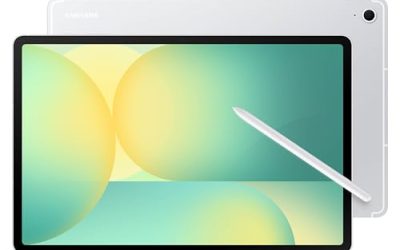
Samsung Galaxy Tab S9 FE
- Best for: Students and note-takers who want a pen included and room to expand storage over time.
- 10.9-inch display
- 128GB storage
- S Pen included
- 8MP camera
Students and note-takers who want a pen included and room to expand storage over time.
The display is an LCD panel rather than the AMOLED screen on Samsung’s higher-end tablets, so blacks look less deep in a dark room.
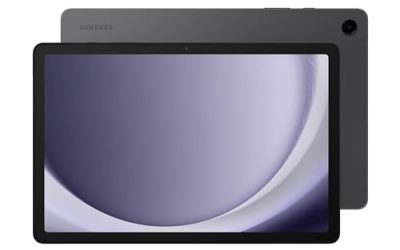
The Galaxy Tab S9 FE is the natural pick for note-takers, because the S Pen comes in the box rather than arriving as a separate purchase. The 10.9-inch display gives handwriting and sketches room to breathe, and the 8MP camera handles document scans and video calls. Storage expands beyond the built-in 128GB, so lecture recordings, textbooks, and offline films have somewhere to go. Its lightweight, durable design suits a bag that already carries books, a charger, and a water bottle.
Watch out for: The display is an LCD panel rather than the AMOLED screen on Samsung’s higher-end tablets, so blacks look less deep in a dark room.
Samsung Galaxy Tab A9+
- Best for: Android households that want a large, light tablet mainly for films, reading, and browsing.
- 11-inch display
- 64GB storage
- 4GB RAM
- Quad speakers
Android households that want a large, light tablet mainly for films, reading, and browsing.
64GB of storage fills up fast with offline video, and no pen is included for handwriting or drawing.
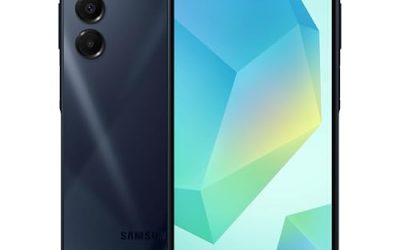
The Galaxy Tab A9+ is a big-screen Android tablet aimed squarely at films, browsing, and casual games. Its 11-inch display and quad speakers make it a comfortable sofa companion, and the multi-window display lets you keep a video open beside a browser or a chat. With 64GB of storage and 4GB of RAM, it covers everyday use well, and its slim, light, durable design means it travels easily. This is the tablet to choose when the screen and speakers matter more than a pen.
Watch out for: 64GB of storage fills up fast with offline video, and no pen is included for handwriting or drawing.
Lenovo Tab M11
The Lenovo Tab M11 stands out because the pen and folio case arrive in the box, so a student can start taking notes on day one without ordering accessories. Its 11-inch display renders text at 1920 x 1200, the Helio G88 octa-core chip handles classes, reading, and streaming, and 4GB of RAM with 128GB of storage covers everyday schoolwork. The ambient light sensor adjusts the screen to the room, and the listed 10-hour battery gets through a school day of mixed use.
Specs
- 11-inch display, 1920 x 1200
- MediaTek Helio G88 octa-core processor
- 4GB RAM
- 128GB storage
- 10-hour battery life
- Folio case included
- Ambient light sensor
Best for: Students who want a pen and a protective case included, with nothing extra to buy.
Watch out for: Some Amazon listings for this model are sold by third-party sellers rather than Amazon itself, so confirm the seller and condition before ordering.
Amazon Fire HD 10 (2023)
- Best for: Readers and streamers who already use Amazon services and want a simple, low-fuss tablet.
- 10.1-inch Full HD display, 1920 x 1200
- Octa-core processor
- 4GB RAM
- 32GB storage
Readers and streamers who already use Amazon services and want a simple, low-fuss tablet.
This configuration shows lockscreen ads, Fire OS uses Amazon’s Appstore rather than Google Play, and Amazon has been reported as selling through remaining Fire tablet stock.
The Fire HD 10 is built for life inside Amazon’s services, and it shows: the 10.1-inch Full HD display at 1920 x 1200 is made for Prime Video, Kindle books, and web browsing. Its octa-core processor and 4GB of RAM keep streaming and reading smooth, while 32GB of built-in storage expands with a microSD card up to 1TB for films and audiobooks. Fire OS 8 keeps the home screen simple, and the listed battery life of up to 13 hours covers long reading sessions and flights.
Watch out for: This configuration shows lockscreen ads, Fire OS uses Amazon’s Appstore rather than Google Play, and Amazon has been reported as selling through remaining Fire tablet stock.
Which One Fits Your Situation
You want one tablet the whole family can share
Pick the Apple iPad 11-inch (A16). Its app library covers children, students, and adults, Touch ID keeps everyone’s content separate, and the 128GB of storage leaves room for a mix of school apps, photos, and downloads. It is the least likely choice to disappoint someone in the house.
You take handwritten notes in class or meetings
Pick the Samsung Galaxy Tab S9 FE. The S Pen is included, so there is nothing extra to buy, and the 10.9-inch display is a comfortable size for writing. Expandable storage means years of notes and recordings fit without a cleanup. If the pen and a case must both be in the box, the Lenovo Tab M11 is the alternative.
You want a big Android screen for films and browsing
Pick the Samsung Galaxy Tab A9+. The 11-inch display and quad speakers suit evening viewing, the multi-window display keeps a chat beside a video, and the slim build slips into a small bag. It fits naturally alongside an Android phone, with the same apps and accounts.
You mainly read, stream, and shop inside Amazon services
Pick the Amazon Fire HD 10 (2023). Its Full HD screen and long battery life suit books and films, the microSD slot holds a large offline library, and Fire OS keeps everything one tap from Prime Video and Kindle. Just confirm the apps you need are in Amazon’s Appstore first.
Common Mistakes
- Choosing the smallest storage option, then running out of room for offline films, photos, and school files.
- Assuming a pen or keyboard is included, when most tablets sell them separately.
- Buying a Fire tablet without checking whether the apps you need exist in Amazon’s Appstore.
- Ignoring weight and grip, then leaving a heavy tablet at home because it is tiring to hold.
- Picking a screen too small for split-screen work, then struggling to keep two apps open side by side.
Frequently Asked Questions
What size tablet is best for most people?
A 10- to 11-inch tablet suits most people, because it is large enough for reading and two apps side by side yet light enough to hold for an hour. Smaller tablets suit one-handed reading on a commute, while larger ones suit desk use and drawing. If you are unsure, start in the middle of that range.
Is 64GB of storage enough on a tablet?
It depends on how you use it. For streaming, browsing, and a handful of apps, 64GB is workable, especially if a microSD card adds room. For offline films, large games, photos, and school files, 128GB is the safer choice. Check whether your tablet accepts a microSD card before relying on it.
Do I need a tablet with a pen?
Only if you write or draw by hand. A pen is worth it for class notes, sketches, and marking up documents, and the Galaxy Tab S9 FE and Lenovo Tab M11 include one. If you mostly tap, type, and watch video, skip the pen and spend the difference on more storage instead.
Can a tablet replace a laptop?
For reading, notes, video, email, and light documents, a tablet with a keyboard can cover a surprising amount of daily work. For heavy spreadsheets, coding, or professional editing, a laptop still wins on software, ports, and multitasking. Many people end up using both, with the tablet as the portable second screen.
More from Amazon
Programs that pair well with the guide above. Offers and eligibility are set by Amazon and may change.
Free shipping on eligible items, Prime Video and more. Eligible new members can start with a free trial.
Start a Prime free trialAd-free music streaming. Eligible new subscribers can start with a free trial.
Try Music Unlimited freeA Prime membership for ages 18-24 with a trial period. Eligibility is set by Amazon.
See Prime for Young AdultsAudiobooks and podcasts to listen to on the go. Eligible new members can start with a free trial.
Try Audible freeAs an Amazon Associate we earn from qualifying purchases.

Write Your Review
No reviews yet. Be the first to share your experience!