

Key takeaways
- Compare the best display tablets with a built-in screen: five true pen displays from Huion, Wacom and XPPen by size, resolution, pen pressure, colour and cables.
Disclosure: As an Amazon Associate we earn from qualifying purchases made through links in this article, at no extra cost to you.
A display tablet, also called a pen display, is a drawing device with a screen built into the drawing surface itself. You connect it to a computer, open your art software on it, and draw exactly where you are looking, with the pen tip and the cursor in the same place. That is the whole appeal, and it is also what separates this category from everything that sounds similar.
A pen tablet without a screen is a flat pad: you draw on the pad and watch a separate monitor. An ordinary tablet computer is a standalone device with its own apps and operating system. Neither of those belongs in this guide. Every pick below is a true pen display with a built-in screen, a battery-free or battery-free-style pen in most cases, and a cable connection to a Windows, Mac or Linux computer. None of them works on its own, so you will need a computer to drive it.
This guide is for illustrators who want to draw where they look, beginners moving up from a screenless pad, photo editors who retouch directly on the image, and students who need a second screen that also takes pen input. The five models cover a portable 13.3-inch display, established 15.6-inch Full HD models, and sharper 2.5K options for buyers who work close and notice soft text.
Our top picks
Best for: Shortcut-Heavy Work
Check price on AmazonQuick Picks
- Best overall: Huion Kamvas 13 (Gen 3) — a 13.3-inch fully laminated Full HD screen, PenTech 4.0 with 16,384 pressure levels, dual dials and a compact body that fits small desks.
- Best established Wacom option: Wacom Cintiq 16 — a 15.6-inch Full HD display with the Wacom Pro Pen 2, 8,192 pressure levels and foldable legs built into the body.
- Best for shortcut-heavy work: XPPen Artist 15.6 Pro V2 — a 15.6-inch fully laminated screen, X3 Pro stylus with 16,384 pressure levels, eight shortcut keys and the Red Dial.
- Best larger colour-focused option: Huion Kamvas Pro 16 — a 15.6-inch fully laminated Full HD screen with a wide colour gamut listing, six express keys and a touch bar.
- Best sharper screen: Huion Kamvas 16 (Gen 3) — a 15.8-inch 2.5K QHD panel, PenTech 4.0 with 16,384 pressure levels and dual dial controls for detailed line work.
1. Huion Kamvas 13 (Gen 3) — Best Overall Pen Display

The Kamvas 13 (Gen 3), model GS1333, is the easiest display tablet here to recommend to the widest group of buyers. Its 13.3-inch screen is large enough for illustration, comics and photo editing, yet the body stays small enough for a crowded desk, a laptop bag or a shared workspace. For a first pen display, that balance matters more than chasing the largest panel.
The screen is fully laminated, which brings the pen tip visually closer to the line it draws and reduces offset. Huion lists anti-sparkle canvas glass with an etched, paper-like texture, so the pen does not glide as it can on plain glass. Colour coverage is listed at 99 percent sRGB and 90 percent Adobe RGB.
The pen uses PenTech 4.0 and is battery-free, with 16,384 pressure levels, a low initial activation force of 2 grams, and tilt support. The low activation force helps with faint sketch lines and soft shading. Two dials and five keys put zoom, brush size and undo within reach without returning to the keyboard.
Key specs from the listing:
- Display: 13.3 inches, 1920 x 1080 Full HD, fully laminated
- Surface: anti-sparkle canvas glass with etched texture
- Colour: 99 percent sRGB, 90 percent Adobe RGB as listed
- Pen: PenTech 4.0, battery-free, 16,384 pressure levels, tilt support
- Controls: dual dials and five shortcut keys
- Model: GS1333
- Compatibility: Windows, Mac and Android devices as listed, connected to a host computer
Pros:
- Fully laminated screen keeps the pen tip close to the cursor
- Low 2-gram activation force suits light sketching and shading
- Dual dials are genuinely useful for zoom and brush size
- Compact size suits small desks and travel
Cons:
- Full HD on 13.3 inches is sharp enough for drawing, but text is less crisp than on the 2.5K models here
- No touch input, so gestures still happen on a trackpad or mouse
- Needs a connected computer and does not run apps by itself
View the Huion Kamvas 13 (Gen 3) on Amazon
2. Wacom Cintiq 16 — Best Established Wacom Pen Display
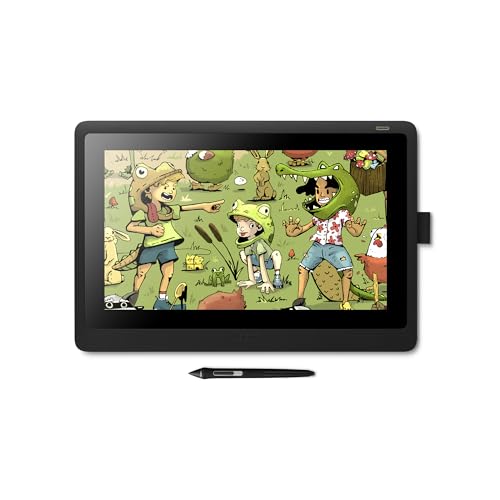
The Wacom Cintiq 16, model DTK1660K0A, is the long-running entry point into the Cintiq line. It gives you a 15.6-inch drawing area in a body with integrated foldable legs that lift it to a 19-degree working angle, so you do not need to buy a stand before you can work at a comfortable tilt.
The display is Full HD with an active area of 13.6 x 7.6 inches. Wacom lists colour at 72 percent NTSC, narrower than the Huion and XPPen listings here. That is workable for sketching, line art and animation, but colour-critical print buyers should check colour on a calibrated main monitor.
The pen is the Wacom Pro Pen 2, using EMR technology. It is battery-free, lists 8,192 pressure levels on tip and eraser end, and supports tilt. Wacom drivers are widely supported across art and design software. Connection is through a 3-in-1 cable carrying HDMI, USB and power, which suits desktops and older laptops without USB-C video output.
Key specs from the listing:
- Display: 15.6 inches, 1920 x 1080 Full HD
- Active area: 13.6 x 7.6 inches
- Colour: 72 percent NTSC as listed by Wacom
- Pen: Wacom Pro Pen 2, battery-free EMR, 8,192 pressure levels, tilt support
- Ergonomics: integrated foldable legs, 19-degree incline
- Connection: 3-in-1 cable with HDMI, USB and power
- Model: DTK1660K0A
Pros:
- Pro Pen 2 has an eraser end and strong software support
- Built-in foldable legs remove the need for a separate stand
- 3-in-1 cable works with computers that only offer HDMI and USB-A
- Larger active area than the 13-inch models
Cons:
- Colour gamut listing is narrower than rival models here
- Full HD resolution is spread over a larger screen, so it looks less sharp up close
- No shortcut keys on the body itself
- Heavier at 1.9 kg without an optional stand
View the Wacom Cintiq 16 on Amazon
3. XPPen Artist 15.6 Pro V2 — Best for Shortcut-Heavy Work

The XPPen Artist 15.6 Pro V2 updates a popular 15.6-inch pen display with a newer stylus generation. The headline change is the X3 Pro smart chip stylus, which lists 16,384 pressure levels, double the count of the original Artist 15.6 Pro pen. The screen itself stays at Full HD, fully laminated and covered with anti-glare etched glass to keep parallax low and reflections under control.
Workflow controls are the reason to pick this model. It has eight customisable shortcut keys and the Red Dial, which can handle zoom, canvas rotation or brush size as assigned in the driver. For painters who change brush size constantly, a physical dial is faster than keyboard brackets.
XPPen lists colour coverage of 99 percent sRGB, along with 60-degree tilt support. The listed package includes a foldable stand, stylus, USB-C cable set and power adapter, plus a glove and cleaning cloth. Compatibility covers Windows, macOS, Linux, Android and ChromeOS as listed, although art software still runs on the connected computer.
Key specs from the listing:
- Display: 15.6 inches listed, 1920 x 1080 Full HD, fully laminated
- Surface: anti-glare etched glass
- Colour: 99 percent sRGB as listed
- Pen: X3 Pro stylus, 16,384 pressure levels, 60-degree tilt support
- Controls: eight customisable shortcut keys and Red Dial
- Stand: foldable stand included as listed
- Model: Artist 15.6 Pro V2
Pros:
- Dial plus eight keys suit brush-heavy painting workflows
- Fully laminated anti-glare screen limits parallax and glare
- 16,384 pressure levels from the X3 Pro stylus
- Broad listed compatibility across desktop systems
Cons:
- Full HD only, where similarly sized 2.5K displays are sharper
- Dial and keys sit on one side, which suits one hand layout better than the other
- Needs a connected computer and a power source as listed
View the XPPen Artist 15.6 Pro V2 on Amazon
4. Huion Kamvas Pro 16 — Best Larger Colour-Focused Option
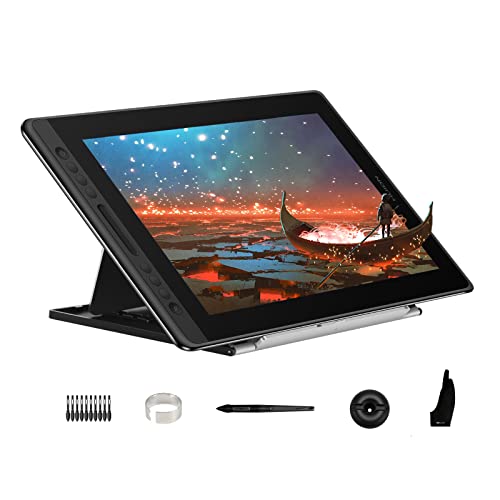
The Huion Kamvas Pro 16, model GT-156 in Huion listings, is a 15.6-inch pen display built around colour and a slim body. Its fully laminated screen lists a colour gamut volume of 120 percent sRGB and 92 percent Adobe RGB, with a 1000 to 1 contrast ratio. Those figures make it the strongest colour listing among the Full HD models in this guide, which matters for illustration that will be printed or shared across screens.
The pen is the battery-free PW507, with 8,192 pressure levels and 60-degree tilt. Six customisable express keys and a touch bar run along the side. The touch bar suits smooth adjustments such as zooming or scrolling a long canvas, while the keys handle undo, redo and tool switching.
The listing includes a foldable stand, model ST200, a 3-in-1 cable and a power adapter, connecting over HDMI and USB. Laptop users with only USB-C ports should check what adapters they need, because this model predates single-cable designs.
Key specs from the listing:
- Display: 15.6 inches, 1920 x 1080 Full HD, fully laminated
- Surface: anti-glare glass with a slight texture
- Colour: 120 percent sRGB gamut volume, 92 percent Adobe RGB, 1000 to 1 contrast as listed
- Pen: PW507, battery-free, 8,192 pressure levels, 60-degree tilt support
- Controls: six express keys and one touch bar
- Stand: foldable stand ST200 included as listed
- Model: Kamvas Pro 16, GT-156
Pros:
- Widest colour listing among the Full HD picks here
- Touch bar gives smooth control for zoom and scrolling
- Slim, fully laminated body with a stand in the box as listed
- Battery-free pen with tilt support
Cons:
- 8,192 pressure levels, half the count of the newest pens here
- Older 3-in-1 cable setup is less tidy than a single USB-C cable
- Full HD resolution, not 2.5K
View the Huion Kamvas Pro 16 on Amazon
5. Huion Kamvas 16 (Gen 3) — Best Sharper Screen

The Huion Kamvas 16 (Gen 3), model GS1563, is the step up for buyers who found Full HD displays a little soft. Its 15.8-inch panel runs at 2.5K QHD, 2560 x 1440, which Huion lists at 186 pixels per inch. Fine line art, small interface text in art software and detailed cross-hatching all hold up better at that density, especially when you draw with your face close to the screen.
Colour coverage is listed at 99 percent sRGB and Rec. 709, plus 90 percent Adobe RGB. The pen is the same PenTech 4.0 generation as the Kamvas 13 (Gen 3): battery-free, 16,384 pressure levels, a 2-gram initial activation force and tilt support — a combination aimed at long, detailed sessions.
Like its smaller sibling, it uses dial controls alongside shortcut keys. The trade-off is desk space: a 15.8-inch display plus room for your drawing arm needs a proper desk, and it travels less easily than the 13.3-inch model. Huion notes clearly that it is not standalone and must connect to a computer, laptop or compatible Android device.
Key specs from the listing:
- Display: 15.8 inches, 2560 x 1440 2.5K QHD, 186 PPI as listed
- Colour: 99 percent sRGB and Rec. 709, 90 percent Adobe RGB as listed
- Pen: PenTech 4.0, battery-free, 16,384 pressure levels, tilt support
- Activation: 2-gram initial activation force as listed
- Controls: dial controls and shortcut keys
- Model: GS1563
- Use: must be connected to a host computer or compatible device
Pros:
- 2.5K resolution is visibly sharper for fine lines and small text
- PenTech 4.0 pen starts with a very light touch
- Strong listed colour coverage for illustration work
- Larger canvas suits detailed, long-form drawing
Cons:
- Needs the most desk space of any pick here
- Sharper panel is wasted if your software interface is usually scaled up large
- Not standalone, despite the tablet-like form
View the Huion Kamvas 16 (Gen 3) on Amazon
How to Choose a Display Tablet
Start with screen size. A 13.3-inch display suits small desks, laptop-based setups and artists who zoom often. A 15.6-inch or 15.8-inch display gives broader strokes more room and keeps menus visible, but it claims real desk space. Measure your desk before choosing, including room for the keyboard you will still use.
Then check resolution at that size. Full HD at 13.3 inches looks reasonably sharp. Full HD at 15.6 inches is fine for drawing but softer for text. If you read small tool labels all day or draw fine detail, a 2.5K panel in the larger size is the meaningful upgrade, not a higher pressure number.
Look at lamination and surface. A fully laminated screen reduces the visible gap between pen tip and line. Etched anti-glare glass adds a slight paper-like drag and cuts reflections. If you work under bright lights, the surface matters as much as the panel behind it.
Treat pressure levels sensibly. Counts of 8,192 and 16,384 both give smooth control. Initial activation force, tilt behaviour and driver quality shape how a pen actually feels, so weigh those alongside the headline number rather than buying on the number alone.
Count the controls you will really use. Dials excel at continuous changes like brush size and zoom. Keys excel at discrete commands. A touch bar is smooth for scrolling. If you already keep one hand on a keyboard, on-device controls matter less.
Confirm the cable and ports. Some displays connect with a single USB-C cable that carries video, data and power, but only when the computer port supports DisplayPort Alt Mode. Others use a 3-in-1 cable with HDMI, USB and a power adapter. Check your computer ports first, and check whether a stand is included or built in.
Remember it is not a standalone tablet. Every model here needs a host computer running your art software. If you want to draw with no computer at all, you need a different kind of device entirely, and none of these picks replaces it.
FAQs
What is the difference between a display tablet and a pen tablet?
A display tablet has a screen, so you draw directly on the image. A pen tablet has no screen: you draw on a pad while looking at a separate monitor. Display tablets feel more natural at first, while pen tablets are usually lighter and simpler on the desk.
Can a pen display work without a computer?
No. The models in this guide are monitors with pen input. They need a connected computer, laptop or compatible host device to run software and supply the image. They do not run drawing apps by themselves.
Is 16,384 pressure levels noticeably better than 8,192?
It gives a finer ramp of pressure, but most artists feel activation force, tilt and driver behaviour more in daily work. Both counts are capable; choose based on the whole pen and screen package rather than the number alone.
Which size should a beginner choose?
A 13.3-inch model is a forgiving start: it fits most desks, travels well and still shows enough canvas for illustration and editing. Move to 15.6 inches or larger if you draw with broad arm movements or keep many panels open.
Do pen displays work with photo editing software?
Yes. Connected to a computer, they work as both a monitor and a pen input device in common editing and drawing programs, which makes masking, retouching and brush work easier to control than with a mouse.
Conclusion
For most buyers, the Huion Kamvas 13 (Gen 3) is the right first display tablet: compact, fully laminated, and equipped with a light-touch PenTech 4.0 pen and useful dual dials. Buyers who prefer the Wacom pen and driver ecosystem should choose the Cintiq 16, while shortcut-heavy painters will get more from the XPPen Artist 15.6 Pro V2 and its Red Dial. If colour coverage in a Full HD model is the priority, the Kamvas Pro 16 leads this group on its listing, and if sharpness is the priority, the Kamvas 16 (Gen 3) and its 2.5K panel are the clear step up. Whichever you choose, confirm your computer ports and desk space first, because those two checks decide whether a pen display fits your setup happily.
More from Amazon
Programs that pair well with the guide above. Offers and eligibility are set by Amazon and may change.
Free shipping on eligible items, Prime Video and more. Eligible new members can start with a free trial.
Start a Prime free trialAd-free music streaming. Eligible new subscribers can start with a free trial.
Try Music Unlimited freeA Prime membership for ages 18-24 with a trial period. Eligibility is set by Amazon.
See Prime for Young AdultsAudiobooks and podcasts to listen to on the go. Eligible new members can start with a free trial.
Try Audible freeAs an Amazon Associate we earn from qualifying purchases.


Write Your Review
No reviews yet. Be the first to share your experience!