

Our Short List of 3
All 4 Picks at a Glance
| Product | Specs | Action |
|---|---|---|
 HP ENVY Photo 7975 — Best All-Around HP Photo Printer | Check price on Amazon | |
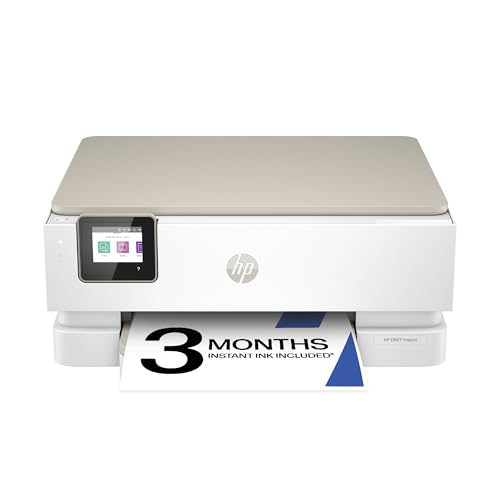 HP ENVY Inspire 7255e — Best Lighter All-in-One Alternative | Check price on Amazon | |
 HP Sprocket Studio Plus — Best Dedicated 4 by 6 Inch Photo Printer | Check price on Amazon | |
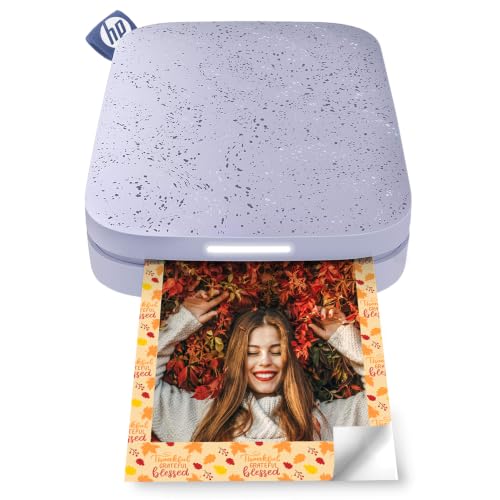 HP Sprocket Portable 2 by 3 Inch — Best Portable HP Photo Printer | Check price on Amazon |
Key takeaways
- Looking for the best hp photo printers for home photos and family albums? Compare HP ENVY all-in-one models and Sprocket printers by size and features.
As an Amazon Associate I earn from qualifying purchases.
The Short Answer
If you want one printer that handles family photos and everyday documents, the HP ENVY Photo 7975 is the strongest all-around choice in this guide. It pairs a separate photo tray and borderless photo printing with scanning, copying, an automatic document feeder, and automatic two-sided printing. If you want a smaller all-in-one with the same photo-first idea, the HP ENVY Inspire 7255e is the lighter alternative, with a dedicated photo tray and support for square and panoramic photo sizes. If you only want prints from your phone, skip the all-in-one entirely: the HP Sprocket Studio Plus makes full 4 by 6 inch dye-sublimation prints at home, while the HP Sprocket Portable 2 by 3 inch printer makes small sticky-backed prints you can carry in a bag.
Our Top Picks
- Best all-around HP photo printer: HP ENVY Photo 7975 — separate photo tray, borderless photos, automatic document feeder, and full all-in-one functions.
- Best lighter all-in-one alternative: HP ENVY Inspire 7255e — dedicated photo tray, square and panoramic photo sizes, and the same 4800 by 1200 color resolution.
- Best dedicated 4 by 6 inch photo printer: HP Sprocket Studio Plus — dye-sublimation prints in the classic 4 by 6 inch album size, printed over Wi-Fi.
- Best portable HP photo printer: HP Sprocket Portable 2 by 3 inch — pocket-size Zink prints with a sticky back, made for phones, parties, and travel.
Quick Comparison
| Printer | Best For | Largest Photo Size | Print Method | Standout Photo Feature |
|---|---|---|---|---|
| HP ENVY Photo 7975 | Family photos plus documents | 8.5 by 11.7 inch media | Thermal inkjet | Separate photo tray and borderless printing |
| HP ENVY Inspire 7255e | Home photos with less bulk | 8 by 10 inch media | Thermal inkjet | Photo tray plus square and panoramic sizes |
| HP Sprocket Studio Plus | Phone photos in album size | 4 by 6 inch | Dye-sublimation | Full 4 by 6 inch prints from a phone |
| HP Sprocket Portable 2 by 3 inch | Small prints on the go | 2 by 3 inch | Zink | Sticky-backed prints, no ink cartridges |
How to Choose
Begin with the print size you actually want
Print size decides almost everything else. An all-in-one such as the ENVY Photo 7975 or the ENVY Inspire 7255e prints photos up to 8 by 10 inches and larger, which suits framed prints and family albums. The Sprocket Studio Plus prints only in the 4 by 6 inch album size, which suits keepsakes and gifts. The Sprocket Portable prints at 2 by 3 inches, which suits wallets and journals.
Decide whether you need an all-in-one at all
That is a good outcome if you print documents too, and a poor one if you only print from a phone and never touch a scanner. A dedicated photo printer has fewer parts, a smaller footprint, and a simpler job: take a photo from your phone and put it on paper. Buy the all-in-one when documents are part of the plan; buy the dedicated printer when photos are the whole plan.
Look for a separate photo tray
A separate photo tray is the single most useful photo feature on an HP all-in-one. It holds photo paper apart from plain paper, so you can print a photo without swapping paper in and out of the main tray. Both ENVY models in this guide have one.
Check resolution the right way
Color resolution is listed as dots per inch, and both ENVY models in this guide list up to 4800 by 1200 optimized color resolution when printing from a computer, a useful comparison point between inkjet models. It does not describe dye-sublimation or Zink prints, which work differently: dye-sublimation blends color smoothly onto the paper, while Zink prints use heat-activated color crystals embedded in the paper itself. Match the method to the result you want: inkjet for large, detailed prints; dye-sublimation for smooth 4 by 6 inch prints; Zink for small, instant, sticky-backed prints.
Think about paper, ink, and connectivity
Each printing method has its own supplies. The ENVY printers use HP 64 black and tri-color cartridges, with XL versions listed for higher yield. Confirm the cartridge type on the listing before you buy spares, and confirm whether the box includes setup cartridges, because setup cartridges hold less ink than standard ones. The Sprocket Studio Plus uses dye-sublimation cartridges and 4 by 6 inch paper, and the listing used here includes 10 sheets plus a cartridge, so confirm what is in the box. The Sprocket Portable uses Zink sticky-backed paper and no ink cartridges at all. Store photo paper flat, dry, and away from sunlight. On connectivity, the ENVY models use Wi-Fi and USB with the HP Smart app, the Studio Plus prints over Wi-Fi from iOS and Android, and the portable Sprocket connects over Bluetooth. A Wi-Fi printer needs a stable home network; a Bluetooth printer needs your phone nearby. On size, the Sprocket Portable fits in a bag, the Studio Plus sits on a shelf, and the ENVY models weigh 15.23 and 17.9 pounds, so both need a real desk with room for the paper path and the scanner lid.
The Picks in Detail
HP ENVY Photo 7975 — Best All-Around HP Photo Printer
The HP ENVY Photo 7975 is the most complete photo printer in this guide. It is a color thermal inkjet all-in-one that prints, scans, and copies, with a 2.7 inch touchscreen, a 35-sheet document feeder, and a separate photo tray. Color resolution reaches up to 4800 by 1200 optimized dots per inch when printing from a computer. Print speed is listed at up to 15 pages per minute in black and up to 10 pages per minute in color. The main tray holds up to 125 sheets, maximum media size is 8.5 by 11.7 inches, and automatic two-sided printing is built in. It connects over Wi-Fi and USB, works with mobile printing from laptops, PCs, and smartphones, and uses HP 64 black and tri-color cartridges, with HP 64XL versions listed for both. Confirm the full box contents and warranty terms on the listing.
What makes it the top pick is the combination: the photo tray keeps photo paper ready, borderless printing covers the full sheet, and the document feeder handles multi-page scanning and copying. The trade-off is size: at 17.9 pounds, it is the heaviest printer here and needs a permanent spot.
Pros:
– Separate photo tray plus borderless photo printing
– Prints, scans, and copies, with a 35-sheet automatic document feeder
– Color resolution up to 4800 by 1200 optimized dots per inch
– Automatic two-sided printing and Wi-Fi plus USB connectivity
– 2.7 inch touchscreen for jobs at the printer
Cons:
– Heaviest printer in this guide at 17.9 pounds, needs a permanent spot
– Cartridge ink, so heavy photo printing means regular cartridge changes
– First page can take up to 22 seconds, per the listing, so single quick prints are not instant
HP ENVY Inspire 7255e — Best Lighter All-in-One Alternative
The HP ENVY Inspire 7255e is the lighter all-in-one in this guide, and it shares the core photo idea with the top pick: a dedicated photo tray, borderless photos, and the same color resolution of up to 4800 by 1200 dots per inch. Print speed is listed at up to 15 pages per minute in black and up to 10 pages per minute in color. It prints, copies, and scans, with automatic two-sided printing, a 2.7 inch touchscreen, dual-band Wi-Fi, USB, and the HP Smart app. Its photo sizes include 4 by 6, 5 by 7, and 8 by 10 inches, plus 5 by 5 inch square and 4 by 12 inch panoramic sizes optimized for the ENVY Inspire series. Maximum media size is listed as 8 by 10 inches, sheet capacity is 125 sheets, and it weighs 15.23 pounds. Confirm the full box contents and warranty terms on the listing.
The 7255e suits a home that wants the all-in-one photo setup without the largest machine, and its square and panoramic photo sizes are a genuine difference from the 7975. It has no automatic document feeder listed, so multi-page scanning means feeding pages by hand. Confirm on the listing that the model number is 1W2Y9A and that the listing is for a new printer rather than a renewed one.
Pros:
– Dedicated photo tray and borderless photos at up to 4800 by 1200 color resolution
– Square 5 by 5 inch and panoramic 4 by 12 inch photo sizes
– Lighter than the top pick at 15.23 pounds
– Dual-band Wi-Fi, USB, AirPrint, and HP Smart app printing
– Automatic two-sided printing built in
Cons:
– No automatic document feeder listed, so multi-page scanning is manual
– Maximum media size is listed at 8 by 10 inches, smaller than the top pick
– Renewed listings for this model exist under other codes, so confirm the listing is for a new printer
HP Sprocket Studio Plus — Best Dedicated 4 by 6 Inch Photo Printer
The HP Sprocket Studio Plus is the only dedicated photo printer in this guide that makes full-size album prints. It is a 4 by 6 inch wireless instant photo printer that uses premium dye-sublimation printing, which blends color smoothly for classic photo prints. It connects over Wi-Fi and prints from iOS and Android devices through an editing app, so cropping, filters, borders, and text happen on your phone before the print. The listing used here includes 10 sheets plus a cartridge. Because dye-sublimation uses a cartridge and paper together, confirm on the listing which cartridge and paper are included before buying spares.
This printer suits a home that prints phone photos for albums, scrapbooks, and gifts. Its limits are plain: it prints only at 4 by 6 inches, it does not scan or copy, and it needs Wi-Fi, so it is a home printer rather than a travel printer.
Pros:
– True 4 by 6 inch dye-sublimation prints in classic album size
– Wi-Fi printing from iOS and Android through an editing app
– Compact home design with no document functions to manage
– Good fit for albums, scrapbooks, and gifts
Cons:
– Prints only at 4 by 6 inches, with no larger sizes
– No scanning, copying, or document printing
– Needs dye-sublimation cartridges and paper, so confirm supplies on the listing
HP Sprocket Portable 2 by 3 Inch — Best Portable HP Photo Printer
HP Sprocket Portable 2 by 3 Inch
The HP Sprocket Portable 2 by 3 inch printer is the smallest printer in this guide, and the only one built to travel. It prints pictures on Zink sticky-backed paper from iOS and Android devices over Bluetooth, so photos come straight from a phone with no cables and no ink cartridges. The sticky back means a print can go straight onto a journal page, a locker, a laptop lid, or a scrapbook without glue or tape. The lilac color in this listing is one of several colors for this model; confirm the color on the listing before ordering, because color variants exist under different codes.
This printer suits parties, trips, and classrooms. Its limits follow from its size: prints are 2 by 3 inches, so it is not a printer for framed photos or albums, and Zink prints have a different look from inkjet or dye-sublimation prints. Battery life and charging details are not stated in the listing details used here, so confirm them on the listing before buying for travel, along with the paper type.
Pros:
– Pocket-size and portable, prints from a phone over Bluetooth
– Zink sticky-backed paper, so prints stick without glue or tape
– No ink cartridges to buy or replace
– Simple fit for parties, travel, journals, and scrapbooks
Cons:
– Prints only at 2 by 3 inches, too small for frames or albums
– Zink prints look different from inkjet and dye-sublimation prints
– Battery and charging details are not stated in the listing details used here, so confirm them on the listing
Who Should Choose What
Choose the HP ENVY Photo 7975 if you want one printer for a household: photos, homework, forms, scanning, and copying, with a photo tray that stays loaded.
Choose the HP ENVY Inspire 7255e if you want the same all-in-one photo setup in a lighter machine, and especially if you print square or panoramic photos.
Choose the HP Sprocket Studio Plus if your photos live on your phone and you want classic 4 by 6 inch prints for albums and gifts.
Choose the HP Sprocket Portable 2 by 3 inch if you want prints away from home: at a party, on a trip, or in a classroom.
Common Mistakes
Buying a photo printer for documents, or a document printer for photos. A printer built for photos has a photo tray, borderless printing, and photo paper support. Match the machine to the job you do most.
Ignoring the paper. Photo prints need photo paper, and each method needs its own kind: inkjet photo paper for the ENVY models, dye-sublimation paper and cartridges for the Studio Plus, and 2 by 3 inch Zink paper for the portable Sprocket. Printing a photo on plain paper gives a dull result.
Skipping the photo tray. If your printer has a separate photo tray, use it. Loading photo paper into the main tray and forgetting to swap it back is the most common cause of a photo printed on plain paper, or a document printed on photo paper.
Forgetting the app. Most photo printing from a phone happens in an app: cropping, borders, filters, and print size are set there, not on the printer. Install the app for your model before the first print.
Choosing by size alone. A pocket printer is wonderful until you want a framed 8 by 10 inch print, and a full-size all-in-one is wonderful until you want a print at a picnic. Decide the print size first.
Assuming every listing is for a new printer. Some HP models, including the ENVY Inspire 7255e, have renewed listings under different codes. Confirm the model number and the condition on the listing before ordering.
FAQ
What is the best HP photo printer for home use?
For most homes, the HP ENVY Photo 7975 is the best all-around choice, because it combines a separate photo tray, borderless photo printing, and full all-in-one functions. If you print mainly from a phone and want only 4 by 6 inch prints, the HP Sprocket Studio Plus is the simpler choice.
Do HP ENVY printers print borderless photos?
Yes, both ENVY models in this guide list borderless photo printing. Confirm the supported borderless sizes on the listing for your model, because borderless support varies by paper size.
What ink do HP ENVY photo printers use?
Both ENVY models in this guide use HP 64 black and tri-color cartridges, with HP 64XL versions listed for higher yield. Confirm the cartridge type on the listing for your model before buying spares. The Sprocket printers do not use ink cartridges: the Studio Plus uses dye-sublimation cartridges, and the portable Sprocket uses Zink paper with no ink at all.
Can I print photos from my phone with an HP photo printer?
Yes. The ENVY models print from smartphones through the HP Smart app over Wi-Fi, and they also support mobile printing from laptops and PCs. The Sprocket Studio Plus prints from iOS and Android devices over Wi-Fi through its editing app, and the Sprocket Portable prints from iOS and Android devices over Bluetooth.
What is the difference between the Sprocket Studio Plus and the Sprocket Portable?
The Studio Plus is a home printer that makes 4 by 6 inch dye-sublimation prints over Wi-Fi, which suits albums and gifts. The portable Sprocket is a pocket printer that makes 2 by 3 inch Zink sticky-backed prints over Bluetooth, which suits travel and parties.
Should I choose an all-in-one or a dedicated photo printer?
Choose an all-in-one such as the ENVY Photo 7975 or the ENVY Inspire 7255e if you also print documents, scan, or copy. Choose a dedicated photo printer such as the Sprocket Studio Plus if photos are the only job.
Conclusion
The best hp photo printers are built around photos, not adapted to them. The HP ENVY Photo 7975 leads this guide because it handles photos and documents together, with a photo tray, borderless printing, and a document feeder. The HP ENVY Inspire 7255e follows closely for smaller homes and for square and panoramic prints. The HP Sprocket Studio Plus is the right choice when phone photos and 4 by 6 inch album prints are the whole job, and the HP Sprocket Portable 2 by 3 inch is the right choice when prints need to travel. Pick the print size first, confirm the model number and box contents on the listing, and choose the printer whose job matches yours.
More from Amazon
Programs that pair well with the guide above. Offers and eligibility are set by Amazon and may change.
Free shipping on eligible items, Prime Video and more. Eligible new members can start with a free trial.
Start a Prime free trialAd-free music streaming. Eligible new subscribers can start with a free trial.
Try Music Unlimited freeA Prime membership for ages 18-24 with a trial period. Eligibility is set by Amazon.
See Prime for Young AdultsAudiobooks and podcasts to listen to on the go. Eligible new members can start with a free trial.
Try Audible freeAs an Amazon Associate we earn from qualifying purchases.










Write Your Review
No reviews yet. Be the first to share your experience!