

Key takeaways
- Find the best backpacks for 17 inch laptops with our guide to real compartment fit, padding, comfort, and capacity for large laptops.
A 17-inch laptop is a different carrying problem from a 13-inch ultrabook, and the best backpacks for 17 inch laptops are built around that fact. The machine is wider, heavier, and harder to protect, and many bags that claim to fit a 17-inch laptop only do so if you force the zipper closed or leave the charger at home. A bag designed for this size class gives the laptop a padded compartment with real room to spare, spreads the weight across both shoulders, and still leaves space for the rest of your day.
The stakes are practical. A 17-inch laptop is often a gaming machine, a mobile workstation, or a desktop replacement, which means it is also expensive to repair. A thin sleeve and a tight fit invite corner damage every time the bag is set down hard or squeezed into an overhead bin. The right backpack prevents that: the laptop slides into a suspended, padded compartment, the charger has its own pocket, and the bag stays comfortable on a long walk across campus or through an airport.
This guide explains how to judge fit with real numbers rather than marketing claims, then compares five backpacks that are made for 17-inch and larger laptops. Each one is a different answer to the same question, so the comparison focuses on what each bag does well, who it suits, and where it falls short.
How to Choose
1. Measure the Compartment, Not the Label
The phrase fits a 17-inch laptop describes the screen diagonal, not the physical size of the machine, and 17.3-inch gaming laptops are noticeably larger than 17-inch thin-and-light models. Before buying, measure your laptop’s width, depth, and thickness, then compare those numbers with the compartment dimensions in the product specifications. A good fit leaves a small margin on each side: enough room to slide the laptop in without forcing it, but not so much room that it rattles around.
Also check how the compartment is built. A suspended sleeve holds the laptop above the bottom of the bag, so a drop onto the floor does not drive the corner into the ground. If the listing does not give compartment dimensions, treat that as a warning sign and look for a bag that publishes them openly.
2. Look for Real Padding and Structure
Padding is what stands between your laptop and the world, and not all padding is equal. A proper laptop compartment uses dense foam on all sides, a soft lining that will not scratch the lid, and a secure strap or snug fit that stops the machine from shifting. The bottom of the compartment deserves special attention, since that is where impact lands when the bag is set down.
3. Mind the Weight Before You Load It
A 17-inch laptop can weigh well over two kilograms on its own, and the charger adds more. If the empty backpack is already heavy, the loaded bag becomes a burden on a long commute. Lighter bags in this class sit near the bottom of the weight range, while feature-heavy travel bags can be substantially heavier. Neither is wrong in itself, but the trade-off should be conscious: extra pockets, a hard shell, and a rain cover all add weight.
4. Check Capacity and Organization
Capacity in liters tells you how much the bag holds beyond the laptop, but the number alone hides how usable that space is. A 30-liter bag with one cavernous compartment can be harder to live with than a slightly smaller bag with a well-planned layout. Look for a main compartment that opens wide enough to pack without a fight, a front organizer for pens, cables, and small accessories, and a quick-access pocket for the items you reach for most.
5. Consider Weather Protection
Laptops and rain are a bad combination, and a 17-inch machine is too large to tuck under a jacket. Water-resistant fabric is the baseline for this size class: tightly woven polyester or nylon with a water-repellent finish sheds light rain and keeps the bag dry in a drizzle. Sealed or covered zippers add another layer, since the zipper line is often where water gets in first.
For heavier rain, a dedicated rain cover is the most reliable option. Some bags include one in a bottom pocket, while others leave it as an accessory. If you commute on foot or cycle in wet weather, treat a rain cover as essential rather than optional.
6. Judge Travel and Security Features
If the bag will fly with you, checkpoint-friendly design saves time. A laptop compartment that unfolds flat lets the bag pass through screening without removing the machine, which is one less thing to juggle at the airport. Lockable zippers, a hidden pocket against the back panel for a wallet or passport, and RFID-blocking pockets add security in crowded places.
A USB charging port is a common feature in this class, and it is genuinely useful if you already carry a power bank. Remember that the port is only a pass-through cable: the power bank itself is not included, and it lives in an internal pocket connected to the external port.
7. Fit the Bag to Your Body and Your Laptop
A backpack that fits a 17-inch laptop is a large bag, and it should match the person carrying it. Check the overall dimensions against your frame: a bag that is too tall will bump the back of your head, while one that is too wide will catch on door frames and seat backs. Adjustable straps, a sternum strap, and a padded hip belt on larger models help distribute a heavy load and keep the bag stable while walking.
Also consider where the bag will live when you are not carrying it. A large backpack needs to fit under an airplane seat or in an overhead bin, under a desk, or in a locker. Measure those spaces if they matter to you. The best backpack for a 17-inch laptop is the one that fits the machine, fits your body, and fits the places you actually take it.
Top Picks
SwissGear 1900 ScanSmart Laptop Backpack
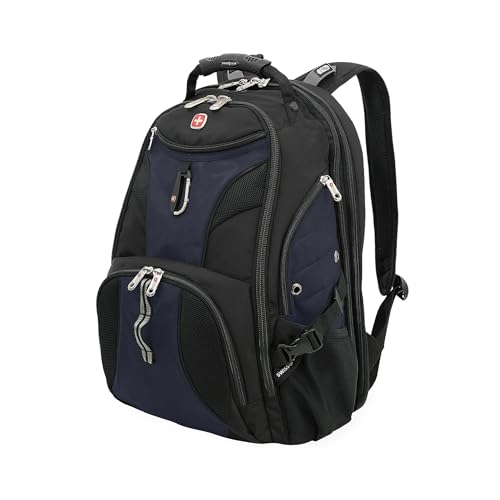
SwissGear 1900 ScanSmart Laptop Backpack
The SwissGear 1900 ScanSmart is the long-running benchmark for 17-inch laptop backpacks, and it earns that position with a layout built around airport travel. The laptop compartment is designed for most 17-inch laptops, and it unfolds flat so the bag can pass through security screening without removing the machine. A separate tablet pocket holds devices up to 10 inches, keeping a second screen away from the laptop.
Construction is rugged 1200D polyester, a dense weave that resists scuffs and sheds light rain. The interior is organized rather than cavernous: a main compartment for files and gear, a front organizer for small accessories, and side pockets for a water bottle. An RFID-blocking pocket protects cards, and the bag carries a 5-year warranty from the manufacturer, which is generous for this class.
This backpack suits commuters and frequent flyers who want a proven, no-nonsense bag for a large laptop. It is at its best on work trips and daily office commutes, where the lay-flat compartment and sensible organization matter more than maximum capacity. The caveats are its weight and its look: it is a substantial bag with a traditional business-travel appearance, so buyers who want a slim, minimal silhouette should look elsewhere. Owners of very thick 17.3-inch gaming laptops should also measure carefully, since the compartment is sized for most 17-inch machines rather than every oversized model.
MATEIN Extra Large 17 Inch Travel Laptop Backpack

MATEIN Extra Large 17 Inch Travel Laptop Backpack
The MATEIN Extra Large is the roomy value choice in this group, built for travelers who need to carry a 17-inch laptop plus several days of gear in one bag. The dedicated laptop compartment fits devices up to 17 inches, and the main compartment opens wide, from 90 to 180 degrees, so packing feels more like loading a small suitcase than stuffing a sack. A built-in USB charging port connects to a power bank kept in an internal pocket, and an anti-theft hidden pocket sits against the back panel for valuables.
Water-resistant, high-density polyester handles rain and daily wear, and the bag includes a luggage strap for sliding over a rolling suitcase handle. The capacity is generous for the class, which makes it a strong option for overnight trips and students carrying books alongside a laptop.
This backpack suits buyers who want maximum space for their money and travel often with a large laptop. It is less suited to minimalists: fully loaded, it is a big, heavy bag, and its boxy shape is more practical than stylish. The USB port is useful only if you carry a power bank, since none is included.
KROSER TSA Friendly Travel Laptop Backpack 17.3 Inch

KROSER TSA Friendly Travel Laptop Backpack 17.3 Inch
The KROSER TSA Friendly 17.3 Inch is a well-organized travel backpack that puts security and access first. The laptop compartment is sized for 17.3-inch machines, which covers the larger end of this size class, and it opens flat for checkpoint screening. RFID-blocking pockets protect cards and documents, and a built-in USB port lets you charge a phone from a power bank stored inside the bag.
The water-repellent fabric stands up to rain and daily use, and the layout includes a roomy main compartment, a front organizer panel, and a tablet pocket. The bag is designed as an everyday carry for work, college, and travel, with a structured shape that keeps its form when partially loaded. It is one of the more complete packages here in terms of features per bag, covering the common travel needs without pushing into the largest capacity class.
This backpack suits commuters, students, and business travelers who want a 17.3-inch fit with strong organization and travel features. It is a good middle ground between the compact SwissGear and the cavernous MATEIN. The caveats are the usual ones for a feature-rich bag: it is heavier than a simple daypack, and the USB port needs a power bank of your own to function.
Targus Drifter II Laptop Backpack

Targus Drifter II Laptop Backpack
The Targus Drifter II is the rugged workhorse of this group, a backpack built for professionals who carry a 17-inch laptop through rough daily use. The padded compartment fits laptops up to 17 inches, and the bag uses durable, water-resistant material with a reinforced base that stands up to being set down on hard floors and wet pavements. Multiple zippered compartments keep the laptop, files, and accessories separated, and the padded mesh back panel and ergonomic shoulder straps spread the load on long walks.
Inside, the layout is straightforward and practical: a large main compartment, a front workstation area for pens and small gear, and side pockets for a water bottle. The black and gray styling with restrained accents reads as professional without being dull, and the bag has been in production for years, which means its design has survived long exposure to real commutes.
This backpack suits buyers who value durability and a professional look over the latest travel gadgets, and it is a strong choice for daily office commutes, field work, and campus use. The caveats are that it lacks the lay-flat checkpoint design of the SwissGear and KROSER, and it has no built-in USB port, so travelers who prioritize fast airport screening or phone charging should weigh those omissions.
Everki Titan Checkpoint Friendly Laptop Backpack
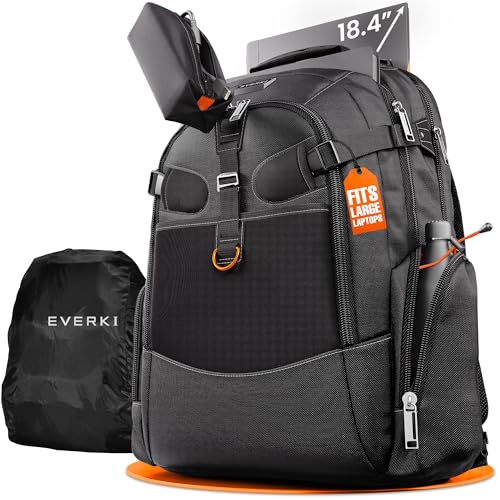
Everki Titan Checkpoint Friendly Laptop Backpack
The Everki Titan is the heavy-duty option for the largest laptops, a backpack designed around machines that other bags cannot hold. The rear laptop compartment fits devices up to 18.4 inches and folds open 180 degrees for checkpoint screening, so even a thick gaming laptop or mobile workstation travels without being removed from the bag. A felt-lined tablet pocket protects a second screen, and a removable accessory pouch keeps chargers and cables organized.
At 40 liters, the Titan is the largest bag in this group, with a main compartment, a front organizer, and a stash pocket built into the exterior. A 5-point balance strap system distributes the weight of a heavy load, and a water-resistant cover is included to protect the bag in rain. The construction is premium throughout, with dense nylon, strong zippers, and a lifetime warranty from the manufacturer.
This backpack suits owners of very large or heavy laptops who need maximum protection and capacity, including gamers and professionals with mobile workstations. It is the right choice when no other bag in this group is large enough. The caveats are size and weight: the Titan is a big, heavy backpack even before it is loaded, and it can feel oversized for a thin 17-inch laptop or a short commute.
Comparison Table
| Backpack | Laptop fit | Capacity | Key features | Access style |
|---|---|---|---|---|
| SwissGear 1900 ScanSmart | Up to 17 inches | Large | Lay-flat compartment, RFID pocket, tablet pocket | Checkpoint-friendly lay-flat |
| MATEIN Extra Large 17 Inch | Up to 17 inches | Extra large | Wide opening, USB port, anti-theft pocket | 90 to 180 degree opening |
| KROSER TSA Friendly 17.3 Inch | Up to 17.3 inches | Large | RFID pockets, USB port, tablet pocket | Checkpoint-friendly lay-flat |
| Targus Drifter II | Up to 17 inches | Large | Water-resistant base, mesh back panel | Top and front access |
| Everki Titan | Up to 18.4 inches | 40 liters | 180 degree opening, rain cover, accessory pouch | Checkpoint-friendly lay-flat |
Which One Is Right for You?
Begin with your laptop’s actual measurements. If you own a standard 17-inch laptop, the SwissGear, MATEIN, KROSER, and Targus all fit the class, and the choice comes down to how you travel. Frequent flyers should favor the SwissGear or the KROSER for their lay-flat compartments. Travelers who pack heavy should look at the MATEIN for its extra space and wide opening. Buyers who want a tough, professional daily bag should consider the Targus.
If your laptop is a thick 17.3-inch gaming machine, the KROSER’s 17.3-inch compartment is the safer first choice, and the Everki Titan is the fallback when nothing else is large enough. If you own an 18-inch class machine or a mobile workstation, the Titan is the only bag in this group built for that size, and its capacity and protection justify its bulk.
Then consider your daily routine. A short walk to an office favors a lighter, simpler bag. A long commute with a charger, notebook, and water bottle favors strong organization and padded straps. A trip with flights favors checkpoint-friendly access and a luggage strap. Match the bag to the hardest day you regularly have, not the easiest one, and measure your laptop before you order.
Frequently Asked Questions
Will these backpacks fit a 17.3-inch gaming laptop?
It depends on the model. The KROSER is sized for 17.3-inch machines, and the Everki Titan fits up to 18.4 inches, so those two are the safest choices for thick gaming laptops. The SwissGear, MATEIN, and Targus are sized for most 17-inch laptops, which covers many thin-and-light 17-inch models but not every oversized gaming chassis. Measure your laptop’s width, depth, and thickness, then compare those numbers with the compartment dimensions in the product specifications before ordering.
What is a checkpoint-friendly backpack?
A checkpoint-friendly backpack has a laptop compartment that unfolds flat, so the bag can pass through airport screening with the laptop still inside. The design separates the laptop section from the rest of the bag with a hinge or fold, allowing the scanner to see the machine clearly. It saves time at security and means one less item to juggle in the screening line. The SwissGear 1900 ScanSmart, the KROSER, and the Everki Titan all use this design.
Do I need a USB charging port on a backpack?
A USB port on a backpack is a pass-through cable that connects an external port to a power bank stored in an internal pocket. It is convenient for charging a phone while walking, but it only works if you carry a power bank, which is not included with any of these bags. If you already carry a power bank daily, the port is a genuine convenience. If you do not, it adds little, and you should choose based on fit, comfort, and capacity instead.
How do I protect a 17-inch laptop from rain?
Begin with water-resistant fabric and covered zippers, which handle light rain well. For heavier rain, use a dedicated rain cover, which the Everki Titan includes and which is available as an accessory for other bags. Keep the laptop in its padded compartment rather than an outer pocket, and set the bag down on its water-resistant base rather than on wet ground. If the bag does get soaked, let it dry fully before using the laptop compartment again.
Disclosure: As an Amazon Associate, we may earn from qualifying purchases.
More from Amazon
Programs that pair well with the guide above. Offers and eligibility are set by Amazon and may change.
Free shipping on eligible items, Prime Video and more. Eligible new members can start with a free trial.
Start a Prime free trialAd-free music streaming. Eligible new subscribers can start with a free trial.
Try Music Unlimited freeA Prime membership for ages 18-24 with a trial period. Eligibility is set by Amazon.
See Prime for Young AdultsAudiobooks and podcasts to listen to on the go. Eligible new members can start with a free trial.
Try Audible freeAs an Amazon Associate we earn from qualifying purchases.



Write Your Review
No reviews yet. Be the first to share your experience!