

Key takeaways
- Compare the 5 best small office printers: fast mono lasers, a color LED all-in-one, and a supertank inkjet, with specs, trade-offs, and live-check tips.
Choosing a printer for a small office is a decision about workflow, not raw speed. A machine that prints fast but jams on two-sided documents, drops the office Wi-Fi, or refuses third-party toner will cost more in lost time than any headline speed figure saves. The real question is how the printer fits the way a small team actually works: shared documents, scanned contracts, invoices, and the occasional color chart.
This guide is for small business owners, office managers, and home-office workers who need an all-in-one that prints, copies, scans, and faxes. Every model below is an all-in-one with an automatic document feeder, automatic duplex printing, and network connectivity, chosen from Amazon titles and listing specs. Four are lasers built for volume; the fifth is a supertank inkjet for offices that print in color without paying laser cartridge prices.
Quick Picks
As an Amazon Associate we earn from qualifying purchases
| Product | Best for | Key spec from title |
|---|---|---|
| Brother MFC-L2820DW | A tight office corner with mostly black-and-white printing | Mono laser, up to 34 ppm, 250-sheet tray |
| Brother MFC-L3780CDW | A small team that needs color without a true laser price | Color LED laser, up to 31 ppm, single-pass duplex scan |
| HP LaserJet Pro MFP 4101fdw | Heavy daily document volume on a shared network | Mono laser, up to 42 ppm letter, 80,000-page duty cycle |
| Canon imageCLASS MF465dw II | Fast mono printing with a large touchscreen | Mono laser, 42 ppm, 5-inch color touchscreen |
| Epson EcoTank ET-4850 White | Color printing with very low running ink cost | Supertank inkjet, up to 15.5 ppm black, 2 years of ink included |
How to Choose
Match the engine to your mix of documents
Laser and supertank inkjet serve different offices. Mono lasers print crisp text fast and sit idle for weeks without clogging, which suits invoices, contracts, and forms. Color LED machines like the Brother MFC-L3780CDW add charts and presentations without a true laser engine. A supertank inkjet such as the Epson ET-4850 prints color cheaply per page but runs far slower. Count how much of your output is black text versus color before choosing an engine, because the wrong one turns every print job into a compromise.
Check the feeder and duplexing, not just the speed
A headline speed figure means little if the machine cannot feed a stack of pages by itself. Every printer in this guide has a 50-sheet automatic document feeder and automatic two-sided printing, but the details differ: the Brother L3780CDW and the Canon MF465dw II scan both sides of a page in a single pass, while others take two passes. If your office scans contracts or copies double-sided originals daily, single-pass duplex scanning saves real minutes. Also confirm the paper tray size; a 250-sheet tray suits a small team, while a 100-sheet tray empties fast.
Count the connections your office actually uses
A shared office printer needs more than a USB cable. Look for dual-band Wi-Fi and Ethernet so every desk can reach the machine, plus mobile printing for phones and tablets. The Brother models add NFC for tap-to-print, and the HP and Canon machines offer a front USB port for printing straight from a flash drive. If the printer will sit in a room without a wired network drop, strong Wi-Fi matters more than any other feature. Check that the machine supports the devices your team already owns before buying.
Plan for toner, ink, and the fine print
Running cost decides whether a cheap printer stays cheap. Mono lasers use toner cartridges with stated page yields, and high-capacity versions cut the cost per page; the HP 148X cartridge, for example, is rated for far more pages than the standard 148A. Supertank inkjets ship with bottles instead of cartridges and can include up to two years of ink. Also read the fine print: HP Dynamic Security firmware can block non-HP cartridges on the LaserJet Pro 4101fdw, and some models push subscription trials at setup. Know the consumable before you commit.
The 5 Best Options
Brother MFC-L2820DW

The Brother MFC-L2820DW is the compact mono laser for a small office that prints mostly black text. It handles printing, copying, scanning, and faxing from a footprint that fits a crowded desk or a small cabinet, and its 250-sheet tray holds enough paper for a day of ordinary office work. Dual-band Wi-Fi and Ethernet make it easy to share across a few desks, and automatic duplex printing keeps paper use down on multi-page documents. It is the straightforward choice when color is rarely needed.
Specs
- Mono laser all-in-one: print, copy, scan, fax
- Up to 34 ppm black and white
- Automatic duplex printing; 50-sheet automatic document feeder
- 250-sheet paper tray; 1200 x 1200 dpi
- Dual-band Wi-Fi, Ethernet, USB; works with Alexa
- Uses TN830 and TN830XL toner; ENERGY STAR and EPEAT Silver rated
Best for: A small office printing mostly black-and-white documents from a tight space.
Watch out for: Listing crawls contradict each other on availability, with some showing no offers and others showing strong recent buying activity, so check live availability before ordering. Note that one roundup lists 36 ppm; the Amazon listing says 34 ppm.
Brother MFC-L3780CDW

The Brother MFC-L3780CDW is the color option for a small team that needs charts, presentations, and the occasional color document alongside everyday black text. It uses a color LED engine that Brother markets as laser quality output, printing up to 31 ppm in both color and black. Its single-pass duplex copy and scan handle double-sided originals in one pass, and the multipurpose tray takes envelopes and heavier media. With a recommended monthly volume up to 4,000 pages, it suits a busy shared office better than a basic home printer.
Specs
- Color LED all-in-one: print, copy, scan, fax; laser quality output
- Up to 31 ppm in color and black; single-pass duplex copy and scan
- 50-sheet automatic document feeder; 250-sheet tray plus 30-sheet multipurpose tray
- Dual-band Wi-Fi, Gigabit Ethernet, NFC; color touchscreen
- 2400 x 600 dpi class; duty cycle up to 50,000 pages per month
- Uses TN229, TN229XL, and TN229XXL toner
Best for: A small team that needs color documents and fast double-sided scanning.
Watch out for: Sources disagree on the touchscreen size, with the listing description saying 3.5 inches and one spec page saying 3.7 inches, so confirm the live listing figure. Avoid Renewed listings and accessory bundles under different ASINs.
HP LaserJet Pro MFP 4101fdw

The HP LaserJet Pro MFP 4101fdw is the workhorse for offices that print a lot of black-and-white documents every day. At up to 42 ppm on letter paper, it is one of the fastest mono machines here, and its duty cycle reaches up to 80,000 pages per month with a recommended range of 750 to 4,000 pages. Single-pass two-sided scanning through the 50-sheet feeder keeps multi-page jobs moving, and the combination of Wi-Fi, Ethernet, USB, and a front USB port covers nearly every connection a shared office needs. It is built for volume first.
Specs
- Mono laser all-in-one: print, copy, scan, fax
- Up to 42 ppm letter, 40 ppm A4; automatic duplex printing as default
- 50-sheet automatic document feeder with single-pass two-sided scanning
- 100-sheet multipurpose tray plus 250-sheet tray, 350 standard, 900 maximum with optional tray
- Wi-Fi, Ethernet, USB, front USB port; 2.7-inch color touchscreen
- 1200 x 1200 dpi; uses HP 148A and 148X toner
Best for: A busy office that needs fast, high-volume black-and-white printing every day.
Watch out for: HP Dynamic Security firmware can block non-HP cartridges on this model, so budget for genuine HP toner. This is the plain fdw model; the HP+ fdwe version requires an HP+ account. This model also has the weakest freshness signal in this guide, so verify live stock before buying.
Canon imageCLASS MF465dw II
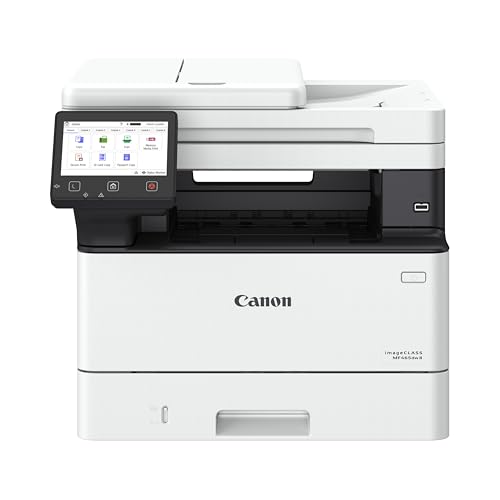
The Canon imageCLASS MF465dw II is the fast mono laser with the most modern feel in this guide. It prints up to 42 ppm with a first page out in 4.9 seconds, and its 5-inch customizable color touchscreen makes copying, scanning, and faxing easy to run without a computer. The single-pass duplex feeder scans both sides of a page at once, and the paper capacity expands with an optional 550-sheet tray for growing offices. A three-year limited warranty backs the machine, which is longer than most rivals offer.
Specs
- Mono laser all-in-one: print, copy, scan, fax
- Up to 42 ppm; 4.9-second first print out
- Automatic duplex printing; 50-sheet single-pass duplex automatic document feeder
- 250-sheet cassette plus 100-sheet multipurpose tray; optional 550-sheet tray
- Wi-Fi, Ethernet, mobile and USB flash drive printing; 5-inch customizable color touchscreen
- Uses Toner 070 standard and 070 High Capacity; 3-year limited warranty
Best for: An office that wants fast mono printing with a large, easy touchscreen.
Watch out for: Buy the II refresh under this ASIN; the original MF465dw is a different listing with thin stock. Confirm the live listing shows the II model before ordering.
Epson EcoTank ET-4850 White

The Epson EcoTank ET-4850 White is the only inkjet in this guide, and its case is running cost rather than speed. Instead of cartridges, it uses refillable ink tanks fed by bottles, with up to two years of ink included per the listing, so an office that prints a steady stream of color documents spends far less on ink over time. It still covers the small-office basics: automatic duplex printing, an automatic document feeder, Wi-Fi, and Ethernet. At up to 15.5 ppm in black, it is by far the slowest machine here, so it suits offices that value low ink cost over print speed.
Specs
- Color inkjet supertank all-in-one: print, copy, scan, fax
- Up to 15.5 ppm black, 8.5 ppm color; automatic duplex printing
- Automatic document feeder; 250-sheet paper tray
- Wi-Fi and Ethernet; refillable ink tanks
- Uses 502 ink bottles: 127 mL black, 70 mL each cyan, magenta, and yellow
- Up to 2 years of ink included per listing; 14.8 lb
Best for: A small office that prints color regularly and wants the lowest ink cost per page.
Watch out for: This is the White variant; the Black model is a different ASIN, so do not mix their listings. The freshest stock signals for this model are months old, so check live availability before buying.
Which One Fits Your Situation
A tiny office that prints mostly black text
Pick the Brother MFC-L2820DW. Its compact size fits a crowded desk, its 34 ppm speed handles everyday documents, and its 250-sheet tray covers a small team without constant refills. The fax and scan functions cover the rest of the basics, and the mono laser engine means no color cartridge costs when color is rarely needed. It is the simplest fit for a tight space.
A shared office that needs color every day
Pick the Brother MFC-L3780CDW. Its color LED engine prints charts and presentations at 31 ppm in both color and black, and single-pass duplex scanning keeps double-sided originals moving fast. The multipurpose tray handles envelopes and heavier paper, and the high-capacity toner options keep running costs in check. It is the color workhorse for a small team.
A high-volume office printing all day
Pick the HP LaserJet Pro MFP 4101fdw. Its 42 ppm letter speed and 80,000-page monthly duty cycle are built for heavy daily use, and the 350-sheet standard capacity expands to 900 sheets with an optional tray. The front USB port and full network options make it easy to share. Just remember the Dynamic Security warning and budget for genuine HP toner.
An office that wants color cheaply, not quickly
Pick the Epson EcoTank ET-4850 White. Its refillable tanks and included ink keep color printing costs low over months of steady use, and it still offers duplex printing, a document feeder, and network connections. Accept the 15.5 ppm black speed as the trade for ink savings. If speed matters more than ink cost, choose one of the lasers instead.
Common Mistakes
- Buying on headline speed alone without checking whether the feeder, duplexing, and tray size match the office workload.
- Assuming a color LED machine is a true laser printer; the Brother L3780CDW uses an LED engine, which matters for how it handles certain media.
- Ordering the wrong variant: the HP+ fdwe, the original Canon MF465dw, the Epson ET-4850 Black, or a Renewed listing are all different ASINs from the models in this guide.
- Ignoring Dynamic Security on the HP 4101fdw and discovering later that third-party cartridges are blocked.
- Expecting supertank speed to match laser speed; the Epson ET-4850 trades print speed for low ink cost, and that trade is only worth it for color-heavy offices.
Frequently Asked Questions
Is a mono laser enough for a small office?
For most small offices, yes. Invoices, contracts, forms, and internal documents are almost entirely black text, and a mono laser prints them fast, sharply, and cheaply per page. Color only matters if the office regularly prints charts, presentations, or client-facing material. If color appears once a month, a mono laser plus an occasional print shop visit costs less than a color machine.
How fast should a small office printer be?
A mono laser printing 31 to 42 ppm covers a small team comfortably, since most office jobs are a few pages each and the machine spends more time idle than printing. The Epson supertank at 15.5 ppm black is noticeably slower, so it fits offices that print in smaller batches. Feeder capacity and duplex speed usually matter more than a few extra pages per minute.
Do I need a printer with a document feeder?
Yes, if the office scans or copies multi-page documents. A 50-sheet automatic document feeder lets the machine feed a stack by itself, and single-pass duplex scanning handles double-sided pages in one pass. Without a feeder, every page must be placed on the glass by hand, which turns a ten-page contract into a long chore.
Can I use third-party toner or ink in these printers?
It depends on the model. Brother and Canon machines generally accept third-party consumables, though quality varies. The HP LaserJet Pro 4101fdw uses Dynamic Security firmware that can block non-HP cartridges, so plan on genuine HP toner for that model. Epson supertank printers use bottled ink, and third-party bottles exist, but warranty and print quality can suffer if the ink is poor.
More from Amazon
Programs that pair well with the guide above. Offers and eligibility are set by Amazon and may change.
Free shipping on eligible items, Prime Video and more. Eligible new members can start with a free trial.
Start a Prime free trialAd-free music streaming. Eligible new subscribers can start with a free trial.
Try Music Unlimited freeA Prime membership for ages 18-24 with a trial period. Eligibility is set by Amazon.
See Prime for Young AdultsAudiobooks and podcasts to listen to on the go. Eligible new members can start with a free trial.
Try Audible freeAs an Amazon Associate we earn from qualifying purchases.


Write Your Review
No reviews yet. Be the first to share your experience!