

Key takeaways
- Who it suits: competitive FPS players who want the shortest possible response and per-key control.
- Pros: adjustable actuation, Rapid Trigger, 8,000 Hz polling, tenkeyless layout leaves more mouse space.
- Cons: wired only, switches are not interchangeable with standard MX-style switches, and the board sits in the premium tier.
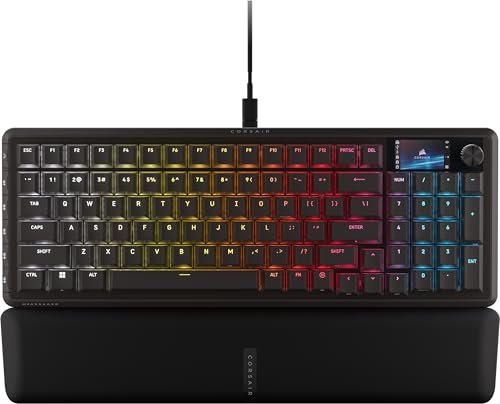
The best Corsair gaming keyboard for most players in 2026 is the K70 Pro TKL, a tenkeyless board with Hall-effect MGX Hyperdrive switches, Rapid Trigger and 8,000 Hz polling. If you want a full-size layout with the same magnetic switch technology, the K70 Max is the pick. For wireless freedom the K65 Plus Wireless is the best all-round choice, and the K55 Core is the sensible budget option. This guide compares seven current Corsair boards by switch type, layout, connectivity and who each one actually suits, using Corsair’s published specifications and the review data attributed in each section.
Our top picks


As an Amazon Associate we earn from qualifying purchases at no extra cost to you.
Quick comparison of the best Corsair gaming keyboards
| Pick | Best for | Layout | Switch type | Connection | Price tier |
|---|---|---|---|---|---|
| K70 Pro TKL | Best overall, competitive play | Tenkeyless | Hall-effect magnetic (MGX Hyperdrive) | Wired | Premium |
| K70 Max | Best full-size | Full-size | Magnetic MGX, linear | Wired | Premium |
| K65 Plus Wireless | Best wireless | 75% | MLX Red linear, hot-swap | 2.4 GHz, Bluetooth, USB | Mid-range |
| K65 Pro Mini | Best compact wired | 65% | OPX optical-mechanical | Wired | Mid-range |
| K70 Pro Mini Wireless | Best 60% and hot-swap | 60% | Cherry MX, hot-swap | 2.4 GHz, Bluetooth, USB | Premium |
| K70 Core TKL Wireless | Best value mechanical | Tenkeyless | MLX Red v2 linear, pre-lubed | 2.4 GHz, Bluetooth, USB | Mid-range |
| K55 Core RGB | Best budget | Full-size | Membrane | Wired | Budget |
Corsair sells boards under several naming schemes, which confuses shoppers. In short, “K70” usually means a larger or premium board, “K65” means a compact one, “K55” means membrane and budget, “Pro” marks the feature-rich revisions, and “Core” marks cost-reduced mechanical boards. Magnetic and optical designs are newer and trade a bit of tactile character for speed and adjustable actuation.
Best overall: Corsair K70 Pro TKL
The K70 Pro TKL is Corsair’s current Hall-effect performance board in a tenkeyless layout. It uses MGX Hyperdrive magnetic switches that let you set the actuation point per key, and it supports Rapid Trigger, SOCD handling (FlashTap) and a dedicated game mode, all at up to 8,000 Hz polling. The switches are rated for 150 million presses. Sources differ on the exact actuation range: Corsair’s own listing gives 0.4 mm to 3.6 mm, while some retail pages round it to roughly 0.1 mm to 4.0 mm. The board launched on October 31, 2024.
Hall-effect switches measure the distance a magnet travels, so the keyboard can register a press and a release at any point in the stroke. In shooters this allows you to set a very short actuation distance for fast movement keys, then turn Rapid Trigger on so a key resets the moment you start releasing it. This matters for counter-strafing in tactical shooters, where the time between letting go of A and tapping D decides the shot. Reviewers at PC Gamer and TechRadar describe the stock linear feel as smooth, with a typing sound that is clean rather than hollow.
- Who it suits: competitive FPS players who want the shortest possible response and per-key control.
- Pros: adjustable actuation, Rapid Trigger, 8,000 Hz polling, tenkeyless layout leaves more mouse space.
- Cons: wired only, switches are not interchangeable with standard MX-style switches, and the board sits in the premium tier.
Best full-size: Corsair K70 Max
The K70 Max is the full-size magnetic board in the lineup. Corsair’s specification lists adjustable MGX switches with an actuation range from 0.4 mm to 3.6 mm in 0.1 mm steps, a linear 45 g force, a 2.0 mm default actuation point and 4.0 mm total travel. It supports Rapid Trigger, dual-point actuation (two actions on one key press) and up to 8,000 Hz polling.
The build is heavy by design. It has an aluminum frame, 1.5 mm double-shot PBT keycaps, two layers of sound dampening, 8 MB of onboard storage for up to 50 profiles and a tournament switch. The footprint is 442 x 166 x 39.2 mm and it weighs about 1,390 g with a wrist rest included. That weight keeps the board planted during aggressive play but makes it less portable.
- Who it suits: players who use a number pad, macros or a lot of keybinds and still want magnetic speed.
- Pros: full layout, strong build, rich onboard memory, dual-point actuation.
- Cons: large desk footprint, wired only, and a high price tier.
Best wireless: Corsair K65 Plus Wireless
The K65 Plus Wireless is a 75% board released on February 20, 2024. It comes with factory pre-lubed MLX Red linear switches and supports three connection modes: Corsair’s SLIPSTREAM 2.4 GHz, Bluetooth and wired USB. It is one of the few Corsair boards with true hot-swap sockets, so you can replace switches without soldering. Corsair rates battery life in the hundreds of hours with lighting off, and the number falls sharply with lighting on.
The 75% layout keeps the function row and arrow keys while saving horizontal space. The pre-lubed linear switches give a smoother, quieter keystroke than typical factory-fresh gaming switches. It also exists in special editions, including a tactile MLX Fusion version and a Mac-focused version.
- Who it suits: players who want a clean desk, a single keyboard for gaming and typing, and the option to modify switches later.
- Pros: tri-mode connectivity, hot-swap sockets, long battery life, compact layout with function row.
- Cons: wireless polling is lower than the magnetic wired boards, and the board is not built around Rapid Trigger.
Best compact wired: Corsair K65 Pro Mini
The K65 Pro Mini is a 65% board with 68 keys and OPX optical-mechanical switches. According to Corsair, the switches have a 45 g actuation force, a 1.0 mm actuation distance, 3.2 mm total travel and a 150 million keystroke rating. It supports N-key rollover, up to 8,000 Hz polling and up to 50 onboard profiles. The case is anodized aluminum, the keycaps are double-shot PBT, there are two layers of sound dampening and the USB-C cable is detachable.
The board measures 315 x 105.4 x 35.8 mm and weighs about 609 g. It is not hot-swappable, so you are tied to the stock OPX switches. GamesRadar’s review described the board as built for speed, and the 1.0 mm actuation point is among the shortest of any Corsair board without magnetic technology.
- Who it suits: low-sensitivity mouse players who need desk space and a fast, fixed actuation point.
- Pros: very short actuation, compact aluminum build, detachable cable.
- Cons: wired only, no hot-swap, no adjustable actuation.
Best 60% and hot-swap: Corsair K70 Pro Mini Wireless
The K70 Pro Mini Wireless is a 60% board that ships with Cherry MX RGB Red or Cherry MX Speed Silver switches in hot-swappable three-pin sockets. It supports 8,000 Hz hyper polling over a wired connection and 4,000 Hz key scanning. Review sources differ on the wireless polling ceiling, with Corsair’s SLIPSTREAM mode rated for 2,000 Hz in some reports and lower in others, so treat the wired connection as the true low-latency mode.
Because it drops dedicated arrow keys and the function row into layers, a 60% board has a learning curve. Its advantage is maximum desk space and a footprint that fits comfortably in a backpack. The standard switch sockets mean you can try tactile or silent switches from other brands without replacing the keyboard.
- Who it suits: enthusiasts and travelers who want a compact board with real switch choice.
- Pros: tiny footprint, standard MX-style hot-swap, tri-mode connectivity.
- Cons: no arrow keys without a layer, a premium price tier, and layers can frustrate players who rely on many keybinds.
Best value mechanical: Corsair K70 Core TKL Wireless
The K70 Core TKL Wireless gives you a mechanical tenkeyless board with pre-lubricated CORSAIR MLX Red v2 linear switches, according to Corsair’s product page. TweakTown lists a 2.0 mm actuation point and an 80 million press rating, with 1,000 Hz polling. It supports 2.4 GHz and Bluetooth in the wireless version, and a wired K70 Core TKL is also available if you prefer a lower cost.
It is not as fast as the magnetic boards, but 1,000 Hz is plenty for most players. TweakTown called the wired version great value for all gamers, and the pre-lubed switches sound better than the typical budget mechanical board.
- Who it suits: gamers who want a mechanical feel and a tidy tenkeyless layout without paying for magnetic technology.
- Pros: pre-lubed linear switches, wireless option, sensible layout.
- Cons: no adjustable actuation, no Rapid Trigger, and fewer premium touches than the aluminum-framed boards above.
Best budget: Corsair K55 Core RGB
The K55 Core RGB is a full-size membrane board with 110 keys, 10-zone RGB lighting in 16.8 million colors, dedicated media buttons, a Win Lock key and brightness buttons. Corsair rates it for 300 ml of spill resistance and 1,000 Hz polling. It uses ABS keycaps, a plastic frame and a non-detachable cable, and it measures 451.35 x 141.15 x 35 mm at about 752 g. A tenkeyless K55 Core TKL is also available.
A membrane board feels softer and quieter than a mechanical one. Its main purpose is to be affordable while still working with Corsair’s iCUE software for lighting and macros. If you play casually, type in shared spaces, or need a spare keyboard, it does the job.
- Who it suits: students, casual players and secondary desks.
- Pros: very low price tier, spill resistance, quiet.
- Cons: membrane feel, ABS keycaps, no switch replacement and limited durability compared with mechanical boards.
What about the K100 Air and other Corsair boards?
The K100 Air Wireless is Corsair’s low-profile wireless full-size model, built around Cherry MX Ultra Low Profile tactile switches and not hot-swappable. It suits typists who prefer a slim, laptop-like feel. The K100 RGB uses OPX optical-mechanical switches with 1.0 mm actuation and is Corsair’s older flagship full-size board. Both are worth considering if you find them discounted, but the magnetic K70 Max and K70 Pro TKL have taken over as the performance recommendations.
Layout guide: full-size, tenkeyless, 75%, 65% and 60%
Layout shapes comfort more than any switch spec. A full-size board such as the K70 Max or K55 Core is about 440 to 450 mm wide, which pushes a right-handed mouse further from your body. Tenkeyless boards like the K70 Pro TKL and K70 Core TKL remove the number pad and gain roughly 100 mm of mouse travel. The 75% K65 Plus Wireless keeps the function row and arrows in a tight block, the 65% K65 Pro Mini drops the function row but keeps arrows, and the 60% K70 Pro Mini Wireless removes both. If you play low-sensitivity shooters with large arm sweeps, every centimeter of extra space helps, and the compact formats are worth the learning curve. If you work from the same desk, keep the function row and arrow keys, because spreadsheets and video editing rely on them.
Which Corsair keyboard lasts longest?
Durability ratings differ by switch family. Corsair rates the MGX and OPX designs at 150 million presses, the Cherry MX switches in the K70 Pro Mini Wireless at a similar tier set by Cherry, and the MLX Red v2 switches in the K70 Core TKL at 80 million. All of these exceed what a typical player produces in a decade. In practice, keycap wear, stabilizer rattle and battery capacity on wireless boards fail well before the switches do. Hot-swap sockets extend the useful life because a failed switch becomes a quick replacement rather than a repair.
How to choose a Corsair gaming keyboard
Decision matrix by situation
| Your situation | Best choice | Reason |
|---|---|---|
| Competitive FPS, wired, wants Rapid Trigger | K70 Pro TKL | Adjustable Hall-effect actuation at 8,000 Hz |
| Needs a number pad and macros | K70 Max | Full-size layout with magnetic switches |
| Wants to go wireless and change switches later | K65 Plus Wireless | Tri-mode with hot-swap sockets |
| Small desk, low mouse sensitivity | K65 Pro Mini | 65% layout with 1.0 mm actuation |
| Travels often, wants tiny footprint | K70 Pro Mini Wireless | 60% layout, wireless, hot-swap |
| Wants a mechanical board at a mid-range price | K70 Core TKL Wireless | Pre-lubed linear switches |
| Tight budget | K55 Core RGB | Membrane board with iCUE support |
Switch type in plain terms
Mechanical switches (Cherry MX and Corsair’s MLX) register a press when metal contacts touch at a fixed point in the stroke. Optical switches (Corsair OPX) use a beam of light, which removes contact debounce delay and allows a very short actuation distance. Magnetic or Hall-effect switches (Corsair MGX) measure travel continuously, so the actuation and reset points are adjustable and Rapid Trigger becomes possible. Membrane switches use a rubber dome sheet and are the quietest and cheapest.
Understand polling rate honestly
A polling rate of 8,000 Hz means the keyboard reports to the computer eight times per millisecond. The gain over 1,000 Hz is small for most players, and the higher rate uses more processor time and drains wireless batteries faster. It matters most when you play at very high frame rates on a fast display. For everyone else, actuation distance, Rapid Trigger and the feel of the switch are more noticeable than polling.
Worked example: choosing an actuation setting
Suppose you play a tactical shooter with a default actuation of 2.0 mm on a board with 4.0 mm of travel. Moving your finger from fully released to the actuation point takes half the stroke. If you lower the actuation to 1.0 mm, that stroke shortens by half, and with Rapid Trigger set to a 0.3 mm reset, the key releases after only 0.3 mm of upward movement instead of returning past 2.0 mm. At a typical finger speed, that saves a few milliseconds per key change, which is small in absolute terms but repeated hundreds of times per round. The trade-off is accidental presses, so many players use a 1.2 to 1.5 mm actuation on movement keys and keep 2.0 mm or deeper on keys like reload or crouch.
Ownership realities
- Keycaps wear first. ABS caps develop shine within a year or two of heavy use, while PBT caps resist it. The K70 Max and K65 Pro Mini ship with PBT caps.
- Software is required for advanced features. Rapid Trigger, actuation adjustment and profiles are controlled through Corsair’s iCUE software, so plan to install it.
- Battery life drops with lighting and polling. Wireless boards last far longer with RGB off and the lower polling rate.
- Cleaning is easier on hot-swap boards. You can pull the keycaps and switches to remove debris. Non-hot-swap boards need a keycap puller, compressed air and a soft brush.
Common mistakes when buying a Corsair keyboard
- Buying a magnetic board and never turning on Rapid Trigger or lowering the actuation distance.
- Choosing a 60% layout without checking whether your games need keys that live on the hidden layer.
- Assuming that every wireless Corsair board supports 8,000 Hz over the wireless link.
- Expecting hot-swap sockets on every K-series board. Only certain models have them.
- Paying for premium features such as an aluminum frame when a lighter, cheaper mechanical board would do.
Frequently Asked Questions
What is the best Corsair gaming keyboard overall?
The K70 Pro TKL is the best overall pick for gaming thanks to its adjustable Hall-effect switches, Rapid Trigger and 8,000 Hz polling. If you need a full-size layout, the K70 Max uses the same style of switch in a larger body.
Which Corsair keyboard is best for wireless gaming?
The K65 Plus Wireless is the best all-round wireless choice because it supports 2.4 GHz, Bluetooth and USB, uses pre-lubed MLX Red switches and has hot-swap sockets. For a smaller footprint, the K70 Pro Mini Wireless is the 60% alternative.
Are Corsair magnetic keyboards worth it?
They are worth it if you play fast-paced competitive games and will use the adjustable actuation and Rapid Trigger. For casual play and typing, a cheaper board such as the K70 Core TKL Wireless feels just as good for most people.
Do I need Corsair iCUE software?
You can use the keyboard without it for basic typing, but features such as RGB effects, macros, profiles and adjustable actuation are managed in iCUE. Profiles can be saved to the keyboard’s onboard memory, so the software does not have to run all the time.
Is a membrane keyboard like the K55 Core good for gaming?
It works for casual gaming and it is quiet and spill resistant. Players who want faster response and longer durability should step up to a mechanical, optical or magnetic board.





Write Your Review
No reviews yet. Be the first to share your experience!