

Our Top Picks
The honest headline: the best AM5 motherboard under $300 in November 2026 is the ASRock X870E Challenger WiFi, at $229.99. A full X870E board — the flagship AM5 chipset — with a 20+2+1 phase VRM on 110A stages, dual USB4, 5GbE LAN, Wi-Fi 7, and four M.2 slots. Tom’s Hardware gave it an Editor’s Choice; TweakTown scored it 95%.
At $100, you buy a board. At $200, you buy a board with Wi-Fi and a strong VRM. At $300, you are buying the flagship chipset, USB4, and 5GbE — not speed. The winner costs less than the boards that lost last time: the MSI MAG X870 Tomahawk WiFi, which missed the $200 budget at $229.99 last guide, now costs $219.99.
Every price here is a November 2026 snapshot from Amazon US or an authorized retailer — check the current price on Amazon before you buy.
Our top picks
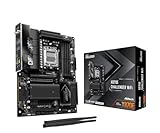
Best for: A builder who wants the flagship chipset, USB4, and the strongest VRM without paying flagship money
Check price on Amazon
Best for: A gaming PC where USB4 and Wi-Fi 7 matter and the second Gen5 drive does not
Check price on Amazon
Best for: A gaming PC that needs two fast SSDs but will never plug in a USB4 drive
Check price on Amazon
Best for: A builder who wants X870E and MSI’s BIOS and does not plan heavy overclocking
Check price on Amazon
Best for: A video editing or storage-heavy build that needs two Gen5 SSDs and the best Wi-Fi 7
Check price on AmazonThe Honest Price Ladder
| Budget | What it actually buys in November 2026 |
|---|---|
| $149.99 | Gigabyte B650 AORUS Elite AX — our $200-guide top pick: 14-phase VRM, Wi-Fi 6E, 2.5GbE |
| $209.99 | MSI MAG B850 Tomahawk MAX WiFi — the best B850 board in this guide |
| $219.99 | MSI MAG X870 Tomahawk WiFi — the cheapest real X870 board, down $10 from last batch |
| $229.99 | ASRock X870E Challenger WiFi — the top pick: flagship X870E, USB4, 5GbE |
| $239.99 | MSI X870E Gaming Plus WiFi — the cheapest MSI X870E, on sale at Amazon |
| $269.99 | MSI MAG X870E Tomahawk WiFi — the premium X870E pick |
| $279.99 | ASUS TUF Gaming X870-Plus WiFi — also fits |
Honest platform math: a Ryzen 5 9600X ($179.99) plus the Challenger ($229.99) plus the cheapest 16GB DDR5 kit ($249) costs $658.98 before the graphics card. With 32GB of DDR5-6000 ($429.97) and a Crucial P3 Plus 1TB ($157.41), it is $997.35; the AM4 equivalent (5700X, B550M-HDV, 32GB DDR4) is $420.99 total.
Quick Picks
| Board | Chipset | Best For | VRM / USB4 | M.2 | Price Note (Nov 2026) |
|---|---|---|---|---|---|
| ASRock X870E Challenger WiFi | X870E | Best overall | 20+2+1, 110A / dual USB4 | 4 | $229.99 |
| MSI MAG X870 Tomahawk WiFi | X870 | Best X870 value | 14+2+1 / dual USB4 | 4 | $219.99 |
| MSI MAG B850 Tomahawk MAX WiFi | B850 | Best B850 | 14+2+1, 80A / none | 4 | $209.99 |
| MSI X870E Gaming Plus WiFi | X870E | Best second X870E | 12+2+1, 60A / dual USB4 | 3 | $239.99 |
| MSI MAG X870E Tomahawk WiFi | X870E | Best premium X870E | 14+2+1, 80A / dual USB4 | 4 | $269.99 |
How to Choose an AM5 Motherboard Under $300
X870 vs X870E: one Gen5 M.2 slot and a few lanes
X870 and X870E share the same mandatory features: a PCIe 5.0 x16 graphics slot, a PCIe 5.0 M.2 slot, USB4, and Wi-Fi 7. X870E adds a second PCIe 5.0 M.2 slot and more chipset lanes. One Gen5 drive: X870 is enough. Two: X870E earns its keep.
B850 is still the value chipset — X870E is the features chipset
B850 makes the Gen5 graphics slot and one Gen5 M.2 slot mandatory, supports overclocking and PBO, and takes every Ryzen 7000, 8000, and 9000 chip. What it does not give you is USB4. At $209.99, the B850 Tomahawk MAX is $20 cheaper than the cheapest X870 board and $60 cheaper than the cheapest X870E board. No USB4 drive or dock: buy B850. Fastest external storage: buy X870E.
The VRM is the real spec sheet
Every board here runs any Ryzen 9 at stock with PBO enabled. What changes at $300 is the margin: the Challenger’s 20+2+1 phase design on 110A stages is the strongest here — TweakTown measured its VRM at 57°C under a 20-minute Cinebench loop. The X870E Gaming Plus has the weakest VRM here at 12+2+1 with 60A stages — fine at stock, skip it for heavy overclocking. AM5 is DDR5-only: 16GB is $249, 32GB of DDR5-6000 is $429.97. Buy two EXPO sticks, never one.
1. ASRock X870E Challenger WiFi — Best Overall
Key specs: X870E, ATX, 20+2+1 phase VRM (110A SPS), DDR5 to 8200+ MHz (OC), PCIe 5.0 x16, 4x M.2 (1x Gen5), dual USB4, 5GbE, Wi-Fi 7 + BT 5.4, ALC4082 audio.
The X870E Challenger WiFi is the best AM5 motherboard under $300 because it is a flagship-chipset board at a mainstream price, with the strongest VRM in this guide (20+2+1 phases, 110A stages). Tom’s Hardware gave it an Editor’s Choice (September 28, 2026); TweakTown scored it 95%. At $229.99 on Amazon (November 16, 2026), it is $70 under budget — even at the $255.99 one catalog tracker reads, it still fits by $44.01.
Pros: Flagship X870E at $229.99; strongest VRM here (20+2+1, 110A); dual USB4, 5GbE, best onboard audio (ALC4082).
Cons: Wi-Fi 7 is limited to 160 MHz channels; only one M.2 slot is Gen5; the BIOS needs polish; memory benchmarks ran average to below average.
Best for: A builder who wants the flagship chipset, USB4, and the strongest VRM without paying flagship money.
2. MSI MAG X870 Tomahawk WiFi — Best X870 Value
Key specs: X870, ATX, 14+2+1 phase VRM, DDR5 to 8400+ MHz (OC), PCIe 5.0 x16, 4x M.2 (1x Gen5), dual USB4, 5G LAN, Wi-Fi 7 + BT 5.4, 8-layer PCB.
The MAG X870 Tomahawk WiFi is the best X870 board under $300 — and it comes with a correction to our last guide. In batch 127 it cost $229.99 and missed the $200 budget. On November 17, 2026 it costs $219.99 on Amazon, the lowest price in 90 days (SmartValueLab). You get dual USB4, Wi-Fi 7, 5G LAN, and a Gen5 graphics slot and M.2 slot on an 8-layer PCB. It is $10 cheaper than the top pick and $50 cheaper than the X870E Tomahawk below, for one fewer Gen5 M.2 slot.
Pros: Cheapest real X870 board at $219.99 — down $10 from last batch; dual USB4, Wi-Fi 7, 5G LAN; 8-layer PCB; the best-reviewed board here (4.7/5).
Cons: One Gen5 M.2 slot, not two; 14+2+1 VRM is strong but not Challenger-class.
Best for: A gaming PC where USB4 and Wi-Fi 7 matter and the second Gen5 drive does not.
3. MSI MAG B850 Tomahawk MAX WiFi — Best B850
Key specs: B850, ATX, 14+2+1 phase VRM (80A SPS), DDR5 to 8400+ MHz (OC), PCIe 5.0 x16, 4x M.2 (2x Gen5), Wi-Fi 7 + BT 5.4, 5G LAN.
The B850 Tomahawk MAX WiFi is the best B850 board under $300, and the cheapest pick in this guide at $209.99. TechSpot’s 47-board B850 roundup rated it above the ASUS TUF Gaming B850-Plus WiFi and the ASRock B850 Steel Legend WiFi. Its 14+2+1 phase VRM with 80A stages matches the X870E Tomahawk’s, and it is the only B850 board here with two Gen5 M.2 slots. What it does not have is USB4. At $209.99, it is $20 cheaper than the cheapest X870 board and $60 cheaper than the cheapest X870E board.
Pros: Cheapest pick at $209.99; two Gen5 M.2 slots — unique among B850 boards here; 80A VRM; Wi-Fi 7 and 5G LAN.
Cons: No USB4; $40 more than the B850 Steel Legend WiFi for the second Gen5 slot and 5G LAN.
Best for: A gaming PC that needs two fast SSDs but will never plug in a USB4 drive.
4. MSI X870E Gaming Plus WiFi — Best Second X870E
Key specs: X870E, ATX, 12+2+1 phase VRM (60A SPS), DDR5 to 8200+ MHz (OC), PCIe 5.0 x16, 3x M.2 (1x Gen5), dual USB4, 5G LAN, Wi-Fi 7 + BT 5.4.
The X870E Gaming Plus WiFi is the cheapest way onto the X870E chipset from MSI. PCGuide reported it at $239.99 on Amazon (November 5, 2026); MSI’s own store lists it at $229.99. The trade-off is the VRM — 12+2+1 phases with 60A stages, the weakest here — and three M.2 slots instead of four. It still runs any Ryzen 9 at stock, but at $10 more than the Challenger, it is the pick for the builder who prefers MSI’s BIOS.
Pros: Cheapest MSI X870E at $239.99 (MSI store: $229.99); dual USB4, Wi-Fi 7, 5G LAN; MSI BIOS.
Cons: Weakest VRM here (12+2+1, 60A); three M.2 slots, not four; $10 more than the stronger Challenger at street price.
Best for: A builder who wants X870E and MSI’s BIOS and does not plan heavy overclocking.
5. MSI MAG X870E Tomahawk WiFi — Best Premium X870E
Key specs: X870E, ATX, 14+2+1 phase VRM (80A SPS), DDR5 to 8400+ MHz (OC), PCIe 5.0 x16, 4x M.2 (2x Gen5), dual USB4, 5G LAN, Wi-Fi 7 + BT 5.4, 8-layer PCB.
The MAG X870E Tomahawk WiFi is the premium X870E pick — and the second board here that fits only because its price moved. In batch 127 it cost $269.99 and missed the $200 budget; it now fits by $30.01, and the price has held since August 18, 2026. Against the Challenger it trades a weaker VRM for a second Gen5 M.2 slot, full 320 MHz Wi-Fi 7, and MSI’s 8-layer PCB.
Pros: Two Gen5 M.2 slots; full 320 MHz Wi-Fi 7; dual USB4 and 5G LAN; 8-layer PCB.
Cons: $40 more than the top pick for a weaker VRM; $50 more than the X870 Tomahawk for one extra Gen5 slot.
Best for: A video editing or storage-heavy build that needs two Gen5 SSDs and the best Wi-Fi 7.
What to Avoid
The $149.99 X870 Tomahawk trap. Several deal-roundup tables list the MSI MAG X870 Tomahawk WiFi at $149.99 or $159.95. SmartValueLab says the real Amazon price on November 17, 2026 is $219.99 — a $149.99 listing is a marketplace seller, not Amazon’s price.
The MAX trap, both directions. The MSI MAG X870E Tomahawk MAX WiFi is $329.99 — a different board from the $269.99 X870E Tomahawk. The MSI X870E Gaming Plus MAX WiFi is $287.99 — a different board from the $239.99 Gaming Plus. The B850 Tomahawk MAX WiFi at $209.99 is cheaper than the older B850 Tomahawk WiFi at $219–$229: do not pay more for the older board.
The Ice trap. The Gigabyte X870 AORUS Elite WiFi7 is black; the X870 AORUS Elite WiFi7 Ice is a different, white board at $309.99 and up. The X870E AORUS Elite WiFi7 Ice is a third board. Match the exact model name and color.
The PZ trap. The MSI MAG X870E Tomahawk MAX WiFi PZ at $350.99 is a back-connect board — its connectors sit on the rear of the PCB and need a compatible case.
The B840 trap. B840 boards look like B850 boards, but B840 has no CPU overclocking and no PBO, and its PCIe slots are Gen4 only. If the model number says B840, it is a cut-down board, not a deal.
One stick of slow DDR5. A single 16GB stick runs in single-channel mode — the cheapest 16GB kit is $249, a 2x8GB kit. Buy two sticks of EXPO DDR5-6000.
Still Doesn’t Fit
- ASUS TUF Gaming X870E-Plus WiFi7, $304.49 — misses by $4.49. Honest budget: $305.
- Gigabyte X870 AORUS Elite WiFi7, ~$320 — misses by ~$20. Honest budget: $320. Trackers disagree ($279.19 vs $320.30) — verify before you pay.
- ASUS ROG Strix B850-F Gaming WiFi, ~$322 — misses by ~$22. Honest budget: $320. Correction: the ~$240 price in some guides is stale — listings now read $322.11 and up.
- MSI MAG X870E Tomahawk MAX WiFi, $329.99 — misses by $29.99. Honest budget: $330.
- MSI MPG X870E Carbon WiFi, $389.99 — misses by $89.99. Honest budget: $390.
- ASUS ROG Strix X870E-E Gaming WiFi7 Neo, $599.99 — misses by $299.99. Honest budget: $600. Five M.2 slots, 18+2+2 phases.
FAQ
Is the ASRock X870E Challenger WiFi really the best AM5 motherboard under $300?
Yes — the cheapest X870E board with dual USB4, 5GbE, Wi-Fi 7, and a 20+2+1 phase VRM on 110A stages, for $229.99. Tom’s Hardware gave it an Editor’s Choice and TweakTown scored it 95%. The trade-offs are real — 160 MHz Wi-Fi 7, one Gen5 M.2 slot, a BIOS that needs polish — but nothing else under $300 matches it.
What is the actual difference between X870 and X870E?
Both have a PCIe 5.0 graphics slot, a PCIe 5.0 M.2 slot, USB4, and Wi-Fi 7. X870E adds a second PCIe 5.0 M.2 slot and more chipset lanes. One fast SSD: X870 is enough — the X870 Tomahawk at $219.99 saves $10 over the cheapest X870E board.
Should I buy B850 or X870E at this budget?
Buy B850 if you will never use USB4: the B850 Tomahawk MAX at $209.99 runs the same CPU at the same speed as any board here, and it is the only B850 board with two Gen5 M.2 slots. Buy X870E for USB4 or more headroom.
Does a $300 motherboard make my PC faster?
No. A motherboard does not add frames per second. It decides which CPU you can run, how many drives you can install, and whether you have USB4 and 5GbE — and every board here runs any Ryzen 9 at stock. Spend the $70 you save on the graphics card or RAM.
Is USB4 worth paying for on a motherboard?
Only if you own — or plan to buy — a USB4 drive, dock, or display. USB4 runs at 40 Gbps and carries DisplayPort video too. If your external storage is USB 3.2 or slower, USB4 buys you nothing today.
Verdict
Buy the ASRock X870E Challenger WiFi at $229.99 — a flagship-chipset board with a 20+2+1 phase VRM on 110A stages, dual USB4, 5GbE LAN, Wi-Fi 7, and four M.2 slots, $70 under budget, with an Editor’s Choice from Tom’s Hardware and a 95% from TweakTown. Pair it with a Ryzen 5 9600X ($179.99) and the cheapest 16GB DDR5 kit ($249): $658.98 before the graphics card.
Cheapest real X870 board: the MSI MAG X870 Tomahawk WiFi at $219.99. Never using USB4: the MSI MAG B850 Tomahawk MAX WiFi at $209.99. X870E with MSI’s BIOS: the MSI X870E Gaming Plus WiFi at $239.99. Two Gen5 SSDs with the best Wi-Fi 7: the MSI MAG X870E Tomahawk WiFi at $269.99.
The honest alternative is still AM4 — a 5700X, a B550M-HDV, and 32GB of DDR4 for $420.99 total. AM5 is the future; AM4 is the bargain.
As an Amazon Associate, we earn from qualifying purchases.
Suggested Internal Links
- Best Streaming PC Build Under $1,200
- Best Streaming PC Build Under $1,100
- Best Gaming PC Build Under $2,100
More from Amazon
Programs that pair well with the guide above. Offers and eligibility are set by Amazon and may change.
Free shipping on eligible items, Prime Video and more. Eligible new members can start with a free trial.
Start a Prime free trialAd-free music streaming. Eligible new subscribers can start with a free trial.
Try Music Unlimited freeA Prime membership for ages 18-24 with a trial period. Eligibility is set by Amazon.
See Prime for Young AdultsAudiobooks and podcasts to listen to on the go. Eligible new members can start with a free trial.
Try Audible freeAs an Amazon Associate we earn from qualifying purchases.
Write Your Review
No reviews yet. Be the first to share your experience!