

Key takeaways
- Current-generation 10-core i5 for under $600
- Fast PCIe 4.0 SSD and DDR5
- Wi-Fi 6E, SD card reader, and plenty of USB ports
Seven hundred dollars is the first budget where an office desktop stops feeling like a compromise. At $300 or $400, the honest choice is usually a refurbished business machine or a mini PC with an entry-level chip. At $700, you can buy a brand-new tower with a current-generation 10-core processor, a proper all-in-one with a built-in screen, or a refurbished business machine that originally cost three times as much. The catch is that the market is full of traps at exactly this price: last-generation chips dressed up as deals and 8GB of RAM in a single stick.
We checked real, purchasable listings in November 2026 — Amazon US, manufacturer stores, and established retailers — and picked five machines genuinely worth the money. Every price below is a November 2026 snapshot, so check the current price on Amazon before buying.
Quick Picks
| Pick | Best For | Price (Nov 2026) |
|---|---|---|
| Acer Aspire TC-1785-UA92 | Best overall | ~$581 |
| Lenovo IdeaCentre AIO Gen 9 (24″ AMD) | Best all-in-one | from $699.99 |
| HP ProDesk 400 G7 SFF (Renewed) | Best refurbished business PC | ~$699.99 |
| MINISFORUM UM870 Slim (16GB/1TB) | Best compact mini PC | ~$689 |
| Dell OptiPlex 7020 Micro | Best tiny business PC | ~$599.99 |
How to Choose an Office Desktop Under $700
New or refurbished — the only decision that matters
At this budget the fork is simple. A new machine buys you a warranty, a current-generation processor, and a clean Windows 11 install. A refurbished business machine buys you more raw hardware for the same money — an 8-core i7 instead of a 10-core i5, 16GB of RAM instead of 8GB — but it already lived one life in an office. Neither choice is wrong; paying new-machine money for a refurbished machine is.
The specs that decide whether a $700 desktop is usable
Processor generation matters more than the brand. A 14th-generation Intel Core i5-14400 or a Ryzen 7 8745H will feel fast for years. A 10th-generation i7 sounds impressive on a listing and is slower in everyday work than a modern i5. Always check the generation number: i5-14400 is 14th gen, i7-10700 is 10th gen.
16GB of RAM is the floor for comfortable office work in 2026. Several new machines under $700 still ship with 8GB, often as a single stick, which also halves memory bandwidth. That is not a dealbreaker if the machine has a free slot and you are willing to add a stick later — it is a dealbreaker if the RAM is soldered or the machine has only one slot. We flag it on every pick below.
Storage should be a 512GB NVMe SSD at minimum. A 256GB drive fills up fast once Windows, Office, and a few work apps are installed. A hard drive as the only storage is a hard no in 2026.
Windows 11 compatibility is not automatic. Any machine with an 8th-generation Intel chip or newer, or a Ryzen 2000 series or newer, and TPM 2.0 will run Windows 11. Microsoft ended Windows 10 security updates in October 2026, and every pick in this guide runs Windows 11.
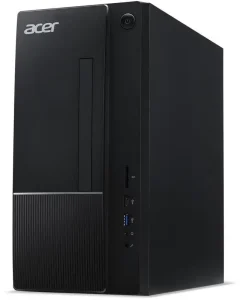
1. Acer Aspire TC-1785-UA92 — Best Overall
Specs: Intel Core i5-14400 (10 cores, up to 4.7 GHz) · 8GB DDR5-5600 · 512GB PCIe 4.0 NVMe SSD · Intel UHD Graphics 730 · Wi-Fi 6E, Bluetooth 5.3 · SD card reader · Windows 11 Home
The Aspire TC-1785 is the most computer you can buy new for office work under $700. The 10-core i5-14400 chews through spreadsheets, video calls, and a browser full of tabs, the 512GB PCIe 4.0 SSD boots in seconds, and Wi-Fi 6E plus an SD card reader cover the connectivity most home offices need.
We found the UA92 configuration at about $581 on Amazon in November 2026 — a genuinely good price that leaves almost $120 of headroom, enough for a second 8GB stick of DDR5 to fix the machine’s one real weakness.
Pros:
- Current-generation 10-core i5 for under $600
- Fast PCIe 4.0 SSD and DDR5
- Wi-Fi 6E, SD card reader, and plenty of USB ports
Cons:
- Only 8GB of RAM in a single stick, so it runs in single-channel mode until you add more
- The 300W power supply rules out any serious GPU upgrade later
- Acer’s bundled software includes the usual trialware you will want to remove
Best for: Anyone who wants a new, warrantied tower and will add $30 of RAM.
2. Lenovo IdeaCentre AIO Gen 9 (24″ AMD) — Best All-in-One
Specs: AMD Ryzen 3 7335U (4 cores, up to 4.3 GHz) · 8GB DDR5 · 256GB PCIe Gen4 SSD · 23.8″ FHD IPS display, 100Hz, 99% sRGB · 5MP webcam with privacy shutter · Wi-Fi 6 · Windows 11 Home
If your desk has no room for a tower, or you simply do not want to buy a monitor, the IdeaCentre AIO Gen 9 is the all-in-one to buy at this budget. The 24-inch IPS screen runs at 100Hz with 99% sRGB coverage — noticeably nicer than the dim 60Hz panels on most budget all-in-ones. It starts at $699.99 on Lenovo’s own store, exactly on the budget line.
Here is the honest part: the base configuration is thin. A Ryzen 3 with 8GB of RAM and a 256GB SSD is fine for email, documents, and video calls, but not for heavy spreadsheets or photo editing. The Ryzen 5 7535HS configuration with 16GB and 512GB is a much better computer — and it costs more than $700. This pick is a trade: you are paying for the screen and the clean desk, not for raw performance.
Pros:
- A genuinely good 24-inch 100Hz IPS screen built in
- Quiet, tidy setup with wireless keyboard and mouse included
- 5MP webcam with a physical privacy shutter
Cons:
- Base configuration is a Ryzen 3 with 8GB of RAM and only 256GB of storage
- The better Ryzen 5 / 16GB configuration costs more than $700
- The screen and the computer age together — you cannot upgrade the display later
Best for: A home office or reception desk where the screen, the webcam, and a clean setup matter more than raw speed.
3. HP ProDesk 400 G7 SFF (Renewed) — Best Refurbished Business PC
Specs: Intel Core i7-10700 (8 cores, up to 4.8 GHz) · 16GB DDR4 · 512GB NVMe SSD · Intel UHD Graphics 630 · Wi-Fi, DisplayPort and HDMI · Windows 11 Pro
This is the most hardware per dollar in the guide, and it comes with a condition: it is refurbished. The ProDesk 400 G7 is a proper HP business desktop — small form factor, tool-less case, Windows 11 Pro — that spent its first life in an office and has been inspected, cleaned, and resold. The 10th-generation 8-core i7-10700 is not as efficient as a 14th-gen i5 but still a strong office processor, and it comes with 16GB of RAM and a 512GB NVMe SSD where the new machines at this price give you 8GB.
We found the i7-10700 configuration at about $699.99 in November 2026. That is a lot of money for a refurbished machine, so the seller matters more than the specs: buy from a seller with a clear return policy and a warranty of at least 90 days, and check that Windows 11 Pro is genuinely activated. A cheaper i5-10500 version was listed at about $692.99 — poor value, since the processor is two tiers down for almost the same money.
Pros:
- 8-core i7 with 16GB of RAM and a 512GB NVMe SSD
- Windows 11 Pro included, which matters if you need remote desktop or BitLocker
- Real business build quality: metal case, standard parts, easy to upgrade
Cons:
- Refurbished, not new — condition and remaining lifespan vary by seller
- 10th-generation processor with no upgrade path to newer Intel chips
- At $699.99 it sits right at the budget ceiling, leaving nothing for a monitor or accessories
Best for: Buyers who want maximum hardware for the money and are comfortable buying refurbished from a reputable seller with a return policy.
4. MINISFORUM UM870 Slim (16GB/1TB) — Best Compact Mini PC
Specs: AMD Ryzen 7 8745H (8 cores, up to 4.9 GHz) · 16GB DDR5 · 1TB PCIe 4.0 SSD · Radeon 780M integrated graphics · USB4, HDMI 2.1, DisplayPort · 2.5GbE Ethernet, Wi-Fi 6E · Windows 11 Pro
The UM870 Slim is the fastest machine in this guide in a box smaller than a paperback. The 8-core Zen 4 Ryzen 7 8745H and its Radeon 780M integrated graphics are the strongest you will find without a discrete GPU — good enough for light photo editing, 4K video playback, and even casual gaming at modest settings. The USB4 port means a single cable can drive a monitor, a dock, and laptop charging.
We found the 16GB/1TB configuration at about $689 in November 2026. A word of warning: Minisforum sells this machine in many configurations, and the prices are all over the place. The barebone version — no RAM, no SSD, no operating system — goes for about $319, while the 32GB/1TB version runs about $839, well over budget. Make sure the listing you buy actually says 16GB and 1TB and includes Windows 11.
Pros:
- The fastest processor and graphics in this guide
- 16GB of DDR5 and a full 1TB SSD included
- USB4, dual 4K display support, and 2.5GbE Ethernet
Cons:
- Configuration roulette: barebone, 16GB, and 32GB versions share one product page and very different prices
- The MediaTek Wi-Fi card has poor Linux driver support, if that matters to you
- No room for a discrete graphics card, ever — what you buy is what you get
Best for: A small desk, or anyone who wants the most performance per cubic inch.
5. Dell OptiPlex 7020 Micro — Best Tiny Business PC
Specs: Intel Core i5-14500T (14 cores, up to 4.8 GHz) · 8GB DDR5 · 256GB PCIe SSD · Intel UHD Graphics 770 · Wi-Fi 6E · VESA mountable · Windows 11 Pro
The OptiPlex 7020 Micro is a business-class machine barely bigger than a sandwich, hiding a genuinely modern processor: the 14-core i5-14500T. Dell’s OptiPlex line is the default desktop of corporate IT departments for a reason — the build quality is consistent, the drivers are maintained for years, and it mounts behind a monitor and disappears. We found it at about $599.99 in November 2026.
The trade-offs are the same ones that show up everywhere at this price. The base configuration ships with 8GB of RAM and a 256GB SSD, which is thin for a machine you plan to keep for five years. The good news is that this Micro takes standard DDR5 SODIMMs and a standard M.2 SSD, so a $50 upgrade fixes both. The bad news is that the compact case means no internal expansion beyond that — no second drive bay, no PCIe slot, no GPU.
Pros:
- Modern 14-core i5 that fits behind a monitor
- Genuine Dell business build quality
- Windows 11 Pro included
Cons:
- Base configuration is only 8GB of RAM and a 256GB SSD
- No internal expansion beyond RAM and the single M.2 slot
- At $599.99 before upgrades, the total cost creeps toward $700 once you fix the storage
Best for: An office that needs reliable, mountable machines, or a home desk where the computer should be invisible.
What to Avoid
A “new” HP Pavilion TP01. HP has discontinued the Pavilion tower line and replaced it with the OmniDesk, so the TP01 systems still for sale are old retail stock or refurbished units, often with 9th- or 11th-generation processors.
Any desktop with a hard drive as its only storage. If the listing says “1TB HDD” and does not mention an SSD, walk away. Windows 11 on a spinning hard drive is slow in a way no amount of RAM fixes.
Cheap “gaming” desktops with a GT 1030 or GTX 1650. At this price, a low-end graphics card from 2019 adds cost and noise without adding anything an office user needs. The integrated graphics in the Ryzen 7 8745H are faster.
Refurbished machines running Windows 10. Microsoft ended Windows 10 security updates in October 2026. Any refurbished desktop that cannot run Windows 11 is a security risk, not a bargain.
FAQ
Is $700 enough for a good office desktop in 2026?
Yes — it is the first budget where you do not have to compromise on something important. A new tower like the Acer Aspire TC-1785 gives you a current-generation 10-core processor, and a refurbished business machine like the HP ProDesk 400 G7 gives you 16GB of RAM and Windows 11 Pro. What $700 does not buy is a discrete graphics card.
Should I buy new or refurbished under $700?
Buy new if you want a warranty, a current-generation processor, and zero history. Buy refurbished if you want more hardware for the money and are comfortable checking the seller’s return policy. The worst option is paying new prices for a refurbished machine.
How much RAM does an office desktop need in 2026?
16GB is the comfortable floor. Three of our five picks ship with 8GB, and all three can be upgraded cheaply — a second 8GB stick costs about $30 in late 2026.
Does an office desktop under $700 include a monitor?
Usually not. Towers and mini PCs are sold without a screen, so budget $100–150 for a decent 24-inch monitor if you do not already own one. The exception is the Lenovo IdeaCentre AIO Gen 9, which has a 24-inch screen built in.
Verdict
The best office desktop computer under $700 is the Acer Aspire TC-1785-UA92. At about $581, it is a brand-new tower with a current-generation 10-core i5, a fast 512GB PCIe 4.0 SSD, and Wi-Fi 6E — and the money you save buys the extra 8GB of RAM that turns it from a good machine into a great one. If you want a screen included, buy the Lenovo IdeaCentre AIO Gen 9. If you want the most hardware for the money and do not mind refurbished, the HP ProDesk 400 G7 is the value pick. And if your desk is small, the MINISFORUM UM870 Slim packs the fastest processor in this guide into a box the size of a paperback.
Whatever you buy, check the current price on Amazon before ordering.
As an Amazon Associate, we earn from qualifying purchases.
Suggested internal links for pcreviewer.org
- Best Office Desktop Computer Under $600
- Best Office Desktop Computer Under $500
- Best Office Desktop Computer Under $400
More from Amazon
Programs that pair well with the guide above. Offers and eligibility are set by Amazon and may change.
Free shipping on eligible items, Prime Video and more. Eligible new members can start with a free trial.
Start a Prime free trialAd-free music streaming. Eligible new subscribers can start with a free trial.
Try Music Unlimited freeA Prime membership for ages 18-24 with a trial period. Eligibility is set by Amazon.
See Prime for Young AdultsAudiobooks and podcasts to listen to on the go. Eligible new members can start with a free trial.
Try Audible freeAs an Amazon Associate we earn from qualifying purchases.
Write Your Review
No reviews yet. Be the first to share your experience!