

Key takeaways
- Pros: Excellent cooling headroom, large slow fans, huge component clearance, supports big radiators, five fans included.
- Cons: Big footprint, open front lets sound escape, premium pricing compared with other mid-towers, and the layout is less friendly to builds with many storage drives.
- Who it suits: Builders with a high-wattage GPU and CPU who want maximum cooling out of the box and are happy to give up some quietness.
The Fractal Design Torrent is the strongest airflow case in this group, thanks to two 180 mm front fans and a layout that pushes air straight at the graphics card, while the Lian Li Lancool 216 and Montech Air 903 Max deliver most of that cooling for far less money. The right pick depends on how much GPU and CPU heat your build produces, how much noise you tolerate and how much desk or floor space you have.
“Airflow case” is a loose label, so this guide narrows it down. A true airflow case has a mesh or heavily perforated front panel, enough intake fans out of the box to move air without extra purchases, and an internal layout that does not choke the path from front to back. Specifications below come from the manufacturers’ published spec sheets, with notes where retailers disagree.
Our top picks


As an Amazon Associate we earn from qualifying purchases at no extra cost to you.
Quick comparison of the airflow picks
| Case | Best for | Stock fans | Max GPU length | Max CPU cooler height | Price tier |
|---|---|---|---|---|---|
| Fractal Design Torrent | Best overall airflow | 2x 180 mm front, 3x 140 mm bottom | 461 mm (423 mm with front fan fitted) | 188 mm | Upper mid-range |
| Lian Li Lancool 216 | Best value airflow | 2x 160 mm front, 1x 140 mm rear | 392 mm | 180 mm | Mid-range |
| Montech Air 903 Max | Best budget with many fans | 3x 140 mm front ARGB, 1x 140 mm rear | 400 mm | 180 mm | Budget |
| Lian Li Lancool 217 | Best for large builds and radiators | 2x 170 mm front, 1x 140 mm rear | 380 mm | 180 mm (INF variant) | Mid-range |
| Fractal Design Meshify 2 | Best for quiet high-TDP workstations | 2x 140 mm front, 1x 140 mm rear | 467 mm (315 mm in storage layout) | 185 mm | Upper mid-range |
| Phanteks Eclipse G360A | Best compact mesh-front | 3x 120 mm front D-RGB | 400 mm | 162 mm | Budget to mid-range |
| Corsair 4000D Airflow | Best for simple, clean builds | 2x 120 mm | 360 mm | 170 mm (6.7 in) | Budget to mid-range |
Dimensions and clearances are published figures; some third-party listings show slightly different numbers, so check the exact variant (RGB, non-RGB, white or black) on the manufacturer page before ordering.
What actually makes a case good at airflow
Three things decide thermals more than any marketing label. First is the intake opening: a solid front with side vents restricts air to a trickle, while a full mesh front lets the fans pull in air with little turbulence. Second is fan size and speed. Larger fans such as 160 mm, 170 mm and 180 mm move more air at a lower RPM, which is why cases using them tend to be both cool and quiet. Third is the clear path inside: a graphics card with a triple-fan cooler needs fresh air from the front, not air that has already passed over hard drive cages or cables.
Positive versus negative pressure matters too. If total intake airflow is slightly higher than exhaust, the case runs at slight positive pressure, which pushes air out through every gap and reduces dust building up on filters that are hard to reach. If exhaust wins, dust is pulled in through every opening. Most of the cases below ship with more intake than exhaust, which is a sensible default.
The real compromise is noise. Mesh passes fan noise and GPU coil whine straight into the room, whereas a foam-lined, closed-panel case muffles both. Airflow cases rely on slow, large fans to stay acceptable.
Best overall: Fractal Design Torrent
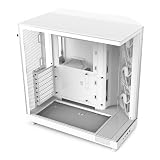
The Torrent is built around one idea: move as much cool air as possible directly across the graphics card and motherboard. The front is open, and two 180 x 38 mm fans sit behind it, while three 140 mm fans in the bottom of the case feed air upward toward the GPU. Fractal’s published specifications give a maximum graphics card length of 461 mm (423 mm if the front fan is kept in place), CPU cooler height up to 188 mm and PSU length up to 230 mm.
The case supports boards from Mini-ITX to E-ATX and has seven expansion slots, and radiators up to 420 mm fit at the front and bottom. That makes it a good home for a high-end graphics card with a large heatsink alongside a 360 mm AIO. The dimensions are large (about 544 x 242 x 530 mm), so confirm your desk or cabinet space.
- Pros: Excellent cooling headroom, large slow fans, huge component clearance, supports big radiators, five fans included.
- Cons: Big footprint, open front lets sound escape, premium pricing compared with other mid-towers, and the layout is less friendly to builds with many storage drives.
- Who it suits: Builders with a high-wattage GPU and CPU who want maximum cooling out of the box and are happy to give up some quietness.
Best value airflow: Lian Li Lancool 216
The Lancool 216 is the case most people should look at first if the Torrent feels excessive. It ships with two 160 mm PWM front fans and a 140 mm PWM rear fan, supports a 360 mm radiator at the top and front, and allows up to ten fans in total. Published clearances are 392 mm for graphics cards and 180 mm for CPU coolers. It supports ATX, Micro-ATX and Mini-ITX boards and E-ATX boards under 280 mm in width.
A clever extra is the rear PCIe fan bracket, which positions an additional fan to blow cool air at the graphics card. Front I/O includes a 10 Gbps USB Type-C port alongside USB 3.0 Type-A ports and an audio jack. Some third-party listings show slightly different GPU and cooler clearance, so rely on the Lian Li spec page if you are close to the limit.
- Pros: Strong stock airflow, big quiet fans, 360 mm radiator support in two locations, great port selection, sensible footprint.
- Cons: Cable routing space behind the tray is tight, and the dust filter on the front needs removing to clean.
- Who it suits: Anyone building a gaming PC with a mid- to high-end GPU who wants cooling without paying flagship prices.
Best budget with the most fans: Montech Air 903 Max
For buyers watching every dollar, the Air 903 Max packs four 140 mm fans into a low-cost enclosure: three ARGB PWM fans on the front and one PWM fan on the rear. Fan speeds range from 600 to 1500 RPM. Clearance numbers are good for the price tier: 180 mm for CPU coolers, 400 mm for graphics cards and 240 mm for PSUs. It supports 360, 280 and 240 mm radiators on both the front and the top, can hold up to nine fans, and accepts boards from Mini-ITX to E-ATX. An ARGB and PWM hub handles up to six connections, so lighting and fan control do not need extra hardware.
- Pros: Four fans included, strong cooling for the money, roomy for large GPUs, hub included.
- Cons: Stock fans have noticeable noise at full speed, the build feels lighter than premium cases, and the ARGB front fans are not for those who prefer a plain look.
- Who it suits: First-time builders and anyone who wants airflow comparable to pricier cases without spending extra on fans.
Best for large builds: Lian Li Lancool 217
The Lancool 217 takes the concept further with an unusually wide set of motherboard options: SSI-EEB (up to 330 mm wide), E-ATX (up to 280 mm wide), ATX, Micro-ATX and Mini-ITX, including back-connect boards. It has two 170 mm front intake fans, a 140 mm rear exhaust fan and two 120 mm fans on the PSU shroud. The roof takes 360 mm or 280 mm radiators. Lian Li quotes 380 mm as the graphics card limit, though one retailer shows 400 mm, so use the Lian Li number for planning. The case measures about 482 x 238 x 503 mm.
The 217 INF variant swaps the original’s wood-accented look for an infinity-mirror RGB front panel, with CPU cooler clearance up to 180 mm and PSU length up to 220 mm (180 mm if rotated). Airflow performance is similar, but the INF front is less open, so the original 217 is the pick if cooling alone drives the decision.
- Pros: Five stock fans, broad board support, flexible radiator placement, distinctive design.
- Cons: Fans get loud at maximum speed, GPU clearance is lower than the Torrent, and the front panel design is polarizing.
- Who it suits: Builders using workstation-class boards or planning custom cooling.
Best for quiet workstations: Fractal Design Meshify 2
The Meshify 2 uses a triangular mesh front to feed air to two 140 mm Dynamic X2 GP-14 fans, with a third 140 mm fan at the rear. Fractal lists a CPU cooler limit of 185 mm. Graphics card length depends on layout: up to about 467 to 470 mm with the standard layout, dropping to about 315 mm when the storage trays beside the motherboard are installed. Radiator support is generous, with up to 420 mm at the top, 360 mm at the front, 280 mm at the bottom and 120 mm at the rear (reviewers note the top is limited to 360 mm in the storage layout).
Fractal designed the case for high-TDP parts, and the sound-dampened side and solid top make it quieter than most mesh-front designs. The Compact and XL versions have different clearances, so choose the size deliberately: the XL allows graphics cards up to about 549 mm and the Compact trims the footprint.
- Pros: Flexible interior layout, good dust filtration, quieter than full-mesh rivals, plentiful radiator and drive options.
- Cons: Fewer included fans than some rivals, pricier than the budget cases, and the storage layout limits GPU length.
- Who it suits: Content creators and professionals who want both strong cooling and low noise.
Best compact mesh-front: Phanteks Eclipse G360A
The Eclipse G360A is a slimmer tower with a fully perforated front and three 120 mm D-RGB PWM fans already installed on the intake side. It supports 360 or 280 mm radiators at the front, a 360 mm radiator in the roof (though two 360 mm radiators cannot be installed at the same time) and a 120 mm unit at the rear. Maximum GPU length is 400 mm and CPU cooler height tops out at 162 mm, so check tall air coolers before you order. It has seven expansion slots and measures about 465 mm high, 455 mm deep and 200 mm wide.
- Pros: Excellent airflow for a narrow case, three fans included, easy to build in.
- Cons: 162 mm cooler limit excludes large dual-tower air coolers, and the smaller interior leaves less room for cables.
- Who it suits: Mid-range gaming builds on a Micro-ATX or ATX board where desk space is limited.
Best simple, clean build: Corsair 4000D Airflow
The 4000D Airflow has been a favorite for years because it is easy to build in and pairs an understated look with a mesh front. Corsair lists support for graphics cards up to 360 mm (under 340 mm if an AIO is mounted at the front), CPU coolers up to about 170 mm (6.7 in) and PSUs up to 8.7 in. It takes a 360 mm radiator at the front and a 280 mm unit in the roof, with room for six fans in total. It ships with two 120 mm fans, which is the weakest stock complement here, so budget for an extra intake fan or two if you run a hot GPU. Some third-party spec tables claim no fans are included, but Corsair and retailer listings both show two.
- Pros: Smart cable-routing system, clean looks, wide availability, easy to build in.
- Cons: Only two stock fans, shorter GPU clearance than newer designs, and a mesh front that is less open than the Torrent.
- Who it suits: Builders who value tidy cabling and are happy to add fans later.
How to choose: a decision matrix
| Your situation | Best choice | Why |
|---|---|---|
| High-end GPU plus 360 mm AIO, no space limits | Fractal Design Torrent | 180 mm intake fans and 461 mm GPU clearance |
| Mid-range GPU, tight budget | Montech Air 903 Max | Four fans included, 400 mm GPU clearance |
| Balanced gaming build, quiet fans wanted | Lian Li Lancool 216 | Large 160 mm PWM fans, 360 mm radiator support |
| Workstation board or custom loop | Lian Li Lancool 217 | SSI-EEB support and flexible radiator mounting |
| Quiet creative workstation | Fractal Design Meshify 2 | Sound-dampened panels with mesh front |
| Small desk, mid-range parts | Phanteks Eclipse G360A | Narrow 200 mm width with mesh front |
| Clean cable routing, willing to add fans | Corsair 4000D Airflow | Simple layout with strong cable management |
Worked example: counting airflow for a gaming build
Suppose a build has a CPU rated at 120 W and a graphics card at 300 W. Together with the motherboard, memory and drives, the case must remove roughly 450 W of heat under load. A single 140 mm fan at 1200 RPM moves in the region of 60 to 70 cubic feet per minute depending on the model, and manufacturers rate their fans individually, so check the fan spec sheet. Three intake fans and one exhaust fan give the air enough volume to move through a mesh front without needing high speeds.
Compare that with a case with only two 120 mm fans. Each fan must work harder to hit the same flow, and noise rises quickly. This is why cases with larger fans, such as the Torrent and the Lancool 216, can run at lower RPM for the same temperature. When shopping, count the fan sizes, not just the fan count.
A simple rule: aim for at least two 140 mm-class intake fans (or equivalent) for a mid-range build and three for a high-wattage one, with a single exhaust fan at the rear and another in the roof if the case supports a radiator there.
Fan placement and setup tips
- Put intake at the front and bottom. The graphics card draws from the bottom and the front, and cool air should reach it before it reaches the CPU cooler.
- Exhaust at the rear and top. Warm air rises, so a roof exhaust fan helps remove heat that gathers around the CPU and VRM area.
- Keep intake slightly stronger than exhaust. Slight positive pressure keeps dust on the filters you can clean.
- Set a fan curve. Link case fans to a motherboard temperature sensor so they stay near silent during idle and web use.
- Mount AIO radiators as exhaust or front intake deliberately. Top-mounted radiators exhaust CPU heat but warm the case slightly; front-mounted radiators feed the CPU cool air but warm the air that reaches the GPU.
- Clean filters every one to three months. A clogged filter can raise temperatures noticeably.
Durability and ownership realities
Mesh panels attract dust, so removable magnetic or slide-out filters are worth more than they look on a spec sheet. Fans are the first parts to wear out, usually after several years of continuous use, and bearings can develop noise before they stop. Check that replacement fans are standard sizes (120, 140, 160, 170 or 180 mm) before buying. Proprietary thicknesses like the Torrent’s 38 mm fans are still replaceable but are less common in shops than standard 25 mm models.
Tempered glass side panels are heavy and can crack from impact when the case is shipped or moved, so keep original packaging if you plan to relocate. Thin steel panels flex when carried, which rarely matters for desktop use but can lead to rattles with unmounted fans.
Common mistakes to avoid
- Choosing by fan count alone without checking fan size and RPM.
- Forgetting to check CPU cooler height; the Eclipse G360A’s 162 mm limit rules out many dual-tower coolers, while the Torrent’s 188 mm does not.
- Putting a front-mounted radiator in a case where the graphics card is long; Corsair notes the 4000D Airflow fits only cards under 340 mm with a front AIO.
- Ignoring the room: mesh fronts push warm air toward whatever is behind the PC, which matters in small enclosed desks.
- Skipping a fan hub when the motherboard has too few headers; the Montech includes one, others may not.
Frequently Asked Questions
Is a mesh front always better for cooling?
For temperatures, yes in almost every case, because the intake fans meet less resistance. The trade-off is noise, as mesh lets more fan and component sound out, and it collects dust faster unless the filter is good.
How many case fans do I need?
Two intake and one exhaust is enough for most mid-range gaming PCs. High-wattage graphics cards or overclocked processors benefit from three intake fans and an additional roof or rear exhaust.
Are bigger fans really quieter?
Generally yes. A 180 mm fan can move the same air as a 120 mm fan at a much lower speed, and lower RPM usually means a lower, less irritating noise. The actual result depends on the fan’s bearing and blade design.
Does an airflow case need an AIO cooler?
No. A good air cooler works well in any of these cases, provided it fits the height limit. Many airflow cases do accept 360 mm radiators, so you can add one later if you upgrade your processor.
Will an airflow case make my PC louder?
It can, because open mesh lets sound out. You can offset this by choosing a case with large, low-RPM fans, setting a sensible fan curve and avoiding maximum speed on small fans.
Which case is best for a very long graphics card?
The Fractal Design Torrent accommodates cards up to 461 mm per the manufacturer, and the Meshify 2 supports about 467 to 470 mm in its standard layout. Always compare the card’s listed length plus a few millimetres of cable clearance with the case spec.



Write Your Review
No reviews yet. Be the first to share your experience!