

Key takeaways
- /best-desktop-pc-under-1000/ — smaller budgets
- /best-mini-pc-for-gaming/ — compact PC comparisons
- /best-workstation-pc-under-1000/ — lower-priced workstation options
A workstation is not a gaming PC with a different badge. It is built for work that runs for hours — CAD models, 3D renders, video timelines, large datasets — with certified drivers, quiet cooling, and a chassis you can upgrade instead of replacing.
Under $1,500, you cannot have everything at once: choose between a faster CPU, a professional GPU, more RAM, or a newer platform with a real warranty. This guide covers five real workstation PCs sold on Amazon US in November 2026, in configurations that fit the budget. Prices change and the same model name covers many configurations, so check the exact configuration before you buy. We have not bench-tested these units.
Top pick: the HP Z2 G9 SFF — a current 14-core Intel CPU, 16GB of DDR5, a fast NVMe drive, and Windows 11 Pro in a compact chassis that still takes a full-height graphics card later. If your work needs a professional GPU today, look at the Lenovo ThinkStation P3 Ultra instead.
Quick Picks
| Product | Best for | Key specs | Price note |
|---|---|---|---|
| HP Z2 G9 SFF | Best overall | Core i5-14500, 16GB DDR5, 512GB NVMe, Win 11 Pro | $1,049.99 sale (Nov 2026) |
| Lenovo ThinkStation P3 Ultra SFF | Best pro GPU | Core i7-13700T, 32GB DDR5, 1TB NVMe, NVIDIA T400 4GB | $1,149.95 (Nov 2026) |
| Lenovo ThinkStation P3 Tiny | Best compact | Core i7-14700, 32GB DDR5, 1TB SSD, Win 11 Pro | $1,399.99 (Nov 2026) |
| Lenovo ThinkStation P3 Tower | Best value new tower | Core i5, 16GB DDR5, 512GB SSD, Win 11 Pro | $979.99 sale (Nov 2026) |
| Dell Precision T5820 (Renewed) | Best budget renderer | Xeon W-2123, Quadro P4000 8GB, 500GB NVMe, Win 11 | $515.92 (Nov 2026) |
How to Choose a Workstation PC Under $1,500
Start with your software. CAD tools care most about single-core speed and certified drivers. Rendering and video care about GPU memory and core count; data work cares about RAM. Check your two main apps’ recommended requirements; that decides whether you need a professional GPU.
CPU: 12 cores or more is the sweet spot. Most picks here use a 14-core Core i5-14500, a 16-core Core i7-13700, or a 20-core Core i7-14700. Older Xeon chips offer ECC support but lower clock speeds.
GPU: professional vs. consumer is a real choice. Professional cards such as the NVIDIA T400 and Quadro P4000 use ISV-certified drivers, tested by major CAD vendors. They trade raw speed for stability and support more displays. Integrated graphics, found in the HP and two Lenovos here, handle 2D CAD and light 3D — not heavy GPU rendering.
RAM: 16GB is the minimum, 32GB is the target. A large CAD assembly, a 4K timeline, or a few virtual machines can use 16GB before lunch. Two picks ship with 32GB, and all five can be upgraded. Check for DDR5, free slots, and ECC support.
Storage and upgradeability. Every pick uses an NVMe SSD as its boot drive. Prefer a second M.2 slot, room for a full-height graphics card, and spare RAM slots. New machines usually carry a 1-year warranty; renewed machines come with a shorter return window.
1. HP Z2 G9 SFF — Best Overall
Best for: Most buyers who want a new, warrantied workstation for CAD, engineering, office work, and light 3D.
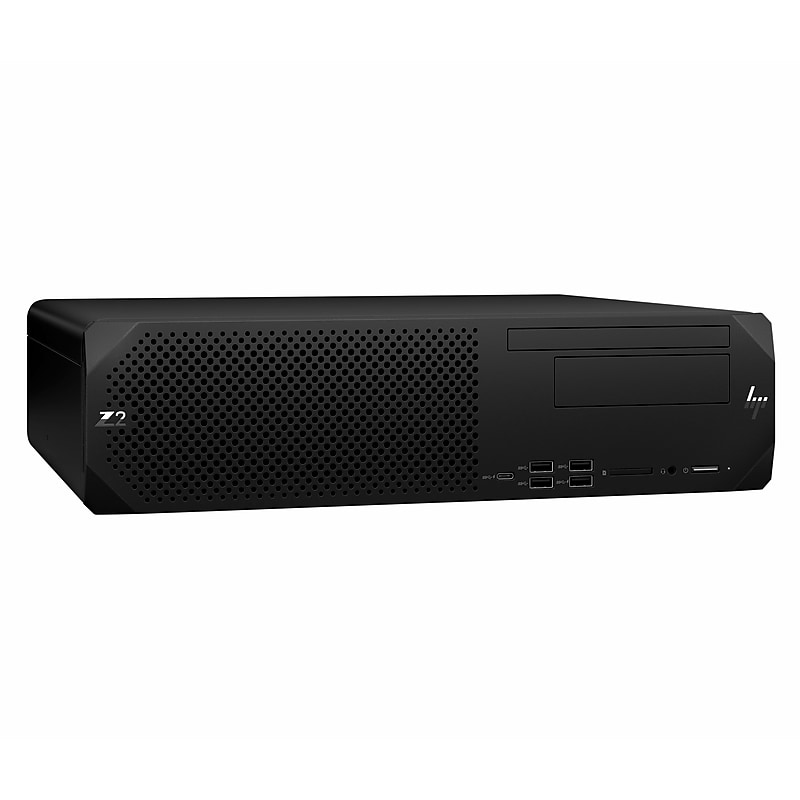
The Z2 G9 SFF pairs a 14-core Intel Core i5-14500 (up to 5.0 GHz) with 16GB of DDR5, a 512GB NVMe SSD, and Windows 11 Pro. Our catalog search on 17 November 2026 showed it at $1,049.99 on sale (list $1,499.99), with a 1-year warranty and keyboard and mouse.
It has no discrete GPU — Intel integrated graphics suits 2D CAD, modelling, and photo editing rather than GPU rendering. But HP says the Z2 SFF fits full-height, full-length graphics cards, so you can add a professional card such as an NVIDIA T400 later.
Specs: Core i5-14500, 14 cores, up to 5.0 GHz; 16GB DDR5; 512GB NVMe SSD; integrated graphics; Windows 11 Pro; 1-year warranty.
Pros: Current 14-core CPU; DDR5 and fast NVMe; accepts a full-height GPU; 1-year warranty.
Cons: No discrete GPU; 16GB RAM needs an upgrade for large assemblies or 4K video; 512GB storage fills fast.
Who it is best for: Engineers who mainly model in 2D and 3D and want a new machine with a warranty and an upgrade path.
Check price on Amazon — HP Z2 G9 SFF
2. Lenovo ThinkStation P3 Ultra SFF — Best Pro GPU
Best for: CAD and 3D users who need a certified professional GPU and multi-monitor support today, not later.
The P3 Ultra is the only pick here that ships with a professional graphics card inside the budget: an NVIDIA T400 with 4GB of graphics memory, alongside a 16-core Intel Core i7-13700T, 32GB of DDR5, and a 1TB NVMe drive, running Windows 11 Pro with a 3-year warranty on the listed configuration, seen at $1,149.95 on Amazon in November 2026.
The T400 is an entry-level professional card: certified for CAD software, driving up to six monitors, and handling modelling and light rendering well. Its 4GB of VRAM limits large scenes, but for most CAD seats it beats integrated graphics.
Specs: Intel Core i7-13700T, 16 cores, up to 4.9 GHz; NVIDIA T400 4GB; 32GB DDR5; 1TB NVMe SSD; Windows 11 Pro; 6 monitors; 3-year warranty.
Pros: ISV-certified GPU under $1,500; 32GB RAM and 1TB storage included; drives six monitors; 3-year warranty.
Cons: 4GB VRAM caps large 3D scenes; small chassis limits GPU upgrades; i7-13700T is a lower-power chip.
Who it is best for: CAD and BIM users who need certified drivers and several monitors now, working with medium-sized models.
Check price on Amazon — Lenovo ThinkStation P3 Ultra
3. Lenovo ThinkStation P3 Tiny — Best Compact
Best for: Small desks, multi-monitor office setups, and professionals who want workstation reliability in a mini PC.
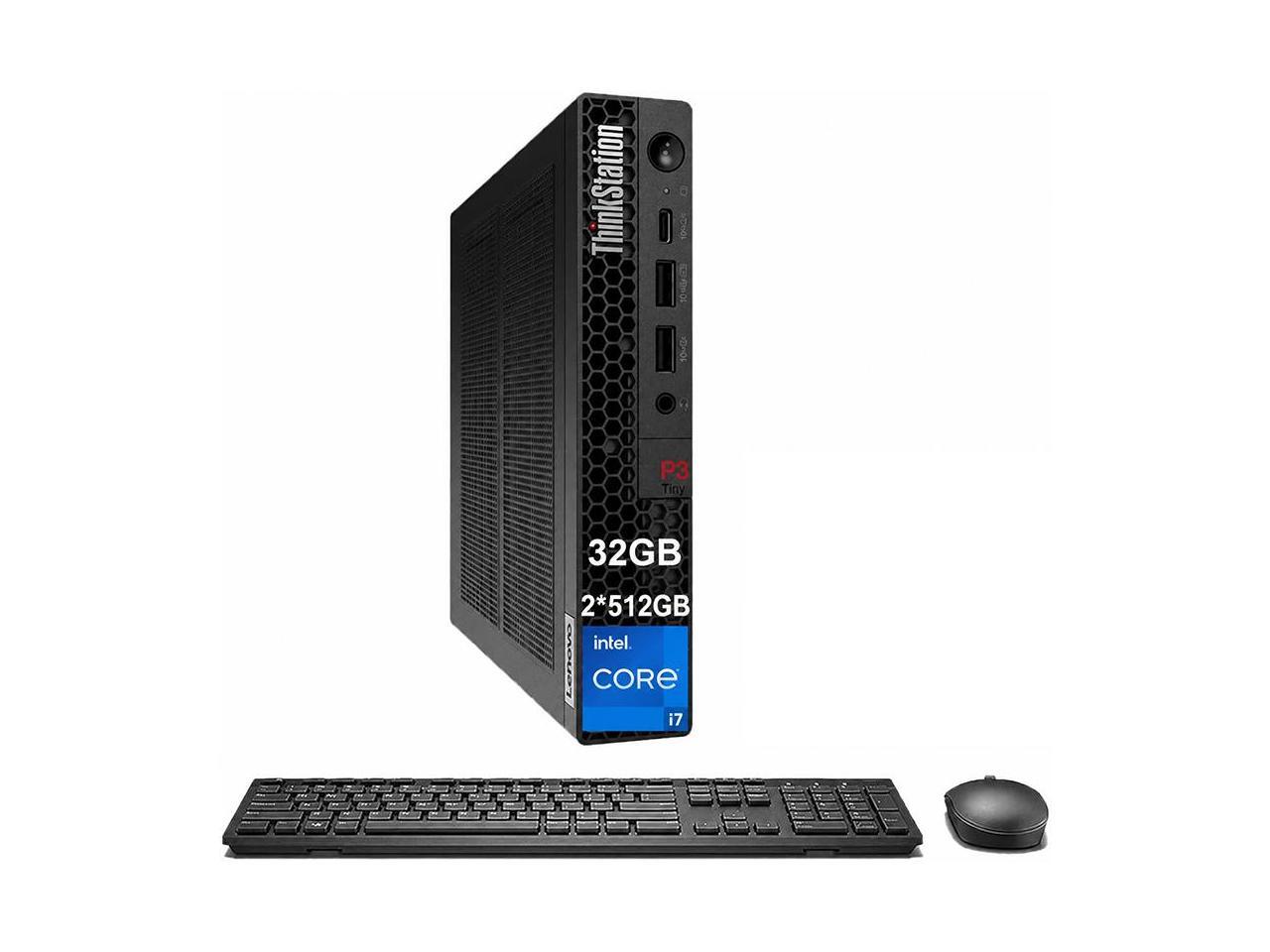
The P3 Tiny packs a 20-core Intel Core i7-14700 (up to 5.4 GHz) with 32GB of DDR5 and a 1TB NVMe SSD into a chassis roughly 7.2 x 7 x 1.5 inches, running Windows 11 Pro with vPro. Listings were seen at $1,399.99 on Amazon in November 2026, and a catalog search showed an upgraded 32GB configuration at $1,499.99 — right at the ceiling.
This is a CPU-first machine with no discrete GPU. Intel integrated graphics handles 2D CAD, data work, virtual machines, and multi-monitor office use well. Its strengths are the 20-core processor, generous memory and storage, and tiny footprint: it mounts behind a monitor.
Specs: Intel Core i7-14700, 20 cores, up to 5.4 GHz; 32GB DDR5-5600; 1TB NVMe SSD; integrated graphics; Windows 11 Pro with vPro.
Pros: Powerful 20-core CPU in a tiny chassis; 32GB RAM and 1TB storage, nothing to upgrade on day one; ISV-certified; vPro for IT management.
Cons: No discrete GPU, so GPU rendering and heavy 3D are out; integrated graphics share system memory; the 32GB configuration sits at the top of the budget; limited expansion.
Who it is best for: Professionals with limited desk space running CPU-heavy work — data analysis, development, 2D CAD, finance — who want a quiet, reliable machine.
Check price on Amazon — Lenovo ThinkStation P3 Tiny
4. Lenovo ThinkStation P3 Tower — Best Value New Tower
Best for: Buyers who want a new, full-size workstation tower with the most room to upgrade, for the lowest entry price.
The P3 Tower is the classic workstation shape: a full tower with room for graphics cards, extra drives, and more memory. The configuration we verified pairs an Intel Core i5 with 16GB of DDR5 and a 512GB SSD, running Windows 11 Pro. Our catalog search on 17 November 2026 showed it at $979.99 on sale — the lowest price of any new machine here.
Two warnings. First, the P3 Tower name covers many configurations: a Core i7-14700 with 32GB of RAM and a 1TB SSD was listed on Amazon at $1,549.95 on 16 November 2026 — over budget. Only the Core i5 configuration qualifies at the price we verified, so confirm the exact specs. Second, it ships with integrated graphics, so plan on adding a GPU if your work needs one.
Specs: Intel Core i5; 16GB DDR5; 512GB SSD; integrated graphics; Windows 11 Pro; full tower, room for full-height graphics cards.
Pros: Lowest entry price for a new workstation tower here; best upgrade room; leaves budget for a RAM or GPU upgrade.
Cons: Only the Core i5 fits under $1,500; integrated graphics only, so a GPU upgrade is likely; 16GB RAM and 512GB storage are starting points.
Who it is best for: Buyers who want a new tower they can grow into: start with the Core i5, then add memory and a professional GPU as projects demand.
Check price on Amazon — Lenovo ThinkStation P3 Tower
5. Dell Precision T5820 (Renewed) — Best for Rendering on a Budget
Best for: 3D rendering, video editing, and CAD on a tight budget — if you accept a renewed machine and an older platform.
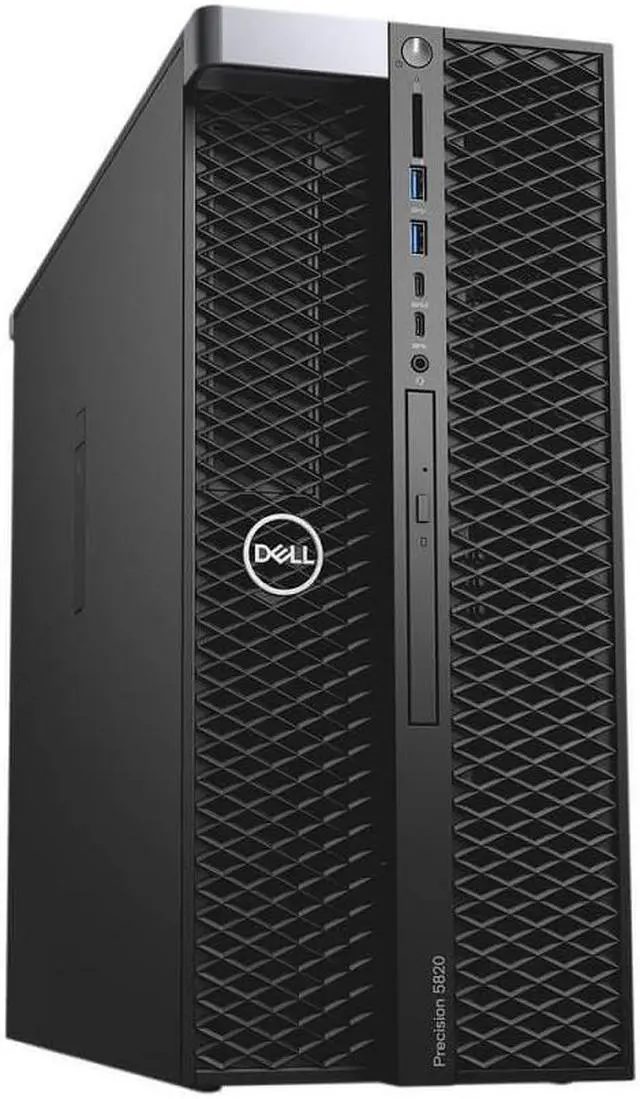
The Precision T5820 is a full-size Xeon workstation tower. The renewed configuration we verified pairs an Intel Xeon W-2123 (4 cores, 3.6 GHz) with an NVIDIA Quadro P4000 (8GB), 8GB of RAM, and a 500GB NVMe drive, running Windows 11. Our catalog search on 17 November 2026 showed it at $515.92. A stronger renewed configuration — Xeon W-2135 with 64GB of RAM and the same Quadro P4000 — was seen on Amazon at $695.79 (listing B099R1W5T3).
That value comes with real trade-offs. This is a renewed machine: expect a 90-day return window, not a multi-year manufacturer warranty, and inspect it in the first week. The Xeon W-2123 has only four cores, so interactive CAD will feel slower than on the Core i5 and i7 machines above. And 8GB of RAM is too little for serious work — budget for an upgrade to 32GB or 64GB.
Specs: Xeon W-2123, 4 cores, 3.6 GHz; Quadro P4000, 8GB GDDR5; 8GB DDR4 (up to 64GB+); 500GB NVMe SSD; Windows 11; renewed.
Pros: Quadro P4000 with 8GB of VRAM for a fraction of new-workstation prices; eight RAM slots, room for two GPUs, ECC support; excellent cooling.
Cons: Renewed — shorter return window, no multi-year warranty; only four CPU cores; 8GB RAM needs an immediate upgrade; older platform, higher power use, no DDR5.
Who it is best for: Budget renderers, video editors, and CAD users who value GPU memory over CPU speed and will add RAM on day one.
Check price on Amazon — Dell Precision T5820 (Renewed)
What to Avoid
Do not buy on the model name alone. HP Z2, ThinkStation P3, and Precision T5820 are families, not single machines: the same name can mean a $979 Core i5 or a $1,549 Core i7 with 32GB. Always confirm the processor, RAM, storage, graphics, and OS on the exact listing, and check the total is under $1,500 before tax.
Do not confuse a gaming GPU with a professional GPU. A GeForce card may render faster per dollar, but it lacks ISV-certified drivers, and some CAD applications are only supported on professional cards. If your employer or vendor requires certification, buy the professional card.
Do not settle for 8GB of RAM. It is the most common regret in workstation buying. 16GB is the minimum in 2026, and 32GB is the sensible target for CAD, video, and data work. If a machine ships with 8GB, price the upgrade before you buy.
Do not ignore the warranty on renewed machines. A renewed workstation’s safety net is the return window — usually 90 days on Amazon Renewed — not a warranty. Power it on, run a memory test, and stress the GPU in the first week, while you can still return it.
Frequently Asked Questions
Is $1,500 enough for a good workstation PC?
Yes. $1,500 buys a current 14- to 20-core CPU, 16GB to 32GB of DDR5, and a fast NVMe drive — or a renewed Xeon tower with a professional GPU. It does not buy a high-end RTX professional card or 64GB of RAM out of the box.
Do I need a professional GPU for CAD?
For 2D CAD, modelling, and most office-based engineering work, integrated graphics or an entry-level card such as the NVIDIA T400 is enough. For large 3D assemblies and GPU rendering, a professional card with 8GB or more of VRAM — like the Quadro P4000 in the renewed Dell above — makes a real difference.
Is a renewed workstation worth it?
Often, yes — if you buy carefully. A renewed Dell Precision T5820 with a Quadro P4000 costs roughly a third of a comparable new workstation. The risks are the shorter return window, an older CPU platform, and the need to add RAM. Test it in the first week.
How much RAM does a workstation PC need in 2026?
16GB is the minimum, and 32GB is the target for CAD, 3D rendering, video editing, and data work. Large assemblies, 4K timelines, and virtual machines can use 32GB easily, and 64GB is worth considering if you render or simulate regularly.
Can I upgrade a workstation PC under $1,500 later?
Yes — and you should plan to. The HP Z2 G9 SFF and the Lenovo ThinkStation P3 Tower both accept full-height graphics cards, extra memory, and additional storage. Upgrade RAM first, then the GPU, then add a second SSD. The compact P3 Tiny and P3 Ultra have less room inside, so buy them with the memory and storage you need.
Verdict
The best workstation PC under $1,500 for most buyers is the HP Z2 G9 SFF: a 14-core Core i5-14500, DDR5, fast NVMe storage, and 1-year warranty — verified at $1,049.99 on sale — with room to add a professional graphics card later.
If you need a professional GPU today, buy the Lenovo ThinkStation P3 Ultra instead: its NVIDIA T400, 32GB of RAM, and 1TB drive were seen at $1,149.95, the only new machine here with certified graphics inside the budget. If desk space matters most, the Lenovo ThinkStation P3 Tiny packs a 20-core i7-14700 into a mini chassis. If rendering performance per dollar is your priority and you are comfortable buying renewed, the Dell Precision T5820 with its Quadro P4000 is unmatched value — just budget for a RAM upgrade on day one.
Confirm the exact configuration and current price before buying — in this price range, the configuration is the product.
As an Amazon Associate, we earn from qualifying purchases.
Suggested internal links
- /best-desktop-pc-under-1000/ — smaller budgets
- /best-mini-pc-for-gaming/ — compact PC comparisons
- /best-workstation-pc-under-1000/ — lower-priced workstation options
More from Amazon
Programs that pair well with the guide above. Offers and eligibility are set by Amazon and may change.
Free shipping on eligible items, Prime Video and more. Eligible new members can start with a free trial.
Start a Prime free trialAd-free music streaming. Eligible new subscribers can start with a free trial.
Try Music Unlimited freeA Prime membership for ages 18-24 with a trial period. Eligibility is set by Amazon.
See Prime for Young AdultsAudiobooks and podcasts to listen to on the go. Eligible new members can start with a free trial.
Try Audible freeAs an Amazon Associate we earn from qualifying purchases.
Write Your Review
No reviews yet. Be the first to share your experience!