

Key takeaways
- Pros: excellent cooling, strong build, high factory boost, widely praised in roundup testing.
- Cons: large, premium pricing, limited colour choices.
Sapphire is the best AMD graphics card brand for most buyers in 2026, with its Nitro+ line favoured by TechSpot in a 14-card RX 9070 XT roundup and its Pulse line the value pick, while PowerColor, XFX, ASUS, Gigabyte and ASRock each win for specific needs such as quiet running, compact size or premium build. The brand matters far less than the individual cooler: TechSpot measured only about a 6 percent performance spread between the fastest and slowest RX 9070 XT models.
That small spread changes how you should shop. Every Radeon card in a given family uses the same AMD GPU, so the real differences are cooler size, fan noise, power connectors, coil whine, warranty handling and price. This guide ranks seven well-known board models from the six main Radeon partners, explains what separates a premium design from an entry design, and gives a way to choose by case size, noise tolerance and budget tier. Prices are described only as market tiers because they change often.
Our top picks



As an Amazon Associate we earn from qualifying purchases at no extra cost to you.
Quick comparison of the seven picks
| Pick | Best for | Notable traits | Market tier |
|---|---|---|---|
| Sapphire Nitro+ RX 9070 XT | Best overall | Flagship Sapphire cooler, roughly three-slot, high boost clock near 3.06GHz | Premium |
| Sapphire Pulse RX 9070 | Best value and undervolting | Dual-fan, two 8-pin connectors, simpler cooler | Mid-range |
| PowerColor Hellhound RX 9070 XT | Quiet operation | Rated for low noise and low coil whine in roundups | Upper mid-range |
| XFX Mercury RX 9070 XT | Overclocking headroom | Boost clock up to 3,100MHz, three 8-pin connectors | Premium |
| ASUS TUF Gaming RX 9070 XT | Durable, polished build | Premium shroud and backplate, strong support network | Premium |
| Gigabyte Gaming OC RX 9070 XT | Balanced all-rounder | Named an overall pick by one enthusiast guide; Elite variant had the coolest VRM | Upper mid-range |
| ASRock Taichi RX 9070 XT | Feature-rich flagship | Boost clock up to 3,100MHz, single 12V-2×6 connector | Premium |
What actually differs between Radeon brands
AMD designs the GPU, and partner companies build the board, cooler, fans and firmware around it. For the RX 9070 XT that means the same 4,096 stream processors, 16GB of GDDR6 on a 256-bit bus and 64MB of Infinity Cache on every card, with a typical board power of 304W in AMD’s specification. The partner decides how quickly the GPU is allowed to boost, how big the heatsink is and how quiet the fans are.
Cooler size and thickness
Premium designs use three-slot coolers with large heatpipe arrays. They run cooler at the same noise level, or run quieter at the same temperature. Entry designs use two-slot, dual-fan coolers that are smaller and cheaper but hotter or louder under a sustained load. Check the card length and thickness against your case before buying; a three-slot, 330mm card does not fit many compact cases.
Power delivery and connectors
Reference-spec cards use two 8-pin connectors, while factory-overclocked models such as the XFX Mercury use three 8-pin connectors and the ASRock Taichi uses a single 12V-2×6 connector in the roundup information. More connectors do not mean faster performance by themselves, but they allow higher power limits and can make cable management easier or harder depending on your power supply.
Firmware and BIOS options
Some models, such as the ASUS Prime, include dual BIOS switches so you can choose a quiet or performance profile. A dual BIOS is also a safety net if an overclock or a firmware flash goes wrong, which is handy if you tinker.
Warranty and support
Warranty length and the claim process vary by region and by brand. Check the manufacturer’s current warranty page for your country, and keep the purchase receipt, since several partners require proof of purchase and some limit transfer to a second owner. Warranty is a legitimate tie-breaker when two cards are otherwise equal.
Best overall: Sapphire Nitro+ Radeon RX 9070 XT
Sapphire is the brand most associated with Radeon, and its Nitro+ is the company’s flagship line. In TechSpot’s roundup of 14 RX 9070 XT cards, the Nitro+ was the reviewer’s favourite. It combines a large three-slot cooler with a high factory boost clock near 3.06GHz, and its main criticism was the lack of black or white colour options, which matters only if you are building a themed system.
It suits buyers who want the card to run cool and quiet at 1440p and 4K for years, and who have a case with room for a thick cooler. Because the GPU is identical across brands, you are paying for the cooler, the build quality and the fan curve. If your case is cramped or you are on a strict budget, the Pulse below is the more sensible choice.
- Pros: excellent cooling, strong build, high factory boost, widely praised in roundup testing.
- Cons: large, premium pricing, limited colour choices.
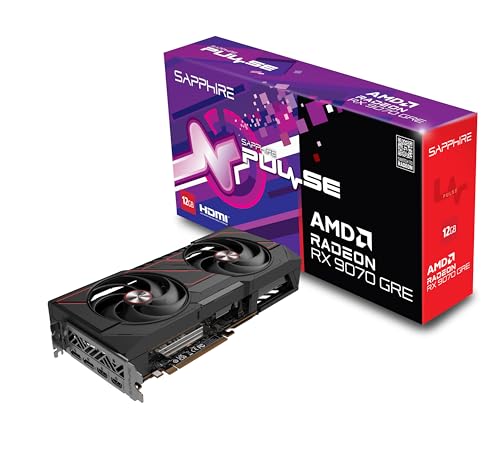
Best value: Sapphire Pulse Radeon RX 9070
The Pulse is Sapphire’s simpler dual-fan line. The RX 9070 it carries has 3,584 stream processors and 16GB of GDDR6 with a 220W board power, and reviewers who recommend the Pulse family cite value and how well the cards respond to undervolting. An undervolt lowers the voltage the GPU asks for, which cuts heat and fan noise at nearly the same speed, and it takes only a few minutes in AMD’s driver software.
Pick it if you want the efficient card in a mid-sized case and care about noise more than the last few percent of speed. TechSpot’s comparison put the 9070 XT about 9 percent faster at 1440p on average, so the RX 9070 gives up little in return for lower power and lower cost.
- Pros: value pricing, good efficiency, responds well to undervolting.
- Cons: simpler cooler than the Nitro+, fewer premium touches.
Best for quiet systems: PowerColor Hellhound Radeon RX 9070 XT
PowerColor is another long-standing Radeon specialist, and the Hellhound is its mid-range to premium line. One roundup rates it highly for quiet operation and low coil whine, the high-pitched electrical buzz some cards make at high frame rates. Coil whine varies from card to card even within a model, so no brand can promise silence, but a design with a large heatsink and slow-spinning fans gives you a better starting point.
This is the card for a desk-side PC where fan noise bothers you. The white variant also suits light-themed builds, and listings for it have tended to sit above the basic models, so compare the tier against the Pulse and Gigabyte options before deciding.
- Pros: quiet reputation, attractive design, white option.
- Cons: priced above entry models, size varies by variant so check clearance.
Best for overclocking: XFX Mercury Radeon RX 9070 XT
XFX builds its Mercury line as a high-end, high-power design with a boost clock listed up to 3,100MHz and three 8-pin power connectors. TechSpot recorded memory temperatures of 82°C and VRM temperatures of 64°C on the Mercury, and noted that XFX’s Swift and Quicksilver models ran with lower memory temperatures. That tells you the Mercury is built for power headroom, not necessarily the coolest memory.
It suits enthusiasts who want to raise power limits and experiment, and who have a power supply with three spare 8-pin cables. If you plan to leave the card at stock settings, there is no advantage to the extra connectors, and the Swift is a more restrained alternative from the same company.
- Pros: high power capability, headroom for tuning, strong boost clock.
- Cons: needs three cables, memory ran warmer than some XFX siblings.
Best premium build: ASUS TUF Gaming Radeon RX 9070 XT
ASUS makes both its premium TUF Gaming model and the cheaper Prime. TechSpot priced the Prime lower, describing dual BIOS support and a full-length aluminum backplate, while the TUF is the more premium choice with a heavier shroud and tougher styling. ASUS also has one of the larger service networks, which is useful if you want local support.
Choose the TUF if you value a refined, rigid card that looks good in a window case, and choose the Prime if you want the brand and the dual BIOS at a lower tier. Either way, check the dimensions, because ASUS cards tend to be generous in size.
- Pros: premium materials, strong brand support, dual BIOS on the Prime.
- Cons: large cards, pricier than comparable partner models.
Best all-rounder: Gigabyte Gaming OC Radeon RX 9070 XT
One enthusiast guide named the Gigabyte Gaming OC as its overall RX 9070 XT pick when it was written, and in TechSpot’s testing the Gigabyte Elite recorded the best VRM temperature of the group at 57°C. VRM cooling matters because power-delivery parts that stay cool tend to last longer.
This card is a good choice if you want solid cooling, a modest factory overclock and a mainstream design without paying the flagship premium. It is a balanced middle path between the Pulse and the Nitro+.
- Pros: balanced thermals, strong power-stage cooling, mainstream pricing.
- Cons: less distinctive than flagship models, three-fan designs are long.
Best flagship features: ASRock Taichi Radeon RX 9070 XT
ASRock’s Taichi is the company’s premium Radeon line. One guide calls it the choice for a buyer who wants a more elaborate card, listing a boost clock of up to 3,100MHz and a single 12V-2×6 connector rather than multiple 8-pin cables. That connector keeps cabling tidy if your power supply has a native cable, though you need to seat it fully and avoid sharp bends near the plug. ASRock also offers cheaper Challenger and Steel Legend models for those who want the brand at a lower tier.
The Taichi suits builders who want a showpiece and a clean single-cable look. If your power supply lacks the 12V-2×6 cable, factor in an adapter or choose a card with 8-pin connectors.
- Pros: premium design, high boost clock, single-cable power.
- Cons: needs a compatible power connector, premium pricing.
Specification reference for the RX 9000 family
| Model | Stream processors | Memory | Board power | AMD recommended PSU |
|---|---|---|---|---|
| RX 9060 XT 8GB | 2,048 | 8GB GDDR6, 128-bit | 150W | 450W |
| RX 9060 XT 16GB | 2,048 | 16GB GDDR6, 128-bit | 160W | 450W |
| RX 9070 | 3,584 | 16GB GDDR6, 256-bit | 220W | 650W |
| RX 9070 XT | 4,096 | 16GB GDDR6, 256-bit | 304W | 750W |
These are the reference figures from AMD’s product pages; partner cards with factory overclocks can draw somewhat more. Use the table to size your power supply first, then pick the brand and cooler that fits your case.
How to choose a brand by situation
| Your situation | Best match | Why |
|---|---|---|
| Small or mid-size case, tight budget | Sapphire Pulse RX 9070 | Compact dual-fan design, low power |
| Quiet desk PC | PowerColor Hellhound | Reputation for low noise and low coil whine |
| Long-term 4K build with room | Sapphire Nitro+ | Large cooler, strong thermals |
| Overclocker with a big power supply | XFX Mercury | Three 8-pin connectors, high power ceiling |
| Window case showpiece | ASUS TUF or ASRock Taichi | Premium styling and materials |
| Want a safe mainstream choice | Gigabyte Gaming OC | Balanced cooling and mainstream pricing |
Worked example: is the premium cooler worth it?
Take two RX 9070 XT cards. A premium three-slot model costs around 15 to 20 percent more than a basic dual-fan model. If TechSpot’s observed performance spread of about 6 percent between the fastest and slowest models holds, the premium card might deliver, say, 100 frames per second where the basic card delivers 95. That is a small gain for a notable price difference, so the real value is acoustic and thermal, not speed. If your fans on the basic card hit 2,000 RPM and sound intrusive, while the premium card holds 1,400 RPM at the same temperature, the extra cost buys quiet. If you wear headphones and the case sits under the desk, the basic card is the better purchase.
Now factor in lifespan. A card that stays 8 to 10 degrees cooler will usually spin its fans slower, which reduces bearing wear, and keeps thermal paste and pads from cooking as quickly. Over a four-year ownership period that is a real benefit, but it is rarely worth stretching the budget by a full price tier.
Ownership realities: what to check before and after buying
- Clearance: measure the length from the rear fan mount to the front panel or radiator, and the number of expansion slots free below the card.
- Weight and sag: heavy three-fan cards benefit from a support bracket, because sag can stress the slot over time.
- Power cables: use separate cables for each connector instead of a single daisy-chained lead, and fully seat 12V-2×6 plugs.
- Coil whine: test at the frame rate you play at; if it is intrusive, a frame cap or an undervolt often reduces it, and a return within the retailer’s window may be justified.
- Driver and firmware: install the latest AMD graphics driver and avoid flashing the card BIOS unless you understand how to recover.
- Cleaning: blow out dust every 12 to 18 months, since clogged fins raise temperatures and fan speeds.
Common mistakes when picking an AMD card brand
- Paying extra for a factory overclock that adds only one or two percent.
- Ignoring card length and slot thickness until the box arrives.
- Assuming one brand never has coil whine; it varies by individual unit.
- Choosing the 8GB RX 9060 XT for long-term use when the 16GB version costs only a little more.
- Buying a three-connector card with a power supply that cannot supply three separate cables.
Matching the brand to the GPU tier
Not every card family needs a flagship cooler. The RX 9060 XT draws only 150W to 160W, so even a basic single-fan or dual-fan design from any partner keeps it cool and quiet, and paying for a three-slot Nitro+ class model on that chip rarely makes sense. The RX 9070 at 220W is the sweet spot for simpler coolers such as the Pulse, because the lower heat output lets small heatsinks work quietly. The RX 9070 XT at 304W is where cooler quality starts to show, since the extra 80W or so over the RX 9070 has to be removed from the same case.
A practical rule is to spend on the cooler in proportion to the wattage. Under 200W, buy the cheapest model with good reviews. Between 200W and 250W, choose a mid-range dual or triple-fan design. At 300W and above, prefer a card with a large heatsink and a three-fan layout, and make sure the case has at least two intake fans. If you live in a hot climate or run a quiet fan profile, move one tier up.
The older RX 7900 XTX, with a 355W rating, follows the same rule and is only worth considering from a brand with a very large cooler. Where it is still stocked, check that the specific model has a recent manufacturing date and a full warranty, since remaining stock of a previous-generation card can sit in warehouses for a long time.
Frequently Asked Questions
Which brand makes the best AMD graphics cards?
Sapphire is the most common answer, thanks to the Nitro+ and Pulse lines, but PowerColor, XFX, ASUS, Gigabyte and ASRock all build competitive cards. Because they share the same AMD GPU, pick the specific cooler design that fits your case and noise tolerance rather than the logo.
Does the brand change gaming performance?
Only slightly. TechSpot’s roundup found about a 6 percent spread between the fastest and slowest RX 9070 XT models, mostly from factory clocks and cooling. A premium card can sustain its boost clock longer, but the difference is much smaller than the gap between GPU tiers.
Is the Sapphire Nitro+ worth the extra cost over the Pulse?
It is worth it if you want a cooler, quieter card for 4K gaming or a long ownership period and you have case room for a three-slot design. If you play at 1440p, wear headphones or have a compact case, the Pulse delivers most of the performance for less.
Are AMD reference-style cards better than partner cards?
Not necessarily. Partner cards usually have larger coolers and higher power limits, which makes them quieter and cooler under load. Choose a reference-style design only if you need a compact size or a specific form factor.
How do I avoid coil whine on a new graphics card?
You cannot fully predict it, because it varies by individual card. Capping the frame rate near your monitor refresh rate, enabling a slight undervolt and using a good-quality power supply all reduce it. If it is still loud, use the retailer’s return or exchange window.
Which Radeon brand has the best warranty?
Terms differ by country and change over time, so check each manufacturer’s current warranty page for your region. Look at the length, whether it transfers to a second owner, and whether claims are handled locally or require shipping abroad.




Write Your Review
No reviews yet. Be the first to share your experience!