

Key takeaways
- Do not trust unusually cheap listings. Scarcity brings counterfeit and fraudulent offers; check the seller’s history and the return policy.
- Prebuilt systems may be a pricing escape valve. Some system builders hold contracted allocations, though bundles carry other components you may not need.
- Consider the next card down. Against the RTX 5090’s 32 GB, the RTX 5080 offers 16 GB and in raster games the difference at 1440p is much smaller than the difference in cost.
- Verify what is in stock before reading headlines. Several European retailers were quoting prices at about three times the launch level at the time of the reports.
The most important RTX 5090 update in October 2026 is about availability: leakers claimed NVIDIA had stopped allocating new GB202 chips to board partners, and an NVIDIA senior vice president said on October 16 that the card has not been discontinued but is supply constrained. For owners the practical news is quieter: keep the driver current, keep the 12V-2×6 plug fully seated, and do not assume tuning tools behave the same after every driver release.
This page collects the update threads that matter for a GeForce RTX 5090 buyer or owner, separates confirmed facts from rumor, and ends with a maintenance routine you can repeat after each driver or BIOS change. Where information comes from a single leaker or aggregator, it is labelled that way.
Our top picks
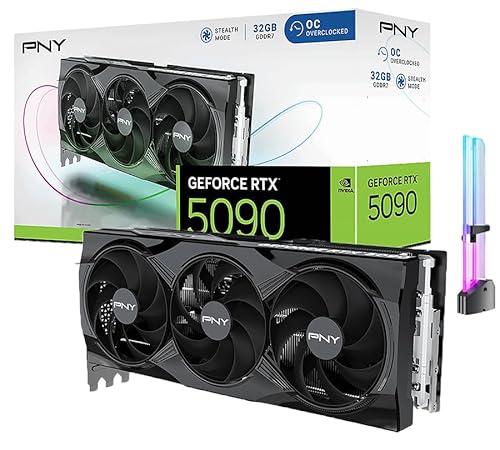


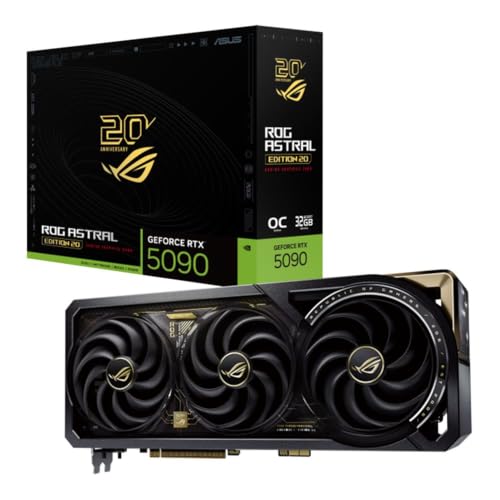
As an Amazon Associate we earn from qualifying purchases at no extra cost to you.
Snapshot: where the RTX 5090 stands today
| Topic | Status | Confidence | What to do |
|---|---|---|---|
| Production and supply | NVIDIA says not discontinued; admits constrained capacity | Official statement, but partner reports differ | Buy from authorised sellers; avoid panic purchases |
| Retail pricing | Well above launch levels in several regions | Widely reported by retailers and press | Compare several sellers; wait if your current card works |
| Power connector | 12V-2×6 improved, melting cases still reported | Community logs and press measurements | Seat fully, avoid sharp bends, monitor temperatures |
| Drivers | Regular Game Ready and Studio releases | Official release notes | Update through a clean routine; verify tuning tools |
| Next-generation Super refresh | Rumored, tied to memory availability | Leaks only | Do not plan purchases around it |
Supply and the discontinuation rumor
In mid-October 2026, two well-known leakers claimed that NVIDIA would stop sending GB202 silicon to partners for consumer RTX 5090 cards and instead reserve it for professional products. German outlet PC Games Hardware reported, citing retail and distribution sources, that no new allocations had been arriving. Igor’s Lab reported that at least one large US retailer had marked the card as discontinued rather than temporarily out of stock, and that the card had vanished from NVIDIA’s US marketplace listing at the time.
On October 16, NVIDIA’s senior vice president for personal computing, Jeff Fisher, told Taiwanese media the rumors were not true: the card has not been discontinued and is still shipping. He also acknowledged constraints on production capacity. Those two statements are not strictly contradictory. A product can remain officially active while very few units reach retail, and several outlets noted that the real picture is probably a heavily rationed supply rather than a clean end of life.
Why GB202 is scarce
GB202 is the largest Blackwell consumer die, with 21,760 CUDA cores and a 512-bit memory bus. The same chip family appears in the professional RTX PRO Blackwell workstation line, where cards with far larger memory pools sell into business budgets. When wafers and memory are limited, a vendor has an obvious incentive to favor the products with higher margins. Earlier reporting in December 2025 also pointed to a cut in RTX 50 supply for the first half of 2026 linked to tight GDDR7, GDDR6 and DDR5 memory markets, which is consistent with the shortage story.
What it means for buyers
- Do not trust unusually cheap listings. Scarcity brings counterfeit and fraudulent offers; check the seller’s history and the return policy.
- Prebuilt systems may be a pricing escape valve. Some system builders hold contracted allocations, though bundles carry other components you may not need.
- Consider the next card down. Against the RTX 5090’s 32 GB, the RTX 5080 offers 16 GB and in raster games the difference at 1440p is much smaller than the difference in cost.
- Verify what is in stock before reading headlines. Several European retailers were quoting prices at about three times the launch level at the time of the reports.
The RTX 5090 D and regional variants
NVIDIA also sold a China-specific GeForce RTX 5090 D, created to comply with export rules. It keeps the 32 GB memory configuration but trims AI performance relative to the standard card, so it is not a drop-in equivalent for local AI work. Outside that market, the standard RTX 5090 is the model most buyers will see. If a listing says “D” or uses a different model number, confirm that it matches the card you intend to buy.
Power connector safety: the update that keeps coming back
The RTX 5090 draws a reference 575 W through a single 16-pin 12V-2×6 connector, which is the revised version of the 12VHPWR plug used by RTX 40 cards. The revision shortened the sense pins and lengthened the power pins so that the plug is less likely to carry current when it is only partly inserted, but it has not ended the debate. Community trackers have continued to log melted connectors through 2026, and press measurements of a Founders Edition under heavy load reported connector hot spots in the 80 to 90 degree Celsius range, depending on workload.
A five-step connector routine
- Power down and unplug. Never reseat the cable while the system is energized.
- Inspect both ends. Look for discoloration, bent pins or a plastic housing that has deformed.
- Push until it clicks. The latch should engage fully, with no visible gap between housing and socket.
- Bend away from the plug. Leave at least about 35 mm of straight cable before any curve, as NVIDIA’s own clearance guidance indicates.
- Check again after any case work. Moving a PC, swapping a side panel or tidying cables can loosen a plug.
If you see a 12V-2×6 cable showing brown or black marks, stop using the card and contact the cable maker and the card vendor. The reason for caution is simple: a bad contact raises resistance, resistance turns current into heat, and the cable carries roughly 50 amps at full load.
Driver updates and tuning behavior
NVIDIA ships Game Ready drivers for gaming and Studio drivers for creative applications. For an RTX 5090 owner three habits matter more than chasing every release.
- Read the release notes. Fixed issues and known issues lists tell you about black screens, fan control quirks, multi-monitor bugs or video playback glitches before you install.
- Re-check tuning tools after each release. Press reports during 2026 noted that certain driver builds changed low-level power-tuning behavior in ways that affected unofficial utilities, while standard vendor overclocking controls kept working. If you run an undervolt through a third-party tool, verify its profile after updating.
- Keep a rollback. Save the last driver installer that worked so you can revert within minutes if a game starts crashing.
When a driver update seems to cut clocks
Earlier in the RTX 50 lifecycle, some users suspected newer drivers of limiting voltage on RTX 50 boards, and a later release fixed fan and performance faults while appearing to lower voltages. The takeaway is to compare behavior under a repeatable load: note the clock, power draw and temperature in a given benchmark scene before and after the update, and judge by numbers rather than by feel.
PCIe 5.0 link stability
At launch, some owners of RTX 5090 Founders Edition cards reported that systems failed to detect the card or became unstable when the slot ran at PCIe 5.0 speed. The common workaround was to force the slot to PCIe 4.0 in the BIOS, which cost almost nothing in games because the card rarely saturates a 4.0 x16 link. A motherboard BIOS update, a shorter riser cable or reseating the card cured many cases. If you are building a new system with a riser for vertical mounting, buy a PCIe 5.0 rated riser or set the slot to 4.0 from the start.
What the newest features mean for RTX 5090 owners
The RTX 5090 supports DLSS 4 with Multi Frame Generation, which can insert up to three AI-generated frames per rendered frame, plus the transformer-based Super Resolution and Ray Reconstruction models. Those features have continued to expand across game catalogs and through the NVIDIA app’s override settings. Two points deserve emphasis.
- Frame generation raises displayed frame rate but does not raise the speed at which your inputs are processed. A game rendering 60 real frames per second and displaying 240 still responds like roughly 60.
- Higher frame generation multipliers add GPU load of their own and, at the top of the range, can raise board power noticeably. If power or heat is a concern, limiting frame rate to your monitor’s refresh rate is a sensible cap.
The direction of travel is clear even if individual figures vary by outlet: more AI work per second means more heat on the same cable. Anyone running a high frame generation multiplier at 4K for hours should keep an eye on both board power and connector temperature, ideally with a thermal camera or a PSU that reports per-cable current.
How to read RTX 5090 news without being misled
Almost every week brings a new claim about the card, and the quality varies widely. A simple filter saves time and money.
- Official source: NVIDIA’s release notes, product pages and executive statements are authoritative for what the company intends, not for what is on shelves.
- Retail evidence: A listing marked discontinued, a vendor stock count or a regional price move is evidence of supply, not of company policy.
- Single leaker: Treat one anonymous account as a hint. Two independent sources with different channels are stronger, and a hardware measurement published with method notes is stronger still.
- Aggregator sites: Pages that repackage news often add invented version numbers or product names. Check any specific driver version or feature name against NVIDIA’s own download page.
Applying that filter to the October 2026 story shows why it is unresolved: the leak and the retail evidence agree with each other, the executive statement disagrees on wording but concedes constraints, and nobody has published an allocation document.
Undervolting as the practical update every owner can make
Because the card is power hungry and the connector is the sensitive part, many owners cap the power limit or apply a voltage-frequency curve. The goal is a lower wattage at nearly the same speed.
- Record a baseline: run a repeatable 4K scene for ten minutes and note average clock, board power and hottest component.
- Lower the power limit in your vendor utility to roughly 80 percent, which is about 460 W on a 575 W card.
- Repeat the same run. A typical result is a performance drop in the low single digits of percent with a noticeable fall in fan noise and heat.
- If you use a curve-based undervolt, pick a modest voltage target and validate with a long gaming session, not only a short benchmark.
- After every driver update, repeat the baseline to confirm the profile still applies.
The reasoning is the physics of power: board power rises faster than frequency because voltage must rise with frequency, so the last few hundred megahertz cost disproportionately many watts. Giving up a small slice of speed relieves the cable, the cooler and the power supply at once.
What to do if you are shopping right now
A scarce flagship rewards patience and a clear list of requirements. Decide first whether you need 32 GB of memory. If your games top out at 16 GB of use and your work does not involve large models or scenes, a high-end card with half the memory delivers most of the experience at a far lower cost and is easier to find. If you do need 32 GB, set a ceiling for what you will pay relative to the launch level and walk away from offers beyond it, because scarcity-driven pricing tends to ease once demand is satisfied or a replacement product appears.
Next, plan the rest of the build so the card can go in the moment it arrives: a 1000 W or larger ATX 3.x power supply, a case with at least 350 mm of clearance (or a Founders Edition if you are tight), and a motherboard with a reinforced PCIe slot. Having those pieces ready lets you act on a legitimate restock without compromising on safety.
Finally, keep your expectations calibrated. Independent reviews show roughly 20 to 35 percent more native 4K speed than the RTX 4090, so an RTX 4090 owner gains a solid but not dramatic step, while an owner of a two-generation-old card gains far more. The update news changes when and where you can buy, not what the card does once it is in your case.
Warranty, returns and what to document
If a card misbehaves after an update, documentation shortens the support process. Save screenshots of monitoring graphs, note the driver version and the exact game or workload, and photograph the connector at both ends if you suspect heat damage. Authorised sellers and vendor support teams respond faster to evidence. Check your region’s return window before opening a long troubleshooting thread, because a refund is simpler than a repair while supply is tight, and keep the original packaging until you are sure the card is stable.
If you use a third-party cable, record its manufacturer and rating. Cable makers publish their own guidance on bend radius and strain relief, and a vendor will ask which cable you were using before agreeing that a connector fault was a card defect.
RTX 50 Super: what is real and what is hopeful
Rumors of RTX 50 Super cards with larger memory modules have circulated for months. Reports indicate that none of the Super models in the leaks use GB202, so they would not affect RTX 5090 supply, but their launch timing is described as blocked by memory prices. Until NVIDIA confirms anything, treat them as speculation. If you need a high-end card now, waiting for an unannounced product is a bet with no stated deadline.
Worked example: the cost of waiting versus buying
Suppose your current card delivers 70 frames per second at 4K in your main game and an RTX 5090 would deliver about 105 at native settings, based on the typical gain of around 50 percent over many mid-high cards. Waiting three months costs you nothing in hardware but spends roughly 90 days of lower performance. If you play 10 hours per week, that is about 130 hours at 70 frames instead of 105. Whether that matters is personal. The calculation becomes clearer when the card is for paid work: if a render finishes in 20 minutes instead of 30, you recover 10 minutes per job, so 12 jobs a week returns two hours.
Ownership routine after every update
| Step | What to check | Why |
|---|---|---|
| 1. Driver | Release notes, known issues, rollback copy | Prevents silent regressions |
| 2. Power plug | Fully seated, no discoloration | Connector failures are the highest-severity risk |
| 3. Baseline run | Clock, wattage and temperature in one repeatable scene | Detects behavior changes objectively |
| 4. BIOS and firmware | Motherboard BIOS, GPU vendor BIOS notes | Fixes PCIe and compatibility problems |
| 5. Airflow | Dust on fans and filters | A clogged intake raises memory temperatures |
| 6. Monitoring | Hot spot and memory temperatures | GDDR7 often runs warmer than the core |
Frequently Asked Questions
Has NVIDIA discontinued the RTX 5090?
NVIDIA says no. A senior vice president stated on October 16, 2026 that the card is still shipping but that capacity is constrained. Retail reports and partner sources describe very limited new supply, so availability may feel like a discontinuation even if the official status has not changed.
Should I update my driver immediately?
Not necessarily. Read the release notes and install when a fix applies to a problem you have or a game you play. Keep the previous installer so you can roll back.
Is the melting connector issue solved?
It is reduced rather than eliminated. The 12V-2×6 design is more tolerant of partial insertion, but cases are still logged. Full seating, gentle cable bends and a quality power supply cable are the best protection.
Will an RTX 50 Super make the 5090 obsolete?
The rumored Super models do not appear to use the GB202 chip, so a 32 GB flagship would likely stay the top card. Nothing is confirmed, so do not rely on it for buying decisions.
Does forcing PCIe 4.0 hurt performance?
Very little. Games rarely saturate a PCIe 4.0 x16 link on this card, so the stability benefit usually outweighs any measurable loss. Streaming large datasets in professional workloads could show a small difference.
Is the RTX 5090 D the same card?
No. The D version is built for a specific regional market and has reduced AI capability compared to the standard card, even though it keeps 32 GB of memory. Check the model name before buying.




Write Your Review
No reviews yet. Be the first to share your experience!