

Key takeaways
- Versus RX 9070 XT. Sources conflict. One large 100-plus game comparison shows the 9070 XT about 9 percent faster, while an aggregate synthetic score favors the 7900 XT by around 8 percent. Another comparison found them nearly identical at 1440p, with averages of roughly 505 and 496 frames per second across a game set. The honest summary is a tie in raster, with the 9070 XT ahead in ray tracing and features.
- Versus RTX 5070 Ti. A comparison across more than 100 games has the 5070 Ti about 4 percent faster than the 7900 XT. TechSpot’s 52-game suite shows the 5070 Ti about 1.4 percent ahead of the 9070 XT at 1440p and about 4 percent ahead at 4K, with averages of 84 and 81 frames per second at 4K.
- Versus RTX 5070. The 7900 XT usually pulls ahead in raster performance, especially at 4K where the 5070’s 12 GB of memory and narrower bus work against it.
The Radeon RX 7900 XT still holds up in 2026 as a strong 1440p card and a capable entry-level 4K card, but it is no longer the best buy on specs alone. Its main advantage over newer cards is 20 GB of video memory. Its main disadvantages are higher power draw, weaker ray tracing and a feature set that trails the RDNA 4 generation. Benchmarks place it within a few percentage points of the Radeon RX 9070 XT and GeForce RTX 5070 Ti in traditional rasterized games, so the right answer depends on what you play and what you can find in stock.
Our top picks



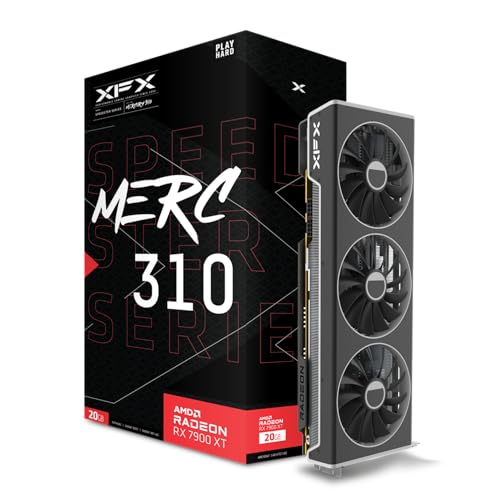
As an Amazon Associate we earn from qualifying purchases at no extra cost to you.
RX 7900 XT specifications
AMD launched the RX 7900 XT in December 2022 as part of the RDNA 3 generation, based on its chiplet design. According to AMD’s published specifications and review databases, the card has 84 compute units, which equals 5,376 stream processors, 20 GB of GDDR6 memory on a 320-bit bus delivering 800 GB/s, and 80 MB of Infinity Cache. Typical game clocks are around 2.0 GHz with boosts up to about 2.4 GHz. Total board power is 315 W, and the card uses a PCIe 4.0 x16 interface with two or three 8-pin power connectors depending on the partner design.
| Specification | RX 7900 XT | RX 9070 XT | RTX 5070 Ti | RTX 5070 |
|---|---|---|---|---|
| Architecture | RDNA 3 | RDNA 4 | Blackwell | Blackwell |
| Video memory | 20 GB GDDR6 | 16 GB GDDR6 | 16 GB GDDR7 | 12 GB GDDR7 |
| Memory bus | 320-bit | 256-bit | 256-bit | 192-bit |
| Memory bandwidth | 800 GB/s | Up to 640 GB/s | 896 GB/s | 672 GB/s |
| Board power | 315 W | 304 W | 300 W | 250 W |
| PCIe interface | 4.0 x16 | 5.0 x16 | 5.0 x16 | 5.0 x16 |
| Upscaling | FSR 3.1, FSR 4.1 upscaling reported | FSR 4 | DLSS 4 | DLSS 4 |
| Frame generation | FSR 3 frame generation | FSR frame generation | DLSS multi frame generation | DLSS multi frame generation |
The numbers come from the manufacturers’ spec sheets and the review databases that mirror them. Memory bandwidth on the 9070 XT depends on the memory speed of the specific model, so treat that value as a ceiling.
How it performs against today’s cards
Results vary by review site, the game list and the settings, so the sensible approach is to read the pattern, not a single number. Across large game suites, the RX 7900 XT lands in the same band as the RX 9070 XT and the RTX 5070 Ti in rasterized games at 1440p and 4K.
- Versus RX 9070 XT. Sources conflict. One large 100-plus game comparison shows the 9070 XT about 9 percent faster, while an aggregate synthetic score favors the 7900 XT by around 8 percent. Another comparison found them nearly identical at 1440p, with averages of roughly 505 and 496 frames per second across a game set. The honest summary is a tie in raster, with the 9070 XT ahead in ray tracing and features.
- Versus RTX 5070 Ti. A comparison across more than 100 games has the 5070 Ti about 4 percent faster than the 7900 XT. TechSpot’s 52-game suite shows the 5070 Ti about 1.4 percent ahead of the 9070 XT at 1440p and about 4 percent ahead at 4K, with averages of 84 and 81 frames per second at 4K.
- Versus RTX 5070. The 7900 XT usually pulls ahead in raster performance, especially at 4K where the 5070’s 12 GB of memory and narrower bus work against it.
In path-traced and heavy ray tracing games, the Nvidia cards lead by a much wider margin, and the 9070 XT leads the 7900 XT as well thanks to its improved ray tracing hardware.
Where the 7900 XT still wins
Video memory capacity
Twenty gigabytes is a real advantage. Several recent games ask for more than 12 GB at 4K with maximum textures, and modded games, high-resolution texture packs and creative workloads can use far more. A card with 16 GB is enough for nearly everything today, but the 20 GB model leaves more room if you keep a card for five years or more.
Memory bandwidth
With a 320-bit bus and 800 GB/s, the card has more bandwidth than the 9070 XT and the RTX 5070. This helps at 4K, where data movement matters most.
Raster performance per unit of cost
When a new or discounted unit appears at a lower price than a 9070 XT, the 7900 XT can be the better value for pure rasterized gaming. Stock of this older model is thinning as the generation ages, so availability and price differ widely by region.
Where it falls behind
Ray tracing
RDNA 3 handles ray tracing, but RDNA 4 and Nvidia’s Blackwell cards do it much better. If you enable ray tracing in games like Cyberpunk 2077 or Alan Wake 2, the 7900 XT loses ground quickly.
Upscaling and frame generation
Upscaling is where the older card has felt behind. FSR 4 launched with the RX 9000 series and was first limited to RDNA 4. According to a recent report from XDA Developers, AMD has since made FSR 4.1 upscaling officially available on Radeon 7000 cards, while machine-learning frame generation and ray regeneration remain exclusive to RDNA 4. Older reports say the card is limited to FSR 3.1, so check AMD’s current driver notes and the game’s supported features before relying on this. Before the official release, enthusiasts got FSR 4 running on RDNA 3 through third-party tools, without support.
Nvidia’s DLSS 4 and multi frame generation, available on the RTX 50 series, are widely supported in new games and remain an advantage for those cards.
Power and efficiency
At 315 W, the 7900 XT draws more than the RTX 5070 at 250 W, and the RTX 5070 Ti and RX 9070 XT draw about the same while delivering similar frame rates with better efficiency in newer features. The extra heat means a good case and a power supply of 750 W or more.
Interface
The card uses PCIe 4.0, while newer cards use PCIe 5.0. In practice, games show very small differences between the two on a x16 slot, so this matters mainly if you plan to run the card in a x8 slot or an older PCIe 3.0 board.
Decision matrix by situation
| Your situation | Best choice | Reason |
|---|---|---|
| 1440p high refresh, raster focus | RX 7900 XT or RX 9070 XT | Similar frame rates, pick the one with a better deal |
| 4K, texture-heavy games, long ownership | RX 7900 XT | Twenty gigabytes of memory and 800 GB/s bandwidth |
| Ray tracing and path tracing | RTX 5070 Ti | Much stronger ray tracing and DLSS 4 |
| Lower power, quieter case | RTX 5070 or RX 9070 | Lower board power and heat |
| Streaming and creative work with CUDA tools | RTX 5070 Ti | Software support across creative applications |
| Linux gaming with open drivers | RX 7900 XT or RX 9070 XT | Strong open-source driver support for AMD |
| Small case | RTX 5070 or RX 9070 | Many shorter, cooler designs |
Cost per frame, a worked method
Use this method to compare cards when prices are volatile. Take the average 1440p frame rate from a review that covers your games, and divide the current local price of each card by that frame rate. The card with the lowest result gives the lowest cost per frame. Then adjust for the factors that the number misses: ray tracing performance if you use it, memory capacity if you play at 4K, and power cost if you game many hours a week.
For example, if two cards both average 100 frames per second at 1440p, the cheaper one wins on cost per frame outright. If the cheaper card has 12 GB and the other has 20 GB, the memory difference may justify a small premium for the larger card. If the cheaper card uses 65 W less, running it 20 hours a week saves about 68 kWh a year, which at a typical electricity rate adds up to a small but real credit toward the cheaper card’s total cost.
Buying a 7900 XT in 2026
New stock of RDNA 3 cards is limited, so you will find a mix of remaining new units, open-box returns and used cards. If you buy used, inspect the listing for mining history and warranty transfer, and check temperatures on delivery. For a new unit, compare it against a 9070 XT at the same price. If they cost the same, the 9070 XT is the safer choice for features and efficiency, unless you specifically need the extra memory.
Partner designs from Sapphire, XFX, PowerColor and ASUS differ in cooler quality, noise and length. A triple-fan model is usually quieter than a dual-fan one at the same power, and larger coolers need a case with enough clearance.
Video memory in practice, a worked example
Video memory use grows with resolution, texture quality and features such as ray tracing and frame generation, which add their own buffers. A rough way to judge is to see how much memory a modern game requests at your settings. At 1440p with high textures, many current games use 8 to 11 GB. At 4K with maximum textures, demanding games can pass 12 to 14 GB, and with ray tracing and frame generation on top, usage climbs further. A 12 GB card runs out of room in the heaviest cases, which shows up as stutter, texture pop-in or lower settings forced by the game.
A card with 16 GB covers almost every title today. A 20 GB card adds a margin of roughly 25 percent over that, which does not change frame rates now but protects against the games of the next few years. If you upgrade your graphics card every two years, the margin matters less. If you keep a card for five or six years, as many owners do, it matters more. This logic explains why the 7900 XT remains attractive to long-term owners, and why a 12 GB card is a riskier pick for 4K.
Beyond gaming, what the card does for other work
Video encoding and streaming
The RX 7900 XT includes hardware encoders for H.264, HEVC and AV1. AV1 encoding is useful for streaming and recording at lower bitrates. Nvidia’s encoders have a long record for quality in streaming software, and the latest Radeon encoders are competitive but not always identical in output. If you stream often, check recent encoder comparisons for the settings you use.
Creative applications
Many creative programs support AMD cards through OpenCL, Vulkan or the vendor’s own acceleration paths, though some tools favor CUDA and run noticeably faster on Nvidia hardware. Twenty gigabytes helps with large video timelines, big textures in 3D scenes and high-resolution image editing, which can run out of memory on 12 GB cards.
Local AI and compute
Running local language and image models needs memory first and software support second. The card’s 20 GB allows larger models than a 16 GB or 12 GB card, but software support on AMD hardware is still behind CUDA in breadth, and setup can take extra steps. If AI work is a central goal, Nvidia is the easier path today.
Linux
AMD’s open-source graphics stack is a draw on Linux. The card works well with current kernels and Mesa drivers, and many players choose Radeon for that reason.
Getting the most from a 7900 XT
- Update the driver. AMD’s Adrenalin driver adds game optimizations and new upscaling features. Check release notes for FSR support.
- Use FSR where it helps. Enable the highest supported FSR version in games that offer it, and choose a quality mode that suits your resolution. At 4K, quality mode is the usual starting point.
- Tune power. A mild undervolt and a lower power limit often cut heat and noise with little loss in frame rate. Make small changes and watch for crashes.
- Set a frame cap. Capping the frame rate a few frames below your monitor’s refresh rate with adaptive sync reduces power use and input lag spikes.
- Check airflow. The card dumps more heat than efficient newer models, so make sure the case has front intake and rear exhaust fans.
- Monitor temperatures. Hot spot temperature on the GPU and memory junction temperature are the numbers to check under load. Sustained values near their limits suggest a cooling problem.
Neighbors worth comparing
| Card | Memory | Why compare it |
|---|---|---|
| Radeon RX 7900 XTX | 24 GB GDDR6 | Faster sibling with more memory, higher power draw |
| Radeon RX 9070 | 16 GB GDDR6 | Newer architecture, lower power, a step below the 9070 XT |
| GeForce RTX 4070 Ti Super | 16 GB GDDR6X | Previous-generation Nvidia option with DLSS support |
| GeForce RTX 5080 | 16 GB GDDR7 | Faster than the 7900 XT, in a higher tier |
The RX 7900 XTX is the natural step up inside the same generation, offering more compute units and 24 GB of memory. The RTX 4070 Ti Super is a previous-generation Nvidia card in the same performance neighborhood, and it is a sensible alternative if you find a good deal and want DLSS. The RTX 5080 sits clearly above the 7900 XT in performance and features, although its 16 GB is less than the AMD card.
Longevity and ownership realities
A 7900 XT bought today should serve for several years at 1440p, and for 4K with upscaling. What wears first is the feature set, not the raw speed. New games lean on upscaling and frame generation, and Nvidia’s lead in those features means that comparable raster performance can translate to a smoother experience on a newer card. Driver support for RDNA 3 is expected to continue, and AMD has been expanding some features to older cards, but the newest technologies tend to arrive on the newest hardware first.
On the mechanical side, fans and thermal pads are the parts that age. A card used heavily for several years may need fresh thermal paste or pads for lower memory temperatures. Clean the dust from the cooler every six to twelve months, and avoid sagging with a support bracket on heavy triple-fan models.
Common mistakes when choosing between these cards
- Comparing only the memory number. More memory does not make a card faster. It only helps when a game would otherwise run out.
- Ignoring the power supply. A card that draws 315 W alongside a high-power processor needs a quality unit with the right connectors.
- Trusting a single benchmark. Different games favor different architectures, so look at averages across many titles.
- Forgetting the monitor. The right card depends on resolution and refresh rate. A 1080p monitor does not need this class of card.
- Overlooking resale. Newer cards with the latest features keep value better than older ones.
Frequently Asked Questions
Is the RX 7900 XT still good in 2026?
Yes, for rasterized gaming at 1440p and 4K it remains competitive with the RX 9070 XT and RTX 5070 Ti. Its 20 GB of memory is a lasting strength. It lags in ray tracing, efficiency and feature support compared with the newest cards.
Is the RX 7900 XT faster than the RX 9070 XT?
The two are close in rasterized games, and review results conflict by source and game selection. The 9070 XT leads in ray tracing and in newer features, so it is the better all-round choice when prices match.
Does the RX 7900 XT support FSR 4?
Reports differ by date. A newer report says FSR 4.1 upscaling is officially available on Radeon 7000 cards, with machine-learning frame generation reserved for RDNA 4. Check AMD’s current driver and game support lists to confirm what applies to your games.
How much power supply does an RX 7900 XT need?
With a 315 W board power, a quality 750 W unit is a comfortable choice with a typical processor. Choose a larger unit if you plan to overclock or pair it with a high-power CPU.
Is 20 GB of video memory necessary?
It is not required for most games today, since 16 GB handles nearly everything. The extra memory helps with maximum texture settings at 4K, modded games and long-term use as games grow more demanding.
Should I buy a 7900 XT or an RTX 5070 Ti?
Pick the 5070 Ti if you want ray tracing, DLSS 4 and creative software support. Pick the 7900 XT if you want more memory for raster gaming and you find it at a clearly lower price.




Write Your Review
No reviews yet. Be the first to share your experience!