
Our Short List of 3
All 5 Picks at a Glance
| Product | Specs | Action |
|---|---|---|
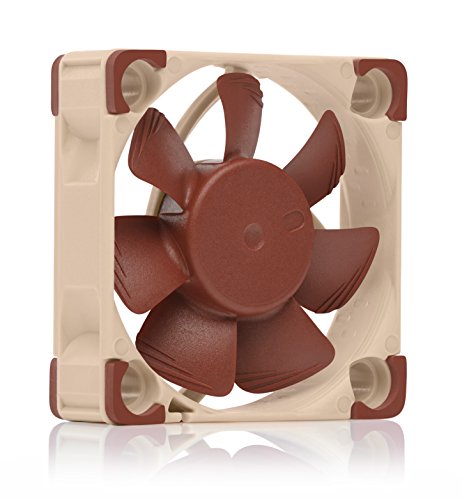 Noctua NF-A4x10 FLX | Check price on Amazon | |
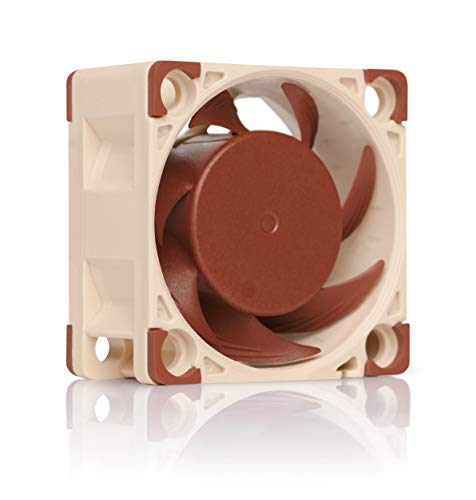 Noctua NF-A4x20 5V PWM | Check price on Amazon | |
 GDSTIME 4010 Blower Fan 12V 2-Pack | Check price on Amazon | |
 Awxlumv 40x40x20 mm Heatsink 4-Pack | Check price on Amazon | |
| Noctua NF-A4x10 24V PWM | Check price on Amazon |
Key takeaways
- Compare the 5 best chipset coolers and 40 mm fans for boards, with real Amazon picks, specs, and what to check before you buy board cooling.
Dedicated chipset coolers are a legacy class. The chunky passive northbridge heatsinks of the mid-2000s have mostly vanished, because modern chipsets run cooler and board makers now bolt on their own heatsinks. That does not mean chipset cooling is a dead subject. A chipset that runs hot in a cramped case, a RAID controller that needs moving air, or a compact board with no airflow over the chipset can still benefit from a small fan or a stick-on heatsink, and the parts that do that job today are 40 mm fans and passive heatsinks rather than purpose-built chipset coolers.
The five picks below are chosen for that modern job. Three are Noctua 40 mm fans in three different voltages, one is a blower fan sold as a two-pack, and one is a set of four passive aluminum heatsinks. Each one is matched to a different board situation, from a standard 12 V motherboard header to a 24 V printer board, and the voltage caveats are stated plainly because plugging a 5 V fan into a 12 V header, or a 24 V fan into a normal PC, will damage the fan.
As an Amazon Associate, we earn from qualifying purchases.
Quick Answer
For most boards, the Noctua NF-A4x10 FLX is the safest pick: a 12 V, 3-pin, 40 mm fan that mounts on a chipset heatsink or blows across a RAID controller. The 5 V and 24 V Noctuas serve niche boards, the GDSTIME blower suits tight spots where air must be pushed sideways, and the Awxlumv heatsinks add passive surface area with no fan at all.
Noctua NF-A4x10 FLX
The NF-A4x10 FLX is the default pick for a reason: it runs on a standard 12 V, 3-pin motherboard header, it is quiet enough to live inside a desktop case, and it is the fan most often recommended for blowing air across a chipset heatsink or a RAID controller. Its 10 mm depth keeps it low-profile, so it fits under a graphics card or beside a tall heatsink where a 20 mm fan would not. The included low-noise adaptor drops the speed from 4500 RPM to 3700 RPM when the full speed is not needed, which trades a little airflow for a quieter case. With an SSO2 bearing and a rated MTTF of over 150,000 hours, it is built to run for years without attention, which matters for a part that usually sits out of sight once installed.
Noctua NF-A4x20 5V PWM
The NF-A4x20 5V PWM is the pick for 5 V boards, and it must be treated as exactly that. This fan runs on 5 V only, so it cannot be plugged into a standard 12 V motherboard fan header. Doing so will damage it, and the damage is the buyer’s fault, not a defect. Where it belongs, it is a strong fan: a 20 mm deep frame, 4-pin PWM control, a 5000 RPM maximum speed, and a 14.9 dB(A) noise figure that is quieter than the 12 V FLX at full speed. The OmniJoin adaptor set included in the box makes it easy to wire into 5 V projects, and the SSO2 bearing matches the rest of the Noctua line. It suits small single-board computers, 5 V printer controllers, and any board that supplies a 5 V fan rail, and it should never be bought for a normal desktop PC.
GDSTIME 4010 Blower Fan 12V 2-Pack
The GDSTIME 4010 is the only blower in this roundup, and that shape is the point. An axial fan pushes air straight through its frame, while a blower pushes air out sideways, which suits tight spots where a fan cannot sit directly above the hot part. A 12 V, 2-pin blower spinning at 7000 RPM and moving 2.53 CFM at 30.5 dBA is louder than the Noctua fans here, but it fits where they cannot, and it comes as a two-pack, so a spare is on hand if one fails. Check the listing and confirm current availability before ordering, as the most recent availability reading for this pack was BackOrder rather than in stock. It is a practical pick for a cramped enclosure, a small server, or a board with no clearance above the chipset.
Awxlumv 40x40x20 mm Heatsink 4-Pack
The Awxlumv heatsink pack is the only pick with no moving parts. Four pieces of 6063-T5 anodized aluminum, each 40 x 40 x 20 mm and weighing 41 g, add passive surface area to a chipset or a hot chip that does not need a fan. Passive cooling has obvious limits: it cannot match a fan in a sealed case with no airflow, and it relies on the case moving air across the fins. But it is silent, it cannot fail mechanically, and it costs little, which makes it a sensible first step for a board that runs warm rather than hot. Four pieces in the pack cover a chipset plus a voltage regulator or a second chip, and the anodized finish resists corrosion in a humid room. For a quiet build, pairing these heatsinks with a slow fan is often better than either part alone.
Noctua NF-A4x10 24V PWM
The NF-A4x10 24V PWM is the 24 V specialist, and it must be bought with that voltage in mind. It needs at least 17 V to start, it is not suitable for standard PC applications, and it will not run from a normal 12 V motherboard header. Where it belongs is on 24 V boards, most often in 3D printers, where a 24 V rail is standard and a small PWM fan is needed to cool a controller board or a hot end. Its specs are otherwise familiar Noctua territory: a 40 x 40 x 10 mm frame, 4-pin PWM control, 5000 RPM, 19.6 dB(A), an SSO2 bearing, and an NA-AC9 adaptor cable for JST XHP-2 included in the box. Check the listing and confirm current availability before ordering. For a 24 V build, it is the quiet, long-lived option; for a 12 V PC, it is simply the wrong part.
How to Choose
Match the voltage first, because everything else is secondary. A 12 V fan goes on a standard motherboard header, a 5 V fan goes on a 5 V rail, and a 24 V fan goes on a 24 V board. Getting this wrong damages the fan, and no amount of airflow makes up for a dead part. Check the board manual for the fan header voltage before ordering, and read the listing title as well as the ASIN, because these fans look alike and the voltage is the difference that matters.
Measure the space before buying. A 40 mm fan is small, but a 20 mm deep frame will not fit where a 10 mm frame will, and a heatsink that is 20 mm tall can collide with a graphics card or a tall RAM stick. Measure the clearance above the chipset, check the mounting holes on the heatsink, and confirm the fan can be screwed down or zip-tied in place without touching anything that moves.
Think about noise as well as airflow. A 7000 RPM blower moves air in tight spaces, but it is noticeably louder than a 4500 RPM Noctua, and a fan that runs all day in a bedroom or an office should be quiet enough to forget. A low-noise adaptor or PWM control helps, and a passive heatsink is silent by definition. If the board runs warm rather than hot, a heatsink alone may be enough, and adding a slow fan only if temperatures stay high keeps the build quiet.
Finally, confirm the listing before ordering. These are niche parts with thin stock, and a listing that was available months ago may be out of stock today. Check the model number, the voltage, and the connector on the listing page, and confirm the seller’s current availability rather than assuming the part is ready to ship.
Who Should Skip
Skip this roundup if the board already has a factory heatsink with a fan and runs at normal temperatures. Adding a second fan to a chipset that is already cool does nothing useful, and it adds noise and another point of failure. Check the chipset temperature first with a monitoring tool, and only add cooling if the reading is high under load.
Skip the 5 V and 24 V fans unless the board actually supplies those voltages. A normal desktop PC has 12 V headers, so the 5 V and 24 V Noctuas are wrong for it, and buying one by mistake wastes time and money. The 12 V FLX is the safe default for a PC, and the other two are for 5 V and 24 V boards only.
Skip the blower if the case has room for a normal axial fan. A blower is a compromise for tight spots, and it is louder than an axial fan of the same size. If a 40 mm axial fan fits above the chipset, it will usually cool better and quieter than a blower squeezed into the same space.
FAQ
Can I use a 40 mm fan to cool a chipset?
Yes, a 40 mm fan mounted on or beside the chipset heatsink is the standard modern approach. The fan does not replace the heatsink; it moves air across the fins so the heatsink can shed heat faster. A 12 V fan on a motherboard header is the usual setup, and a low-noise adaptor can slow it down when full speed is not needed.
What is the difference between a blower fan and an axial fan?
An axial fan pushes air straight through its frame, from front to back, while a blower fan pushes air out sideways through a vent. A blower suits tight spots where a fan cannot sit directly above the hot part, because it can sit beside the chipset and push air across it. A blower is usually louder than an axial fan of the same size.
Will a 5 V fan work on a 12 V motherboard header?
No. A 5 V fan plugged into a 12 V header will be damaged, and the damage is not covered as a defect. The 5 V Noctua in this roundup is for 5 V boards only, such as small single-board computers and some printer controllers. Always check the fan header voltage in the board manual before ordering.
Do I need a fan at all, or is a heatsink enough?
It depends on the board and the case. A passive heatsink is enough if the chipset runs warm rather than hot and the case has airflow across it. If the chipset runs hot under load or the case is sealed and still, a fan is needed to move air across the fins. A heatsink plus a slow fan is often the best combination for a quiet build.
Final Verdict
For a standard PC, the Noctua NF-A4x10 FLX is the pick: 12 V, quiet, long-lived, and sized to fit where a chipset fan needs to go. The 5 V and 24 V Noctuas serve their own voltages well and should never be swapped into a normal desktop. The GDSTIME blower is the answer for a tight spot where air must move sideways, and the Awxlumv heatsinks are the silent, cheap first step for a board that runs warm. Check the voltage, measure the space, and confirm the listing before ordering, and the chipset will stay cool without adding noise or risk to the build.
Product and ASIN Reference
| Product | ASIN |
|---|---|
| Noctua NF-A4x10 FLX | B009NQLT0M |
| Noctua NF-A4x20 5V PWM | B071FNHVXN |
| GDSTIME 4010 Blower Fan 12V 2-Pack | B07MS1DBZ7 |
| Awxlumv 40x40x20 mm Heatsink 4-Pack | B07SMX1DB7 |
| Noctua NF-A4x10 24V PWM | B0CN39MCPL |
More from Amazon
Programs that pair well with the guide above. Offers and eligibility are set by Amazon and may change.
Free shipping on eligible items, Prime Video and more. Eligible new members can start with a free trial.
Start a Prime free trialAd-free music streaming. Eligible new subscribers can start with a free trial.
Try Music Unlimited freeA Prime membership for ages 18-24 with a trial period. Eligibility is set by Amazon.
See Prime for Young AdultsAudiobooks and podcasts to listen to on the go. Eligible new members can start with a free trial.
Try Audible freeAs an Amazon Associate we earn from qualifying purchases.


Write Your Review
No reviews yet. Be the first to share your experience!