
Our Short List of 3

- Best for: Dark-room PS5 gaming where black levels and contrast come first.
- 4K OLED evo panel, 55-inch class
- 144Hz refresh rate, as listed
- webOS smart platform
- Magic Remote included

- Best for: Bright living rooms where glare control and HDR punch matter.
- QD-Mini LED QLED panel, 55-inch class
- 4K HDR
- 120Hz-144Hz refresh wording, as titled
- Anti-reflective screen
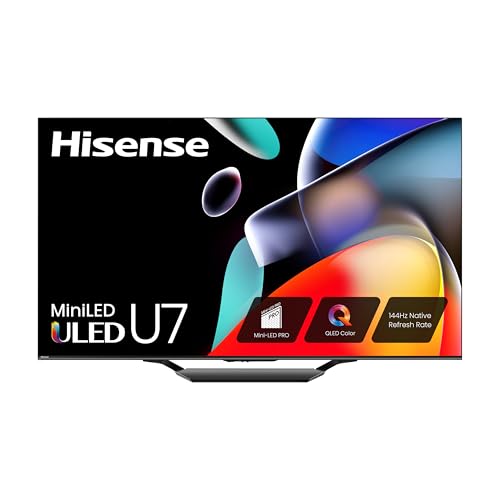
- Best for: Feature-led buyers who want VRR and a native high-refresh panel stated in writing.
- Mini-LED ULED QLED panel, 55-inch class
- 4K UHD
- Native 144Hz with Game Mode Pro and VRR, as titled
- Dolby Vision IQ and Dolby Atmos
All 5 Picks at a Glance
| Product | Specs | Action |
|---|---|---|
| LG OLED evo C4 55″ (OLED55C4PUA) |
| Check price on Amazon |
| TCL QM7K 55″ (55QM7K, 2025) |
| Check price on Amazon |
| Hisense U7N 55″ (55U7N, 2024) |
| Check price on Amazon |
 Samsung QN90F 55″ (QN55QN90FAFXZA) |
| Check price on Amazon |
 Sony X90L 55″ (XR55X90L, 2023) |
| Check price on Amazon |
Key takeaways
- Five 55-inch TVs for PS5 compared on listed gaming facts: native 120Hz and 144Hz panels, HDMI 2.1 with VRR and ALLM where stated, and game modes.
A PlayStation 5 will light up almost any 4K television, yet only some panels actually accept the console’s higher frame-rate output. The dividing line is the refresh rate and the gaming feature set printed on the listing: a native 120Hz-class panel with the right HDMI support unlocks 120 fps modes in compatible games, while a basic 60Hz set quietly caps them. Choosing well means matching the TV’s stated specifications to how the PS5 really sends its signal.
Gamers who play fast shooters and racers, movie watchers who also game, and anyone upgrading a living-room setup around the console will all find a route through this list. Each television below is a 55-inch model selected from the name and specifications given on its Amazon page, covering OLED, QD-Mini LED, Mini-LED, Neo QLED and full-array LED panels, so the panel technologies can be weighed against one another directly.
Quick Picks
As an Amazon Associate we earn from qualifying purchases
| Product | Best for | Key spec from title |
|---|---|---|
| LG OLED evo C4 55″ | Picture-first players who want the fastest panel here | 144Hz refresh rate as listed |
| TCL QM7K 55″ | Mini-LED brightness with an anti-reflective screen | 120Hz-144Hz refresh wording as titled |
| Hisense U7N 55″ | A gaming feature list that names VRR outright | Native 144Hz with Game Mode Pro and VRR |
| Samsung QN90F 55″ | Bright rooms and fast motion | Motion Xcelerator 165Hz as listed |
| Sony X90L 55″ | PS5-specific features stated on the listing | HDMI 2.1 with 4K/120, VRR and ALLM |
How to Choose
Panel Refresh Rate Is the First Filter
Everything begins with the panel. The PS5 outputs up to 120 frames per second in supported titles, so a television limited to a native 60Hz panel cannot display that mode at all. Look for listings that state a native 120Hz panel or higher figures such as 144Hz, and read the wording closely, because some sets quote a motion-processing rate rather than the panel’s own rate. The Sony below specifies a native 120Hz panel, the Hisense a native 144Hz, and the Samsung quotes its Motion Xcelerator 165Hz figure as listed; each phrasing tells you something slightly different.
HDMI 2.1, VRR and ALLM Need to Be Stated
Full-bandwidth HDMI 2.1 is the connection that carries 4K at 120Hz from the console, variable refresh rate smooths out frame-rate dips, and auto low latency mode switches the TV into its game settings when the console wakes. These features only count when the listing actually states them. The Sony X90L names all three, including VRR and ALLM, while other listings in this roundup emphasise their refresh figures and leave port details less explicit. When a port count or HDMI version matters to your setup, verify it on the live listing rather than assuming it from the model name.
Panel Technology Sets the Picture Character
OLED delivers perfect black levels because every pixel switches off individually, which suits dark-room gaming on the LG C4. Mini-LED and Neo QLED designs, represented here by the TCL, Hisense and Samsung, push far higher brightness and fight glare better in lit rooms; the TCL adds an anti-reflective screen and the Samsung a Glare Free finish. The Sony’s full-array LED sits between those camps. None of this is visible in a headline specification, so decide by your room: bright and windowed, or dark and cinema-like.
Game Modes and Console-Specific Extras
Beyond the panel, listings describe the software layer. Hisense names a Game Mode Pro alongside its VRR support, Samsung points to its Gaming Hub, and Sony goes furthest for this particular console with features it lists as Perfect for PlayStation 5, namely Auto HDR Tone Mapping and Auto Genre Picture Mode. Smart platforms differ too, with Google TV on the TCL, Hisense and Sony, and webOS on the LG. These extras shape daily use long after the first game boots, so weigh them rather than treating them as decoration.
The 5 Best Options
LG OLED evo C4 55″ (OLED55C4PUA)
- Best for: Dark-room PS5 gaming where black levels and contrast come first.
- 4K OLED evo panel, 55-inch class
- 144Hz refresh rate, as listed
- webOS smart platform
- Magic Remote included
Dark-room PS5 gaming where black levels and contrast come first.
Listing-derived summaries credit this model with four HDMI 2.1 ports, but that count was not captured from the listing itself, so confirm the port layout on the live page before relying on it.
Picture quality leads the argument for the C4. Its 4K OLED evo panel is listed with a 144Hz refresh rate, comfortably above the PS5’s 120 fps ceiling, and OLED’s per-pixel light control gives dark game scenes a depth that backlit panels chase rather than match. webOS handles the smart side, the Magic Remote is included, and Alexa is built in, per the listing. For a player whose sessions happen in a dim room and who values contrast over raw brightness, this is the set around which the rest of the list is measured.
TCL QM7K 55″ (55QM7K, 2025)
- Best for: Bright living rooms where glare control and HDR punch matter.
- QD-Mini LED QLED panel, 55-inch class
- 4K HDR
- 120Hz-144Hz refresh wording, as titled
- Anti-reflective screen
Bright living rooms where glare control and HDR punch matter.
The HDMI specification was not captured for this listing, so check the live page for its HDMI 2.1 provision before assuming full 4K/120 support on every port.
Brightness is the QM7K’s calling card. The QD-Mini LED QLED panel pairs 4K HDR with an anti-reflective screen, a combination aimed squarely at living rooms where curtains stay open during daytime sessions. TCL titles the refresh rate as 120Hz-144Hz, wording that covers the PS5’s high frame-rate modes with headroom, and the audio side is unusually well specified for a television, with Dolby Atmos and Onkyo sound named in the listing. Google TV runs the apps. Buyers wanting Mini-LED punch without stepping up to the flagship tier should start here.
Hisense U7N 55″ (55U7N, 2024)
- Best for: Feature-led buyers who want VRR and a native high-refresh panel stated in writing.
- Mini-LED ULED QLED panel, 55-inch class
- 4K UHD
- Native 144Hz with Game Mode Pro and VRR, as titled
- Dolby Vision IQ and Dolby Atmos
Feature-led buyers who want VRR and a native high-refresh panel stated in writing.
Confirm on the live listing that the set offered is the 55U7N model described here, and re-check its stated gaming features there before ordering.
Few listings state their gaming credentials as plainly as the U7N’s title does: Mini-LED ULED QLED, native 144Hz, Game Mode Pro and VRR are all named outright. Full Array Local Dimming works behind the panel, Dolby Vision IQ adapts HDR to the room, and Dolby Atmos covers sound, with Google TV on top. A native 144Hz panel exceeds what the PS5 can send, which means the console’s 120 fps modes run with room to spare. For a gamer who shops by stated features, this block reads like a checklist already ticked.
Samsung QN90F 55″ (QN55QN90FAFXZA)
- Best for: Bright rooms, fast motion and mixed gaming-and-sport viewing.
- Neo QLED 4K panel, 55-inch class
- Neo Quantum HDR+
- Glare Free screen finish
- Object Tracking Sound+ with Dolby Atmos
Bright rooms, fast motion and mixed gaming-and-sport viewing.
This model is also sold in bundle listings with extra accessories; make sure the listing you buy is the plain television described here, and confirm its gaming port specification on that page.
Samsung’s Neo QLED entry is built for motion and bright spaces. The listing quotes Motion Xcelerator 165Hz, the highest motion figure in this roundup, alongside Neo Quantum HDR+ and a Glare Free screen finish that keeps reflections from washing out afternoon play. Object Tracking Sound+ with Dolby Atmos follows on-screen action through the speaker array, the Samsung Gaming Hub gathers cloud and console sources in one place, and Alexa is built in. Players in sunlit rooms who watch sport between gaming sessions will find the specification pointed directly at them.
Sony X90L 55″ (XR55X90L, 2023)
- Best for: PS5 owners who want console-specific features and HDMI 2.1 stated explicitly.
- Full Array LED 4K HDR panel, 55-inch class
- Native 120Hz panel
- HDMI 2.1 with 4K/120, VRR and ALLM, as listed
- Perfect for PlayStation 5 features: Auto HDR Tone Mapping, Auto Genre Picture Mode
PS5 owners who want console-specific features and HDMI 2.1 stated explicitly.
This is a 2023 model, so verify on the live listing that the set on offer is the XR55X90L with the features above, since later Sony ranges use similar naming.
The X90L is the one television here whose listing speaks the PS5’s language fluently. A native 120Hz full-array LED panel sits behind HDMI 2.1 stated with 4K/120, VRR and ALLM, and Sony adds the features it markets as Perfect for PlayStation 5: Auto HDR Tone Mapping and Auto Genre Picture Mode, which adjust the picture around the console automatically. The Cognitive Processor XR drives processing, Dolby Vision is supported, and Google TV provides the apps. Anyone who wants the console-specific boxes ticked by name, rather than inferred, lands here.
Which One Fits Your Situation
Night Sessions in a Dark Room
Reach for the LG OLED evo C4. Its per-pixel OLED blacks keep shadow detail intact in horror titles and night races, and the listed 144Hz refresh rate covers the console’s fastest modes. The only homework is the HDMI port layout, which deserves a check on the live listing because the count was not captured from the page itself.
A Bright Room With Windows Opposite the Screen
Glare decides this one. The TCL QM7K counters reflections with an anti-reflective screen over its QD-Mini LED panel, and the Samsung QN90F answers with a Glare Free finish plus the strongest motion figure here. Both keep HDR bright enough for daytime play. Pick the TCL for its titled 120Hz-144Hz range, or the Samsung if sport and the Gaming Hub appeal more.
You Want Every Gaming Feature in Writing
The Hisense U7N and Sony X90L state their credentials most explicitly. Hisense names native 144Hz, Game Mode Pro and VRR in its title; Sony names HDMI 2.1 with 4K/120, VRR and ALLM plus its PlayStation-specific picture features. Choose the Hisense for the faster panel, the Sony for the console-tailored extras and the explicitly stated connection standard.
One Screen for Games, Films and Football
A mixed household screen needs balance rather than a single extreme. The Samsung QN90F spreads its talents widest, with Neo Quantum HDR+, object-tracking sound and that 165Hz motion figure for sport. The Sony X90L counters with Dolby Vision and its processor-led picture. Either serves double duty; the room’s brightness and your platform preference, Google TV or Samsung’s hub, break the tie.
Common Mistakes
- Buying a native 60Hz television and expecting the PS5’s 120 fps performance modes to appear in game settings.
- Reading a motion-processing rate as the panel’s native refresh rate, when the listing’s wording distinguishes the two.
- Assuming every HDMI port on a set carries the full gaming specification, instead of checking which ports the listing describes.
- Ignoring the room: an OLED bought for a sun-facing living room, or a glare-prone screen placed opposite windows.
- Comparing televisions by screen size alone while skipping stated features such as VRR, ALLM and the named game modes.
Frequently Asked Questions
Does the PS5 need a 120Hz TV to work?
No. The console works on any 4K television, but its 120 fps performance modes only become available when the display accepts a 120Hz signal. A native 60Hz set still shows every game, simply capped at 60 frames per second. Every television in this roundup lists a refresh figure of 120Hz or above, which is precisely why they were selected.
What does VRR do for PS5 gaming?
Variable refresh rate lets the television match its refresh timing to the console’s frame output, which reduces visible stutter and screen tearing when a game’s frame rate fluctuates. The Hisense U7N names VRR in its title, and the Sony X90L lists it among its HDMI 2.1 features. Where a listing does not mention VRR, do not assume the set includes it.
Is OLED or Mini-LED better for a PS5?
Each suits a different room. OLED, like the LG C4 here, produces perfect blacks and suits dark-room play. Mini-LED designs such as the TCL QM7K and Hisense U7N reach higher brightness and handle reflections better, helped in the TCL’s case by an anti-reflective screen. Decide by lighting first, then compare the stated gaming features within that panel family.
Why do listings quote different refresh figures, like 144Hz or 165Hz?
Manufacturers describe motion performance differently. Some state the panel’s native rate, such as the Sony’s native 120Hz or the Hisense’s native 144Hz, while others quote a motion-processing figure, as Samsung does with Motion Xcelerator 165Hz. The PS5 itself tops out at 120 fps, so any figure at or above that threshold covers the console; the wording tells you how the number was derived.
More from Amazon
Programs that pair well with the guide above. Offers and eligibility are set by Amazon and may change.
Free shipping on eligible items, Prime Video and more. Eligible new members can start with a free trial.
Start a Prime free trialAd-free music streaming. Eligible new subscribers can start with a free trial.
Try Music Unlimited freeA Prime membership for ages 18-24 with a trial period. Eligibility is set by Amazon.
See Prime for Young AdultsAudiobooks and podcasts to listen to on the go. Eligible new members can start with a free trial.
Try Audible freeAs an Amazon Associate we earn from qualifying purchases.





Write Your Review
No reviews yet. Be the first to share your experience!