

Key takeaways
- Dust: small cases pack components tightly and fans clog faster. Clean filters every two to three months.
- Undervolting: lowering voltage a little often trims power and temperature by several percent with minimal performance loss, which helps ITX thermals. Use the manufacturer’s tuning tool or a standard overclocking utility.
- Cable strain: avoid sharp bends at the graphics card connector, especially on 12V-2×6. Where the cable must turn, use a straight-exit or angled adapter designed for that connector and fully seat it until the clip clicks.
- Sag: shorter cards weigh less, but heavier 2.5-slot designs may still need a support bracket in a horizontal layout.
- Risers: in sandwich-style ITX cases the card connects through a riser cable. Make sure the riser matches the card’s PCIe generation, because a poor riser can force a downgrade to a slower link speed.
- Airflow: in a case with a 120 mm exhaust fan only, a 250 W card will raise internal temperatures noticeably, so plan an intake path before the build.
The best ITX graphics card in 2026 is the one that clears your case by at least 10 mm and still fits your power supply, and for most small builds that means the ZOTAC GeForce RTX 5060 Ti 16GB Twin Edge OC at about 220 mm long. If the case is tiny, the ZOTAC RTX 5060 Solo (164.5 mm) is the safest fit, and if you want 1440p headroom in a compact chassis the ZOTAC RTX 5070 Twin Edge (241.5 mm) is the pick to beat. The rest of this guide ranks seven real cards by the dimension that matters most in a mini-ITX case: millimetres.
Our top picks


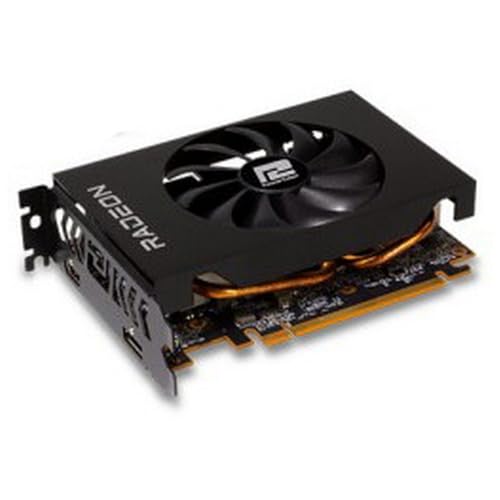

As an Amazon Associate we earn from qualifying purchases at no extra cost to you.
Quick comparison of the seven ITX-friendly picks
Dimensions below come from each manufacturer’s product or specification page (length x height x thickness). Always compare them against your own case’s clearance figures, because “ITX” is a motherboard size, not a graphics card standard.
| Pick | Best for | Length x height x thickness | Memory | Power |
|---|---|---|---|---|
| ZOTAC RTX 5060 Solo | Smallest cases, 1080p | 164.5 x 111.2 x 36.4 mm | 8 GB GDDR7 | 145 W, one 8-pin |
| ZOTAC RTX 5060 Ti 16GB Twin Edge OC | Best overall | 220.5 x 120.25 x 41.6 mm | 16 GB GDDR7 | 180 W reference |
| Sapphire Pulse RX 9060 XT 16GB | AMD fans, 1440p value | 240 x 124 x 46.1 mm | 16 GB GDDR6 | 170 W typical, one 8-pin |
| Intel Arc B580 Limited Edition | Budget with 12 GB | about 272 x 111 x 39 mm | 12 GB GDDR6 | One 8-pin |
| ZOTAC RTX 5070 Twin Edge | 1440p in a compact case | 241.5 x 120.1 x 40.6 mm | 12 GB GDDR7 | 250 W, 12V-2×6 |
| Colorful iGame RTX 5070 Mini OC | Shortest RTX 5070 | 180 x 123 x 39.8 mm | 12 GB GDDR7 | 250 W class |
| Gigabyte RTX 5070 WINDFORCE OC SFF 12G | Quiet triple-fan in roomier cases | 282 x 110 x 50 mm | 12 GB GDDR7 | 250 W, 16-pin |
How to choose an ITX graphics card (four numbers to check first)
Generic lists treat every compact card as interchangeable. The reality of a small-form-factor build is that four numbers decide whether a card works, long before you compare frame rates.
1. Card length versus case clearance
Case makers publish a maximum GPU length. Subtract roughly 10 mm for the power cable bend and any front fan or radiator that intrudes, and treat the remainder as your real budget. A case rated for 280 mm of GPU space realistically takes a card of about 270 mm, so the 282 mm Gigabyte card would not fit, while the 272 mm Intel card would be a very tight squeeze.
2. Thickness in slots, not just “dual-slot”
Manufacturers use “2-slot” loosely. A card that is 41.6 mm thick, like the ZOTAC 5060 Ti, fits a true two-slot space, but a 50 mm card such as the ASUS Dual RTX 5060 Ti or the MSI RTX 5070 Ventus 2X is a 2.5-slot design and will not fit cases that reserve exactly two slots. Bracket spacing is about 20 mm per slot, so anything much above 40 mm is over the line for a strict two-slot case unless the case maker confirms otherwise.
3. Power connector and power supply headroom
Many ITX builds use an SFX or SFX-L power supply, which tops out lower than full ATX units. A 250 W graphics card plus a modern 8-core CPU pulling 120 W to 150 W under gaming load leaves very little margin on a 450 W unit, which is why the manufacturers of 250 W cards typically recommend 650 W to 750 W. Check that the supply has a native 12V-2×6 (16-pin) cable if the card uses one, because adapters add bend radius you may not have room for.
4. PCIe lane width and generation
Several mid-range cards, including the RTX 5060 Ti and the RX 9060 XT, use a PCIe 5.0 x8 interface rather than x16. On a modern B650, B850 or Z890 mini-ITX board this is irrelevant. On an older PCIe 3.0 board, however, an x8 link carries a fraction of the bandwidth of a PCIe 5.0 link and can cost performance, particularly when 8 GB of memory forces texture streaming over the bus. If you are upgrading an older ITX system, prefer a card with 12 GB or more of memory and confirm the board’s PCIe generation.
Decision matrix: match your situation to a card
| Your situation | Pick this | Why |
|---|---|---|
| Case allows under 200 mm, 1080p gaming | ZOTAC RTX 5060 Solo | 164.5 mm, 145 W, single 8-pin connector |
| Case allows about 230 mm, want 16 GB | ZOTAC RTX 5060 Ti 16GB Twin Edge OC | 220.5 mm and a true two-slot cooler |
| Case allows about 245 mm, AMD preferred | Sapphire Pulse RX 9060 XT 16GB | 240 mm, 16 GB, single 8-pin |
| Case allows about 250 mm, 1440p target | ZOTAC RTX 5070 Twin Edge | 241.5 mm, 12 GB GDDR7, 2-slot thickness |
| Case allows under 190 mm, want 1440p | Colorful iGame RTX 5070 Mini OC | 180 mm, though availability is regional |
| Case allows over 290 mm, want low noise | Gigabyte RTX 5070 WINDFORCE OC SFF 12G | Three fans on a 282 mm board |
| Tight budget, VRAM matters most | Intel Arc B580 Limited Edition | 12 GB at an entry-level tier |
Best for the smallest cases: ZOTAC GeForce RTX 5060 Solo
The ZOTAC RTX 5060 Solo measures 164.5 x 111.2 x 36.4 mm according to ZOTAC’s product page, which makes it one of the shortest current NVIDIA cards available and a rare option for the very smallest mini-ITX enclosures. It carries 8 GB of GDDR7 on a 128-bit bus, draws 145 W, and needs one 8-pin power connector with a 550 W supply recommended on ZOTAC’s page.
Who it suits: builders using shoebox-style cases or console-sized chassis with a GPU limit near 180 mm, and 1080p gamers who want DLSS 4 upscaling and frame generation support without a large cooler. It is also a good fit for a first ITX build because the single-fan design is easy to cable around and the 8-pin connector avoids the stiff 16-pin bend.
Pros: tiny footprint, modest power draw, simple connector, full RTX 50 feature set. Cons: 8 GB of memory is the ceiling in 2026. Recent games with high-resolution texture packs can exceed 8 GB at 1440p, and the card’s PCIe 5.0 x8 interface matters more once memory spills over, so pair it with a current-generation board. A single small fan also means the card runs warmer and louder than a larger two-fan design at the same power, so expect fan noise to rise under sustained load.
Best overall: ZOTAC GeForce RTX 5060 Ti 16GB Twin Edge OC
This card balances every ITX constraint. ZOTAC’s store page lists it at about 220.5 x 120.25 x 41.6 mm in a two-slot design, with 16 GB of GDDR7 on a 128-bit bus and the SFF-Ready label that NVIDIA uses to mark cards sized for compact cases. The RTX 5060 Ti has a reference total graphics power of 180 W, so cooling demands are moderate.
Who it suits: anyone with at least 230 mm of GPU space who wants a card that handles 1080p at high settings and 1440p at medium to high settings without worrying about memory. The 16 GB version in particular gives longer useful life than the 8 GB variant of the same GPU for modern open-world titles and for creative work such as video editing with GPU effects.
Pros: short, two-slot, 16 GB, DLSS 4 and good efficiency. Cons: it is not a 4K card, and the PCIe 5.0 x8 link means older boards are best avoided. If your case reserves strictly two slots, confirm the 41.6 mm thickness fits, because some cases with vertical brackets leave less than 40 mm. Alternatives in the same class include the ASUS Dual GeForce RTX 5060 Ti 16GB at 229 x 120 x 50 mm and the MSI RTX 5060 Ti 16G Ventus 2X OC PLUS at 227 x 126 x 41 mm; the MSI is the better fit when slot thickness is the limiting factor, and its single 8-pin connector with a 600 W supply recommendation is listed on MSI’s page.
Best AMD pick: Sapphire Pulse Radeon RX 9060 XT 16GB
The Sapphire Pulse RX 9060 XT 16GB is listed at 240 x 124 x 46.1 mm and is described as a 2.3-slot card. It uses 16 GB of GDDR6, draws roughly 170 W typical board power, and needs a single 8-pin connector with a 450 W minimum power supply according to retailer listings of Sapphire’s specifications. Sapphire’s own page quotes a slightly smaller card height than most retailers, so measure with a caliper if you are cutting it close.
Who it suits: builders who want a straightforward power connector, 16 GB of memory, and strong rasterization at 1080p and 1440p, and who prefer AMD’s FSR 4 upscaling and driver approach. The 8-pin connector is a real advantage in ITX because it avoids the stiff 12V-2×6 cable bend that crowds small cases.
Pros: 16 GB, simple power, solid 1440p capability. Cons: 46.1 mm of thickness means it is slightly over a pure two-slot envelope, so check clearance beside the card for the case panel and any intake fan. Ray tracing and AI features are less polished than on NVIDIA’s RTX 50 series, and some creative applications favor CUDA.
Best budget with 12 GB: Intel Arc B580 Limited Edition
The Intel Arc B580 Limited Edition is Intel’s own reference design with 12 GB of GDDR6 on a 192-bit bus. Tom’s Hardware lists its dimensions at about 272 x 111 x 39 mm, though retailer listings quote 272 x 115 x 44 mm; either way it is a dual-slot card that uses a single 8-pin connector.
Who it suits: budget builders who want more memory than an 8 GB NVIDIA card at a similar tier, and who have a case with at least 285 mm of GPU space. The extra memory helps at 1440p in titles that use large textures, and Intel’s XeSS upscaling is supported in a growing number of games.
Pros: 12 GB at an entry tier, single 8-pin, true dual-slot thickness. Cons: at 272 mm it is long for an ITX card, so it will not fit many of the smaller cases that suit the cards above. Intel Arc cards are also known to depend more heavily on CPU performance and on Resizable BAR being enabled, so they pair best with a recent processor and a current BIOS. Driver maturity is better than at launch but still behind NVIDIA and AMD for older games.
Best for 1440p: ZOTAC GeForce RTX 5070 Twin Edge
ZOTAC’s brochure lists the RTX 5070 Twin Edge at 241.5 mm long, 120.1 mm high and 40.6 mm thick, which is a genuine two-slot card. It carries 12 GB of GDDR7 on a 192-bit bus, draws 250 W, and uses one 12V-2×6 connector with a 650 W power supply recommended by ZOTAC.
Who it suits: compact-case owners who want a clear step up from the 5060 Ti for 1440p high-refresh gaming and for ray-traced titles with DLSS 4. If your case takes 250 mm and your power supply is an SFX-L unit of 650 W or higher, this is the strongest performer in the guide that does not require a large chassis.
Pros: true two-slot, strong 1440p capability, DLSS 4. Cons: 250 W is a lot of heat for a small case, so airflow matters more than card size. The 12V-2×6 connector needs a straight, fully seated plug; leave about 35 mm of clearance behind the connector before bending the cable. The MSI RTX 5070 12G Ventus 2X OC is a close alternative at 236 x 126 x 50 mm, but its 2.5-slot thickness is a problem in strict two-slot cases.
Best for tiny 1440p builds: Colorful iGame RTX 5070 Mini OC
Colorful designed its iGame Mini series as true mini-ITX cards. The RTX 5070 Mini OC measures 180 x 123 x 39.8 mm, uses a single 95 mm fan and a two-slot cooler, and shares that body with the company’s RTX 5060 Ti 8GB and 16GB Mini cards, per Colorful’s announcements as reported by VideoCardz and other outlets.
Who it suits: builders with cases limited to about 190 mm who still want RTX 5070 class performance. A 180 mm RTX 5070 is unusually short for a 250 W GPU.
Pros: the shortest RTX 5070 on the market, two-slot thickness. Cons: the series launched in China, and international availability and warranty support had not been announced when this guide was written, so verify local sellers before planning a build around it. A single fan on a 250 W card also means louder operation under load than the larger twin-fan cards; the TechPowerUp measurements summarized by VideoCardz found the card ran cooler than the Founders Edition but with higher noise.
Best quiet triple-fan option: Gigabyte GeForce RTX 5070 WINDFORCE OC SFF 12G
Gigabyte’s specification page lists this card at 282 x 110 x 50 mm, with 6144 CUDA cores, 12 GB of GDDR7, 250 W total board power, one 16-pin connector and three fans. It carries NVIDIA’s SFF-Ready designation, which means it fits within NVIDIA’s dimension envelope for compact cases, and Gigabyte lists a 750 W recommended power supply.
Who it suits: owners of larger ITX cases, such as those that accept GPUs up to 300 mm, who want lower fan noise at the same performance as the shorter RTX 5070 cards. Three fans can spin slower for the same cooling.
Pros: quieter cooling, low height of 110 mm. Cons: 282 mm is not small in any absolute sense, and slot thickness is about 2.5 slots (sources list between 2.2 and 3 slots depending on how they count), so it is the least flexible card in this guide. Choose it only if your case documentation lists 290 mm or more of clearance.
Worked example: will it fit, and what does it cost to run?
Take a mini-ITX case rated for 300 mm GPUs, 2.5 slots of thickness, and an SFX-L 750 W power supply. After a 10 mm allowance for cable bend, the usable length is 290 mm. The Gigabyte card (282 mm) fits with 8 mm to spare, while the 272 mm Intel card leaves 18 mm. Now take a smaller case rated for 240 mm: usable length drops to 230 mm, which admits the 5060 Solo (164.5 mm) and the 5060 Ti Twin Edge (220.5 mm) but excludes the 240 mm Sapphire and the 241.5 mm ZOTAC RTX 5070.
For running cost, assume 20 hours of gaming a week at full load, 52 weeks a year, which is 1,040 hours. A 145 W card consumes about 151 kWh over that period, or roughly 22.60 in electricity at 15 cents per kWh. A 250 W card consumes about 260 kWh, or roughly 39.00. The gap of about 16.40 a year is small compared with the purchase decision, but the extra 105 W of heat is what a small case has to remove, which is why airflow and fan curves matter more than the electricity bill.
Ownership realities in a small case
- Dust: small cases pack components tightly and fans clog faster. Clean filters every two to three months.
- Undervolting: lowering voltage a little often trims power and temperature by several percent with minimal performance loss, which helps ITX thermals. Use the manufacturer’s tuning tool or a standard overclocking utility.
- Cable strain: avoid sharp bends at the graphics card connector, especially on 12V-2×6. Where the cable must turn, use a straight-exit or angled adapter designed for that connector and fully seat it until the clip clicks.
- Sag: shorter cards weigh less, but heavier 2.5-slot designs may still need a support bracket in a horizontal layout.
- Risers: in sandwich-style ITX cases the card connects through a riser cable. Make sure the riser matches the card’s PCIe generation, because a poor riser can force a downgrade to a slower link speed.
- Airflow: in a case with a 120 mm exhaust fan only, a 250 W card will raise internal temperatures noticeably, so plan an intake path before the build.
Frequently Asked Questions
What does ITX mean for a graphics card?
ITX describes the motherboard size, not the graphics card. A card marketed as an ITX GPU is simply short and thin enough to fit small cases, usually under about 250 mm long and two slots thick. Always check the actual dimensions rather than the label.
Is a 16 GB graphics card worth it in an ITX build?
Yes, if you play recent games at 1440p or edit video, because more memory prevents stutter when textures spill over the PCIe bus. In a compact system, where upgrading later is harder, the extra memory extends the card’s useful life.
Can I use a normal graphics card in a mini-ITX case?
Only if it fits. Many full-size cards are 300 mm or longer and three slots thick, which exceeds most mini-ITX cases. Compare the card’s length, thickness and power connector with the case’s specification page before buying.
What power supply do I need for an ITX GPU?
Follow the manufacturer’s recommendation: ZOTAC lists 550 W for the RTX 5060 Solo and 650 W for the RTX 5070 Twin Edge, while Gigabyte lists 750 W for its RTX 5070 WINDFORCE SFF. Make sure the supply is SFX or SFX-L if the case requires it and has the right connector for the card.
Does a PCIe 5.0 x8 card work on an older motherboard?
It works, but it may run at a lower speed. On a PCIe 3.0 board an x8 card has much less bandwidth than on a PCIe 5.0 board, which can cost performance when memory is under pressure. For older ITX boards, choose a card with 12 GB or more and a full x16 interface when possible.
Are single-fan ITX graphics cards loud?
Often, yes under sustained load, because one small fan must move enough air for the whole cooler. Lower-power cards such as the RTX 5060 Solo handle this better than 250 W models, and undervolting can reduce fan speed noticeably.




Write Your Review
No reviews yet. Be the first to share your experience!