

Key takeaways
- 29-inch 2560×1080 ultrawide: roughly 8-12 lb without the stand.
- 34-inch 3440×1440 curved ultrawide: roughly 12-20 lb without the stand, with OLED models toward the lighter end and thick curved VA models toward the heavier end.
- 38-inch 3840×1600 ultrawide: roughly 18-24 lb without the stand.
- 49-inch 32:9 super ultrawide: roughly 24-35 lb without the stand.
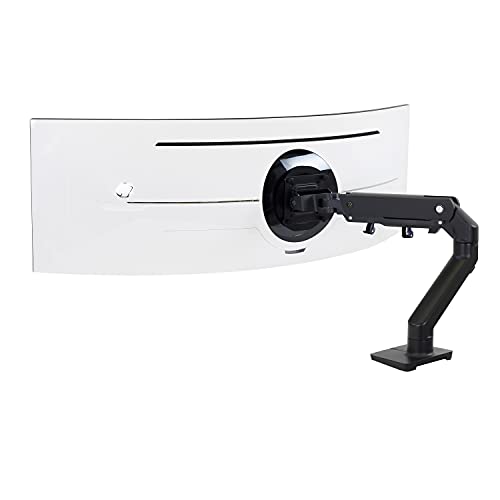
The best gaming monitor arm for an ultrawide in 2026 is one whose rated weight range brackets your panel, not simply the one with the highest maximum. For heavy 34- to 49-inch screens, the Ergotron HX is the benchmark choice, the Humanscale M10 is the premium alternative, and the Huanuo TitanLift and MSI MAG MT201 are the budget-friendly heavy-duty options. Lighter ultrawides can use gentler arms such as the Ergotron LX or Humanscale M2.1.
Ultrawides punish weak arms in a way that a standard 24-inch panel never does. The panel is wide, so its weight sits far from the arm’s mounting point, which multiplies the twisting force on the tilt joint. A curved panel pushes its center of mass even further forward. That is why an arm that happily holds a 16 lb flat monitor can droop, wobble or slowly tilt forward under an ultrawide of similar weight. This guide explains how to match arm to monitor, compares seven real arms using manufacturer-style spec ranges, and lays out the setup mistakes that cause most problems.
Our top picks


As an Amazon Associate we earn from qualifying purchases at no extra cost to you.
Quick Comparison of the Best Ultrawide Monitor Arms
| Arm | Best for | Rated load per monitor | Max screen size | Tier |
|---|---|---|---|---|
| Ergotron HX | Heavy 34-49 inch ultrawides | about 19.8-42 lb | up to 49 in | Premium |
| Humanscale M10 | Largest and heaviest setups | up to about 44 lb | up to 75 in | Premium |
| Huanuo TitanLift | Heavy panels on a budget | up to about 44 lb | up to 49 in | Budget |
| MSI MAG MT201 | Gaming-focused heavy-duty value | up to about 44 lb | large ultrawides | Budget |
| VIVO STAND-V101G1 | Mid-weight 34-49 inch panels | up to about 33 lb | up to 49 in | Budget |
| Ergotron LX | Lighter 29-34 inch ultrawides | about 7-25 lb | up to about 34 in | Mid-range |
| Humanscale M2.1 | Very light ultrawides, long warranty | about 5-15.5 lb | smaller panels | Premium |
Capacity figures above come from manufacturer-style listings and reviewer roundups, and they differ slightly between sources because brands round them or quote them for different revisions. Always confirm the exact number on the spec sheet for the revision you are buying.
How to Match an Arm to an Ultrawide Monitor
Start with the weight of the monitor without its factory stand. Spec sheets list two figures, one with the stand and one without, and the arm only carries the second. Then compare it to the arm’s rated range. Gas-spring arms have a minimum as well as a maximum, because the spring is calibrated to balance a certain load. Put a 12 lb panel on an arm built for 20 to 42 lb and the arm will float upward and refuse to stay at the height you set. This is the single most common mistake with heavy-duty arms and the reason the Ergotron HX, whose range starts around 20 lb, is a poor fit for lighter ultrawides.
Typical ultrawide weights
Weights vary by model, so treat the following as rough planning ranges and check your own spec sheet.
- 29-inch 2560×1080 ultrawide: roughly 8-12 lb without the stand.
- 34-inch 3440×1440 curved ultrawide: roughly 12-20 lb without the stand, with OLED models toward the lighter end and thick curved VA models toward the heavier end.
- 38-inch 3840×1600 ultrawide: roughly 18-24 lb without the stand.
- 49-inch 32:9 super ultrawide: roughly 24-35 lb without the stand.
A worked example: weight margin
Say your 34-inch curved gaming ultrawide weighs 16 lb without the stand. A 25 lb rated arm like the Ergotron LX leaves a healthy margin, and 16 lb sits comfortably inside its 7 to 25 lb range, so the spring will balance the screen. A 44 lb arm such as the Huanuo TitanLift might not balance it out of the box, because the spring is tuned for heavier loads, although many budget heavy-duty arms have adjustable spring tension that lets you tune it down. Now take a 49-inch super ultrawide at 31 lb. The Ergotron LX is overloaded, the VIVO STAND-V101G1 at 33 lb has only a small margin, and the HX at 42 lb gives you headroom of about 11 lb. A practical rule is to keep the monitor between 40 and 85 percent of the arm’s maximum rating, which keeps the spring in its useful range and leaves margin for accessories like a clip-on light or a webcam.
Curvature and the extra tilt force
A strongly curved panel, such as a 1000R or 1800R screen, shifts the visual center of weight forward of the VESA plate. Ergotron sells an optional HD Pivot accessory for the HX to handle 1000R curved panels, so plan for that add-on if you own one of the more aggressively curved screens. The practical symptom of too little tilt tension is a screen that slowly nods forward during the day. Most quality arms have a tilt tension screw to correct this.
VESA pattern and the plate
Most arms support 75×75 and 100×100 mm VESA patterns. Many large ultrawides have VESA holes in the same pattern, but a handful of models use a recessed mount or a plastic back with limited screw length. If your monitor has a deep recess, you may need the extension spacers that come in the arm’s hardware bag. Never use screws that thread more than a few millimeters into the monitor body, since over-long screws can damage the internal electronics.
Best Overall: Ergotron HX
The Ergotron HX is the arm most reviewers name for large, heavy ultrawides. It is rated for roughly 19.8 to 42 lb, supports screens up to 49 inches, and uses Ergotron’s constant-force lift to keep the monitor wherever you leave it. Its long reach and wide height range make it easy to pull a 34-inch curved panel closer for competitive games and push it back for movies or desk work. A long warranty, reported at ten years in retailer listings, reflects confidence in the mechanism.
Who it suits: owners of 38-inch and 49-inch ultrawides, people who want the screen to stay put after thousands of height adjustments, and anyone who is tired of replacing cheap arms.
Pros: excellent stability, wide range of motion, polished finish, strong warranty, handles the biggest consumer ultrawides. Cons: premium tier, the minimum rating means light panels will not stay put, and extremely curved displays may need the optional pivot accessory.
Best Premium Alternative: Humanscale M10
Humanscale’s M10 is the arm for anyone who wants a design-forward mount with a very high load rating. Roundups describe it as holding around 44 lb and supporting monitors up to roughly 75 inches, which puts it ahead of most consumer ultrawide needs. It is sculpted, easy to adjust with one hand and built for heavy-use office environments, which transfers well to a gaming desk used daily for years.
Who it suits: buyers with a large super ultrawide who care about the look of the desk and want a long-lived arm with minimal fiddling.
Pros: very high capacity, refined movement, durable materials. Cons: premium tier, and its capacity is more than most 34-inch screens need, so you are paying for headroom you may never use.
Best Budget Heavy-Duty: Huanuo TitanLift
The Huanuo TitanLift is the value answer to the question of how to hold a heavy ultrawide without paying premium money. Listings describe an aluminum build, a capacity around 44 lb and support for ultrawides up to 49 inches, with a five-year warranty. It uses a gas spring with adjustable tension, so it can be tuned to a wide range of monitor weights.
Who it suits: players with a mid-sized or large curved ultrawide who want a stable arm and are willing to spend a little time dialing in the spring tension.
Pros: strong rating for the tier, aluminum construction, good warranty for a budget brand. Cons: finish and cable management are less refined than premium arms, and some units need re-tightening after the first week as the joints settle.
Best Gaming-Brand Value: MSI MAG MT201
MSI’s MAG MT201 is a budget heavy-duty arm marketed to the gaming crowd. It is described as supporting up to about 44 lb, which covers every mainstream ultrawide, and it carries MSI’s gaming styling with a matte finish. Buyers already running an MSI monitor tend to find the color scheme and branding match.
Who it suits: gamers with a 34- to 49-inch ultrawide who want a clean, no-fuss arm at a budget tier.
Pros: high load rating, simple installation, straightforward styling. Cons: fewer accessories and less published long-term durability data than the premium brands.
Best Mid-Weight Value: VIVO STAND-V101G1
VIVO’s STAND-V101G1 is a single-monitor gas-spring arm rated for roughly 33 lb that accepts screens up to 49 inches, according to retailer specifications. That makes it a sensible match for 34-inch and 38-inch ultrawides in the 15 to 28 lb range, with decent margin both ways. It supports both clamp and grommet mounting, so it works with most desk edges.
Who it suits: owners of mid-weight ultrawides who do not need the very high ratings of the 44 lb arms.
Pros: sensible rating for popular ultrawide sizes, flexible mounting, widely available. Cons: very heavy 49-inch panels will push it near its limit, and the finish is a notch below premium arms.
Best for Lighter Ultrawides: Ergotron LX
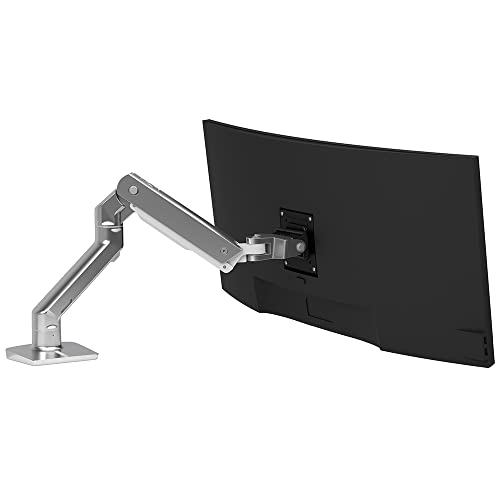
The Ergotron LX is one of the most popular monitor arms ever made, and it works with lighter ultrawides up to about 34 inches. Its rated range is roughly 7 to 25 lb, which covers most 29-inch and 34-inch panels. The movement is smooth, the arm is compact and it keeps cable runs tidy.
Who it suits: owners of 29- to 34-inch ultrawides weighing under 22 lb who want a proven mechanism.
Pros: excellent track record, smooth motion, attractive finish. Cons: too weak for 38-inch and larger panels, and a mid-range tier that sits above the budget heavy-duty arms.
Best for Very Light Panels: Humanscale M2.1
The Humanscale M2.1 targets lighter monitors, with a rated range reported around 5 to 15.5 lb and a long warranty often quoted at fifteen years. It is a good choice for a compact 29-inch ultrawide or a lightweight OLED, but it is a poor match for the heaviest ultrawides. The Herman Miller Flo, rated around 7 to 20 lb with a twelve-year warranty, is a comparable option in the same weight class.
Who it suits: people with a compact, lightweight ultrawide who value a very long warranty and an understated look.
Pros: long warranty, elegant design, smooth operation. Cons: low capacity and a premium tier, so it makes sense only for light screens.
Decision Matrix: Which Arm Fits Your Situation?
| Your situation | Best choice | Why |
|---|---|---|
| 49-inch 32:9 panel, 28-35 lb | Ergotron HX or Humanscale M10 | Rated well above the panel weight, minimal sag |
| 38-inch ultrawide, 18-24 lb | Huanuo TitanLift or VIVO STAND-V101G1 | Within range of spring tension, budget friendly |
| 34-inch curved, 14-20 lb | Ergotron LX or MSI MAG MT201 | Balanced load for LX, adjustable tension for MT201 |
| 29-inch ultrawide, under 12 lb | Humanscale M2.1 or Herman Miller Flo | Light-duty springs tuned for small loads |
| Thick desk or glass edge | Any arm with a grommet option | Avoids clamp-thickness limits |
| Wall or slatwall gaming room | Heavy-duty wall mount of the same rating | Confirm wall studs before anything else |
Installing an Ultrawide Arm Safely
- Measure your desk edge. Most clamps accept roughly 0.4 to 3.5 inches of desk thickness. Thin or hollow desks may need a reinforcement plate to spread the clamping force and prevent the desktop from cracking.
- Attach the VESA plate while the monitor lies flat. Use a soft towel and keep the screen face up on its box. A 34-inch screen can bend if you lean it awkwardly.
- Mount the arm on the desk first, then lift the monitor. With a heavy panel, ask for a second pair of hands. Lift at the sides, not the bezel top.
- Adjust the spring tension with the monitor attached. The arm should neither rise nor sink when you let go. Rotate the tension screw in small quarter turns.
- Set tilt tension last. Tilt the screen slightly down, let go and check that it stays. Add tension until it holds.
- Route cables with slack. Let the cables move with the arm. A tight cable on an ultrawide is a common cause of drift because it pulls on the pivot.
Durability and Ownership Realities
What wears first on a monitor arm is not the metal; it is the friction at the joints and the gas spring. Gas springs slowly lose pressure over years, so a cheap arm can start sinking even when the load has not changed. Premium brands design for tens of thousands of cycles and offer warranties of ten years or more. Budget arms usually offer shorter warranties, but they cost far less to replace. If you plan to keep the same ultrawide for many years, the extra spend on a premium arm pays off, whereas a budget arm is reasonable if you swap monitors every two to three years.
Other ownership tips: re-check the clamp screws every few months, keep the spring tension in the middle of its range so it has room to compensate for wear, and avoid hanging heavy accessories such as a studio light on the monitor, as it adds torque the arm was never rated for. When you change monitors, recalculate the weight margin; a swap to a larger panel can quietly overload an arm that carried your old screen without problems.
Gaming Considerations: Height, Distance and Vibration
An arm does more than free up desk space. For gaming, you can set the top edge of the screen at or just below eye level, which reduces neck strain during long sessions. Most ergonomic guidance suggests keeping the monitor roughly an arm’s length away, which for a 34-inch ultrawide means about 24 to 30 inches. An arm lets you pull a large panel back toward that range, whereas the factory stand often forces it close to the desk edge.
Vibration is another practical point. Heavy typing and mouse swipes on a shared desk make a cheap stand wobble, but a well-clamped arm tends to carry less vibration than a stand that rests on a thin desk surface. If you notice shaking, tighten the clamp, add a reinforcement plate and shorten the arm extension. Fully extended arms amplify vibration, so keep the monitor closer to the pivot when you play competitive titles.
Desk space is the other payoff. A 34-inch ultrawide on its stock stand typically occupies a footprint of around 9 to 11 inches deep, and a 49-inch model can need a base more than 18 inches wide. Moving the panel onto an arm gives that surface back for a keyboard, a large mouse pad, a controller or a streaming deck. It also lets you slide the screen over a desk shelf or push it flush against the wall for a deeper viewing distance when you want a cinematic setup.
Single Arm, Dual Arm or Desk Mount: Which Configuration?
For a single ultrawide, a single arm is almost always the right call because its rated load applies fully to one screen. Dual arms are attractive when you pair an ultrawide with a secondary vertical monitor, but many dual designs rate each arm lower than the same brand’s single model, and the shared pole adds flex when both arms are extended. If you want an ultrawide plus a small side screen, a pair of single arms on separate clamps keeps both loads independent and lets you position each screen freely. Pole-mounted systems are another route when you cannot clamp to the desk, though they trade some reach for stability. Wall mounts suit dedicated gaming rooms, but they remove the ability to pull the monitor to different distances, which is why desk arms remain the most flexible option for competitive players who adjust their setup between games.
Common Mistakes to Avoid
- Buying on maximum capacity only, and ignoring the minimum weight.
- Using the monitor weight with stand rather than without it.
- Ignoring a recessed VESA mount that needs spacers.
- Clamping to a thin particleboard desk without a reinforcement plate.
- Letting the arm hang fully extended for months, which fatigues the gas spring faster.
- Setting the spring tension at the extreme end of its range instead of the middle.
Frequently Asked Questions
Can any monitor arm hold an ultrawide?
No. Many standard arms are rated for 15 to 20 lb and are designed for 24- to 27-inch screens. A 34-inch curved ultrawide may fall inside that weight range but still stress the tilt joint because of its width and curve. Choose an arm that explicitly lists ultrawide support and screens of your size.
What happens if my ultrawide is lighter than the arm’s minimum?
The arm will drift upward because its spring is stronger than the monitor’s weight. Some arms let you reduce spring tension, which solves it. If yours does not, choose a lighter-duty model such as the Ergotron LX or Humanscale M2.1.
Do I need a special arm for a curved monitor?
Not necessarily, but a curved screen shifts its weight forward, so tilt tension matters more. The Ergotron HX offers an optional pivot accessory for strongly curved panels, and most arms with an adjustable tilt screw can handle moderate curves.
Is a gas-spring arm better than a spring-less one?
Gas-spring arms allow smooth height changes without tools, which is ideal if you move the monitor often. Fixed-height arms are simpler and cheaper but need tools to change. Heavy ultrawides generally work best on a gas-spring arm because of the easier adjustment.
How do I know my desk can support a heavy arm?
Check that the desk is at least about 0.75 inches thick at the clamp point and made from solid wood, thick MDF or metal. Hollow or thin desks need a reinforcement plate. If your desk is glass, use a grommet-style mount or a freestanding stand instead of a clamp.
Should I buy a dual arm for an ultrawide plus a second screen?
Only if the dual arm’s per-monitor rating matches your ultrawide. Some dual arms carry a lower rating per arm than their single counterparts, which makes them unsuited to 49-inch panels. For one ultrawide and one small side screen, two single arms are often the safer option.


Write Your Review
No reviews yet. Be the first to share your experience!