

Key takeaways
- Page turning: a Bluetooth foot pedal such as the AirTurn or PageFlip class works on both iPad and Android. Some apps also support face gestures or head nods.
- Music stand mount: a sturdy clamp with a tilt head matters more than most buyers expect for a 13-inch tablet.
- Matte screen protector: reduces glare and gives the pen a paper-like feel.
- Cloud and file storage: keep a backup of your PDF library separate from the device.
The best tablet for sheet music is the 13-inch iPad Pro, because its 4:3 screen is close to the size of a printed page and the forScore app is iPad only. The iPad Air 13-inch is the better value pick, the standard iPad is the budget choice, the Samsung Galaxy Tab S11 Ultra is the best large Android tablet, and the Boox Tab X C is the best e-ink option for bright rooms and long rehearsals.
Sheet music is different from ordinary reading. You need a page-sized view so you do not shrink the notation, a fast and reliable page turn, annotation with a pen, and a battery that survives a long rehearsal or gig. This guide matches those needs to current tablets.
Quick comparison of the picks
| Pick | Best for | Screen | Weight (approx.) | Key strength | Price range |
|---|---|---|---|---|---|
| iPad Pro 13-inch (M5) | Best overall | 13 in OLED, 4:3 | about 580 g | Page-size view, forScore, Apple Pencil Pro | Premium |
| iPad Air 13-inch | Best value | 13 in LCD, 4:3 | about 615 g | Large screen at a lower cost | Mid to upper |
| iPad (11-inch, A16) | Best budget | 11 in LCD | about 477 g | Runs the same music apps | Budget |
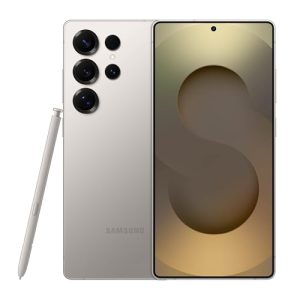
| Samsung Galaxy Tab S11 Ultra | Best Android | 14.6 in AMOLED | about 692 g | Huge screen, S Pen included | Premium |
| Boox Tab X C | Best e-ink | 13.3 in colour e-ink | about 570 g | No glare, days of battery | Upper mid |
Weights and sizes come from the manufacturers’ spec sheets and vary by configuration.
Best overall: iPad Pro 13-inch (M5)
A 13-inch 4:3 display shows a letter-size page at close to real size, so you can read a full page without zooming. The M5 chip handles forScore, Newzik and MobileSheets-style libraries with large PDF files smoothly, and the Apple Pencil Pro makes annotation feel like writing on paper. It is thin and light for its size. Optional nano-texture glass on higher storage tiers reduces glare under stage lighting.
The trade-off is cost. If you only read and rarely annotate, you are paying for performance and an OLED screen you may not need.
Best value: iPad Air 13-inch
The iPad Air 13-inch has the same 4:3 page-sized view and works with the Apple Pencil, so it handles the same apps. It is slightly heavier and its LCD is less bright than the Pro’s OLED, but for reading sheet music the difference is small. For most players it is the most sensible purchase.
Best budget: iPad (11-inch)
The standard 11-inch iPad is the cheapest way into forScore. At 11 inches, an A4 or letter page shows at about 80 percent of full size, which works for most solo parts but can feel small for dense orchestral scores. It supports the Apple Pencil and runs all the same apps.
Best Android: Samsung Galaxy Tab S11 Ultra
With a 14.6-inch AMOLED display and an included S Pen, the Tab S11 Ultra is the largest mainstream tablet and shows scores at or above full page size. It works with Android apps such as MobileSheets, Musicnotes and the IMSLP app. The caveats are its size and weight, which make it awkward on a small music stand, and the fact that forScore is not available on Android.
Best e-ink: Boox Tab X C
The Boox Tab X C has a 13.3-inch colour e-ink screen that is readable in direct sunlight with no glare, and the battery lasts days rather than hours. It runs Android with Google Play access, supports stylus annotation and works with Bluetooth page turners. The compromise is a slower screen refresh, so fast page turns can show ghosting, and colour is muted. It suits static PDFs, choir folders and outdoor performances.
Page size maths: how big a screen do you need?
A letter page is 8.5 x 11 inches. A 13-inch 4:3 tablet has a screen of roughly 7.9 x 10.5 inches in portrait, so after cropping margins it shows a page at close to full size. An 11-inch 4:3-class tablet has a screen of roughly 6.7 x 9.0 inches in portrait, which means the same page appears at about 80 percent of printed size. Players with weaker eyesight, and anyone reading from a stand a metre away, usually prefer 13 inches or larger.
How to choose: a decision matrix
| Your situation | Best choice | Reason |
|---|---|---|
| You want the best apps and annotation | iPad Pro or iPad Air 13-inch | forScore and Newzik are iPad only |
| Student on a budget | iPad 11-inch | Same apps, lower cost |
| You prefer Android | Galaxy Tab S11 Ultra | Big screen and included S Pen |
| Outdoor or stage lighting | Boox Tab X C or nano-texture iPad Pro | Low glare |
| Long gigs and travel | Boox Tab X C | Battery lasts days |
Apps and accessories that matter
- Page turning: a Bluetooth foot pedal such as the AirTurn or PageFlip class works on both iPad and Android. Some apps also support face gestures or head nods.
- Music stand mount: a sturdy clamp with a tilt head matters more than most buyers expect for a 13-inch tablet.
- Matte screen protector: reduces glare and gives the pen a paper-like feel.
- Cloud and file storage: keep a backup of your PDF library separate from the device.
Frequently Asked Questions
Is an iPad good for reading sheet music?
Yes. The iPad has the widest choice of music apps and the best annotation tools, and the 13-inch models match a printed page closely.
Can I use a cheap Android tablet for sheet music?
You can, and apps such as MobileSheets and Musicnotes work well. Choose a tablet with a screen of at least 10 to 11 inches and a decent processor so large PDFs open quickly.
Is e-ink better than an LCD or OLED screen for music?
E-ink is easier on the eyes and works in bright light, but page turns are slower and the screen is less suited to quick flips. It is a good second device for rehearsal and outdoor use.
What size tablet do I need for orchestral scores?
Conductors and players using full scores usually want 13 inches or more. Smaller tablets work for single-line parts but force you to zoom on dense scores.
How do I turn pages hands-free?
A Bluetooth pedal is the most reliable option. Apps like forScore also support face gestures on newer iPads, though lighting affects accuracy.
More from Amazon
Programs that pair well with the guide above. Offers and eligibility are set by Amazon and may change.
Free shipping on eligible items, Prime Video and more. Eligible new members can start with a free trial.
Start a Prime free trialAd-free music streaming. Eligible new subscribers can start with a free trial.
Try Music Unlimited freeA Prime membership for ages 18-24 with a trial period. Eligibility is set by Amazon.
See Prime for Young AdultsAudiobooks and podcasts to listen to on the go. Eligible new members can start with a free trial.
Try Audible freeAs an Amazon Associate we earn from qualifying purchases.
Write Your Review
No reviews yet. Be the first to share your experience!