

Key takeaways
- Class-compliant audio interface: connects through USB-C and avoids driver issues.
- Bluetooth page-turn pedal: keeps your hands on the instrument.
- Sturdy stand clamp: a 13-inch tablet needs a solid mount and a tilt head.
- USB-C hub with power passthrough: lets you charge while using an interface and a MIDI keyboard.
- Matte screen protector: cuts stage glare and gives the pencil a paper feel.
The best tablet for musicians is the iPad, because the widest range of music apps, from forScore for sheet music to GarageBand, AUM and Moises for practice and recording, is built for it. The iPad Pro 13-inch is the best overall, the iPad Air is the best value, the standard iPad is the budget pick, the Samsung Galaxy Tab S11 Ultra is the best Android choice, and the Boox Tab X C is the best e-ink tablet for reading music on stage.
Musicians use tablets for four jobs: reading and annotating scores, recording and producing, practice tools such as metronomes, tuners and backing tracks, and controlling mixers or amplifiers. Each job puts different demands on the screen, audio interface support and battery, which is why one tablet does not fit everybody.
Quick comparison of the picks
| Pick | Best for | Screen | Audio and ports | Key strength | Price range |
|---|---|---|---|---|---|
| iPad Pro 13-inch (M5) | Best overall, production | 13 in OLED | USB-C / Thunderbolt class port | Fast chip, big plugin and app support | Premium |
| iPad Air 13-inch | Best value | 13 in LCD | USB-C | Page-size screen at a lower cost | Mid to upper |
| iPad (11-inch, A16) | Best budget | 11 in LCD | USB-C | Runs all key music apps | Budget |
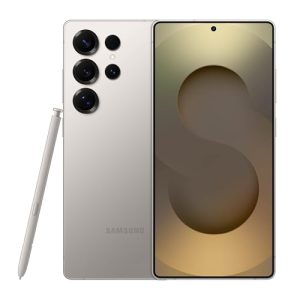
| Samsung Galaxy Tab S11 Ultra | Best Android | 14.6 in AMOLED | USB-C | Large screen, S Pen included | Premium |
| Boox Tab X C | Best e-ink for reading | 13.3 in colour e-ink | USB-C | No glare, long battery | Upper mid |
Specifications are summarised from the manufacturers’ published spec sheets; configurations and regional variants differ.
Best overall: iPad Pro 13-inch (M5)
The iPad Pro combines a page-sized 4:3 screen with a chip fast enough for multi-track recording in Logic Pro for iPad, large sample libraries and synth apps with many plugins. Its USB-C port connects to class-compliant audio interfaces and MIDI controllers without drivers, and the Apple Pencil Pro suits annotating scores. It is the most capable choice for a producer or a gigging musician who wants one device to do everything.
The trade-off is cost, and the fact that iPadOS file handling is more restrictive than a laptop for big sample libraries.
Best value: iPad Air 13-inch
The iPad Air offers the same large 4:3 canvas and works with the same app catalogue. It has less raw performance than the Pro but plenty for GarageBand, forScore, AUM, BandLab and most synths. For a teacher, band member or singer-songwriter it is the sensible sweet spot.
Best budget: iPad (11-inch)
The base iPad is the cheapest route to the iOS music ecosystem. It runs a fast enough chip for practice apps, tuners, metronomes, forScore and simple multi-track recording. The smaller screen means shrunken sheet music, so it is better as a practice and gig tool than as a main score reader for large parts.
Best Android: Samsung Galaxy Tab S11 Ultra
The Tab S11 Ultra has a 14.6-inch AMOLED display and an S Pen in the box, making it a strong score reader and note-taker. It supports Android apps such as MobileSheets, Musicnotes and BandLab. Android’s weaker audio latency and the lack of apps such as GarageBand or forScore are the main drawbacks for serious production.
Best e-ink: Boox Tab X C
For musicians who mostly read music, the Boox Tab X C delivers a glare-free colour e-ink display with battery life measured in days. It can run Android reading and sheet music apps and connects to Bluetooth page turners. It is not suited to audio production, and the slower refresh rate makes it a poor choice for rapid screen interactions.
What matters for audio work
Round-trip latency is the delay between playing a note and hearing it back. At a 48 kHz sample rate, a buffer of 128 samples adds about 2.7 milliseconds in each direction, so a round trip is roughly 5.3 milliseconds before converter and driver overhead. Most players find anything under about 10 milliseconds comfortable. iPads with class-compliant USB interfaces reach those figures consistently, while many Android devices add extra system latency that you cannot reduce by changing buffer size.
| Buffer size | One-way delay at 48 kHz | Typical use |
|---|---|---|
| 64 samples | about 1.3 ms | Live playing of virtual instruments |
| 128 samples | about 2.7 ms | Recording guitar or vocals with monitoring |
| 256 samples | about 5.3 ms | Mixing with many plugins |
| 512 samples | about 10.7 ms | Mastering, heavy effects |
How to choose: a decision matrix
| Your situation | Best choice | Reason |
|---|---|---|
| Producer or recording artist | iPad Pro | Most power and best app support |
| Band member reading charts | iPad Air 13-inch | Page-size view at a good value |
| Student or beginner | iPad 11-inch | Lowest cost, all key apps |
| Prefer Android | Tab S11 Ultra | Big screen, S Pen |
| Outdoor gigs, long sets | Boox Tab X C | Glare-free, days of battery |
Accessories musicians actually need
- Class-compliant audio interface: connects through USB-C and avoids driver issues.
- Bluetooth page-turn pedal: keeps your hands on the instrument.
- Sturdy stand clamp: a 13-inch tablet needs a solid mount and a tilt head.
- USB-C hub with power passthrough: lets you charge while using an interface and a MIDI keyboard.
- Matte screen protector: cuts stage glare and gives the pencil a paper feel.
Frequently Asked Questions
Is an iPad or an Android tablet better for musicians?
For most musicians the iPad is better because of its lower audio latency and the bigger catalogue of music apps. Android can be fine if you mainly read sheet music or use a few cross-platform apps.
Can I record an album on a tablet?
Yes. Apps such as Logic Pro for iPad, GarageBand and BandLab handle multi-track recording, and an iPad Pro or Air handles dozens of tracks. Large sample libraries are easier to manage on a laptop.
What size tablet is best for sheet music?
Thirteen inches is ideal for reading a full page. An 11-inch tablet works for simple parts but shows pages smaller than printed size.
Do I need Wi-Fi or cellular?
Wi-Fi is enough for most users. Cellular is only useful if you want to download or stream charts at venues without Wi-Fi.
How much storage should a music tablet have?
Choose at least 256 GB if you use sample libraries or record audio, because audio files take space quickly. A sheet-music-only player can get by with 64 to 128 GB.
More from Amazon
Programs that pair well with the guide above. Offers and eligibility are set by Amazon and may change.
Free shipping on eligible items, Prime Video and more. Eligible new members can start with a free trial.
Start a Prime free trialAd-free music streaming. Eligible new subscribers can start with a free trial.
Try Music Unlimited freeA Prime membership for ages 18-24 with a trial period. Eligibility is set by Amazon.
See Prime for Young AdultsAudiobooks and podcasts to listen to on the go. Eligible new members can start with a free trial.
Try Audible freeAs an Amazon Associate we earn from qualifying purchases.
Write Your Review
No reviews yet. Be the first to share your experience!