

Key takeaways
- The best wireless mice for laptops, compared by connection type, size, sensor and battery life, with picks for travel, multi-device work and laptop gaming.
A laptop mouse earns its place in your bag, not on a spec sheet. The real decision is whether it still works on a scratched cafe table or a glass hotel desk, whether it connects without stealing one of the two ports your laptop actually has, and whether the battery dies the week you forgot the cable. A trackpad covers short sessions fine; the mouse matters when a long document, spreadsheet or edit turns your wrist into the bottleneck.
This guide is for people who work away from a fixed desk: frequent travelers, hybrid workers splitting time between office and home, and students carrying a laptop all day. Every pick below was chosen from the names and specifications on its Amazon product page, with the connection type, sensor, battery claim and dimensions read from the listing rather than from roundups.
Quick Picks
As an Amazon Associate we earn from qualifying purchases.
| Product | Best for | Key spec from title |
|---|---|---|
| Logitech MX Anywhere 3S | Working on almost any surface, glass included | 8K DPI any-surface tracking |
| Logitech Pebble Mouse 2 M350s | The slimmest fit in a packed laptop bag | Slim Bluetooth mouse with quiet clicks |
| Logitech M720 Triathlon | Jumping between two or three computers | Pairs with up to 3 devices |
| Logitech Signature M650 | Quiet, comfortable all-day laptop work | Silent clicks with SmartWheel scrolling |
| Razer Orochi V2 | Gaming on a laptop without a cable | 18K DPI sensor, up to 950 hours of battery |
How to Choose
Bluetooth or a USB receiver
Modern thin laptops often ship with two USB-C ports and nothing else, so a mouse that needs a USB-A receiver may also need an adapter before it works at all. Bluetooth avoids the dongle entirely and leaves your ports free for charging and storage. A receiver still has one advantage: it wakes instantly and rarely drops in crowded wireless environments like conference venues. Some mice here offer both, and multi-device models can keep a receiver in your main laptop while Bluetooth covers a second machine, which is the most flexible setup for hybrid work.
Size and shape that survive a laptop bag
A mouse that rides in a bag pocket should be low and light enough not to bulge, yet tall enough under the palm that your fingers are not clawing it by noon. Flat designs like the Pebble Mouse 2 disappear into a sleeve but suit short sessions best. Contoured models such as the Signature M650 fill the hand better for full workdays, at the cost of more bag space. Check the listed weight and height against your hand size, and note whether a mouse comes in more than one size, because ordering the wrong variant is an easy mistake to make.
A sensor that handles the surfaces you actually meet
Away from a desk pad, your mouse lands on laminate, polished wood, bedspreads and occasionally glass. Standard optical sensors stall on clear glass and struggle on glossy finishes, while Logitech’s Darkfield tracking in the MX Anywhere 3S is listed as working on glass at least 4 mm thick. DPI range matters less than this surface tolerance for laptop use: anything from 1,000 to 4,000 DPI drives a laptop screen comfortably, and the very high figures on gaming models are headroom you will rarely touch outside a game.
Battery style: rechargeable cell or AA
Two battery philosophies compete here. Built-in rechargeable mice like the MX Anywhere 3S charge over USB-C and run for weeks per charge, but they are dead weight once the cell ages. AA-powered models such as the M720 Triathlon and Signature M650 claim up to 24 months from a single cell, and a spare AA in your bag fixes a flat battery in seconds. For travel, the AA route removes one more cable; for a home desk, USB-C charging is tidier. Either way, read the listing’s battery figure as an upper claim, not a promise.
The 5 Best Options
Logitech MX Anywhere 3S

This is the mouse for people whose desk changes daily. Its Darkfield sensor tracks on surfaces that defeat ordinary optical mice, including glass, so a hotel room or a glass-topped meeting table stops being a problem. Quiet Clicks keep early-morning work in a shared space discreet, and the MagSpeed wheel flips between line-by-line steps and free spinning for long documents. It pairs with up to three devices over Bluetooth, charges by USB-C, and its compact shell still feels substantial enough for precise work in photo and document apps.
Specs
- Sensor: Darkfield, up to 8,000 DPI, tracks on glass (minimum 4 mm thickness)
- Connection: Bluetooth Low Energy and Logi Bolt USB receiver (receiver not included)
- Battery: USB-C rechargeable, up to 70 days per charge
- Buttons: 6, including MagSpeed scroll wheel with middle click
- Size and weight: 100.5 × 65 × 34.4 mm, 99 g
- Compatibility: Windows, macOS, Linux, ChromeOS, iPadOS
Best for: Travelers who work on unpredictable surfaces and want one premium mouse for everything.
Watch out for: The Logi Bolt receiver is sold separately, so Bluetooth is the connection you get out of the box.
ASIN: B0BPY4ZQXG
Logitech Pebble Mouse 2 M350s

The Pebble Mouse 2 is built around one idea: it should vanish into your bag. The flat, pebble-shaped shell slides into a laptop sleeve pocket where a contoured mouse would bulge, and Silent Touch clicks keep it unobtrusive in a library or a quiet train carriage. It connects by Bluetooth only, pairs with up to three devices through Easy-Switch, and has a customizable middle button you can assign through Logitech’s software. Battery life is the other travel trick here, with a single AA rated for up to 24 months.
Specs
- Sensor: Optical, 4000 DPI
- Connection: Bluetooth, Easy-Switch pairing for up to 3 devices
- Battery: 1 AA (included), up to 24 months
- Clicks: Silent Touch technology for quiet clicking
- Buttons: 3, with a customizable middle button
- Build: Plastic parts include certified post-consumer recycled plastic (76% for Black)
Best for: Students and light packers who want the flattest, quietest mouse that still pairs with three devices.
Watch out for: The low profile fills the palm poorly, so it suits short sessions better than full workdays, and there is no USB receiver in the box.
ASIN: B0BT4GFFGR
Logitech M720 Triathlon
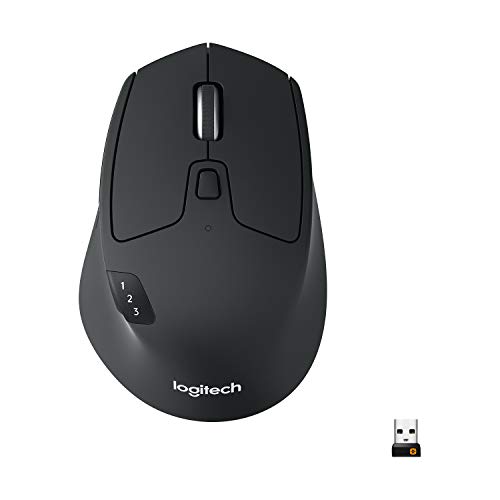
If your day involves a work laptop, a personal laptop and maybe a desktop, the M720 is the traffic controller. It pairs with three computers over Bluetooth or its USB Unifying receiver, and a thumb button cycles between them; Logitech Flow support even lets you move the cursor across machines. The full-size right-handed shape, hyper-fast scroll wheel and six buttons make it the most desktop-like mouse in this list, while the claimed two-year battery means the AA inside is close to a fit-and-forget part.
Specs
- Sensor: Optical, 1000 DPI
- Connection: Bluetooth and USB Unifying receiver, pairs with up to 3 devices
- Battery: 1 AA, up to 24 months
- Buttons: 6 programmable buttons, hyper-fast scroll wheel with tilt
- Software: Logitech Flow cross-computer control supported
- Compatibility: Windows, macOS, ChromeOS, Linux, iPadOS
Best for: Hybrid workers who switch between a work laptop and a personal machine all day.
Watch out for: It is a full-size mouse, so it takes more bag room than the travel-shaped picks, and the Unifying receiver is USB-A only.
ASIN: B087Z6LSHW
Logitech Signature M650

The Signature M650 is the comfortable middle ground: a contoured shell with a soft thumb area, sized for small to medium hands, that still travels well. Its SmartWheel scrolls line by line through documents, then spins freely when you flick it through a long page. SilentTouch clicks keep shared rooms quiet, two side buttons can be customized in Logi Options+, and it connects by Bluetooth or the included Logi Bolt receiver, so a USB-C-only laptop and an older desktop are both covered without extra shopping.
Specs
- Sensor: Logitech Advanced Optical Tracking, 400 to 4,000 DPI
- Connection: Bluetooth Low Energy and Logi Bolt USB receiver (included)
- Battery: 1 AA (included), up to 24 months with receiver
- Buttons: 5, including 2 customizable side buttons
- Scrolling: SmartWheel with precision and free-spin modes
- Size and weight: 108.2 × 61 × 38.8 mm, 101.4 g
Best for: All-day laptop users who want real palm support and quiet clicks in a mid-size body.
Watch out for: This mouse comes in regular and L sizes plus a left-handed version as separate listings, so confirm the size and hand before ordering.
ASIN: B09NQNWT76
Razer Orochi V2

The Orochi V2 is the pick for laptop owners who also play games and refuse to carry a wired mouse. It weighs under 60 grams without its battery, small enough for a jacket pocket, yet carries a proper gaming sensor and second-generation mechanical switches. Two wireless modes split the work: Bluetooth for battery life that Razer rates up to 950 hours, and the HyperSpeed 2.4 GHz connection with its USB receiver when a game demands the faster link. Unusually, it runs on either an AA or an AAA cell, whichever you have.
Specs
- Sensor: Razer 5G optical, up to 18,000 DPI
- Connection: Razer HyperSpeed 2.4 GHz (USB receiver) and Bluetooth
- Battery: 1 AA or AAA, up to 950 hours in Bluetooth mode
- Switches: Razer Mechanical Mouse Switches Gen-2
- Buttons: 6 programmable buttons
- Weight: under 60 g, excluding battery
Best for: Laptop gamers who want a genuinely light mouse that doubles for everyday work.
Watch out for: Battery life drops sharply in HyperSpeed mode compared with Bluetooth, and the small symmetrical shell offers little palm support for long office days.
ASIN: B0916N2LPZ
Which One Fits Your Situation
You work from cafes, trains and hotel rooms
Take the MX Anywhere 3S. Its Darkfield sensor keeps tracking on glass and glossy tables where cheaper optical mice give up, the battery charges from the same USB-C cable as your laptop, and the compact shell still supports precise cursor work. It is the one pick here that treats an unknown surface as a non-issue.
Your laptop bag has no spare room
The Pebble Mouse 2 M350s is the flattest mouse in this guide and slips into a sleeve pocket without a bulge. Quiet clicks suit libraries and shared study spaces, and the two-year AA battery means you can forget about charging entirely. Accept the trade-off: it is a short-session mouse, not an eight-hour one.
You run a work laptop next to a personal one
Choose the M720 Triathlon. Three-device pairing with a thumb-button switch, plus Flow support for crossing between screens, is built exactly for two-computer desks. If your second machine is a tablet instead, the Signature M650 covers the same Bluetooth-plus-receiver trick in a smaller, quieter body that travels better between home and office.
You game on your laptop after work
The Orochi V2 earns its place here. HyperSpeed wireless and an 18,000 DPI sensor give you a real gaming link through the receiver, Bluetooth stretches the battery for workdays, and at under 60 grams it is the easiest mouse in this list to carry everywhere, even in a jacket pocket next to your laptop charger.
Common Mistakes
- Buying a full-size desktop mouse for a laptop bag, then leaving it at home because it never fits the sleeve.
- Assuming a USB-A receiver will work on a USB-C-only laptop without checking for an adapter or a Bluetooth option.
- Ignoring surface tracking, then discovering your optical mouse will not move on a glass or high-gloss desk.
- Picking a mouse in the wrong size or hand variant when a model like the Signature M650 sells regular, large and left-handed versions separately.
- Treating listed battery life as guaranteed, when figures are best-case claims that vary with connection mode and use.
Frequently Asked Questions
Is Bluetooth or a USB receiver better for a laptop mouse?
Bluetooth is usually the better default for laptops because it needs no dongle and leaves scarce USB-C ports free. A receiver can feel more reliable in crowded wireless spaces and wakes instantly. Mice like the Signature M650 and M720 Triathlon offer both, so you can start with Bluetooth and keep the receiver as a backup.
Can a wireless laptop mouse work on a glass desk?
Most optical mice cannot track on clear glass. The exception in this guide is the MX Anywhere 3S, whose Darkfield sensor is listed as tracking on glass at least 4 mm thick. If your workspace has a glass top and you prefer another mouse, a desk mat solves the problem more cheaply than replacing the mouse.
How long do batteries really last in these mice?
The figures in the listings are best-case claims. AA-powered picks here are rated up to 24 months, the rechargeable MX Anywhere 3S up to 70 days per charge, and the Orochi V2 up to 950 hours in Bluetooth mode. Heavy daily use, high DPI settings and 2.4 GHz gaming modes all shorten those numbers in practice.
Do these wireless mice work with MacBooks and Chromebooks?
Yes. Every mouse in this guide lists macOS and ChromeOS compatibility on its Amazon page, and all connect over Bluetooth, which MacBooks and Chromebooks support natively. Customization software such as Logi Options+ is offered for Windows and macOS, so Chromebook users get standard buttons and scrolling without the extra remapping features.
More from Amazon
Programs that pair well with the guide above. Offers and eligibility are set by Amazon and may change.
Free shipping on eligible items, Prime Video and more. Eligible new members can start with a free trial.
Start a Prime free trialAd-free music streaming. Eligible new subscribers can start with a free trial.
Try Music Unlimited freeA Prime membership for ages 18-24 with a trial period. Eligibility is set by Amazon.
See Prime for Young AdultsAudiobooks and podcasts to listen to on the go. Eligible new members can start with a free trial.
Try Audible freeAs an Amazon Associate we earn from qualifying purchases.

Write Your Review
No reviews yet. Be the first to share your experience!