

Key takeaways
- Five monitors that can sit under the 100 line compared on panel, refresh rate and ports, with honest notes on which picks only qualify on a sale display.
The real decision at this budget is not screen size, because every credible candidate is a 24-inch 1080p panel. It is which compromise you accept: a fast gaming screen whose price only dips under the line during a sale, or a calmer office panel that lives under it more comfortably. Refresh rate, panel behaviour, ports and stand design separate these monitors far more than their nearly identical resolution figures suggest.
This roundup suits students, home-office workers and casual gamers who need one competent screen without drifting into the next price band. The five picks were chosen from the names and stated specifications on their Amazon product pages: panel type, refresh rate, sync support, ports and mounting options. Each pick also carries an honest note about how firmly it actually sits under the line, because at this level the price on the day you order matters almost as much as the spec sheet.
Quick Picks
As an Amazon Associate we earn from qualifying purchases.
| Product | Best for | Key spec from title |
|---|---|---|
| MSI PRO MP243L E14 | Office work with casual gaming on the side | 23.8-inch IPS at 144Hz |
| LG UltraGear 24G411A-B | Gamers who want both sync systems covered | 144Hz IPS with G-Sync Compatible and FreeSync |
| Acer Nitro KG241Y M3biip | Fast play while watching the line closely | 180Hz IPS with FreeSync Premium |
| Samsung Essential Monitor S30GD | Reading-heavy desk work | 100Hz IPS with Eye Saver Mode |
| AOC 24G51F2 | Buyers who want the list price itself under the line | 180Hz Fast IPS panel |
How to Choose
Refresh rate is the real dividing line
Every monitor here resolves the same 1920 x 1080 pixels, so smoothness is where your money actually goes. A 100Hz panel already feels steadier than an old 60Hz screen for scrolling documents and light play. Steps up to 144Hz and 180Hz mainly reward gaming, where frame pacing becomes visible in fast camera movement. Office work gains little beyond the first step, so decide honestly how much of your week is play. Also check that your laptop or graphics card can output the rate over the cable you plan to use, because the monitor cannot invent frames the source never sends.
Panel type shapes the everyday picture
All five picks use IPS panels, which hold colour and brightness together when you lean back, slouch or share the screen with someone beside you. That consistency matters for photo viewing, spreadsheets with coloured cells and video calls framed off-centre. Response-time figures on these listings are quoted under different test methods, so treat them as rough guides rather than laboratory rankings. HDR wording at this level means the panel accepts an HDR signal; it does not promise the bright, dramatic highlights of a far costlier display. Judge these screens on clarity and comfort first.
Ports decide what you can plug in
A monitor with only one HDMI input becomes a cable-swapping exercise the moment a console, laptop or streaming stick joins the desk. DisplayPort is the safer route to a PC’s full refresh rate, while the VGA port on the MSI pick keeps genuinely old hardware usable. Count your devices before choosing, not after. Think about audio too: none of these listings leans on built-in speakers as a headline feature, so most buyers will keep using headphones or desktop speakers. Finally, a VESA mount pattern frees desk space if you later add an arm.
Treat the price line as a check, not a promise
Prices at this end of the market move constantly, and several of these monitors cross the line in both directions across a season. One pick only qualifies while a sale display holds, another has sat on both sides of the line within its recorded history, and one relies on older evidence. So the honest way to shop this list is to open the live listing for the exact model, confirm it sits under the line on that day, and be willing to walk away from a pick that has drifted above it. The specifications will still be there next week.
The 5 Best Options
MSI PRO MP243L E14
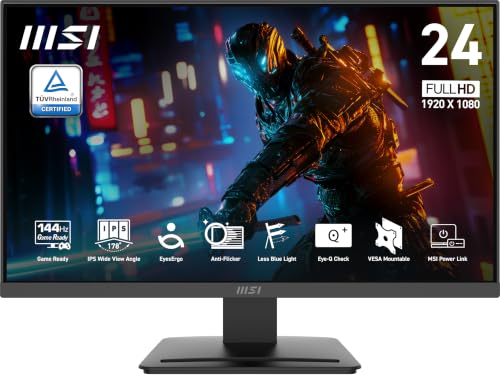
MSI sells this as a business monitor, yet the listing pairs the office brief with a 144Hz refresh rate, which makes it the most rounded pick here. The 23.8-inch IPS panel, slim bezels on four sides and VESA mounting suit a tidy desk, and the VGA port keeps older machines in play alongside HDMI. Buyers who split the week between documents and evening gaming get the fewest compromises from this one, provided its price behaves on the day.
Specs
- 24-inch class (23.8-inch) IPS panel
- 1920 x 1080 (FHD) resolution
- 144Hz refresh rate
- 1ms response time as listed
- Adaptive-Sync / FreeSync wording
- HDR Ready
- HDMI and VGA ports
- VESA mountable, tilt adjustment, 4-side slim bezel
Best for: A home-office desk that also handles casual gaming.
Watch out for: This pick’s list price sits above the line, so it only qualifies while a sale display holds. Confirm on the live listing that this exact model is shown under the line before ordering, and drop it without hesitation on any day it is not.
ASIN: B0FG5XLWNV
LG UltraGear 24G411A-B

LG’s entry is the gamer-leaning all-rounder of the group. Its 144Hz IPS panel carries both NVIDIA G-Sync Compatible and AMD FreeSync support as listed, so the screen adapts to whichever graphics card you own now or buy next. HDR10 support and a DisplayPort input round out a specification that looks a class above the budget, while the slim stand keeps the desk footprint small. That combination is exactly why its pricing history deserves the caution spelled out below.
Specs
- 24-inch class (23.8-inch) IPS panel
- Full HD 1920 x 1080 resolution
- 144Hz (O/C) refresh rate
- 1ms MBR response as listed
- NVIDIA G-Sync Compatible and AMD FreeSync
- HDR10 support
- HDMI and DisplayPort inputs
- Slim stand design
Best for: Gamers who want one screen that syncs with either GPU brand.
Watch out for: This is an explicitly borderline pick. The recorded price history for this listing swings widely on both sides of the line, so it belongs in this roundup only while the live display sits under it. Check the exact listing at order time and drop the pick if it has crossed.
ASIN: B0FLL354M2
Acer Nitro KG241Y M3biip
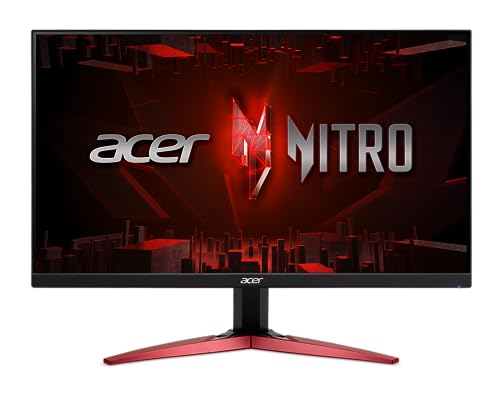
The Nitro is the speed pick: a 180Hz refresh rate and up to 0.5ms response as listed, numbers that would have been unthinkable at this level a few years ago. FreeSync Premium, HDR10 support and a port set with one DisplayPort and two HDMI inputs make it easy to run a PC at full rate while a console stays connected. Its 99 percent sRGB coverage, spelled out in the listing title, keeps colours respectable for everyday editing too.
Specs
- 23.8-inch Full HD 1920 x 1080 IPS panel
- 180Hz refresh rate
- Up to 0.5ms response as listed
- AMD FreeSync Premium
- HDR10 support
- 99 percent sRGB as listed
- 1 x DisplayPort 1.2 and 2 x HDMI 2.0
Best for: Fast-paced gaming where smoothness outranks everything else.
Watch out for: Recent displays for this model sat right at the edge of the line, so confirm the live listing for this exact IPS model sits under it before ordering. Make sure you are looking at the IPS M3biip version; a similarly named VA-panel version is a different listing and a different product.
ASIN: B0CJQ7V6M8
Samsung Essential Monitor S30GD

Samsung takes the opposite approach to Acer: a gentler 100Hz refresh rate, a 5ms GTG-class response and features aimed at long reading sessions. Eye Saver Mode and the listing’s Game Mode cover the two main uses of a household second screen, while the tilt-only stand keeps expectations realistic. One detail matters at setup: the listing notes the panel defaults to 60Hz and the 100Hz rate is selected in the monitor’s own settings, so the first job after unboxing is a menu visit.
Specs
- 24-inch IPS panel
- FHD 1920 x 1080 resolution
- 100Hz refresh rate (defaults to 60Hz; 100Hz set in the monitor’s settings)
- 5ms GTG class response
- Game Mode and Eye Saver Mode
- Tilt-only stand
Best for: Reading, documents and relaxed everyday use.
Watch out for: The evidence placing this pick under the line is the oldest in this roundup, gathered months before the others. Treat its position as unconfirmed until a fresh look at the live listing shows this exact model displayed under the line.
ASIN: B0DK468KVS
AOC 24G51F2

AOC’s candidate matches the Acer on headline speed, with a Fast IPS panel at 180Hz and 0.5ms MPRT as listed, plus Adaptive Sync and HDR wording. What sets it apart is the shape of its pricing: its list figure itself sits under the line rather than depending on a temporary sale, which no other pick here can claim. The trade-off is documentation rather than hardware, and the note below explains what to verify before money changes hands.
Specs
- 24-inch FHD 1080p display
- Fast IPS panel
- 180Hz refresh rate
- 0.5ms MPRT as listed
- HDR wording as listed
- Adaptive Sync
Best for: Buyers who prefer a list price under the line over a sale price.
Watch out for: The tier position is the strongest here, since the list price itself sits under the line, but the link between this model and its Amazon code is the least firmly documented of the five. Open the live listing, confirm the model name and specifications match this description, and confirm the display still sits under the line before ordering.
ASIN: B0H34GTBGN
Which One Fits Your Situation
A student desk that has to do everything
Coursework all day and gaming at night points to the MSI or the LG. Both pair an IPS panel with 144Hz, so text stays comfortable and play stays smooth. The MSI adds VESA mounting and a VGA port for ageing hardware; the LG adds DisplayPort and dual sync support. Either way, run the price check in the pick’s note first, because both monitors drift across the line.
A first gaming setup on a strict cap
Prioritise refresh rate and sync, which means the Acer Nitro or the AOC. Both list 180Hz with adaptive sync, the combination that keeps fast games feeling fluid on modest graphics cards. The Acer’s extra HDMI input suits a console sharing the screen. The AOC’s list price sitting under the line makes it the calmer purchase when no sale is running.
A second screen for a home office
The Samsung S30GD was effectively designed for this job. Its 100Hz rate keeps scrolling pleasant, Eye Saver Mode suits long documents, and a second 1080p panel is an easy load for any modern laptop. Just remember the setup step the listing flags: switch the panel from its 60Hz default to 100Hz in the monitor’s own menu, or you will never see the benefit you paid for.
Buying today rather than waiting for a sale
If the purchase cannot wait, start with the AOC, whose list price itself sits under the line, then check the Acer’s live display. Treat the MSI as a sale-only opportunity and the LG as a coin toss that needs a live check. Walking away from a pick that has crossed the line is not a failed shop; at this budget the same model usually returns under it before long.
Common Mistakes
- Assuming the price quoted in any roundup is the price today, instead of confirming the live listing for the exact model.
- Mixing up the IPS and VA versions of the Acer Nitro KG241Y, which share most of a name but are different listings with different panels.
- Buying a 180Hz monitor and then connecting it through a port or cable that cannot carry that rate from your machine.
- Reading HDR wording on a budget listing as a promise of premium HDR picture quality.
- Ignoring the stand: a tilt-only design with no VESA mount cannot be rescued later with a monitor arm.
Frequently Asked Questions
Are all monitors at this level 1080p?
Effectively yes. Every pick in this roundup is a 1920 x 1080 panel, and higher resolutions at this budget tend to come with compromises elsewhere that are harder to live with. The good news is that 1080p at 24 inches still looks sharp at a normal desk distance, and it is easy for modest graphics hardware to drive at high refresh rates.
Is a high refresh rate worth it if I rarely game?
Partly. Moving from 60Hz to 100Hz makes scrolling, window dragging and video feel visibly steadier, and most people notice that within a day. The jump from 144Hz to 180Hz, by contrast, mostly rewards fast gaming. If your week is documents and browsing, the Samsung’s comfort features may serve you better than the Acer’s extra speed.
Why do some picks carry price warnings?
Because prices at this level move constantly and honestly labelling that movement protects you. One pick only qualifies while a sale display holds, one has crossed the line in both directions within its recorded history, and one relies on older evidence. The warning is the instruction: confirm the exact listing sits under the line on the day you order, and drop any pick that does not.
Does the Samsung S30GD run at 100Hz straight out of the box?
No, and the listing is upfront about it. The panel defaults to 60Hz, and the 100Hz rate is selected in the monitor’s own settings menu. It takes under a minute to change, but skipping it is the single most common reason buyers feel a monitor like this underdelivers.
More from Amazon
Programs that pair well with the guide above. Offers and eligibility are set by Amazon and may change.
Free shipping on eligible items, Prime Video and more. Eligible new members can start with a free trial.
Start a Prime free trialAd-free music streaming. Eligible new subscribers can start with a free trial.
Try Music Unlimited freeA Prime membership for ages 18-24 with a trial period. Eligibility is set by Amazon.
See Prime for Young AdultsAudiobooks and podcasts to listen to on the go. Eligible new members can start with a free trial.
Try Audible freeAs an Amazon Associate we earn from qualifying purchases.


Write Your Review
No reviews yet. Be the first to share your experience!