

Key takeaways
- Compare five toddler-ready tablets by case strength, parental controls, screen size and preloaded content to pick the right first tablet for a 2 year old.
Buying a first tablet for a 2 year old is really a decision about survival and control: the device will be dropped, carried by its case and tapped with sticky fingers, so the case, the screen protection and the parent settings matter far more than raw speed. The second decision is content. A toddler needs big icons, simple cause-and-effect apps and a locked-down library, not an open store they can wander through by accident.
The buyers split into a few camps: parents who want the strongest breakage protection, families who prefer a closed learning system with nothing to configure, and households that want one device a child can keep using into preschool. Every tablet below was picked from the names and specifications on its Amazon listing, including each maker’s stated age range, case design and control options.
Quick Picks
As an Amazon Associate we earn from qualifying purchases.
| Product | Best for | Key spec from title |
|---|---|---|
| Amazon Fire 7 Kids | Smallest hands and lightest carry | 7″ screen, 16 GB, ages 3-7 |
| Amazon Fire HD 8 Kids | Longer days between charges | 8″ HD screen, 13-hr battery |
| LeapFrog LeapPad Academy | A closed, learning-only system | 7″ shatter-safe screen |
| Contixo Kids Tablet V10 | A stylus and preloaded storybooks | 7″ HD screen, 32 GB |
| Contixo 10″ Kids Tablet K102 | The biggest screen for shared viewing | 10″ HD screen, 32 GB |
How to Choose
Start with the case, not the screen
At two, a tablet spends as much time falling as it does playing. Look for a thick foam or silicone case that wraps the corners and rises above the glass, because corner drops are what crack screens. A built-in stand or handle matters more than it sounds: it props the tablet up for videos and gives small hands something to grip. Two listings here go further with replacement backing if the tablet breaks, which changes the risk calculation for a device handed to a toddler.
Read the stated age range carefully
Nearly every tablet in this roundup is labelled by its maker for ages 3 and up, and Amazon’s own listings add a small-parts warning for children under 3. That label is worth respecting rather than ignoring: it reflects the content bands and the hardware testing behind the product. Parents who buy for a 2 year old usually do so for the bumper case and the locked library, then supervise early use. Check the age range printed on the listing you order, and treat the youngest band of the content library as the starting point.
Put parental controls at the centre
The control system decides what your child can reach. Strong setups let you set daily time limits, approve every app before it appears, filter web content and check activity from your own phone. Amazon’s Parent Dashboard and Contixo’s control panel both work this way, while the LeapPad takes a different route: its library is closed, its browser only opens parent-approved sites, and there is no open store to lock down in the first place. For a 2 year old, fewer doors to guard is usually better.
Match size and battery to real routines
A 7-inch tablet is easier for small hands to hold and lighter in a change bag, while a 10-inch screen suits two children watching together or a parent reading along. Battery claims here run from about 7 hours to 13 hours of mixed use, and that gap shows up on travel days. Storage fills quickly with downloaded videos for offline viewing, so note the base capacity and whether a microSD slot lets you expand it later instead of replacing the tablet.
The 5 Best Options
Amazon Fire 7 Kids

The Amazon Fire 7 Kids is the smallest and lightest route into Amazon’s kids line, built around a 7-inch screen and the chunky Kid-Proof Case with a built-in stand. Its listing leads with the 2-year worry-free guarantee: if the tablet breaks, Amazon replaces it. A year of Amazon Kids+ is included, and the Parent Dashboard handles time limits, age filters and educational goals. For a 2 year old, the modest 16 GB storage is the main constraint, softened by the microSD slot.
Specs
- Display: 7″ touchscreen, 1024 x 600 at 171 ppi, IPS
- Processor: Quad-core 2.0 GHz, 2 GB RAM
- Storage: 16 GB (9.5 GB available to user)
- Expansion: microSD up to 1 TB
- Battery: Up to 10 hours of mixed use
- Case: Amazon Kid-Proof Case with built-in stand
- Included: 1 year of Amazon Kids+, 2-year worry-free guarantee
- Age range: Ages 3 and up, as listed
Best for: A first tablet that small hands can actually carry around the house.
Watch out for: The listing states ages 3 and up with a small-parts warning for under-3s, and only 9.5 GB of the storage is usable.
ASIN: B0BLBLRLJB
Amazon Fire HD 8 Kids

The Amazon Fire HD 8 Kids stretches the same formula over an 8-inch HD screen with a battery rated for up to 13 hours, which suits long car rides and full days away from a charger. The 2024 release pairs a hexa-core processor with 32 GB of storage, and the Kid-Proof Case keeps its stand and handle design. Age filters are preset for the 3-7 band, the screen uses strengthened aluminosilicate glass, and the same 2-year worry-free guarantee and year of Amazon Kids+ carry over from the smaller model.
Specs
- Display: 8″ HD touchscreen, 1280 x 800 at 189 ppi, IPS
- Processor: Hexa-core
- Storage: 32 GB (25 GB available to user)
- Expansion: microSD up to 1 TB
- Battery: Up to 13 hours of mixed use
- Case: Amazon Kid-Proof Case with stand and handle
- Included: 1 year of Amazon Kids+, 2-year worry-free guarantee
- Age range: Ages 3-7, as listed
Best for: Families who want the Fire Kids safety net with a bigger screen and longer battery.
Watch out for: The cased tablet is noticeably larger for toddler hands, and the Kids+ subscription renews automatically after the included year.
ASIN: B0CVDVVRYM
LeapFrog LeapPad Academy
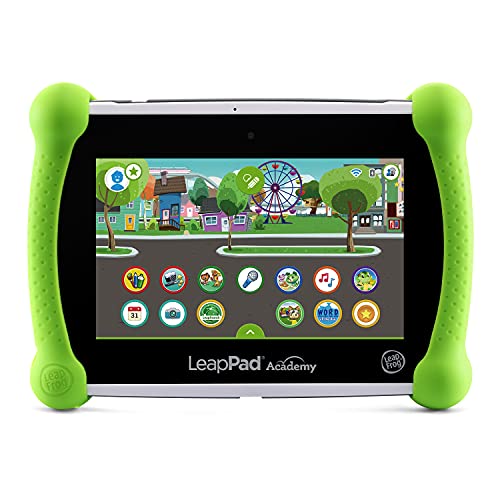
The LeapFrog LeapPad Academy takes the opposite approach to the Fire tablets: instead of locking down a general tablet, it runs a closed learning system with more than 20 educator-approved apps already installed. The 7-inch screen is shatter-safe, the removable bumper doubles as a kickstand, and a stylus is included for tracing and drawing. Parent controls set time limits and approve the websites the LeapSearch browser may open. A three-month trial of the LeapFrog Academy program adds a guided path of activities for the preschool years.
Specs
- Display: 7″ shatter-safe touchscreen, 1024 x 600
- Storage: 16 GB
- Expansion: microSD up to 32 GB
- Battery: Rechargeable lithium-ion, 7 hours average life as listed
- Cameras: Front and rear cameras
- Protection: Removable silicone bumper with built-in kickstand
- Content: 20+ preloaded educator-approved apps, LeapSearch kid-friendly browser
- Age range: 3-8 years, as listed
Best for: Parents who want a walled garden of learning content with nothing extra to configure.
Watch out for: Storage and expansion are the smallest here, and extra LeapFrog content beyond the preloaded apps is bought separately.
ASIN: B07PLG93NS
Contixo Kids Tablet V10

The Contixo Kids Tablet V10 is the one listing here that puts the word toddler in its own title, and it backs that up with a 7-inch format, a kid-proof case that extends over the screen edges and a stylus sized for early scribbling. It runs Android with the Google Play Store behind parental controls that manage screen time and app access. More than 50 Disney storybooks come preloaded, and the 32 GB of storage doubles the base capacity of the 7-inch Fire and the LeapPad at this size.
Specs
- Display: 7″ HD IPS touchscreen, 1024 x 600
- Processor: Quad-core 1.6 GHz, 2 GB RAM
- Storage: 32 GB
- Expansion: microSD up to 128 GB
- System: Android with Google Play access behind parental controls
- Protection: Kid-proof case and stylus included
- Content: 50+ preloaded Disney storybooks
- Age range: Ages 3-7, as listed
Best for: A 7-inch Android tablet with storybooks ready on day one and room to grow.
Watch out for: Contixo’s listings are not consistent about Android version and battery figures across colours, so check the exact listing you order.
ASIN: B099CKJDCZ
Contixo 10″ Kids Tablet K102

The Contixo 10″ Kids Tablet K102 is the big-screen option, with a 10-inch HD display that makes shared viewing and read-along storybooks easier for a parent and toddler side by side. It keeps the family formula of a kid-proof case with kickstand, a stylus and parental controls over apps and screen time, and it preloads Disney storybooks and educational apps. Google Kids Space and YouTube Kids are part of the listed content mix. The trade-off is size: this is a two-handed device for a 2 year old.
Specs
- Display: 10″ HD IPS touchscreen, 1280 x 800
- Processor: Quad-core 1.6 GHz, 2 GB RAM
- Storage: 32 GB
- Expansion: microSD up to 128 GB
- System: Android with Google Kids Space and YouTube Kids
- Protection: Kid-proof case with kickstand, stylus included
- Content: Preloaded Disney storybooks and educational apps
- Controls: Parental controls for apps and screen time
Best for: Shared screen time at home, where a parent sits alongside and size helps.
Watch out for: The 10-inch body is heavy for a toddler to hold alone, so plan on the kickstand doing most of the work.
ASIN: B09N9ZN1F8
Which One Fits Your Situation
Your toddler drops everything
Start with either Fire Kids model. The thick Kid-Proof Case is only half the story; the 2-year worry-free guarantee means a broken tablet is returned and replaced, which removes the financial sting from the drops you cannot prevent. The Fire 7 Kids is the lighter carry, while the HD 8 adds screen size and battery for the same protection.
You want learning content and nothing else
Choose the LeapPad Academy. Its library is closed, every app is already on the device, and the browser only opens sites you approve. There is no store account to secure and no subscription library to curate, which suits parents who want a 2 year old’s screen time to stay educational by default rather than by configuration.
Screen time happens on car rides and flights
Look at the Fire HD 8 Kids first. Its up-to-13-hour battery is the longest listed here, the 32 GB of storage plus a microSD slot leaves room for downloaded shows, and the case handle works as a stand on a tray table. Download everything over home Wi-Fi before leaving, because none of these tablets has a mobile data connection.
Two siblings share one tablet
The Contixo K102 earns its place here. A 10-inch screen is simply easier for two children to watch together without crowding, and the kickstand holds it steady on a table. Contixo’s parental controls let you manage what each session looks like, and the stylus gives an older sibling something constructive to do while the younger one watches.
Common Mistakes
- Buying on screen size alone and ignoring the case, when the case is what a 2 year old actually interacts with.
- Skipping the age-range label on the listing; most of these tablets are rated 3 and up, which should shape how you supervise use.
- Leaving the included content subscription to renew by default instead of checking its settings in the first month.
- Forgetting to download videos and apps over Wi-Fi before travel, then finding the library empty offline.
- Handing over a tablet with the parent account still signed in and purchases one tap away.
Frequently Asked Questions
Is a tablet appropriate for a 2 year old at all?
That is a family decision, but the hardware here is built to make short, supervised sessions manageable: locked libraries, time limits and cases that survive drops. Makers rate these tablets for ages 3 and up, so parents of 2 year olds typically co-view, keep sessions brief and rely on the parental controls rather than handing the device over freely.
Why do the listings say ages 3-7 when my child is 2?
The stated range reflects the maker’s content bands and a small-parts warning that applies to children under 3. Parents often buy these models at 2 for the bumper case and the youngest content settings, then grow into the rest of the library. Read the warning on the listing and decide with that information in front of you.
Which matters more at this age, storage or battery?
Battery, for most families. A 2 year old’s library is small, and every pick here either starts at 32 GB or accepts a microSD card. Running out of charge mid-journey is the failure you will actually meet, which is why the Fire HD 8 Kids and its up-to-13-hour battery figure stands out for travel.
Do these tablets need Wi-Fi to work?
They need Wi-Fi for setup, downloads and streaming, but not for content already stored on the device. Preloaded apps on the LeapPad and Contixo models work offline straight from the box, and Fire tablets play downloaded Kids+ videos without a connection. None of the five listings includes a mobile data option.
More from Amazon
Programs that pair well with the guide above. Offers and eligibility are set by Amazon and may change.
Free shipping on eligible items, Prime Video and more. Eligible new members can start with a free trial.
Start a Prime free trialAd-free music streaming. Eligible new subscribers can start with a free trial.
Try Music Unlimited freeA Prime membership for ages 18-24 with a trial period. Eligibility is set by Amazon.
See Prime for Young AdultsAudiobooks and podcasts to listen to on the go. Eligible new members can start with a free trial.
Try Audible freeAs an Amazon Associate we earn from qualifying purchases.








Write Your Review
No reviews yet. Be the first to share your experience!