

Key takeaways
- Find the best monochrome laser printers for home and small offices, with fast black-and-white output, duplex printing, and wireless setup.
Introduction
If most of what you print is text, the best monochrome laser printers are hard to beat. A black-and-white laser printer produces crisp documents, starts up quickly, and uses toner instead of liquid ink, so there is nothing to dry out during weeks when the printer sits idle. For homework, invoices, contracts, shipping labels, and everyday office documents, a single-function or compact monochrome laser printer covers the job without the bulk and complexity of a color machine.
Monochrome laser printers are also simpler to live with than inkjets. Toner cartridges last for a large number of pages, and wireless models let every computer and phone in the household send jobs without a cable. Many models add automatic two-sided printing, which cuts paper use in half for long documents.
This guide compares four monochrome laser printers for different spaces and workloads: an ultra-compact model for a crowded desk, two mid-size wireless workhorses for home offices, and a faster machine for busier small offices. Every model below prints in black and white only and is listed on Amazon US. Use the comparison table to narrow the field, then read the individual sections to match a printer to the way you print.
At a Glance
| Printer | Print Speed | Duplex | Connectivity | Paper Capacity | Best For |
|---|---|---|---|---|---|
| HP LaserJet M110w | Up to 21 ppm | Manual | Wi-Fi, USB | 150 sheets | Small desks and light use |
| Brother HL-L2370DW | Up to 36 ppm | Automatic | Wi-Fi, Ethernet, USB | 250 sheets | Home offices |
| HP LaserJet M209dw | Up to 29 ppm | Automatic | Wi-Fi, USB | 150 sheets | Small teams |
| Canon imageCLASS LBP246dw II | Up to 42 ppm | Automatic | Wi-Fi, Ethernet, USB | 250 sheets plus 100-sheet tray | Busier small offices |
HP LaserJet M110w
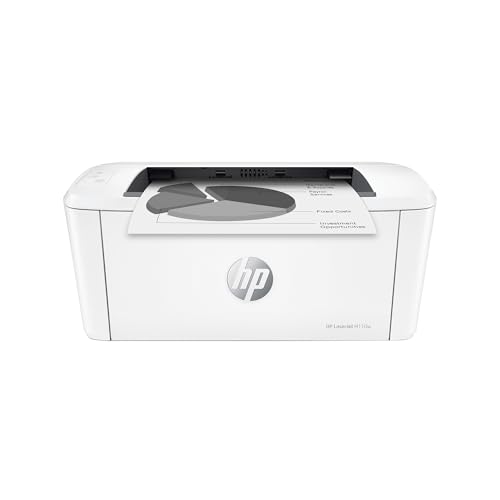
The HP LaserJet M110w is the smallest printer in this guide, and its size is the main reason to choose it. HP describes it as the smallest laser printer in its class, and at roughly 13.6 inches wide and a little over 6 inches tall, it fits on a shelf, a narrow desk, or a rolling cart where a standard printer would crowd everything else out. It weighs about 8.3 pounds, so moving it between rooms or tucking it away when it is not needed is straightforward.
Despite the compact body, the M110w covers the essentials for light black-and-white printing. It prints at up to 21 pages per minute at up to 600 by 600 dpi, which is ample for text documents, forms, and simple graphics. The 150-sheet input tray holds a useful amount of paper for a household or a single user, and the printer accepts plain paper, card stock, envelopes, and labels.
Connectivity is wireless-first. The M110w connects over Wi-Fi and works with the HP Smart app, which lets you print and scan from a phone or tablet and monitor toner levels from the same place. A USB connection is also available for a direct link to a single computer. Setup is guided through the app, which walks through network connection and driver installation step by step.
The printer ships with a preinstalled introductory black toner cartridge, and it uses HP 141A black toner cartridges for replacements. Because it is a print-only machine, there is no scanner or copier built in, which keeps the footprint small and the controls simple. A single button panel handles the basic functions, and the printer wakes from sleep quickly, with a first page out in about 8 seconds.
Considerations
Two-sided printing on the M110w is manual, so printing a long document on both sides means flipping the stack yourself. That is a fair trade for the size, but if you regularly print multi-page reports, an automatic duplex model will spare you time and effort. The 150-sheet tray is also smaller than the 250-sheet trays on the larger models here, so heavy users will refill it more often. Finally, the compact design means there is no Ethernet port, so placement depends on a stable Wi-Fi signal or a USB cable.
Brother HL-L2370DW

The Brother HL-L2370DW is a long-running home-office favorite, and its specification sheet explains why. It prints at up to 36 pages per minute, which is noticeably faster than the compact models in this guide, and it pairs that speed with a 250-sheet paper tray and automatic duplex printing. For a home office that produces invoices, schoolwork, and multi-page documents every day, that combination keeps printing from becoming a bottleneck.
Print resolution reaches up to 2400 by 600 dpi, which produces sharp text and clean line art. The printer handles letter and legal size paper, and its manual feed slot takes envelopes and thicker media when needed. Connectivity covers all the common options: dual-band Wi-Fi, Ethernet, and USB, plus mobile printing through the Brother Mobile Connect app and common mobile printing standards. That flexibility matters in a shared household, where one person may print from a laptop over Ethernet while another sends a job from a phone.
Toner options are a practical strength. The HL-L2370DW uses Brother TN-730 standard cartridges and TN-760 high-yield cartridges, so you can choose standard capacity for light use or high yield when volume climbs. The drum unit is a separate replaceable part, which is the usual arrangement for Brother laser printers. The printer also supports a draft mode for documents where full density is not needed, which stretches a cartridge further.
The machine is ENERGY STAR certified and EPEAT Silver certified, and it measures about 14.2 inches wide and 15.9 pounds, so it needs a solid desk or a dedicated printer stand rather than a crowded shelf. A one-line display and a small set of buttons handle the controls, and the printer is eligible for the Brother Refresh subscription service if you prefer toner to arrive on a schedule.
Considerations
The HL-L2370DW is a print-only printer, so scanning and copying require a separate device or a multifunction model. Its footprint and weight are larger than the compact HP models, so measure your desk before ordering. The one-line display is basic compared with the touchscreen found on some newer printers, though for a print-only machine the controls are rarely used after setup. As with any laser printer, keep it in a ventilated spot and leave clearance around the vents and the paper output area.
HP LaserJet M209dw

The HP LaserJet M209dw sits between the ultra-compact M110w and the larger office models, and it is the pick for a small team that wants wireless printing with automatic two-sided output. It prints at up to 29 pages per minute, which is fast enough for shared use without the bulk of a full office machine, and its automatic duplex printing handles double-sided documents without manual flipping.
The M209dw is a print-only monochrome laser printer, and its feature set is focused on getting documents out quickly. It connects over Wi-Fi with a self-reset feature that reconnects the printer to the network if the connection drops, and it works with the HP Smart app for mobile printing, toner monitoring, and shortcuts that send common document types straight to the printer. A USB port provides a wired option for a desk setup, and the printer supports common mobile printing standards for phones and tablets.
Paper handling includes a 150-sheet input tray and a 100-sheet output bin, which suits a small workgroup printing through the day. The printer accepts plain paper, envelopes, labels, and card stock, and its compact white-and-gray body fits on a side table or a shared work surface. It uses HP 134A black toner cartridges, and the cartridge loads from the front, so replacement takes only a few moments.
Security features include a self-healing Wi-Fi connection and PIN-protected printing through the HP Smart app, which is useful in a shared space where documents should not sit in the output tray unattended. The printer is ENERGY STAR certified, and its sleep mode keeps energy use low between jobs.
Considerations
The 150-sheet input tray is smaller than the 250-sheet trays on the Brother and Canon models here, so a busy team will refill paper more often. There is no Ethernet port, so the printer relies on Wi-Fi or USB for its connection, which means placement should be within reliable range of the router. Like the other print-only models in this guide, it does not scan or copy, so a separate device is needed for those tasks. Check that your operating system and mobile devices are supported by the HP Smart app before settling on this model.
Canon imageCLASS LBP246dw II

The Canon imageCLASS LBP246dw II is the fastest printer in this guide and the one built for the heaviest workload. Canon lists it at up to 42 pages per minute, with a first page out in approximately 5 seconds, so long documents and back-to-back jobs move quickly. It is a single-function monochrome laser printer aimed at small offices where printing volume is high and waiting around the printer wastes time.
Paper handling is the most flexible here: the main cassette holds 250 sheets, a 100-sheet multipurpose tray handles envelopes and heavier stock, and an optional 550-sheet cassette expands capacity for offices that print in bulk. Automatic duplex printing is standard, and the multipurpose tray supports media up to 163 grams per square meter, which covers heavier letterhead and card stock.
Connectivity includes Wi-Fi, Wi-Fi Direct, Ethernet, and USB, and mobile printing works through the Canon PRINT app, Apple AirPrint, and Mopria. A five-line LCD screen makes the menu easier to navigate than the one-line displays on simpler models, and the printer includes office-oriented security features such as secure print, IP filtering, and encrypted network protocols. Canon lists a recommended monthly volume of 750 to 4,000 pages.
The supplied Canon Genuine Toner Cartridge 070 starter covers approximately 1,500 pages, and standard replacement cartridges keep the printer running for longer stretches between changes. The printer measures about 15.7 by 14.7 by 9.8 inches and weighs about 19.2 pounds, so it needs a sturdy desk or printer stand and enough clearance for the paper trays and output area.
Considerations
This is the largest and heaviest printer in the guide, so it is not a good fit for a small desk or a crowded shelf. Its speed and capacity are more than a light home user needs, and the feature set is aimed at office use rather than occasional printing. The five-line display is helpful but still menu-driven, so changing settings takes a few button presses. As with any high-volume laser printer, place it where air can circulate and where the output tray is easy to reach.
How to Choose
Start with your print volume. A household that prints a few pages a week will be happy with the compact HP LaserJet M110w, while a home office printing every day will benefit from the faster Brother HL-L2370DW and its larger tray. A small team sharing one printer should look at the HP LaserJet M209dw for its balance of speed and duplex printing, and a busy office should consider the Canon imageCLASS LBP246dw II for its 42-page-per-minute speed and expandable paper capacity.
Next, decide how much two-sided printing matters. Automatic duplex printing is worth having if you regularly print reports, handouts, or multi-page documents, because it halves paper use and keeps documents neat without manual flipping. The Brother, the HP M209dw, and the Canon all include it, while the compact M110w requires manual duplexing.
Connectivity is the third decision. Every printer here provides Wi-Fi and USB, but only the Brother HL-L2370DW and the Canon LBP246dw II add an Ethernet port, which is useful for a fixed desk setup or a network where Wi-Fi is unreliable. If you print mainly from phones and tablets, check that your preferred mobile printing method is supported and that the companion app works with your devices.
Toner is the running cost that matters most over the life of a laser printer. Each model uses its own cartridge family, and high-yield cartridges are available for the Brother models and the Canon. Look at the cartridge yield in pages and think about how often you want to replace toner. A printer with a high-yield option usually means fewer interruptions for a busy household or office.
Finally, consider the physical space. Measure the desk or stand, including depth for the paper tray and clearance above the output area, and check the weight if the printer will sit on a shelf. Laser printers need ventilation around the vents, and the paper path should be easy to reach for clearing the occasional jam.
Fit and Installation
Before the printer arrives, choose a spot that is flat, stable, and close to a power outlet. Laser printers vibrate slightly while printing, so a wobbly table can cause noise and paper feed problems. Leave a few inches of clearance on each side for ventilation and for opening the toner door, and make sure the paper tray can slide out fully without hitting a wall or drawer.
Unpacking is simple: remove the packing material, install the toner cartridge and drum unit if they ship separately, load paper in the tray, and connect the power cord. Most printers print a test or alignment page on first startup, which confirms that the toner is seated correctly and the paper feeds cleanly. Keep the quick-start guide nearby for the first setup, since the button sequences vary by brand.
For wireless setup, connect the printer to the same Wi-Fi network as your computers and phones, then install the manufacturer’s app or driver. The HP Smart app, Brother Mobile Connect app, and Canon PRINT app each guide you through network connection and add the printer to your devices. If the printer will be shared, add it to each computer from the network rather than moving a USB cable between machines. For a wired setup, use Ethernet on the Brother or Canon, or USB on any model, and install the driver from the manufacturer’s site for the most current version.
Check for driver and firmware updates after installation, since manufacturers release updates that fix connectivity problems and add support for new operating systems. If a computer cannot find the printer on the network, restart the router and the printer, confirm both are on the same network band, and re-run the wireless setup from the printer’s menu.
Paper choice matters more than it seems. Standard 20-pound copy paper works for everyday documents, while heavier paper and envelopes should go through the manual feed slot or the multipurpose tray. Do not overload the tray past its marked capacity, and fan the paper before loading it to reduce double feeds. Store spare paper flat in a dry place so it feeds cleanly.
FAQ
Do monochrome laser printers print in color?
No. A monochrome laser printer prints in black and white only, using a single black toner cartridge. That is the right choice when nearly everything you print is text or grayscale graphics, and it keeps the machine simpler and the toner supply easier to manage than a color printer.
Is a monochrome laser printer better than an inkjet for documents?
For text documents, a laser printer usually produces sharper output, prints faster, and handles idle periods better, because toner does not dry out the way liquid ink can. Inkjets still make sense for photo-quality color printing, but for invoices, homework, and office paperwork, a monochrome laser printer is the more practical option.
What does automatic duplex printing do?
Automatic duplex printing flips the sheet inside the printer so it can print on both sides without you handling the paper. It reduces paper use and keeps long documents compact. Models with manual duplex require you to flip the stack yourself, which works but takes more time.
How long does toner last in a monochrome laser printer?
Toner life depends on the cartridge and on how much of each page is covered in print. Standard cartridges are listed for a set number of pages, and high-yield cartridges hold more toner and last longer between replacements. Draft modes extend cartridge life further for documents where full density is not needed. Because toner is a dry powder, an installed cartridge stays usable for a long time even if the printer sits unused.
Conclusion
The best monochrome laser printers share the same strengths: sharp black-and-white text, fast output, and toner that stays ready even after weeks of inactivity. Which one fits depends on how much you print and where the printer will live. The HP LaserJet M110w suits a small desk and light use, the Brother HL-L2370DW covers a busy home office with speed and a generous tray, the HP LaserJet M209dw adds automatic duplex printing for a small team, and the Canon imageCLASS LBP246dw II handles the heaviest workload with the fastest output and the most flexible paper handling.
Match the printer to your volume, check the connectivity and duplex features you need, and measure the space before ordering. The deciding factors are speed, paper capacity, and how the printer fits into your desk and your network.
As an Amazon Associate, we earn from qualifying purchases.
More from Amazon
Programs that pair well with the guide above. Offers and eligibility are set by Amazon and may change.
Free shipping on eligible items, Prime Video and more. Eligible new members can start with a free trial.
Start a Prime free trialAd-free music streaming. Eligible new subscribers can start with a free trial.
Try Music Unlimited freeA Prime membership for ages 18-24 with a trial period. Eligibility is set by Amazon.
See Prime for Young AdultsAudiobooks and podcasts to listen to on the go. Eligible new members can start with a free trial.
Try Audible freeAs an Amazon Associate we earn from qualifying purchases.



Write Your Review
No reviews yet. Be the first to share your experience!