

Key takeaways
- Best mini PC for gaming —
/best-mini-pc-for-gaming-under-800/ - Best workstation PC for the office —
/best-workstation-pc-under-1500/ - Best 2TB NVMe SSD for a fast boot drive —
/best-2tb-nvme-ssd-under-200/
An office desktop under $500 has one job: stay out of your way. It should boot fast, run Word, Excel, Chrome, Zoom and Slack at the same time, drive two monitors, and not freeze during a video call.
The honest news first: in November 2026, the under-$500 field is tighter than it looks. Several name-brand towers that roundups list under $500 — the Dell Slim ECS1250, HP Pro Tower 290 G9 and Lenovo IdeaCentre Tower in 16GB configurations — actually sell for $600 to $750 on Amazon US right now. What genuinely fits under $500: 8GB towers on sale, all-in-one desktops, compact mini PCs and refurbished business machines.
This guide covers five real office desktops sold on Amazon US in November 2026, in configurations that fit the budget at the time of research. Prices change often, so treat any price below as a snapshot. We have not bench-tested these units.
Top pick: the Acer Aspire TC-1775-UR11 is the best office desktop computer under $500 for most buyers — a modern 14th-gen Core i5 with a 512GB NVMe SSD, seen around $440 with coupons. If you want a screen included, get the HP 22-inch all-in-one.
Quick Picks
| Product | Best for | Key specs | Price note |
|---|---|---|---|
| Acer Aspire TC-1775-UR11 | Best overall | Core i5-14400, 8GB DDR5, 512GB NVMe SSD | Check current price; seen at $440 with coupons |
| HP 22″ All-in-One | Best all-in-one | Intel N100, 8GB DDR5, 21.5″ FHD display | Check current price; $439.99 in Oct 2026 |
| Lenovo IdeaCentre 24 All-in-One | Best screen and storage | 23.8″ FHD IPS, 512GB PCIe SSD, Wi-Fi 6 | Check current price; $499.97 on Amazon |
| Dell OptiPlex 7050 SFF (Renewed) | Best refurbished value | Core i7-7700, 16GB or 32GB RAM, SSD | Check current price; around $335 |
| Beelink Mini S12 Pro | Best compact mini PC | Intel N100, 16GB DDR4, 512GB SSD | Check current price; seen at $339 on sale |
How to Choose an Office Desktop Under $500
Start with the CPU generation, not the brand. A 13th- or 14th-gen Core i3 or i5 beats an 8th-gen Core i7 for everyday office work, even though the older i7 has more cores. The Acer TC-1775’s Core i5-14400 is the strongest CPU here. The Intel N100 in the HP all-in-one and the Beelink mini handles documents and video calls fine but slows down under heavy multitasking. Do not buy a Celeron or Pentium for work in 2026.
RAM: 8GB is the floor, 16GB is the comfort zone. Windows 11 plus Chrome plus Teams will use all of 8GB. With 16GB — the Beelink Mini S12 Pro or a refurbished OptiPlex — heavy multitasking stays smooth. If you buy an 8GB tower, check for a free RAM slot first.
Storage must be an SSD, never a hard drive. A mechanical drive makes even a fast CPU feel slow. 256GB is workable if your files live in the cloud; 512GB is safer.
Ports decide whether your desk works. Most budget towers offer HDMI plus DisplayPort or VGA, which covers two monitors. All-in-ones often have only one video output for a second display; mini PCs usually give you two HDMI ports.
Warranty and seller matter more at this price. New machines carry a one-year manufacturer warranty. Refurbished machines vary: Amazon Renewed offers a 90-day guarantee, while third-party refurbishers set their own terms. Buy refurbished only from a seller with a clear return policy and recent positive ratings.
Upgradeability is your escape hatch. A tower like the Acer TC-1775 has room for more RAM and a second drive; an all-in-one usually does not. A mini PC is in between: RAM and storage are often upgradeable, but the CPU is soldered.
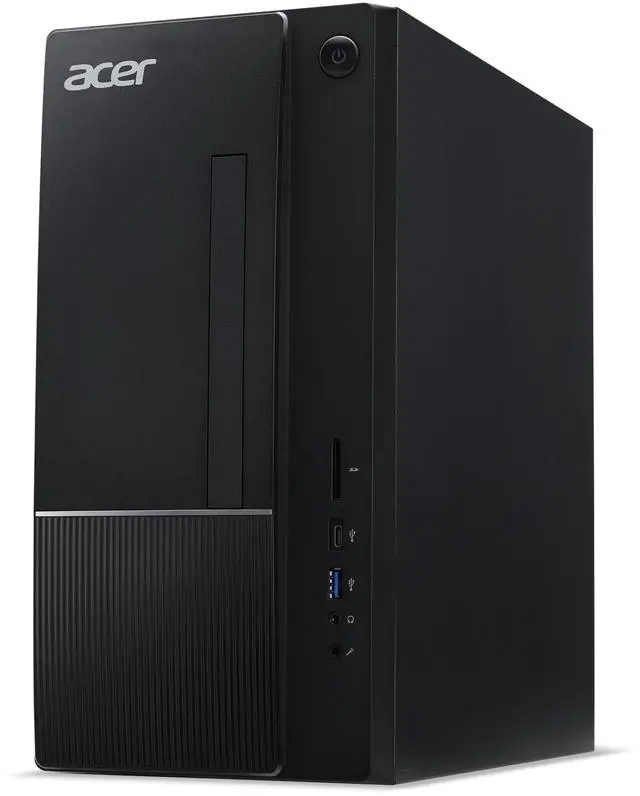
1. Acer Aspire TC-1775-UR11 — Best Overall
Best for: Most office buyers who want a new, full-size tower with a modern CPU and fast storage.
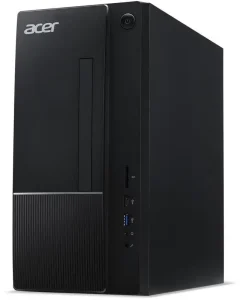
The Aspire TC-1775-UR11 is the closest thing to a no-compromise office desktop under $500: a 14th-gen Intel Core i5-14400 — ten cores, up to 4.7 GHz — with 8GB of DDR5 and a 512GB PCIe 4.0 NVMe SSD. That combination handles dozens of browser tabs, large spreadsheets and video calls without stutter.
The front panel has USB-C 3.2, USB-A, an SD card reader and audio jacks; the rear adds HDMI, DisplayPort and more USB ports, so a dual-monitor setup is straightforward. Wi-Fi 6E is built in.
Specs: Core i5-14400, 10 cores up to 4.7 GHz; 8GB DDR5 (up to 32GB); 512GB PCIe 4.0 NVMe SSD; Wi-Fi 6E; HDMI, DisplayPort, USB-C 3.2, SD reader; Windows 11 Home.
Pros: Strongest CPU in this guide; fast 512GB NVMe SSD; DDR5 with an upgrade path; USB-C and SD reader; keyboard and mouse included.
Cons: 8GB of RAM is the minimum for heavy multitasking — plan an upgrade if you live in Chrome; integrated graphics only.
Who it is best for: Anyone buying one desktop for a home office or small business who wants it to last four or five years.
Check price on Amazon — Acer Aspire TC-1775-UR11
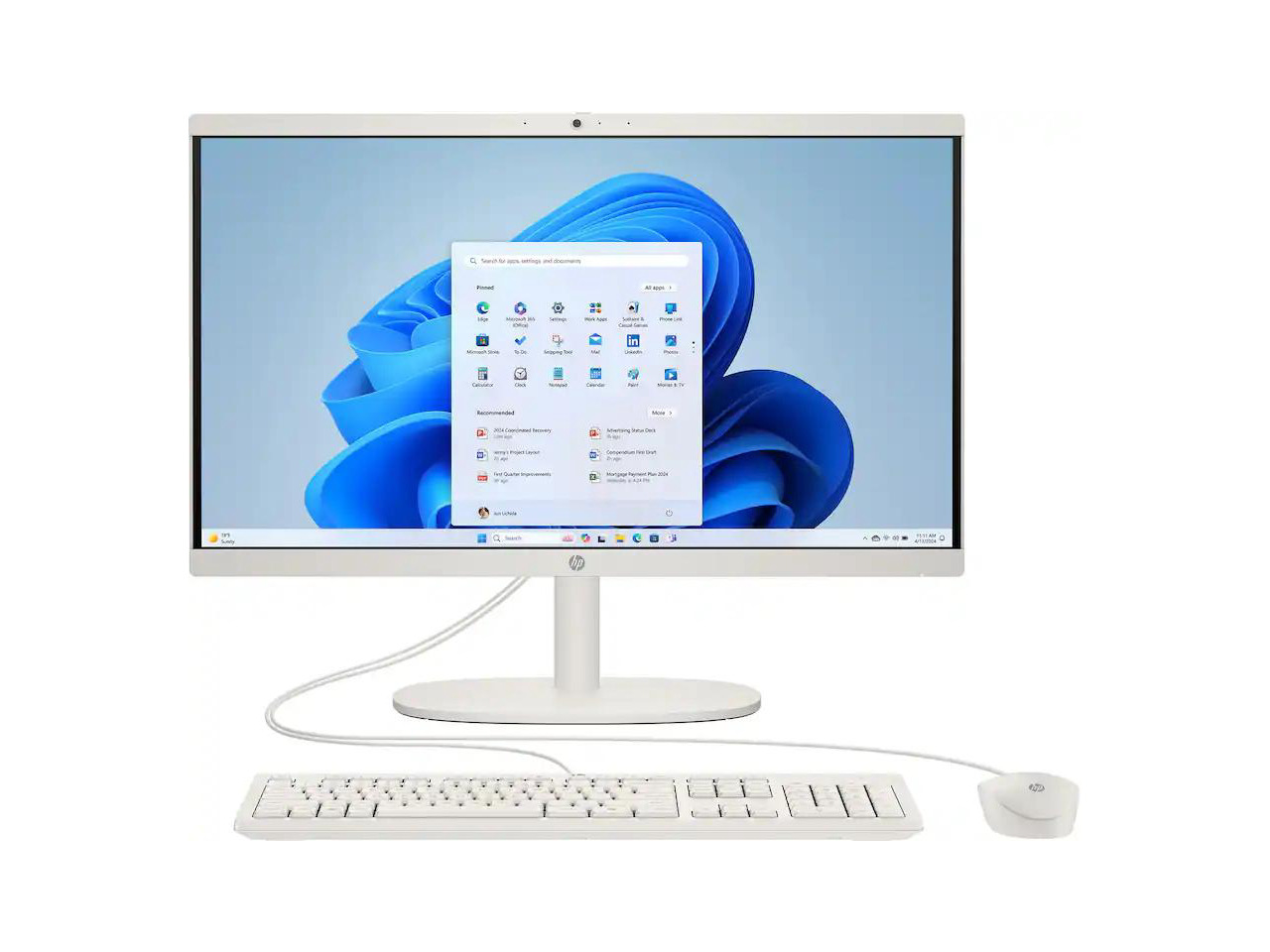
2. HP 22″ All-in-One — Best All-in-One
Best for: Buyers who want a complete setup — screen, speakers, webcam and PC in one box — with no separate monitor to buy.
The HP 22-inch all-in-one is the simplest way to put a working desk together under $500. The 21.5-inch Full HD IPS display, webcam, speakers, keyboard and mouse are all in the box, so the total cost of your setup is the price of this one machine. Inside is an Intel N100 processor with 8GB of DDR5 RAM — modest, but well matched to documents, email, browsing and video calls.
The catch is the ceiling: the N100 will not keep up with large Excel models, dozens of tabs and a video call at once, and the chassis leaves almost no upgrade path.
Specs: Intel N100, 4 cores; 8GB DDR5; 256GB or 512GB SSD (varies); 21.5″ Full HD IPS display; webcam, speakers, Wi-Fi; Windows 11 Home; keyboard and mouse included.
Pros: Everything included — no monitor, webcam or speakers to buy; compact and tidy; quiet in normal use; $439.99 in October 2026.
Cons: N100 is the weakest CPU here; almost no upgrade options; confirm the storage size on the listing; a single 21.5-inch screen may feel small next to dual monitors.
Who it is best for: Home offices, reception desks and students who want one box, one cable and a working desk in ten minutes.
Check price on Amazon — HP 22″ All-in-One Desktop
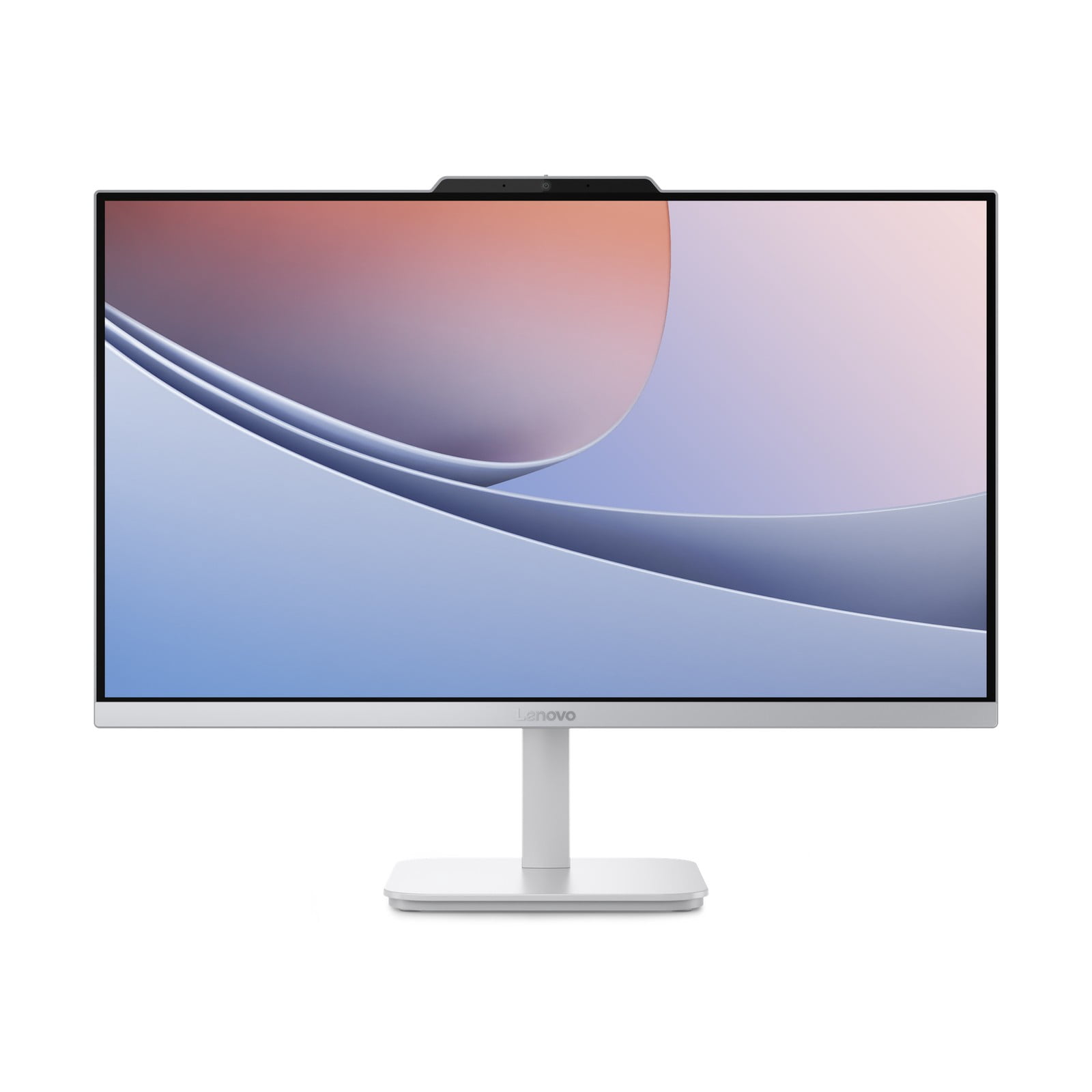
3. Lenovo IdeaCentre 24 All-in-One — Best Screen and Storage
Best for: Buyers who want a bigger screen and more storage than the HP all-in-one, still in one box.
The IdeaCentre 24 is the step up from the HP: a 23.8-inch Full HD IPS display and a 512GB PCIe SSD, listed at $499.97 on Amazon. The larger screen makes a real difference for spreadsheets and side-by-side windows.
Like the HP, this is a complete-package machine with a modest processor: excellent for everyday office work, not for heavy multitasking. Verify the exact processor on the listing, as Lenovo sells several configurations.
Specs: 23.8″ Full HD IPS display; 512GB PCIe SSD; Wi-Fi 6; wireless keyboard and mouse; Windows 11. Confirm the processor and RAM on the listing.
Pros: Bigger 23.8-inch IPS screen; 512GB SSD; complete setup included.
Cons: Sits right at the $500 ceiling, so sale timing matters; processor varies by configuration; limited upgrade path, as with most all-in-ones.
Who it is best for: Buyers who want the largest screen and most storage in a single-box office PC.
Check price on Amazon — Lenovo IdeaCentre 24 All-in-One

4. Dell OptiPlex 7050 SFF (Renewed) — Best Refurbished Value
Best for: Buyers who want the most raw hardware per dollar and are comfortable buying refurbished.
Here is the value play. A renewed Dell OptiPlex 7050 small form factor with a Core i7-7700, 16GB or 32GB of DDR4 RAM and an SSD has been listed around $335. The i7-7700 is a 7th-gen chip, so it loses to the Acer’s i5-14400 in single-threaded work, but with 16GB or 32GB of RAM it multitasks better than any new 8GB machine in this guide.
The trade-off is condition and support. This is a used business machine: the chassis may show wear, the Windows licence and accessories vary by seller, and the warranty is the seller’s or Amazon Renewed’s 90-day guarantee — not Dell’s. Buy only from a seller with recent positive ratings, and check the listing for Wi-Fi: some configurations ship without a wireless card.
Specs: Core i7-7700, 4 cores up to 4.2 GHz; 16GB or 32GB DDR4; SSD (size varies — confirm it); HD Graphics 630; Windows 11 Pro on most listings.
Pros: The most RAM for the money here; genuine business-grade build; around $335.
Cons: Used machine with possible cosmetic wear; 7th-gen CPU is older and less efficient; short, seller-dependent warranty; Wi-Fi and accessories vary by listing.
Who it is best for: Budget hunters who value 16GB-plus RAM over a new-machine warranty.
Check price on Amazon — Dell OptiPlex 7050 SFF Renewed
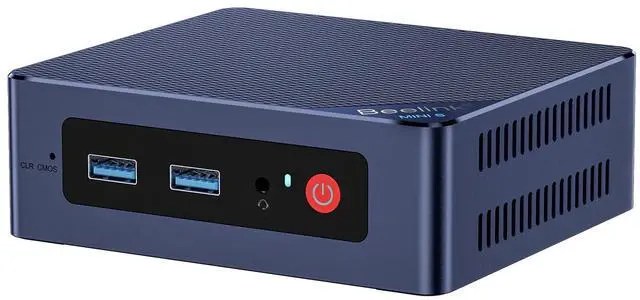
5. Beelink Mini S12 Pro — Best Compact Mini PC
Best for: Small desks, dual-monitor setups in tight spaces, and buyers who want 16GB of RAM in a box the size of a paperback.
The Beelink Mini S12 Pro is the smallest machine here and one of the best balanced: an Intel N100 processor, 16GB of DDR4 RAM and a 512GB SSD, seen at $339 on sale. The 16GB of RAM is the key number — it lets this little box multitask better than the 8GB towers, even though its N100 chip is slower than the Acer’s i5. Dual HDMI outputs drive two monitors, and Wi-Fi 6 and Bluetooth are built in.
Mini PCs have limits: the CPU is soldered, the small fan can get audible under load, and you will not be adding a graphics card. But where space matters — a reception counter, a kitchen office, a monitor-arm setup — the S12 Pro does the job of a tower in a fraction of the space.
Specs: Intel N100, 4 cores up to 3.4 GHz; 16GB DDR4; 512GB NVMe SSD; dual HDMI, dual 2.5GbE LAN, USB-C; Wi-Fi 6, Bluetooth 5.2; Windows 11 Pro.
Pros: 16GB of RAM at a mini-PC price; 512GB SSD; dual HDMI for two monitors.
Cons: N100 is slower than the Acer’s i5 for heavy work; CPU cannot be upgraded; small fan can be heard under load; confirm RAM and storage on the listing.
Who it is best for: Small desks and dual-monitor setups where a full Windows PC should disappear behind a monitor.
Check price on Amazon — Beelink Mini S12 Pro
What to Avoid
Do not buy on the brand name alone. The Dell Slim ECS1250, HP Pro Tower 290 G9 and Lenovo IdeaCentre Tower are good machines — but their 16GB configurations sell for $600 to $750 on Amazon US in November 2026, not under $500. Check the price of the exact configuration, not the family name.
Do not buy less than 8GB of RAM. A 4GB office PC in 2026 will struggle with Windows 11 and a browser. Every pick here has at least 8GB.
Do not buy a hard drive as your only storage. Windows on a spinning disk is slow in a way no CPU can fix. SSD only — 256GB minimum, 512GB preferred.
Do not assume the monitor is included. Towers like the Acer TC-1775 and the OptiPlex ship without a screen. If you do not own a monitor, add $100 to $150 to your budget, or buy an all-in-one instead.
Do not ignore the Windows licence on refurbished machines. A refurbished OptiPlex should come with an activated Windows 11 licence. If the listing is vague about it, ask the seller before buying.
Do not buy a Celeron or Pentium for work. They will cost you time every day. The N100 is the lowest chip worth buying for office work in 2026.
FAQ
Is $500 enough for a good office desktop in 2026?
Yes, with the right expectations. $500 buys a fast SSD, 8GB to 16GB of RAM and a modern or recent CPU — enough for documents, spreadsheets, browsing and video calls. It does not buy a discrete graphics card or 32GB of RAM.
Is a refurbished Dell OptiPlex safe to buy?
Usually, yes, if you buy carefully. OptiPlex machines were built for business use and are sturdy. Buy from a seller with recent positive ratings and confirm the RAM, storage, Wi-Fi and Windows licence on the listing.
Should I buy an all-in-one or a tower?
Buy an all-in-one if you need a screen and want the simplest setup — one box, one cable, done. Buy a tower if you already own a monitor or want to upgrade RAM and storage later.
How much RAM do I need for office work?
8GB is the minimum for a usable Windows 11 office PC in 2026. 16GB is the sweet spot if you keep many browser tabs open or run Teams or Zoom alongside Office. If you buy 8GB, make sure it has a free slot so you can add more later.
Do these desktops come with a keyboard and mouse?
Most do, but not all. The Acer TC-1775, HP all-in-one and Lenovo IdeaCentre 24 include a keyboard and mouse. Refurbished OptiPlex listings vary, and mini PCs like the Beelink S12 Pro usually do not. Check the “in the box” section before you buy.
Verdict
For most buyers, the Acer Aspire TC-1775-UR11 is the best office desktop computer under $500. It has the strongest CPU in this guide, a fast 512GB NVMe SSD, DDR5 memory with an upgrade path, and a price repeatedly seen around $440 with coupons.
If you need a screen included, buy the HP 22″ All-in-One for the simplest setup, or the Lenovo IdeaCentre 24 for the bigger display and more storage. If your budget is tight, the renewed Dell OptiPlex 7050 SFF gives you 16GB or more of RAM for around $335. And if your desk is small, the Beelink Mini S12 Pro packs 16GB of RAM and a 512GB SSD into a box the size of a paperback.
Whichever you choose, check the exact configuration and current price on Amazon before you buy.
As an Amazon Associate, we earn from qualifying purchases.
Suggested internal links for pcreviewer.org
- Best mini PC for gaming —
/best-mini-pc-for-gaming-under-800/ - Best workstation PC for the office —
/best-workstation-pc-under-1500/ - Best 2TB NVMe SSD for a fast boot drive —
/best-2tb-nvme-ssd-under-200/
Prices and availability were checked in November 2026 and are subject to change.
More from Amazon
Programs that pair well with the guide above. Offers and eligibility are set by Amazon and may change.
Free shipping on eligible items, Prime Video and more. Eligible new members can start with a free trial.
Start a Prime free trialAd-free music streaming. Eligible new subscribers can start with a free trial.
Try Music Unlimited freeA Prime membership for ages 18-24 with a trial period. Eligibility is set by Amazon.
See Prime for Young AdultsAudiobooks and podcasts to listen to on the go. Eligible new members can start with a free trial.
Try Audible freeAs an Amazon Associate we earn from qualifying purchases.
Write Your Review
No reviews yet. Be the first to share your experience!