

Key takeaways
- Stop using the system. Power off, unplug the PSU, and avoid reconnecting a visibly melted plug.
- Document it. Take clear photos of the plug, socket and cable ends, and note the card model, PSU model and cable type.
- Contact the right manufacturer. If the cable came from the PSU maker, ask them first. If the socket on the card is damaged, contact the card’s maker. Warranty outcomes vary, and some companies have declined claims when a third-party cable was in use, as reported in one PNY case.
- Replace the whole chain. A melted plug can leave damaged contacts on both ends. Use a new cable and have the socket inspected.
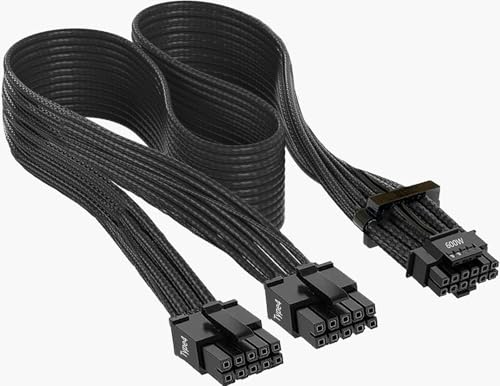
The 12VHPWR and 12V-2×6 power connector problems on GeForce RTX cards come down to one weakness: the connector carries up to 600 W through six power pins, each rated around 9 to 9.5 A, and if the current is not shared evenly across those pins a few of them overheat and can melt the plastic housing. Incomplete insertion, a sharp cable bend near the plug, a worn or poor-quality adapter and a design with almost no safety margin all contribute. You can sharply reduce your risk by using a native ATX 3.1 power cable, pushing the plug in until it is fully seated and keeping the cable straight for the first 35 mm.
Our top picks

As an Amazon Associate we earn from qualifying purchases at no extra cost to you.
What 12VHPWR and 12V-2×6 Actually Are
12VHPWR is the 16-pin power connector introduced with ATX 3.0 and used first on the GeForce RTX 4090. It has 12 large pins, six carrying 12 V and six carrying ground, plus four small sideband pins that tell the card how much power the power supply can deliver. The specification allows up to 600 W, which is why a single cable can replace three or four older 8-pin PCIe connectors.
12V-2×6 is the revised version, defined in the PCIe CEM 5.1 and ATX 3.1 updates. The pin layout and electrical limits are the same, so cables are physically compatible with older sockets. The changes are mechanical. The four sense pins are shorter by about 1.5 mm and the main power pins are longer by about 0.25 mm, so if the plug is not fully inserted the sense pins lose contact and the card refuses to draw full power. The idea is to make a half-seated plug fail safe rather than to alter how current flows. Nvidia and PCI-SIG members treat 12V-2×6 as the correct name for the connector on RTX 50 series cards, and the older 12VHPWR label still appears on many cables and in many reports.
| Feature | 12VHPWR (ATX 3.0) | 12V-2×6 (ATX 3.1) |
|---|---|---|
| Power pins | 6 x 12 V, 6 x ground | 6 x 12 V, 6 x ground |
| Sense pins | 4, standard length | 4, about 1.5 mm shorter |
| Power pin length | Standard | About 0.25 mm longer |
| Maximum power | 600 W | 600 W |
| Rated current per pin | About 9.5 A | About 9.5 A |
| First used on | GeForce RTX 4090 (2022) | Newer RTX 40 revisions and the RTX 50 series (2025) |
The Arithmetic Behind the Problem
The key figures are simple. Six pins carrying 600 W at 12 V means 50 A in total, or roughly 8.3 A per pin if the current shares perfectly. With each pin rated for about 9.5 A, the margin is only around 14 percent. The older 8-pin PCIe connector is rated for 150 W with three 12 V pins, and most real cables have a margin of close to a factor of two. So the new connector is working much closer to its limit.
The RTX 5090 has a board power of 575 W, so at full load it runs about 96 percent of the connector’s rated maximum. Ordinary variation makes the situation worse. If one pin’s contact resistance is a bit lower than another’s, it takes more current. In a worst case where only two or three pins make good contact, each one carries 15 to 25 A and heats rapidly, because heat rises with the square of current. Teardowns and thermal readings by overclocker Roman Hartung (der8auer) in early 2025 showed connector temperatures approaching 150 degrees Celsius on the power supply side during heavy load. That is enough to soften the plastic.
Why It Became a Bigger Story With the RTX 5090
The first wave of melted connectors came from RTX 4090 owners in late 2022. Nvidia concluded that most cases came from plugs that were not fully inserted, and the industry responded with the 12V-2×6 revision. When RTX 50 cards launched in 2025, owners reported the same failures on RTX 5090 cards and, in a few cases, the RTX 5080. Reports covered both the Founders Edition and partner cards, and some involved connectors that melted on the power supply side rather than at the card.
Electrical engineers, including the team at Igor’s Lab and the YouTuber Buildzoid, pointed to a design difference from the RTX 3090 Ti, which used the older 12-pin form. According to those analyses, the 3090 Ti divided the six power pins into separate groups on the circuit board and balanced the load between them, while the RTX 40 and 50 boards join all the pins into a single power plane. With no balancing on the card, any imbalance in cable resistance goes unmanaged. This analysis comes from independent testers, not from Nvidia or PCI-SIG, which have both emphasized proper seating and cable quality.
Several caveats apply. The number of reported failures is small compared to the number of cards sold, and online reports are self-selected. Some incidents involved third-party or older cables, adapters and daisy-chained splitters, and AMD cards using the same connector have also had reports. So the evidence supports a real design risk, but it does not mean every card will fail.
Causes You Can Control
Incomplete insertion
If the plug sits even a millimeter out, contact area shrinks and resistance rises. The connector needs more force than people expect, and a click is often subtle. Look at the plug from the side: the housing should sit flush against the socket with no visible gap and the latch should be seated.
Tight bends near the plug
Bending a cable close to the connector pushes the pins sideways inside the housing and can lift some contacts. Both Nvidia and PSU makers recommend leaving at least 35 mm of straight cable before the first bend. Cases that are too narrow for the card’s height make this hard, so measure the gap before you buy.
Adapters and splitters
The adapter that comes in a graphics card box with four 8-pin plugs is acceptable when used as intended, but it adds extra solder joints and contact points. Cheap third-party adapters, repeated reconnection and daisy-chained leads add resistance. A native cable from a modern power supply has fewer joints and is the better option.
Wear and reuse
Each plug cycle wears the contacts. Treat the connector as rated for a limited number of mating cycles, and avoid unplugging it repeatedly while testing builds. If a cable shows discolored pins, melted plastic or a burning smell, stop using it.
Power draw near the limit
A high power limit pushes more current through the pins. Reducing the card’s power target by 10 to 15 percent costs only a few percent in games, and it lowers heat in the connector in proportion to the square of the current.
How to Install a 12V-2×6 Cable Safely
- Power down and unplug the PSU. Never plug a high-power connector into a live system.
- Check the cable and the socket. Look for bent pins, discoloration, debris or damaged housings before connecting. Use a cable from the PSU maker rated for your model, not a generic substitute.
- Align the plug and push firmly. The plug is keyed, so it only fits one way. Press until the latch clicks and the housing sits flush.
- Inspect from two angles. Confirm that there is no visible gap at the top or bottom edge of the plug.
- Route the cable with a gentle curve. Keep the first 35 mm straight, and avoid side pressure from a case panel.
- Re-check after the first hour of heavy load. Heat cycles can loosen a marginal connection, so power down and look again.
- Re-inspect periodically. A quick visual check every few months catches problems before they escalate.
Power Supply and Cable Choices
Choose a power supply that is certified ATX 3.1 and PCIe 5.1, with a native 12V-2×6 cable. For a card such as the RTX 5090 with a 575 W rating, 1000 W is the manufacturer’s recommended minimum and 1200 W or more provides extra headroom for the rest of the system and for transient spikes. For cards in the 300 to 360 W range, such as the RTX 5080, a 850 W to 1000 W unit is generally enough.
| Card | Board power | Connector load at full power | Suggested PSU class |
|---|---|---|---|
| RTX 5090 | 575 W | About 96% of 600 W | 1000 W minimum, 1200 W or more preferred |
| RTX 5080 | 360 W | About 60% of 600 W | 850 W to 1000 W |
| RTX 5070 Ti | 300 W | About 50% of 600 W | 750 W to 850 W |
| RTX 5070 | 250 W | About 42% of 600 W | 650 W to 750 W |
The table shows why the problem concentrates on the RTX 5090. Cards at 250 to 360 W have much more margin, so even a poor contact is less likely to push a pin past its limit.
Monitoring and Protective Accessories
A small group of accessories aims to detect trouble early. Thermal Grizzly’s WireView Pro line sits between the cable and the card and reports per-pin current and temperature so you can spot a problem pin. ASRock has released an L-shaped 12V-2×6 cable with a temperature sensor, intended for tight cases and for flagging overheating. Some power supply makers add angled connectors and cables with thicker wire or integrated thermal sensors. These products add cost and are not a guarantee, but they can be worthwhile on a high-end system where the card draws more than 500 W. Always buy from known manufacturers, because a counterfeit accessory can add risk.
What to Do If Your Connector Looks Damaged
- Stop using the system. Power off, unplug the PSU, and avoid reconnecting a visibly melted plug.
- Document it. Take clear photos of the plug, socket and cable ends, and note the card model, PSU model and cable type.
- Contact the right manufacturer. If the cable came from the PSU maker, ask them first. If the socket on the card is damaged, contact the card’s maker. Warranty outcomes vary, and some companies have declined claims when a third-party cable was in use, as reported in one PNY case.
- Replace the whole chain. A melted plug can leave damaged contacts on both ends. Use a new cable and have the socket inspected.
What Nvidia, PCI-SIG and Partners Have Said
Nvidia’s public guidance has stressed seating the connector fully and evenly and using a certified cable. PCI-SIG revised the connector rather than replacing it, and the ATX 3.1 standard added longer power pins and shorter sense pins. Critics argue that the revision does not address the underlying lack of current balancing and the thin safety margin. Board partners have responded in different ways: some added indicator lights or sensing circuits on the card, and some cable makers sell angled or reinforced designs. Whether a future connector revision or a card-side balancing circuit appears is still uncertain, and buyers should assume the existing design will remain on RTX 50 cards for the foreseeable future.
Buying Advice by Situation
| Your situation | Recommendation |
|---|---|
| Building around an RTX 5090 | ATX 3.1 PSU of at least 1000 W with native 12V-2×6 cable, a case wide enough for the 35 mm straight run, and consider a power limit of about 90 percent |
| Using an RTX 5080 or 5070 Ti | Native cable if possible, careful seating, and a monthly visual check; risk is much lower at 300 to 360 W |
| Using the card’s included adapter | Acceptable but inspect carefully, avoid repeated plug cycles, and upgrade to a native cable when convenient |
| Small-form-factor case | Pick a card and case with room for the cable, or use a right-angle cable designed for the socket |
| Not sure about your setup | Choose a card that stays under 360 W, which leaves ample margin |
Worked Example: How One Bad Contact Changes the Heat
Take a card pulling 575 W at 12 V, which is about 48 A overall. With all six pins sharing evenly, each carries 8 A. Now imagine two pins have higher contact resistance because of a slightly loose plug, so the other four pins carry the whole load: each now handles 12 A, 50 percent above the even share and well over the 9.5 A rating. Since heating scales with the square of current, each of those four pins dissipates about 2.25 times as much heat as before. If only three pins conduct well, each carries 16 A and produces roughly four times the heat. This is why a connector can run cool for weeks and then suddenly fail: the system has no sensor for individual pins, so a developing imbalance goes unnoticed until the plastic softens.
Common Myths About the Melting Connector
- “It only happens with third-party cables.” Reports include cables supplied by the power supply or card maker, so the cable brand is a factor but not the only one.
- “A bigger power supply fixes it.” Wattage headroom helps the PSU cope with spikes, but the connector limit is set by the pins, not by the PSU’s total capacity.
- “Every RTX 50 card is at risk.” The risk scales with power draw. Cards under 300 W use only half or less of the connector rating.
- “AMD cards never have the problem.” Radeon cards that use the same connector have had reports as well, though far fewer cards use it.
- “If it clicked, it is fine.” A click can occur while the plug is still slightly angled, so visual inspection of the gap remains important.
How to Check Whether Your Cable Is the Right Standard
Look at the labeling on the cable or in the power supply manual for the words 12V-2×6, PCIe 5.1 or ATX 3.1. Cables marked only 12VHPWR work, but the pin lengths may follow the older design, which is less forgiving of partial insertion. If you bought your PSU before 2024, check whether the manufacturer offers an updated 12V-2×6 cable for your model, because most major brands sell them as a direct replacement. Never mix cables between brands or product lines, since the PSU-side connector pinouts are not standardized even when the card-side plug is. Keep the original cable that came with your supply and avoid improvised extensions or splitters.
Long-Term Care for a High-Power Card
Treat the connection as maintenance, not a one-time install. When you clean dust out of the case, take a moment to look at the plug and the cable jacket for discoloration. Keep the card supported with a bracket if it sags, because a drooping card pulls on the cable and can tilt the plug in its socket. Avoid moving a built PC without checking that the cable is still fully seated afterward. If you relocate frequently or ship a system, remove the heavy card and ship it separately to protect both the connector and the slot.
Frequently Asked Questions
Is 12VHPWR the same as 12V-2×6?
They use the same pin layout and power rating, so cables are physically interchangeable. 12V-2×6 changes the pin lengths so the card detects a poorly seated plug, and it is the standard used on RTX 50 series cards.
Can the RTX 5090 melt its connector even with a new power supply?
Yes, there are reports of failures with modern ATX 3.1 supplies and native cables, so a new PSU does not remove the risk. It does reduce the chance of problems caused by adapters and older parts.
Should I undervolt or lower the power limit?
It is a reasonable precaution on an RTX 5090. Cutting the power target by 10 percent lowers the connector current by about the same amount and the heat by around 19 percent, while usually costing only a few percent in frame rates.
Are RTX 5070 and 5060 cards at risk?
The risk is much lower because they draw far less power than a 5090. Many models also use traditional 8-pin connectors or a 12V-2×6 plug running at a small fraction of its rating.
Does a right-angle or 90-degree cable help?
It can help in a tight case because it avoids a sharp bend close to the plug. It must still be a well-made cable from a reputable brand and fully seated.
Will a warranty cover a melted connector?
It depends on the manufacturer and on which parts were involved. Some companies replace the card, while others have refused claims when a third-party cable was used. Keep your receipts and photos in case you need them.
Write Your Review
No reviews yet. Be the first to share your experience!