

Key takeaways
- Set fans for positive pressure. More intake than exhaust helps keep dust out through the filters.
- Use the full cable routing. Route cables behind the motherboard tray and use the included ties, which improves airflow.
- Install the power supply with its fan facing the right direction. If the case has a bottom filter, face the fan down. Otherwise, face it up.
- Clean the filters every few months. Clogged filters raise temperatures by several degrees.
- Test fit before installing the cooler. Place the graphics card and cooler loosely, then check clearance with the side panel on.
The best budget PC case in 2026 is the Montech Air 903 Max if you want the most fans and the most room for the least spending, the Lian Li Lancool 207 if you want the best cooling balance, and the Fractal Design Pop Air if quiet operation matters most. All three are mesh-front mid-towers that fit current graphics cards, and all three cost far less than premium showcase cases.
Searches for “best PC cases under” usually mean one question: how much case can I get before I reach the next budget tier? This guide answers it by tier rather than by exact price, because case prices move with sales and material costs. You will find budget, value, and upper-budget picks, plus the numbers that matter: graphics card clearance, included fans, cooler height, and radiator support.
Our top picks


As an Amazon Associate we earn from qualifying purchases at no extra cost to you.
Quick Comparison of the Best Budget PC Cases
| Case | Best for | Max GPU length | Included fans | Front panel | Budget tier |
|---|---|---|---|---|---|
| Montech Air 903 Max | Most fans for the least spending | about 400 mm | 4 | Mesh | Entry |
| Lian Li Lancool 207 | Best cooling balance | about 375 mm | 2 front, 1 rear | Mesh | Value |
| Phanteks XT Pro Ultra | Rear-connector motherboards | about 400 mm | 4 x 140 mm ARGB | Mesh | Value |
| Fractal Design Pop Air | Quiet, colorful build | about 405 mm | 3 x 120 mm | Honeycomb mesh | Value |
| Corsair 3000D Airflow | Simple, widely available | about 360 mm | 3 x 120 mm | Mesh | Entry |
| Lian Li Lancool 216 | Large front fans, high airflow | about 392 mm | 2 x 160 mm front, 1 x 140 mm rear | Mesh | Upper budget |
| NZXT H5 Flow | Clean look, easy building | about 365 mm | 2 x 120 mm | Perforated | Upper budget |
Figures come from manufacturer specification pages and retailer listings; the fan counts and clearances sometimes differ slightly between regional versions and color variants, so check the sheet for your exact model. Budget tiers are relative: Entry means the cheapest tier of full-size mid-tower cases, Value means a modest step up with better thermals, and Upper budget means cases that approach premium features.
How Budget Tiers Work for PC Cases
Case pricing follows a pattern. At the entry tier, you get steel panels, a mesh front, and often two to four basic fans, but fewer extras such as dust filters on every intake or tool-free panels. At the value tier, build quality, thermal tuning, and cable management improve. At the upper-budget tier, you get thicker materials, better fans, and a more refined layout, and the line between budget and mainstream blurs.
A sensible approach is to decide your graphics card first, then pick the case. A card over 350 mm long needs a case with 360 mm or more of clearance, and many modern three-fan cards are close to that. The next filter is airflow. A mesh front panel and at least two intake fans help a mid-range graphics card stay cool without noise from the fans.
Best Entry Pick: Montech Air 903 Max
The Air 903 Max is widely named as the best budget pick in 2026 roundups. It ships with four fans, which is unusual at this tier, and it supports graphics cards up to about 400 mm. The front is a mesh design built for airflow. That makes it a strong match for an RTX 5060 Ti or Radeon RX 9060 XT class card and still leaves room for a longer card later.
Because the fans are included, you can build a complete cooling setup without buying extras. Reports note that the fans are decent rather than premium, and cable management is adequate but not generous. The steel is thinner than in expensive cases, so panels can flex.
Who it suits: first-time builders and anyone who wants airflow without spending on additional fans.
Trade-off: build quality and fan noise at full speed trail more expensive cases. Case prices are rising with metal tariffs according to some roundups, so buy during a sale if you can.
Best Value for Cooling: Lian Li Lancool 207
The Lancool 207 is a favorite of benchmark-driven reviewers. In published thermal comparisons it ranked at or near the top for balance of CPU and GPU temperatures among budget cases. It has a mesh front, about 375 mm of graphics card clearance, and good tool-free panel access.
It handles high-airflow builds well, including mid-range processors with a 240 mm or 280 mm radiator in the front or top positions according to the spec sheet. It is somewhat shorter on GPU clearance than the Air 903 Max, so measure if you plan a very long card.
Who it suits: gamers who care about temperatures and want a case from a respected brand.
Trade-off: it includes fewer fans than the Air 903 Max, and the interior is slightly tighter.
Best for Rear-Connector Motherboards: Phanteks XT Pro Ultra
Rear-connector motherboards, sometimes called back-connect boards, move the power and front-panel headers to the back edge, which allows much cleaner builds. The XT Pro Ultra supports them and ships with four 140 mm ARGB fans. In one benchmark set it reached about 40.3 degrees Celsius on the CPU and about 43.1 degrees Celsius on the GPU, which placed it among the cooler budget cases.
It does lack a front fan filter in that review, and top panel connectivity is minimal, so dust control needs attention. If you do not use a rear-connector board, the case still works as a normal mid-tower.
Who it suits: builders who want a clean modern layout and four large fans.
Trade-off: no front filter in the reviewed version and fewer front ports than competitors.
Best for Quiet Builds: Fractal Design Pop Air
The Pop Air pairs a honeycomb mesh front with sound-dampening design choices and comes with three 120 mm fans. In a published acoustic comparison it was the quietest case in a gaming-focused group at about 31.3 dB. In the same set it ran warmer than the Lancool 207, with about 44.8 degrees Celsius on the CPU and about 49.2 degrees Celsius on the GPU, so you trade a few degrees for quiet.
It also offers about 405 mm of graphics card room, and the colored accent panels set it apart from gray and black competitors.
Who it suits: bedroom and office builds where noise matters more than the lowest possible temperatures.
Trade-off: it runs warmer than the best airflow cases, so it suits moderate-power cards better than 300W models.
Best Simple Option: Corsair 3000D Airflow
The 3000D Airflow is a straightforward mid-tower with a mesh front, a clean interior, and wide availability. It supports graphics cards up to about 360 mm and uses 120 mm fans, with room for more. Independent testing detail is thin compared with the other cases here, so compare reviews before you commit.
Who it suits: buyers who prefer a well-known brand with easy support and a basic, uncluttered layout.
Trade-off: 360 mm clearance is the smallest in the list, which rules out some of the longest cards.
Best for Big Front Fans: Lian Li Lancool 216
The Lancool 216 uses two 160 mm front fans and a 140 mm rear fan to move a large volume of air at lower speeds. The mesh front, about 392 mm of graphics card room, and good radiator support make it a strong upper-budget option. Because the fans are large, they can be quieter than small fans at the same airflow.
Who it suits: builders with a hot graphics card who want serious airflow without a premium price.
Trade-off: it is larger than the other cases here, so check desk space.
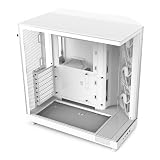
Best for Looks: NZXT H5 Flow
The H5 Flow offers a minimalist design with a perforated front panel, about 365 mm of graphics card clearance, and two 120 mm fans. Its internal layout is straightforward, with a focus on tidy cable routing. It sits at the upper end of the budget range, and its main strengths are appearance and ease of building.
Who it suits: people who value a clean look and easier assembly.
Trade-off: a perforated panel and two fans give less airflow than the mesh-front cases.
Which Case Tier Fits Which Parts
| Your parts | Case priority | Good picks |
|---|---|---|
| Mid-range card around 160W to 200W, quad or six-core CPU | Low cost, basic airflow | Montech Air 903 Max, Corsair 3000D Airflow |
| Card around 250W to 300W, tower air cooler | Strong front airflow | Lancool 207, Lancool 216 |
| Quiet office or bedroom build | Noise control | Fractal Pop Air |
| Rear-connector board and tidy cabling | Layout | Phanteks XT Pro Ultra |
| Display-first build, moderate-power parts | Appearance | NZXT H5 Flow |
How to Choose a Budget Case With Numbers
- Check the graphics card length. Find the card’s length in millimeters on its product page and add 20 mm of margin for cables and airflow. A 340 mm card needs a case with at least 360 mm of clearance.
- Check the cooler height. Tower air coolers vary from about 150 mm to 170 mm tall. Make sure the case’s stated cooler limit is higher. A typical mid-tower allows 160 mm to 180 mm.
- Count the fans. A balanced setup uses two or three intake fans and one exhaust fan. If the case includes only one fan, plan to add two more.
- Check radiator support. If you want a 240 mm or 280 mm liquid cooler, verify front or top mounting and the clearance over the motherboard.
- Look at the power supply space. A shroud and a typical ATX supply of 140 to 160 mm leave limited room for cables. Modular supplies help.
- Review the filters. A removable filter on the intake and the power supply is a quiet, important feature.
Worked Example
Say you plan a build with a Radeon RX 9070 XT, which is a large three-fan card on many partner models, around 320 to 340 mm long, and a tower cooler 160 mm tall. You need a case with a GPU clearance of at least 360 mm and a cooler limit above 160 mm. The Air 903 Max with 400 mm clearance, the Lancool 207 with 375 mm, and the Pop Air with 405 mm all work. The Corsair 3000D Airflow at 360 mm is only just enough, with zero margin. On airflow alone, the Lancool 216 would suit best, given the card’s roughly 300W heat output and the large front fans.
What Budget Cases Skimp On
To keep costs down, manufacturers trim in predictable places. Steel thickness is lower, so panels may flex when you remove the side panel. Cable management channels are shallower, so thick cables from older power supplies can bulge. Front panel ports are limited, often to a pair of USB-A ports and a headset jack, with USB-C missing on some models. Fans are functional rather than premium, and bearings may become noisy after a few years. None of these are deal breakers, and you can improve many of them with a few replacement fans.
If you plan to carry the case to events, steel thickness matters more. If you are installing a heavy graphics card, check for a support bracket. Many modern cards can sag, and a simple bracket or a vertical support prevents stress on the slot.
Tips for Building in a Budget Case
- Set fans for positive pressure. More intake than exhaust helps keep dust out through the filters.
- Use the full cable routing. Route cables behind the motherboard tray and use the included ties, which improves airflow.
- Install the power supply with its fan facing the right direction. If the case has a bottom filter, face the fan down. Otherwise, face it up.
- Clean the filters every few months. Clogged filters raise temperatures by several degrees.
- Test fit before installing the cooler. Place the graphics card and cooler loosely, then check clearance with the side panel on.
Airflow Layouts and Fan Configuration Explained
Case airflow follows a simple physics rule: cool air enters at the front and bottom, passes over the hottest parts, and leaves at the rear and top. In a mesh-front mid-tower, two or three front fans pull air across the graphics card and the processor cooler, and a rear fan removes the warm air heading toward the back panel. A top exhaust fan helps when the graphics card dumps heat upward, which is common with blower-free triple-fan designs. If your case has a solid top panel, the rear fan does most of the work, so choose a good one.
Fan size changes the noise story. A 140 mm fan moves about the same air as a 120 mm fan at roughly 15% lower rotation speed, which makes it quieter at the same airflow, and 160 mm fans, as used on the Lancool 216, stretch that advantage further. When a case ships with only small fans, a swap to larger ones where the frame allows it is the cheapest quiet upgrade. Pay attention to static pressure too: fans behind dense dust filters or tight mesh need higher pressure than fans in open frames, and a pressure-optimized fan on the front intake is worth the small extra cost.
Upgrading a Budget Case Later
One reason to buy a decent budget case is that it can grow with you. You can add a radiator for a liquid cooler, swap in better fans, fit a vertical graphics card bracket, or install additional storage drives. Check the case manual for spare drive bays and for the number of fan mounts, because those numbers set the ceiling for later upgrades. A case with three front, two top, and one rear fan mount can host a complete high-airflow build even if it ships with only a few fans.
Noise, Dust, and Placement
Where the case sits matters nearly as much as which case you buy. On carpet, the bottom intake can clog with fibers, so a desk or a stand with a few centimeters of clearance keeps the power supply filter clean. Leave at least 10 cm behind the rear panel for exhaust, and avoid enclosed cabinets that recirculate warm air. In a dusty home with pets, favor cases with removable front filters you can wash, and plan on a monthly wipe-down. These habits cost nothing and keep a budget case performing like a more expensive one for years.
Frequently Asked Questions
What should I look for in a budget PC case?
Prioritize a mesh front panel, at least two intake fans, graphics card clearance that fits your card with margin, and dust filters. Looks and extra features come after those four.
Are cheap cases bad for cooling?
Not if they have a mesh front and decent fans. Several budget cases in 2026 roundups beat expensive cases in thermal comparisons because airflow depends on openness and fan placement, not material cost.
Do I need to buy extra fans?
Often not. The Montech Air 903 Max and Phanteks XT Pro Ultra come with four fans. Cases with two or three included fans may benefit from one additional exhaust fan.
Will a modern graphics card fit a budget case?
Most mid-range cards do. Check the card length and the case’s stated clearance, and leave at least 20 mm of margin. The largest flagship cards need a roomier case.
Is a glass side panel worth it?
It is mostly about looks. Tempered glass costs a little more and adds weight, and it does not improve cooling. Choose it if you want to show off your build.
How long does a budget case last?
The steel frame can last a decade or more. Fans and filters wear out sooner, so plan on replacing fans after several years if they become noisy.


Write Your Review
No reviews yet. Be the first to share your experience!