

Key takeaways
- Best 4K Gaming PC Build Under $1,200 — the budget where the cheapest real 4K machine first fit.
- Best 4K Gaming PC Build Under $1,100 — the RTX 5060 Ti 16GB at $618 and the Amazon price back at $800.
- Best 4K Gaming PC Build Under $1,000 — the GeForce NOW angle and the first RTX 5060 machine under $1,000.
There is no 4K gaming PC build under $1,300: no DIY build with new parts plays demanding games at native 4K, maximum settings, for $1,300. But at $1,200, the cheapest real 4K machine fit — the CyberPowerPC Gamer Xtreme at $1,141.99 — while a real 4K monitor still did not fit next to any good build. At $1,300, it does: a new RTX 5060 Ti 16GB build at about $997 plus a real 4K monitor at about $217 is about $1,214, with a monitor arm on top at about $1,244.
The extra $100 over $1,200 buys exactly one thing: the screen. It does not buy a true native-4K-max-settings build — that still needs $1,500 or more — and it does not buy the CyberPowerPC prebuilt plus a monitor ($1,358.99, missing by $58.99). What it does buy is the first RTX 5070 build that fits on paper, at about $1,259, and the first used build where two real 4K monitors, an arm, and a 1TB SSD all fit, at about $1,295.41. Every price here is a November 2026 reading.
As an Amazon Associate, we earn from qualifying purchases.
Our top picks
Best for: The buyer who wants the first honest complete 4K setup in this series — card, screen, and arm
Check price on Amazon
Best for: The buyer who already owns a 4K monitor and wants the cheapest 4K-capable machine
Check price on AmazonBest for: The buyer who already owns a 4K monitor and a decent host
Check price on AmazonBest for: The streamer or multitasker who wants two real 4K screens more than the newest card
Check price on AmazonQuick Picks
| Pick | Why it wins | Price |
|---|---|---|
| 1. RTX 5060 Ti 16GB DIY build + 4K monitor + arm | The 16GB build and a real 4K screen both fit | ~$1,244 |
| 2. CyberPowerPC Gamer Xtreme RTX 5060 prebuilt | Cheapest verified 4K machine | $1,141.99 |
| 3. RTX 5070 DIY build | First 5070 build that fits on paper | ~$1,259 |
| 4. iBUYPOWER Slate doorbuster + 4K monitor | Cheapest complete 4K setup, if the deal is still live | ~$1,116.99 |
| 5. Used RTX 3060 Ti build + two 4K monitors + SSD | Two 4K screens and a 1TB SSD under one budget | ~$1,295.41 |
How to Choose
Start with the monitor, not the card. A 4K build without a 4K monitor is a 1080p build with expensive parts. The cheapest real 4K monitor this series has verified is the ASUS VY27UQ at about $217 — a 27-inch 4K IPS panel with 99% sRGB. It read $150–$170 in October; current November reads are $214.65–$219.68.
VRAM is the 4K tax. At 4K, texture-heavy games punish 8GB cards first. The RTX 5060 is $450 new and the 5060 Ti 8GB is about $494–$500, but the 16GB card is the one that holds up at 4K, and its cheapest new price is $618 on eBay (MSI Vanguard, ReadyGPU, November 18, 2026). At Amazon the same card is $800 (PNY) — not the $700 this series briefly reported.
Do not pay used prices above new prices. Used RTX 5060 Ti 16GB cards on eBay now start at $760 asking, with a median of $850 (23 listings, November 18, 2026) — more than the $618 new card.
DLSS is not optional. No card under $1,300 renders demanding games at native 4K, maximum settings, at 60 fps. DLSS 4 is what makes 4K playable on a 5060-class card.
1. RTX 5060 Ti 16GB DIY Build + Real 4K Monitor + Arm — Our Top Pick
The build is unchanged from the $1,200 guide: a new RTX 5060 Ti 16GB at $618 (MSI Vanguard, eBay) plus a refurbished HP Z240 Tower host at about $195 at the floor and about $329 at the median, with a proper 550W supply at $50, works out to about $863 at the floor and about $997 at the median. A real 4K monitor at about $217 brings it to about $1,214; a monitor arm at about $30 brings it to about $1,244.
The $56 buys the build done properly: the Lite case at $53.90 can become the ARGB case at $69.99.
The 16GB card buys VRAM headroom, not more frames — the same GPU as the $494 8GB card. The host is the compromise: a refurbished tower, not new parts, with a 400W supply that needs replacing. No 1TB SSD fits on top: adding the Crucial P3 Plus 1TB at $157.41 takes the total to about $1,401.41.
Specs: RTX 5060 Ti 16GB GDDR7; DLSS 4; $618 new on eBay (MSI Vanguard); $800 at Amazon (PNY). Z240 host: about $329 median. VY27UQ: 27-inch 4K IPS; 60Hz; ~$217. Total with monitor and arm: ~$1,244.
Pros: First budget where the 16GB build, a real 4K monitor, and an arm all fit; $56 left over buys the better case; new card with a warranty.
Cons: The host is refurbished, not new; the 16GB card costs $124 more than the 8GB card; no 1TB SSD fits.
Best for: The buyer who wants the first honest complete 4K setup in this series — card, screen, and arm.
2. CyberPowerPC Gamer Xtreme RTX 5060 Prebuilt — The Cheapest Verified 4K Machine
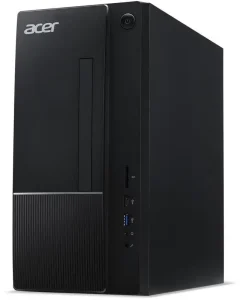
The CyberPowerPC Gamer Xtreme (i5-14400F, RTX 5060 8GB, 16GB DDR5, 1TB SSD, Windows 11 Home, GXiVR8060A47) is $1,141.99 on Amazon in an Early Black Friday deal (PC Guide, prices correct November 5, 2026; live read November 17, 22:29 PST). At $1,300 it fits by $158.01. The DIY build around the plain RTX 5060 costs about $1,148.58 with twice the RAM (5700X at $159 with the $30 BFF23 coupon through December 5).
But the extra $100 does not buy the monitor: the prebuilt plus the VY27UQ is $1,358.99, missing by $58.99. The $100 buys a headset instead — the prebuilt plus the Razer BlackShark V2 Pro at $129.99 is $1,271.98, fitting by $28.02.
One warning: $1,141.99 is a deal price, not a street price — the typical price is about $1,270.
Specs: Prebuilt: i5-14400F, RTX 5060 8GB, 16GB DDR5, 1TB SSD; $1,141.99. DIY: 5700X; RTX 5060 8GB; 32GB DDR4; 1TB NVMe; ~$1,148.58. BlackShark V2 Pro: $129.99.
Pros: Cheapest verified 4K machine by $7.03 over DIY; fits by $158.01.
Cons: Plus a real 4K monitor it misses by $58.99; the deal price may end and stock is thin; PSU and cooling are unknowns.
Best for: The buyer who already owns a 4K monitor and wants the cheapest 4K-capable machine.
3. RTX 5070 DIY Build — The First 5070 Build That Fits on Paper
The RTX 5070 is the faster card: 12GB of GDDR7, a real step up from the 5060 Ti at 4K, and its cheapest new US price is about $880 — the Gigabyte Gaming OC at Best Buy, seen in stock November 16, 2026 (PC Tech Vault), with a 90-day median of $850. The card alone leaves $420 for everything else. The same median refurbished host this series uses — about $329 — plus a proper $50 supply is $379. The total is about $1,259, fitting by $41.
Now the caveat: this build fits only on refurbished-host math. The host is an old i7-7700 tower on PCIe 3.0 with no warranty on the used parts, and it will hold the 5070 back in CPU-heavy games. A proper new-parts host does not fit $1,300 at all: a 32GB DDR5 kit alone costs $429.97 — more than the entire $379 the refurbished-host math allows for the whole host.
Second tradeoff: VRAM. The 5070 has 12GB; the Ti 16GB has 16GB. The 5070 renders faster, but in texture-heavy games that already want more than 12GB at 4K, the cheaper card can outlast the faster one.
Specs: RTX 5070 12GB GDDR7; DLSS 4; ~$880 cheapest new (Gigabyte Gaming OC, Best Buy, Nov 16). Host: ~$329 median refurbished; $50 supply. Total: ~$1,259.
Pros: Fastest card in this guide; first budget where a 5070 build fits on paper.
Cons: Fits only on a refurbished host that bottlenecks the card; a proper new-parts build needs $1,500+; 12GB of VRAM against the Ti’s 16GB.
Best for: The buyer who already owns a 4K monitor and a decent host.
4. iBUYPOWER Slate Doorbuster + Real 4K Monitor — The Cheapest Complete Setup, If It Is Still Live
Best Buy’s early Black Friday doorbuster put an iBUYPOWER Slate (Ryzen 5 8400F, RTX 5060 8GB, 16GB DDR5, 1TB NVMe SSD, SBA5N5601) at $899.99, $500 off its $1,399.99 comparable value (9to5Toys, IGN, HotHardware, November 6, 2026). Add the ASUS VY27UQ at about $217 and the total is about $1,116.99, fitting by $183.01.
Two warnings. First, the first doorbuster round ended November 8, and one roundup re-checking on November 12 said that price should no longer be expected. The early sale runs through November 18 and the main event starts November 19 — the deal may return, or it may not. Second, the full kit still misses by a whisker: Slate plus monitor plus arm plus the Crucial P3 Plus 1TB at $157.41 is about $1,304.40.
Specs: iBUYPOWER Slate: Ryzen 5 8400F, RTX 5060 8GB, 16GB DDR5, 1TB SSD; $899.99 doorbuster. VY27UQ: 27-inch 4K IPS; 60Hz; ~$217. Full kit with arm and 1TB SSD: ~$1,304.40.
Pros: Cheapest complete 4K setup here at about $1,116.99; leaves $183.01 — the most headroom of any pick; no building required.
Cons: The doorbuster round ended November 8 and may be gone; the full kit with a 1TB SSD misses by $4.40; the weakest CPU here, with single-channel RAM.
Best for: The buyer who finds the $899.99 price still live at Best Buy.
5. Used RTX 3060 Ti Build + Two Real 4K Monitors + 1TB SSD — The Dual-Screen Answer
The RTX 3060 Ti sells for a median of $295 on eBay in the US (298 sold listings, 90 days, pcprice.watch, November 18, 2026). The cheapest host is a refurbished HP Z240 Tower, from about $195 — card plus host is about $490 at the floor and about $674 at the median with a proper supply. Two VY27UQ monitors at about $217 each are $434, and a monitor arm at about $30 brings the total to about $1,138. At $1,300 it leaves $162 — and the Crucial P3 Plus 1TB at $157.41 fits: about $1,295.41.
The 3070 step-up does not fit: the RTX 3070’s median sold price is $301, $6 more, and the same total becomes about $1,301.41.
The 3060 Ti is the oldest card here and the slowest at 4K, a generation behind the 5060 Ti, with no DLSS 4 frame generation — only DLSS 3. It needs a 550W supply with an 8-pin connector, and the Z240’s 400W supply still needs replacing. Everything is used, so there is no warranty.
Specs: RTX 3060 Ti 8GB GDDR6; 200W TDP; needs a 550W PSU, 8-pin connector. Z240 Tower: 400W PSU. RTX 3070: median sold $301. VY27UQ: 27-inch 4K IPS; 60Hz; ~$217. P3 Plus 1TB: $157.41. Total: ~$1,295.41.
Pros: Only pick with two real 4K monitors and a 1TB SSD under budget; fits by $4.59.
Cons: Oldest and slowest card here; no DLSS 4; everything used, no warranty; the 3070 step-up misses by $1.41.
Best for: The streamer or multitasker who wants two real 4K screens more than the newest card.
What to Avoid
The fake RTX 4060 for $119.99. This listing keeps reappearing in catalog searches — there in the $800 guide, gone in the $900 and $1,000 guides, back in the $1,100 guide. A new RTX 4060 for $119.99 does not exist: the cheapest used one sells for about $343.
Used cards priced above new ones. The used RTX 5060 Ti 16GB market has inverted: asking prices start at $760 and the median is $850, while the same card is $618 new.
The $429 MSRP. The RTX 5060 Ti 16GB launched at a $429 MSRP in April 2025. In November 2026, the cheapest new card is $618 and the typical retail price is about $800.
The 5070 Ti and 5080. The RTX 5070 Ti costs $1,500–$1,799 alone in November 2026 — more than this entire budget.
GeForce NOW is not a PC. Five years of Ultimate ($19.99 a month or $199.99 a year) plus two controllers is $1,099.93, and with a real 4K monitor it is $1,216.95. But it is a rental, not a machine: 100 hours a month, and streaming adds 25–34ms of latency.
FAQ
Does a 4K gaming PC build under $1,300 exist?
No — not a DIY build with new parts at native 4K, maximum settings. What $1,300 buys is the first complete 4K setup in this series: a new RTX 5060 Ti 16GB build plus a real 4K monitor and an arm, at about $1,244.
What does the extra $100 over $1,200 actually buy?
The monitor. At $1,200, the Ti 16GB build plus a 4K screen missed by $14. At $1,300 it fits by $86, with an arm on top. It also buys the first 5070 build that fits on paper (about $1,259) and the 1TB SSD on top of the used dual-monitor build.
Is the RTX 5070 worth it over the 5060 Ti 16GB at $1,300?
It depends on what you own. The 5070 is faster, but it has 12GB of VRAM against the Ti’s 16GB, and at $1,300 it only fits on a refurbished host.
Should I buy the RTX 5060 Ti 16GB used or new?
New, at $618 on eBay (MSI Vanguard). Used asking prices start at $760 with a median of $850 — more than the new card.
Is the iBUYPOWER Slate still $899.99?
Maybe. The first doorbuster round ended November 8, the early sale runs through November 18, and the main event starts November 19. Check Best Buy first — the deal may return, or it may not.
Verdict
The best 4K gaming PC build under $1,300 is the RTX 5060 Ti 16GB DIY build with a real 4K monitor and an arm, at about $1,244 — the first budget where the card, the screen, and the arm all fit, with $56 left over for the better case and name-brand RAM. The CyberPowerPC Gamer Xtreme at $1,141.99 is still the cheapest verified 4K machine, but the monitor does not fit next to it, missing by $58.99. The RTX 5070 build at about $1,259 is the first 5070 build that fits on paper — and the most compromised machine here, a fast new card in an old refurbished host. The iBUYPOWER Slate at $899.99 plus a monitor is about $1,116.99, the cheapest complete setup, if the doorbuster is still live. And the used RTX 3060 Ti build at about $1,295.41 is the only pick with two real 4K monitors and a 1TB SSD under one budget.
Suggested Internal Links
- Best 4K Gaming PC Build Under $1,200 — the budget where the cheapest real 4K machine first fit.
- Best 4K Gaming PC Build Under $1,100 — the RTX 5060 Ti 16GB at $618 and the Amazon price back at $800.
- Best 4K Gaming PC Build Under $1,000 — the GeForce NOW angle and the first RTX 5060 machine under $1,000.
More from Amazon
Programs that pair well with the guide above. Offers and eligibility are set by Amazon and may change.
Free shipping on eligible items, Prime Video and more. Eligible new members can start with a free trial.
Start a Prime free trialAd-free music streaming. Eligible new subscribers can start with a free trial.
Try Music Unlimited freeA Prime membership for ages 18-24 with a trial period. Eligibility is set by Amazon.
See Prime for Young AdultsAudiobooks and podcasts to listen to on the go. Eligible new members can start with a free trial.
Try Audible freeAs an Amazon Associate we earn from qualifying purchases.
Write Your Review
No reviews yet. Be the first to share your experience!